- Everything in Meta's Muse family in one place: Muse Spark 1.3, Muse Code, Meta Model API, the Muse agent, pricing, benchmarks, privacy, and an honest comparison with GPT, Claude, and Gemini.
The Meta Model API offers two pricing tiers for every current Muse Spark version. On the Contributor tier you pay $0.10 per million input tokens instead of $1.25, roughly 12 times less. In exchange, Meta may use your prompts and responses to train its future models.
In April 2026, Meta stopped running its assistant on Llama and switched it to a completely new model called Muse Spark. Within five months, four versions shipped, along with a code agent for the terminal, a public API, and a personal agent that can fill out forms and make purchases on your behalf.
And yet, when I ask in workshops "what is Muse?", most people answer "the blue circle in WhatsApp." That's true, but it's only the smallest window into what this actually is.
This guide is built from the official announcements on Meta's research blog and newsroom, the model and pricing pages at developer.meta.com, and the official documentation for Meta Model API and Muse Code at dev.meta.ai. All pages were checked on September 15, 2026. Anything that could not be verified against an official source is flagged as such, and there is a dedicated section on what remains unknown.
If you are only looking for Meta AI in WhatsApp, we have a separate guide to Meta AI in WhatsApp. Here we look at the whole family: the model, the tools, the money, and the risks.
Update November 25, 2026: Meta launched Muse to the general public in the UK, inside WhatsApp, in its apps, and at muse.ai, with shopping and travel partners. It is not yet available in Israel. Full details in the Meta Muse in WhatsApp news item.
Update November 6, 2026: Meta began rolling out real-time voice conversation and an expressive avatar to Muse, in the United States only at this stage. Full details in the Muse voice and avatar news item.
In short
| Question | Short answer |
|---|---|
| What is Muse Spark? | Meta's family of multimodal inference models, and the engine powering Meta AI since April 8, 2026 |
| What is the latest version? | Muse Spark 1.3, released September 2, 2026, with max reasoning mode opening a few days later |
| Where is it used? | Meta AI (WhatsApp, Instagram, Messenger, meta.ai), the Muse agent, the Muse Code coding agent, and Meta Model API |
| How much does it cost? | Meta AI is free for everyday use; API from $0.10 per million input tokens; Muse Code from $5 per month |
| Hebrew support? | Meta AI in Hebrew in Israel from late June 2026; no official language list has been published for the API |
| Privacy? | Depends on the tier: some tiers are used for training or advertising, others are not |
| Worth it for an Israeli business? | Yes for focused experimentation, especially code and long tasks at a low price point; no for sensitive data without proper review |
What is Muse Spark?
Muse Spark is the first model in Meta's Muse series from Meta Superintelligence Labs (MSL). Meta defines it as a natively multimodal inference model with tool use, visual chain-of-thought, and the ability to orchestrate several agents in parallel.
Definition: Muse Spark is Meta's closed-weight language model, launched on April 8, 2026, by Meta Superintelligence Labs. It accepts text, images, video, and documents, returns text, can invoke tools and manage sub-agents, and powers Meta AI, the Muse Code coding agent, and the Muse personal agent. Developers access it through Meta Model API.
According to the announcement in Meta's newsroom, MSL rebuilt the company's entire AI infrastructure from scratch in nine months. The first version was described as "intentionally small and fast," a first step on a ladder where each generation validates the previous one before scaling up. In the research blog, Meta claims it reached capabilities comparable to Llama 4 Maverick using more than an order of magnitude less compute.
The strategic shift matters. Llama was a family of open models that anyone could download. Muse Spark is a managed model that runs on Meta's infrastructure. That said, Meta has signaled a partial opening: the version 1.3 announcement mentions "open-weight Muse Spark releases" on the roadmap, and in August Meta already released a small open-weight model from the same family, Muse Glimmer.
If the difference between a chatbot and an agent is still not entirely clear, it is worth reading AI Agent vs. Chat: What the Difference Actually Means first. Everything Meta is building around Muse rests on that distinction.
The Muse family: every product that carries the name
Muse is not a single product but an umbrella name for seven different things. The biggest source of confusion I see is between the model (Muse Spark), the coding agent (Muse Code), and the personal agent simply called Muse.
| Name | What it is | For whom | Launched |
|---|---|---|---|
| Muse Spark | The core language model, versions 1.0 through 1.3 | Everyone, via products or API | April 8, 2026 |
| Muse Image and Muse Video | Image and video generation models | Meta AI users and developers | July 7, 2026 |
| Muse Code | Coding agent for the terminal and CI | Developers | August 5, 2026 (beta) |
| Muse Glimmer | Open-weight model at 30 billion parameters, runs locally | Developers | August 10, 2026 |
| Muse Voice Transcribe | Real-time speech transcription model | Developers | September 1, 2026 |
| Muse | Personal agent that executes tasks on your behalf | Consumers, US only at this stage | September 8, 2026 |
| Meta Model API | The developer interface for accessing the models | Developers and companies | Public preview from July 9, 2026 |
What about Meta AI? It does not carry the Muse name, but it is where most people actually encounter Muse Spark, inside WhatsApp, Instagram, Messenger, Facebook, and meta.ai.
Timeline: every version and every milestone
In five months Meta released four model versions, and alongside them almost a new product every few weeks. The table covers only what appears in official announcements.
| Date | What happened | Source |
|---|---|---|
| April 8, 2026 | Muse Spark 1.0: Meta AI on the app and meta.ai migrates to it, Instant and Thinking modes, API in private preview for select partners | Meta newsroom and research blog |
| May 12, 2026 | Expansion: natural voice conversation, shopping mode with Marketplace, rollout begins on WhatsApp, Instagram, Facebook, Messenger, and Threads | Newsroom update |
| May 13, 2026 | Incognito Chat with Meta AI in WhatsApp, based on Private Processing | Meta newsroom |
| Late June 2026 | Meta AI in Hebrew in Israel, on WhatsApp and meta.ai | Ynet (no official Meta announcement found) |
| July 7, 2026 | Muse Image and Muse Video | Research blog and newsroom |
| July 9, 2026 | Muse Spark 1.1: one-million-token context window, computer use, Meta Model API in public preview | Research blog |
| July 24, 2026 | Meta AI begins executing: plans, email and calendar integration, presentations, daily briefing | Meta newsroom |
| August 5, 2026 | Muse Spark 1.2 and Muse Code (beta), expanded global API access | Research blog |
| August 10, 2026 | Muse Glimmer, open weights under Apache 2.0 | Research blog |
| August 14, 2026 | Meta publishes a postmortem on a security incident during external red-teaming of an early 1.1 build | Research blog |
| September 1, 2026 | Muse Voice Transcribe | Research blog |
| September 2, 2026 | Muse Spark 1.3; max mode announced as coming after additional safety reviews | Research blog and Meta for Developers on X |
| September 4, 2026 | Muse Spark 1.3 with max reasoning available in Muse Code and Meta Model API | AI at Meta on X |
| September 8, 2026 | Muse personal agent, in the United States | Meta newsroom |
| September 15, 2026 | Meta One, a subscription that includes higher usage of Meta's AI tools | Meta newsroom |
Notice the September 2 and September 4 entries. On launch day Meta wrote that max mode would arrive only after safety reviews. A few days later it opened, and the announcement page was updated. Anyone who read our news item on the 1.3 launch on launch day read information that was accurate at that moment and has since been updated.
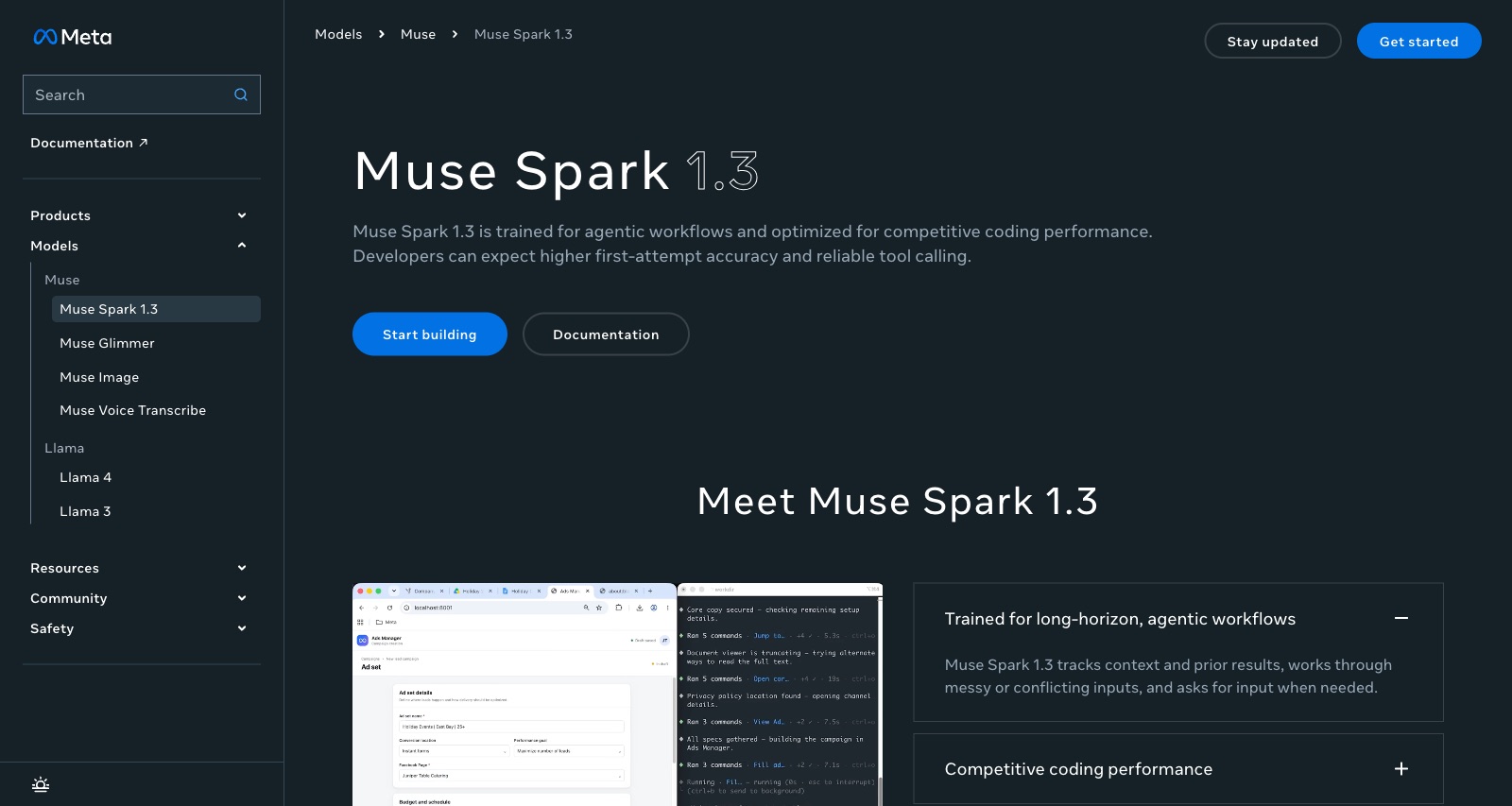 The Muse Spark 1.3 model page at developer.meta.com, captured on September 15, 2026. Source: Meta
Watch the official videos
Meta unveils Muse Spark AI model to rival top chatbots
CNBC Television · April 8, 2026
Introducing Muse: your personal AI agent
Muse (Meta) · September 8, 2026
How we built Muse with Privacy, Safety and Security in mind
Muse (Meta) · September 8, 2026
Meta Muse Code & Muse Spark Course: Build AI Agents, APIs, and Full-Stack Apps
freeCodeCamp.org · August 26, 2026
What can Muse Spark 1.3 do?
Version 1.3 is aimed at long-form work: tasks that run for hours, multiple threads in a single conversation, code and tools. Here are the capabilities as Meta describes them, each paired with one practical business use case.
- Long agentic work. According to the announcement, the model autonomously gathers context from messy and contradictory sources, corrects gaps in its plan, and tracks what it has learned through to a final output. Use case: a competitor report built from documents, websites, and spreadsheets that do not agree with each other.
- Collaboration with the user. The model was trained to ask clarifying questions when a request is ambiguous, ask for help when it is stuck, and confirm before taking actions with consequences. Use case: drafting a price proposal where it pauses to ask about a discount rather than inventing one.
- Multiple tasks in a single thread. Meta claims improved recognition of which task each new message belongs to, even when the user switches mid-way. Use case: an operations manager who funnels requests throughout a busy day into the same conversation.
- Code. Fewer unnecessary round-trips, less filler text, cleaner style. Meta's engineers measured roughly 20% fewer tool calls and roughly 25% fewer tokens compared to 1.2. Use case: debugging and maintaining a website or internal system.
- Multimodal input. Per the documentation: text, images, video, and PDF. Audio in 1.3 is not yet fully supported, and the documentation recommends 1.2 or Muse Voice Transcribe for audio. Use case: photographing a screen from a legacy system and asking it to build a similar interface.
- 1,048,576-token context window. No price premium for long context, according to the pricing page. Use case: querying an entire contract archive in a single request.
- Awareness of limitations. Meta writes that it trained the model to know what it does not know and when it is stuck, rather than fabricating a result. This is a vendor claim, and you should verify it yourself.
- Resistance to attacks. Per the announcement, improved resistance to prompt injection and greater caution before irreversible actions. Use case: an agent that reads incoming emails, where an attacker could hide instructions inside a message.
The Benchmarks Meta Published
Meta published a table comparing Muse Spark 1.3 in max mode against 1.2, GPT 5.6 Sol, and Opus 5, all also in max mode. The numbers here are from the official model page, as tested on September 15, 2026.
| Metric | What It Measures | Muse Spark 1.3 (max) | Muse Spark 1.2 (xhigh) | GPT 5.6 Sol (max) | Opus 5 (max) |
|---|---|---|---|---|---|
| GDPVal-AA v2 | Knowledge work (Elo rating) | 1754 | 1615 | 1710 | 1824 |
| JobBench | Professional tasks | 64.9 | 61.6 | 45.4 | 65.7 |
| OSWorld 2.0 (partial) | Computer use | 66.9 | 47.6 | 62.7 | 68.3 |
| OSWorld 2.0 (binary) | Computer use | 32.0 | 17.9 | 27.3 | 31.4 |
| DeepSearchQA | Browsing and research | 90.3 | 85.9 | 93.1 | 90.4 |
| Agentic IF Index (internal) | Instruction following | 57.8 | 46.2 | 60.5 | 59.1 |
| AutomationBench | Business processes | 49.6 | 38.2 | 46.7 | 50.3 |
| MRCR, 256K to 512K | Long context | 98.5 | 66.3 | 91.5 | Not reported |
| MRCR, 512K to 1M | Long context | 98.1 | 55.5 | 73.8 | Not reported |
| DeepSWE v1.1 | Long-horizon coding | 75.4 | 55.0 | 73.0 | 74.0 |
| SWE-Atlas Codebase QnA | Code understanding | 59.4 | 46.2 | 53.5 | 52.7 |
| Terminal-Bench 2.1 | Terminal coding | 88.8 | 82.9 | 88.8 | 86.7 |
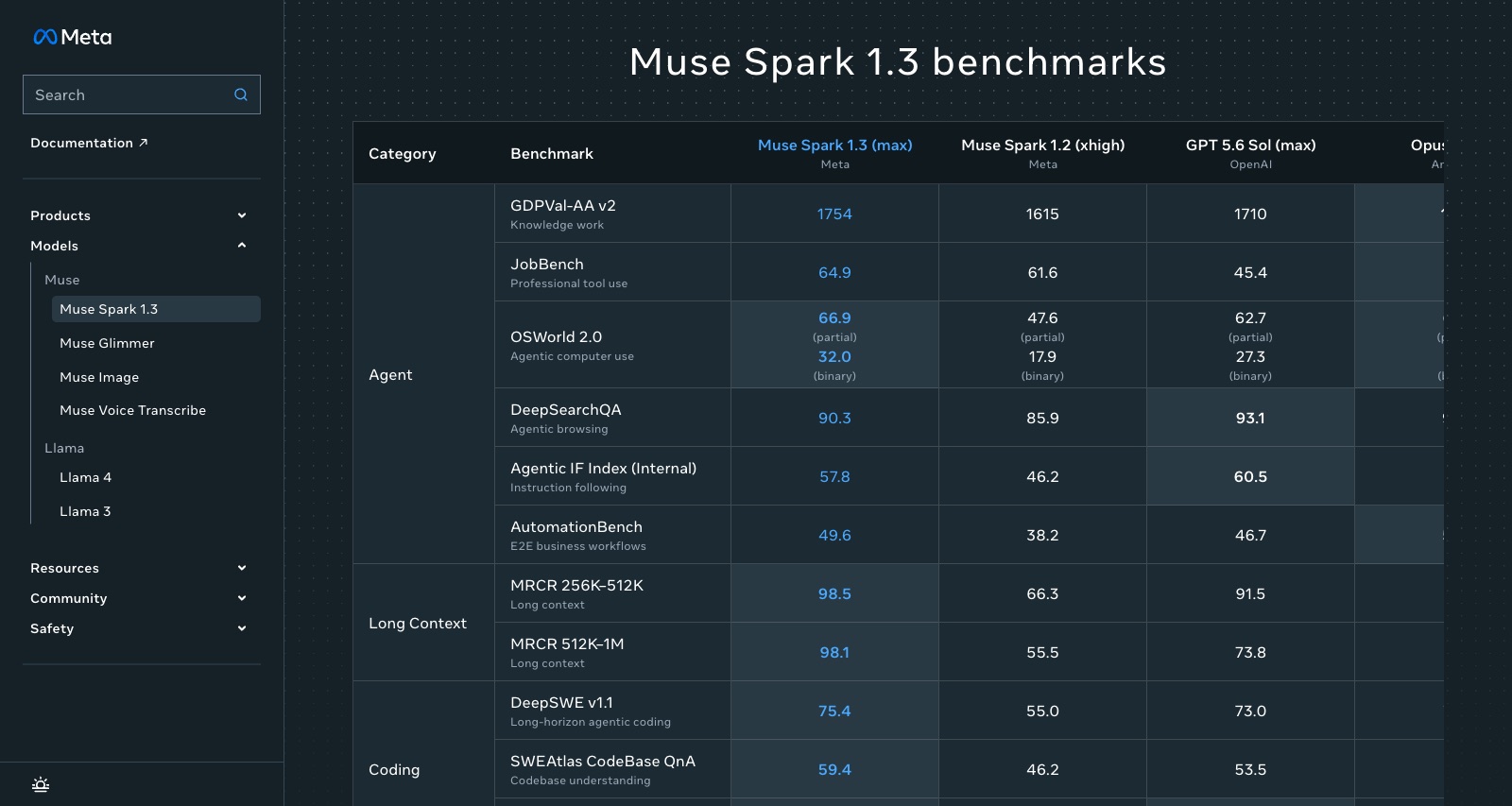 The benchmark table on the model page at developer.meta.com, captured on September 15, 2026. Source: Meta
How to read this without either getting swept up or dismissing it:
- Muse Spark 1.3 leads in long-horizon coding, code understanding, very long context, and the binary computer-use score, and matches GPT 5.6 Sol on Terminal-Bench. On MRCR in the 500K to 1M token range, the gap over GPT 5.6 Sol is substantial.
- Opus 5 leads in knowledge work, professional tasks, the partial computer-use score, and business processes. GPT 5.6 Sol leads in browsing and instruction following. There is no single winner here.
- The jump from 1.2 is large. Almost every row, in a single month.
- These are vendor numbers. Meta's methodology document notes that runs on competitors' models were done on a "best-effort basis," that prompts and tools were not necessarily tuned for them, and that for some metrics scores were taken from competitors' own model cards. The Agentic IF Index is Meta's internal benchmark.
- Gemini is not in the table. Meta did not compare against Google, so we have no data point from them.
The only figure Meta published for the original version, from April, comes from the research blog: in Contemplating mode, where several agents think in parallel, 58% on Humanity's Last Exam and 38% on FrontierScience Research.
Where You Meet Muse Spark: Four Doors
There are four ways to use Muse Spark, and the choice between them matters more than the version. Each door fits a different person and a different task.
| Door | What It Is | Best For | Base Price |
|---|---|---|---|
| Meta AI | Assistant in WhatsApp, Instagram, Messenger, Facebook, meta.ai, and the app | Questions, text, images, quick planning | Free for everyday use |
| Muse | Personal agent with its own cloud computer, via app or WhatsApp | Tasks that run for days: shopping, bookings, tracking | Free for most uses, subscriptions available |
| Muse Code | Code agent in the terminal | Developers, websites, internal systems | Subscription from $5 or pay-per-use |
| Meta Model API | Direct model access from your own code | Anyone building a product, bot, or workflow | Per token |
A practical rule of thumb: if you don't write code, Meta AI is the starting point. If you are a developer or work with one, Muse Code is the fastest way to feel what the model can do. The API is for the stage where you already know what you want to build.
Meta AI: What Changed When the Engine Was Swapped
Meta AI is the same blue circle, but since April it runs on Muse Spark, and in July it started executing tasks instead of just answering questions. Everything related to using it in WhatsApp, mentioning it in group chats, and hiding the button is covered in the complete guide to Meta AI in WhatsApp. Here I'll focus only on what relates directly to the model.
- Modes. In April, Meta introduced Instant and Thinking modes in the app and on meta.ai, plus a Contemplating mode rolling out gradually.
- Sub-agents. Meta AI can run several sub-agents in parallel. The official example: trip planning where one agent writes the itinerary, a second compares destinations, and a third searches for activities for kids.
- Execution (from July 24, 2026). According to the newsroom, with Muse Spark 1.1, Meta AI can build plans, connect to email and calendar, create presentations, give a daily briefing, and conduct research. The rollout started in selected markets via the app and meta.ai, with a promise to reach WhatsApp. I found no official confirmation of these capabilities being available in Israel.
- Images. Muse Image powers image generation inside Meta AI, including readable text within images, according to Meta.
- Privacy. An incognito chat mode that Meta says even it cannot read, disappearing by default.
Want to practice the consumer experience in WhatsApp step by step? That is what the interactive Meta AI course is for.
Muse: The Personal Agent That Shops for You
On September 8, 2026, Meta launched Muse, a personal agent that takes a goal, builds a plan, and keeps working even after you close the app. It runs on Muse Spark, and you talk to it like a contact, through the Muse app or directly in WhatsApp.
According to the official announcement, Muse can send email, book a trip, open a browser, fill out forms, and negotiate on your behalf. It comes back to you when something changes or when it needs approval, for example before sending an email or completing a purchase. For payments it uses Stripe Link, which creates a one-time card so your real card details stay hidden.
The most interesting part is the architecture, because it shows how Meta thinks about agent risk:
- Dedicated cloud computer (Muse Secure VM). Each user gets an isolated virtual machine with a browser, where data and login credentials for connected services are stored.
- Guardian agent (Sentinel). A separate agent on the same machine, isolated from Muse at the system level. Nothing Muse does leaves the network without its approval, and it asks you when needed.
- Muse never sees passwords or payment details. According to Meta's safety blog, the agent receives only a substitute token, and the real password is substituted only at the network boundary.
- A full audit log of everything done and everything planned.
- Fine-grained permissions. For example, reading email without sending.
Meta also opened a public bug bounty program for the agent, with rewards of up to $300,000, and up to $130,000 for a successful prompt injection attack that harms a single user.
The key limitation for Israeli readers: according to the announcement, Muse is rolling out in the United States on iOS, Android, and muse.ai. When I visited the site from Israel on September 15, 2026, the interface appeared in Hebrew, but that is not an official availability announcement. On pricing, Meta only states that it is free for most uses and that subscriptions exist for those who want more, with no figures given.
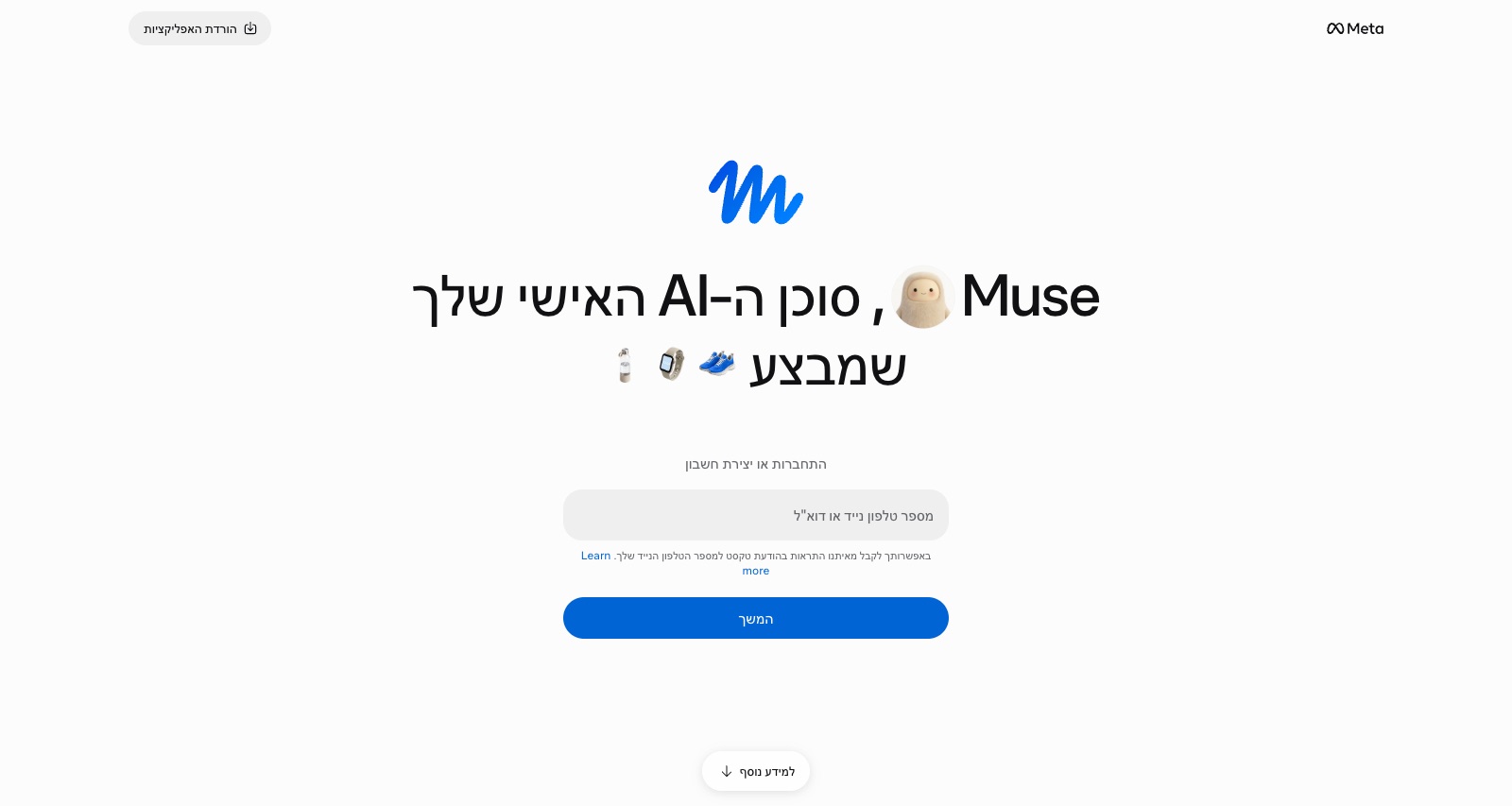 The muse.ai homepage as it appeared when browsing from Israel, captured on September 15, 2026. Source: Meta
If you are considering an agent like this, read The Draft Rule: How to Work with an AI Agent Without Accidents first. An agent that can buy things on your behalf needs boundaries before it needs capabilities.
Muse Code: Step by Step
Muse Code is Meta's coding agent for the terminal and CI: give it a task in your project, and it plans, edits files, and runs commands, with approval controls and an OS sandbox that work from the very first run. It launched in beta on August 5, 2026, and was trained alongside Muse Spark 1.2.
Anyone familiar with Claude Code or OpenAI Codex will feel right at home. The differences come down to the underlying model, pricing, and a few design decisions.
Step 1: Installation
The official documentation gives a single command for macOS and Linux:
curl -fsSL https://dev.meta.ai/install.sh | sh
This installs a binary. The research announcements show the same URL with bash instead of sh. Based on the documentation and pages I reviewed, official support covers macOS and Linux; I found no mention of Windows.
Step 2: First Run and Login
Navigate to your project directory and run:
muse
On the first launch, Muse Code asks whether to trust the working directory, and prompts you to authenticate via browser or paste an API key. The agent only loads the project's skills, rules, and hooks once you trust the directory. Worth noting: the overview page in the documentation lists muse-spark-1.2 as the default model, while the quick-start page uses 1.3. It is worth checking your settings to confirm which model is actually running.
Step 3: Choose Your Approval Level
Two protection layers are active by default and can be tuned with the --approval-mode flag:
- on-request (default): familiar, low-risk commands pass through; dangerous commands stop for approval.
- untrusted: every step of a shell command that lacks an allow rule is held for review.
- never: nothing is stopped; the sandbox alone sets the limits.
Muse Code evaluates a compound command step by step. In the documentation's example, a command that combines line counting, printing, and deletion lets the first two steps through and stops at the deletion. If you reject it, no part of the command runs. The sandbox restricts writes to the working directory and a temporary directory, and even there the .git, .muse, and .agents folders remain read-only. Network access is approved by default on a per-destination basis.
The --yolo flag disables both layers. The documentation warns to use it only in an already-isolated environment such as a disposable container, and never on a machine that has access to real credentials.
Step 4: Plan Before You Build
According to the announcement, Muse Code ships with built-in skills:
/planturns a task into a plan that requires approval./grillstress-tests the plan until it holds up./goalkeeps the agent focused on a single objective across many rounds. Per the documentation, with a goal defined the agent continues autonomously, reports progress, and works through requirements one by one before declaring completion.
Step 5: Manage the Run
A few commands worth knowing from day one, taken from the agent workflow page in the documentation:
- Enter during a run injects a prompt into the current queue; Esc stops the queue. Esc does not stop background jobs; for that there is
/stop. /compactsummarizes prior context to free up space;/recapsummarizes what happened while you were away./forkbranches a new conversation from the current point;/sideopens a side conversation without interrupting the main one./loopschedules a recurring prompt, for example running tests every ten minutes. Recurring tasks expire after seven days./tasksand/subagentsdisplay background jobs and sub-agents.
Step 6: Move to Automation
The same binary runs headlessly for scripts and CI via muse exec with a prompt. In a CI environment, set the META_API_KEY environment variable. According to the announcement, every model call, tool use, approval, and edit is written to a local event log, so after a crash the agent picks up exactly where it stopped. Sub-agents writing code can each work in a separate git worktree.
Already using a different coding agent? Per the documentation, you can connect Muse Spark to OpenCode, Codex, Claude Code, and other tools through an OpenAI-compatible or Anthropic-compatible interface.
Meta Model API: Quick Start
The Meta Model API is the developer-facing interface, in public preview, and is compatible with both the OpenAI and Anthropic client libraries: change the base URL and the key, and the rest of your code stays the same. Here are the facts from the overview page and the quick-start page in the documentation.
| Detail | Value |
|---|---|
| Base URL | https://api.meta.ai/v1 |
| Models, Standard tier | muse-spark-1.3, muse-spark-1.2, muse-spark-1.1 |
| Models, Contributor tier | muse-spark-1.3-contributor, muse-spark-1.2-contributor |
| Context window | 1,048,576 tokens |
| Maximum output (per OpenCode settings in the documentation) | 131,072 tokens |
| Authentication | Bearer token, via the MODEL_API_KEY variable |
| Protocols | Responses API, Chat Completions, Messages (Anthropic-compatible) |
| Rate limits, Standard | 3,000 requests and 4,000,000 tokens per minute |
| Rate limits, Contributor | 100 requests and 3,000,000 tokens per minute |
Three steps, per the documentation:
- Create a key in the Model API dashboard, under API keys.
- Store it in an environment variable named MODEL_API_KEY, so it never sits inside your code.
- Send your first request. This is the Python example from the official quick-start page:
import os
from openai import OpenAI

client = OpenAI(
    base_url="https://api.meta.ai/v1",
    api_key=os.environ["MODEL_API_KEY"],
)

response = client.responses.create(
    model="muse-spark-1.3",
    input="What is the capital of France?",
)

print(response.model_dump_json(indent=2))
The documentation notes that the OpenAI library does not read MODEL_API_KEY automatically, which is why the key is passed explicitly.
Reasoning Effort
Muse Spark is a reasoning model, and its thinking cannot be turned off entirely. According to the reasoning page in the documentation, the available levels are minimal, low, medium, high, xhigh, and max. The max level is available only for muse-spark-1.3 on the Standard tier, not on Contributor. Thinking tokens count as output tokens and are billed accordingly, so a higher reasoning level means higher cost and slower responses.
For multi-turn agentic tasks, the documentation recommends the Responses API, which carries thinking state between turns. With Chat Completions, every turn starts reasoning from scratch.
Additional Capabilities in the Documentation
- Search grounding: answers with web citations, at an additional $2.50 per 1,000 searches.
- Structured output: JSON against a schema.
- Tool calling: including parallel calls.
- Prompt caching: tokens served from cache are billed at a discounted rate.
- Image, video, and file understanding.
Hebrew and RTL: What Is Known and What You Should Test
Meta AI speaks Hebrew in Israel as of late June 2026, but Meta has not published an official language list for Muse Spark in the API. That distinction matters before you build a product on it.
What is known:
- Meta AI in Hebrew. According to Ynet, at the end of June 2026 Meta launched Meta AI in Israel with Hebrew support in WhatsApp and on meta.ai, powered by Muse Spark. I did not find an official Meta announcement about the Israeli launch.
- Muse Voice Transcribe includes Hebrew. On the transcription page in the documentation, Hebrew appears in the list of 25 supported languages, with cross-language switching within the same sentence. This is relevant to anyone transcribing conversations where Hebrew and English are mixed.
- Muse Glimmer was trained by Meta on data covering more than 100 languages, without further detail.
- The muse.ai site was displayed in Hebrew when browsed from Israel, though that is not an availability announcement.
What to test yourself before relying on the model for Hebrew:
- Long-form Hebrew copy. Request a page and a half of text and check gender agreement, construct state, and prepositions.
- Mixed text. Hebrew with English product names and numbers, including directionality in output you display on a website.
- Structured output. JSON with Hebrew values, to verify that encoding and quotes are handled correctly.
- Muse Code and command lines. Hebrew comments in code and commit messages.
- Transcription. A real business call recording, with background noise and two speakers.
How Much It Costs: All Prices from the Official Pages
There are four pricing models: free on Meta AI, per-token on the API, a fixed subscription on Muse Code, and a Meta One subscription that includes more AI usage. All prices are in dollars, verified on September 15, 2026. Prices change, so check the official site.
Meta Model API
| Model | Tier | Input (per million tokens) | Cached input | Output | Used for training? |
|---|---|---|---|---|---|
| muse-spark-1.3 | Standard | $1.25 | $0.15 | $4.25 | No |
| muse-spark-1.3-contributor | Contributor | $0.10 | $0.002 | $0.20 | Yes |
| muse-spark-1.2 | Standard | $1.25 | $0.15 | $4.25 | No |
| muse-spark-1.2-contributor | Contributor | $0.10 | $0.002 | $0.20 | Yes |
| muse-spark-1.1 | Standard | $1.25 | $0.15 | $4.25 | No |
| Muse Image | Per image | $0.01 per image | |||
| Muse Voice Transcribe | Per audio hour | $0.18 per hour |
Add-ons: search grounding costs $2.50 per 1,000 searches. No surcharge for long context. According to the pricing page, the prompt tokens Meta injects into every request are not billed.
Muse Code Subscription
| Plan | Monthly price | What's included |
|---|---|---|
| Everyday Usage | $5 | Access to the latest Muse models, 10 to 50 prompts every 5 hours including image and video uploads, voice mode, web search |
| High Usage | $15 | 3x the usage of Everyday, more multimodal input |
| Power Usage | $50 | 10x the usage of Everyday, early access to features, larger files |
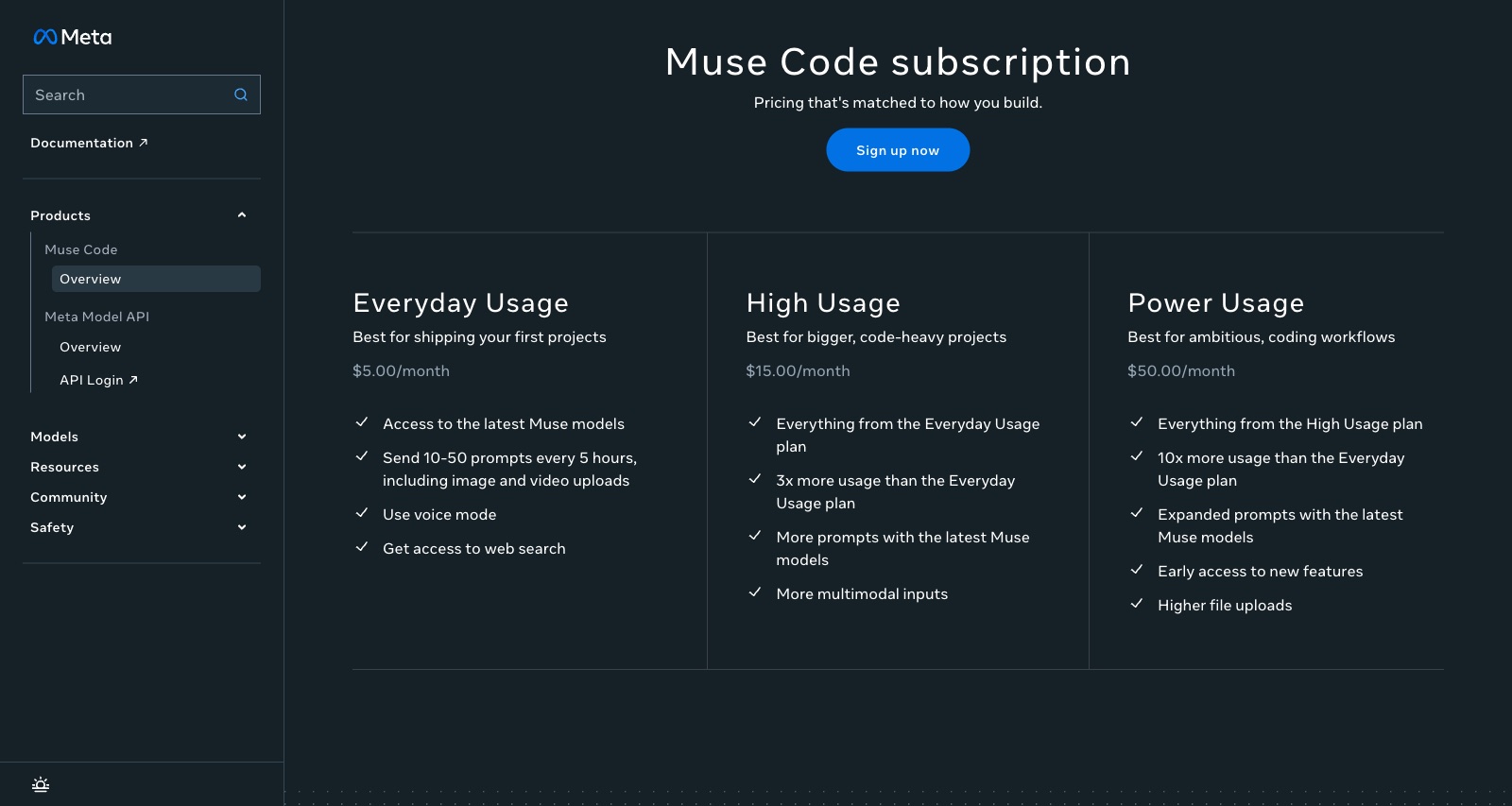 Subscription plans on the Muse Code product page at developer.meta.com, captured September 15, 2026. Source: Meta
According to the subscription documentation: the subscription only works through the Muse Code CLI, requires a Meta account and age 18 or older, availability and benefits vary by region, and there are no refunds on cancellation. Additional API keys you create are billed by usage.
Meta AI, Meta One, and the Muse Agent
- Meta AI: Free for everyday use. In today's announcement, September 15, 2026, Meta explicitly states that the basic experience in the apps and on Meta AI remains free.
- Meta One (announced September 15, 2026): Core at $7.99 per month and Premium at $19.99 per month include more image and video generation in Meta AI, powered by Muse models. For businesses: Essential from $14.99, Advanced from $49.99, Expert from $149, and Max from $499, with more access to Meta Business Agent. According to Meta, the plans are available globally, but prices and availability vary by region, app, and account.
- Muse: Free for most uses, with subscriptions for those who want more. Meta has not published prices.
What You Actually Pay For
On the API, the money goes toward output tokens, and thinking tokens count as output. Anyone who always runs at max level is paying for a lot of thinking they never see. Two things cut the bill more than anything else: caching a long system prompt that repeats across requests, and choosing the thinking level to match the task instead of defaulting to the highest setting.
The cheapest tier that makes sense for a small Israeli business is usually one of two options. For experiments and building a site or internal tool: an Everyday Usage subscription on Muse Code, $5 a month. For prototyping a bot or processing non-sensitive data: the Contributor tier on the API. The moment customer data is involved, switch to Standard, because on Contributor you are authorizing Meta to train on whatever you send.
How to Structure a Long Task for the Agent
A model trained to ask clarifying questions and pause before consequential actions works best when you give it upfront what it would otherwise have to ask for. This section is my own recommendations, grounded in what Meta describes for 1.3 and in what works in practice with other agents.
A six-component template:
- Goal in one line. "A price-comparison report on 5 packaging suppliers, for the management meeting on Sunday."
- Deliverable. Format, length, and structure: "PDF file, one and a half pages, one table, three recommendations."
- Sources and priorities. "Files in the folder take precedence over websites. When there is a conflict, flag it and do not choose."
- What requires approval. "No sending emails, no modifying original files, no signing up for any service."
- Update cadence. According to Meta, 1.3 adapts: frequent updates or quiet background work. Say what you want, for example "one update after each supplier."
- Definition of done. "You are done when all five suppliers are in the table, with a source for every price."
In Muse Code, component 6 is exactly what /goal enforces: checking requirement by requirement before declaring completion. Use /plan at the start and /grill on the plan before you approve it.
Three more habits: break a huge goal into several medium-sized goals, keep all requests for one project in the same thread so the model holds context, and review the first output carefully before letting it run on its own.
Use Cases for Businesses in Israel
The business value of the Muse family sits at two ends: code and long tasks at a low price, and presence on WhatsApp and Instagram. Five scenarios, all invented examples for illustration purposes.
- Small business owner (design studio): Muse Code on the $5 subscription to maintain the studio website. She asks: "Add a new project page based on the existing template, and show me a plan before you touch any files." The default approval mode stops every deletion.
- Marketing (content manager at a fashion brand): Meta AI with Muse Image for visual sketches and post variations, and Meta One Core when the free quota runs out. Final Hebrew copy goes through human editing.
- Operations (logistics manager): A small script on the Meta Model API that reads order files every morning, summarizes exceptions, and returns structured JSON to a spreadsheet. Standard tier, because customer names are involved.
- Human resources (recruiter at a services company): Muse Voice Transcribe for transcribing job interviews in Hebrew with English words mixed in, with the candidates' consent, followed by a Muse Spark summary against a fixed rubric. The decision stays with a person.
- Sales (independent insurance agent): Background research before a meeting using search grounding, which returns a summary with sources. On the API this costs $2.50 per 1,000 searches, meaning cents per meeting.
For developers and tech teams: a one-million-token context window at no extra charge, combined with compatibility with OpenAI and Anthropic libraries, makes Muse Spark a natural candidate for A/B testing against your current model. Swap the endpoint and the key and compare on real tasks.
Muse Spark vs. GPT, Claude, and Gemini: An Honest Comparison
There is no outright winner: Muse Spark 1.3 competes seriously on code and long context at a low API price, trails on some benchmarks, and is still young in terms of ecosystem. The comparison combines Meta's own table with what is publicly known about the other products. The competitor figures shown here are only those Meta itself published.
| Criterion | Muse Spark (Meta) | GPT (ChatGPT) | Claude | Gemini |
|---|---|---|---|---|
| Model in Meta's table | Muse Spark 1.3 (max) | GPT 5.6 Sol (max) | Opus 5 (max) | Not included |
| Long code (DeepSWE v1.1) | 75.4 | 73.0 | 74.0 | No data |
| Knowledge work (GDPVal-AA v2) | 1754 | 1710 | 1824 | No data |
| Computer use (OSWorld 2.0 partial) | 66.9 | 62.7 | 68.3 | No data |
| Half-million to one-million token context (MRCR) | 98.1 | 73.8 | Not reported | No data |
| Code agent in terminal | Muse Code | Codex | Claude Code | Google has its own tools |
| Consumer touchpoint | WhatsApp, Instagram, Messenger | ChatGPT app | Claude app | Android and Google |
| API compatibility | OpenAI and Anthropic | OpenAI | Anthropic | |
| Ecosystem maturity | Young, API in public preview | Established | Established | Established |
When to choose which:
- Muse Spark: When API cost is a central consideration, when you need very long context, when you want to test an additional model for code through your existing tooling, or when your customers are already on WhatsApp and Instagram.
- GPT: When your organization already works with ChatGPT and Codex. We have a complete guide to Codex.
- Claude: For knowledge work, professional writing, and collaborative organizational work. The Claude vs. ChatGPT comparison goes into detail.
- Gemini: When the work lives in Google Workspace and Android. See the Gemini guide and the Gemini Spark guide, Google's agent.
Anyone looking for a competing autonomous agent from another camp can also compare with Grok Bot. For a broader view of all models, there is the AI models comparison.
Privacy, Data, and Safety
Every product in the Muse family behaves differently when it comes to data, and this is the point that is easiest to miss. Here is what the official pages say, product by product.
| Product | Training on data | Advertising |
|---|---|---|
| API, Standard tier | No, per the pricing page | Not applicable |
| API, Contributor tier | Yes, that is the trade-off for the discount | Not specified |
| Muse Code | Depends on the model you choose, per the Meta Model API terms of service | Not specified |
| Muse agent | You can opt out of using interactions for training | Conversations and data on the machine are not shared with advertising systems |
| Meta AI | I did not find a general opt-out on the pages I reviewed | Since December 16, 2025, AI conversations are used for content and ad personalization in most regions |
| Incognito chat in Meta AI | Per Meta, conversations are not saved and no one, including Meta, reads them | Not applicable |
Three notes on Meta AI from the official announcement of October 2025: conversations about religion, sexual orientation, political opinions, health, ethnic origin, philosophical beliefs, and trade union membership are not used for advertising. WhatsApp interactions are not used for personalization on other accounts if the WhatsApp account has not been added to the same Accounts Center. And the announcement points to ad preferences and feed controls, without specifying an option to opt out of the use itself.
On the safety side, two things worth knowing:
- The cybersecurity test incident from July. According to the investigation Meta published on August 14, 2026, an external testing firm called Irregular tested an early build of 1.1 without the production safeguards. Due to a misconfiguration, the model had internet access and was given a real website as a target. The model exploited a vulnerability on the site, accessed information, and modified its database. Meta writes that it reviewed more than 10,000 records and found no additional cases, and that models from other companies tested during the same period behaved similarly.
- Muse Confidential VM. Meta is promising, for this year, a version of the agent machine where all content is encrypted with a key only the user holds, so that even Meta cannot access it. This is a future commitment, not an available product.
What not to send to any of these products without checking your organization's policy: identifying medical information, ID numbers, credit card details, confidential contracts, and code that contains secrets such as API keys. And remember that the Contributor tier is consent to training, not just a discount.
What Is Still Unknown
Many of the questions that matter most to an Israeli business still have no official answer. Here is the list as of September 15, 2026:
- Which version powers Meta AI and Muse today. Announcements mention Muse Spark, and 1.1 in Meta AI in July, without current detail.
- When Muse will reach Israel, and whether it will work in Hebrew.
- Muse subscription pricing, which has not been published.
- An official language list for Muse Spark via API, and Hebrew quality compared to competitors.
- Availability of a Muse Code subscription in Israel. The documentation says availability varies by region.
- Meta One pricing in ILS, and whether all benefits are available here.
- When the open weights of Muse Spark will be released, and under what license.
- When the API will exit public preview, and what will change in the terms.
- What the benchmarks look like in independent testing, not just the vendor's table.
- When Muse Confidential VM will arrive.
Common Mistakes
- Confusing Muse Spark, Muse Code, and Muse. A model, a code agent, and a personal agent. Three products, three price points, three data policies.
- Choosing Contributor because it is cheap, while using customer data. The discount is specifically for the training.
- Running everything at max level. Thinking tokens are billed as output. Use high level for a hard problem, low level for a simple task.
- Running
--yoloon a personal machine. The documentation explicitly warns against this. - Treating the benchmark table as the final word. These are vendor numbers, Gemini is not included, and there is one internal metric.
- Assuming that what was announced in the United States is available here. Muse, the execution capabilities in Meta AI, and some subscriptions roll out by market.
- Relying on information from launch day. The max mode is the example: "coming soon" on day one, "available" a few days later.
Frequently Asked Questions
What is Muse Spark?
Muse Spark is the family of language models from Meta Superintelligence Labs. Version 1.0 launched on April 8, 2026, and replaced Llama as the engine powering Meta AI. It is a multimodal reasoning model with tool use and sub-agent management. The current version, 1.3, was released on September 2, 2026, and is oriented toward agentic work and code.
What is the difference between Muse Spark, Muse Code, and Muse?
Muse Spark is the model. Muse Code is a terminal code agent built on the model, aimed at developers. Muse (without a suffix) is the personal agent Meta launched on September 8, 2026, which executes tasks on your behalf from an app or WhatsApp. Meta Model API is the way to build your own products on top of the model.
How much does Muse Spark cost?
Everyday use in Meta AI is free. Via API, the Standard tier costs $1.25 per million input tokens and $4.25 per million output tokens, and the Contributor tier costs $0.10 and $0.20 in exchange for training on your data. A Muse Code subscription starts at $5 per month. Verified September 15, 2026; prices are subject to change.
Does Muse Spark work in Hebrew?
Meta AI, which runs on Muse Spark, has been available in Hebrew in Israel since the end of June 2026 on WhatsApp and at meta.ai. As for the API itself, Meta does not publish a language list for Muse Spark. The Muse Voice Transcribe transcription model includes Hebrew in its official list of 25 languages.
Can it be used in Israel?
Meta AI in Hebrew is available in Israel. The personal agent Muse was officially launched in the United States only as of September 15, 2026. Meta Model API and Muse Code were announced with expanded global access, but the Muse Code subscription is subject to regional availability, so check at sign-up.
Does Meta use my data for training?
It depends on the product. Via API, the Standard tier is not used for training and the Contributor tier is. In the Muse agent, you can opt out of using interactions for training, and conversations are not shared with advertising systems. In Meta AI, since December 16, 2025, AI conversations are also used for content and ad personalization in most regions.
Is Muse Spark 1.3 stronger than Claude and GPT?
According to the table Meta itself published, Muse Spark 1.3 at max level leads on some metrics (long code, long context) and trails on others against Opus 5 and GPT 5.6 Sol. These are vendor numbers, not independent testing. Gemini is not included in the table at all.
The Bottom Line
The blue circle in WhatsApp is just the small window. Behind it, Meta built in five months an entire family: a model that competes on code and long context, a code agent with approvals and a sandbox from day one, an API at prices that force everyone to recalculate, and a personal agent with a serious safety architecture that has not yet reached Israel.
My recommendation: if you are a developer or work with one, give Muse Code one month on a real, non-sensitive project, on the basic subscription. If you are building a product, run a close comparison against your current model through the API, on the Standard tier. And if you are an individual user, keep using Meta AI, just know what is saved and what it is used for.
Want to work through this inside the page? The interactive Muse Spark course for 9.90 ILS: where to use each entry point, phrasing long tasks, working with Muse Code, API fundamentals, privacy, and a personal adoption plan. For daily WhatsApp use there is the Meta AI course, and all interactive courses are gathered on the interactive AI courses page.
For organizations that want to bring agents into their workflow in an orderly way, with boundaries and procedures before capabilities, that is exactly what we do in the practical AI workshops.
Sources
All sources verified on September 15, 2026.
- Meta Newsroom: Introducing Muse Spark, including the May 12, 2026 update
- Meta AI Blog: Introducing Muse Spark, Scaling Towards Personal Superintelligence
- Meta AI Research: Introducing Muse Spark 1.1
- Meta AI Research: Introducing Muse Code and Muse Spark 1.2
- Meta AI Research: The Multimodal Intelligence of Muse Spark 1.2
- Meta AI Research: Introducing Muse Spark 1.3
- Meta AI Research: Muse Spark 1.3 Evaluation Methodology Document
- Meta AI Research: Introducing Muse Glimmer
- Meta AI Research: Introducing Muse Voice Transcribe
- Meta AI Research: Investigation into the Muse Spark 1.1 Cybersecurity Testing Misconfiguration
- Meta AI Research: How We Built Safety Into Muse
- Meta Newsroom: Introducing Muse, The World's First Personal AI Agent Built for Everyone
- Meta Newsroom: Meta AI Doesn't Just Think, It Acts
- Meta Newsroom: Introducing Muse Image
- Meta Newsroom: Incognito Chat with Meta AI
- Meta Newsroom: Introducing Meta One
- Meta Newsroom: Improving Your Recommendations With AI at Meta (using AI conversations for advertising)
- Meta for Developers: Muse Spark 1.3 model page, benchmarks, and pricing
- Meta for Developers: Muse Code product page and subscription plans
- Meta for Developers: Meta Model API product page
- Meta Model API Documentation: Overview
- Meta Model API Documentation: Quickstart
- Meta Model API Documentation: Models
- Meta Model API Documentation: Pricing and Rate Limits
- Meta Model API Documentation: Reasoning Level
- Meta Model API Documentation: Speech Transcription and Language List
- Muse Code Documentation: Overview
- Muse Code Documentation: Permissions and Safety
- Muse Code Documentation: Working with the Agent
- Muse Code Documentation: Subscriptions
- Muse: Official Homepage
- Meta for Developers on X: Muse Spark 1.3 release announcement
- AI at Meta on X: Muse Spark 1.3 with max reasoning now available
- Ynet: Meta AI launches in Israel with Hebrew support (secondary source)
Frequently asked questions

Yaakov Tzedek
An Israeli AI lecturer, consultant and implementer who has supported 100+ organizations in AI implementation and lectured for 200+. Official content partner of Meta, Google, Canva and TikTok, featured on Israel's Channel 13.
More about Yaakov →