- Looking for a ManyChat alternative? SocialFlow replies to Instagram and Facebook comments, sends a DM with a link, and saves the lead. Full guide: real screenshots, pricing, honest comparison.
In SocialFlow, the monthly counter counts only private messages that were actually sent. A public reply with no follow-up DM is not counted, and neither is a message that Meta rejected. ManyChat counts every contact you exchanged messages with during the month, and once you exceed the quota, each additional contact adds to your bill.
A Hebrew-language ManyChat alternative is a tool that does what most Israeli businesses actually use ManyChat for: someone replies "guide" under a reel, gets a public reply, gets a private message with the link, and is saved as a lead. SocialFlow (isocialflow.com) handles exactly that on Instagram and Facebook, with a full Hebrew right-to-left interface, prices in shekels, and a connection that lets you manage everything from inside Claude or ChatGPT.
SocialFlow runs on my pages every day, and those pages are where the screenshots in this guide were taken. The information here was verified against the system's code and the live site on October 22, 2026; ManyChat data comes from my full ManyChat guide, which was built from their official pricing page.
On the first day the system ran for me, it handled eighteen comments and all the public replies went out. That's not even the interesting part. The interesting part is that five private messages that same day never reached the recipients, yet the screen showed everything was fine. That taught me what to actually check in any tool like this, and it's part of this guide, along with the honest question of when it's not worth switching.
In short
| Question | Short answer |
|---|---|
| What is SocialFlow? | Automation for Instagram and Facebook comments: public reply, private message with a link, and a lead in the activity log |
| How much does it cost? | Free, Creator 49 ILS, Pro 99 ILS, Agency 249 ILS per month, VAT included. Annual: two months free |
| What's the billing basis? | Private messages sent per month, not contacts. When the quota is reached, sending stops, with no overage charges |
| Hebrew? | Full Hebrew right-to-left interface, plus 8 other languages |
| Claude and ChatGPT? | Built-in MCP server from the Pro plan up: ask in chat and the automation is created |
| What doesn't it do? | WhatsApp, TikTok, broadcasts, multi-step flows, and CRM integrations |
| When to stay with ManyChat? | When you need more than Instagram and Facebook, or have complex flows that are already working |
Definition: Comment-to-DM automation is a rule attached to a post or reel. When someone comments with a keyword, the system replies publicly under the comment and sends that person one private message, via Meta's official API. Meta allows one private message per comment, and only to the person who commented.
Why are people looking for a ManyChat alternative?
Three reasons come up every time someone reaches out to me: the invoice, the language, and the time it takes to build.
The first is the invoice. ManyChat bills by active contacts: every person you messaged during the billing month is counted. According to their official pricing page (checked September 14, 2026), the free plan includes 25 active contacts, Essential costs $17 per month with 250, and Pro costs $39 per month with 2,500. Beyond the quota, automations keep running and the overage is added to the invoice for each additional contact. In other words, a reel that takes off generates a higher bill in exactly the good month.
The second is the language. The messages themselves go out in Hebrew just fine in ManyChat, but the interface is in English and doesn't support right-to-left. A request in the ManyChat community for Hebrew and right-to-left support had still not received an official response as of September 2026.
The third is the building process. ManyChat is built around a visual flow builder. That's genuine power for anyone who needs a flow with questions, conditions, and tags, but for a business owner who just wants "comment 'guide' and I'll send it to you," it's a full screen of boxes to send one link.
What SocialFlow does, in a single flow
Four steps, automatically: someone comments, SocialFlow detects the keyword, replies publicly under the comment, and sends the person a private message with the link you promised. The person is saved in the activity log with their name, platform, keyword, and timestamp.
A few more things worth knowing about how the system behaves:
- One post or all posts. You can select a specific post from a visual grid, or choose "all posts on the account," including posts not yet published.
- Old comments don't get replies. The "don't reply to comments that predate the automation" option is always on, so activating it won't send messages to people from a month ago.
- Once per commenter. Someone who comments three times receives one private message.
- Multiple variations for the public reply. The system rotates through them so the replies under the post don't all look identical.
- Up to two minutes. The system scans for new comments every two minutes, and a message that Meta temporarily rejects is retried automatically.
- Instagram only: story comment replies, and an opening message for anyone who writes to the account for the first time (including ad comment replies).
How to build your first automation, in six steps
It starts with connecting via Facebook. You select the page and the Instagram business account, and approve Meta's permissions. There's no password in the system, and the connection can be disconnected at any time. From there, the "+ New automation" button opens a six-step wizard with a live preview on the side.
- Choose a page or account for the system to listen on.
- Choose a post from the grid, or "all posts," or story comment replies, or the opening message.
- Keywords: "reply to all comments" or "only comments with specific words." Multiple keywords are supported, and matching any one of them is enough.
- Public replies: short text that appears under the comment, with multiple variations.
- The private message: the text, variables like the commenter's name, and the link you're attaching.
- Additional settings: once per commenter, and no replies to old comments.
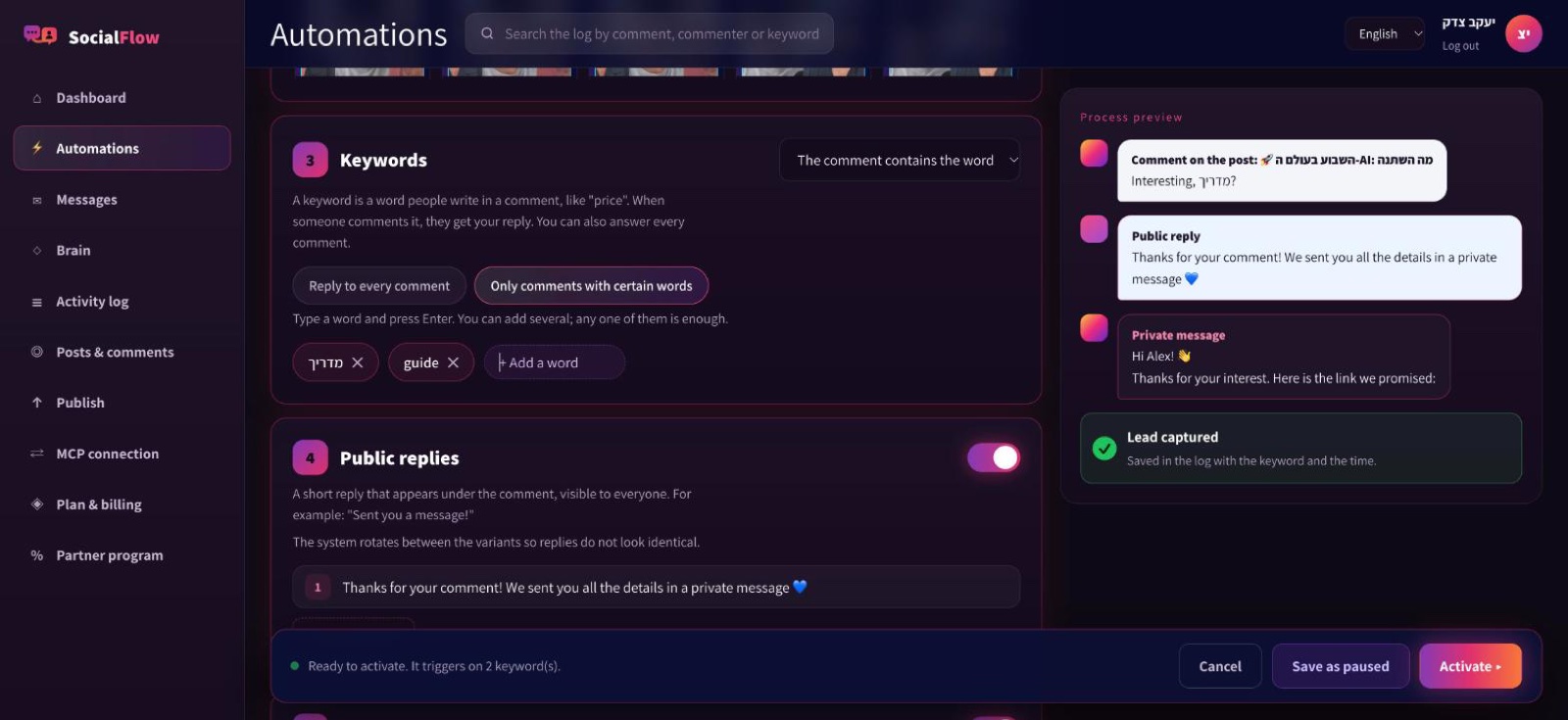 Steps 3 and 4 in the wizard: two keywords, a public reply variation, and a preview of what the commenter will see. Taken from my account, an unsaved draft.
Step 5 is the core: the private message. The text can include the commenter's name, the keyword that triggered it, and the page name, with a separate field holding the link.
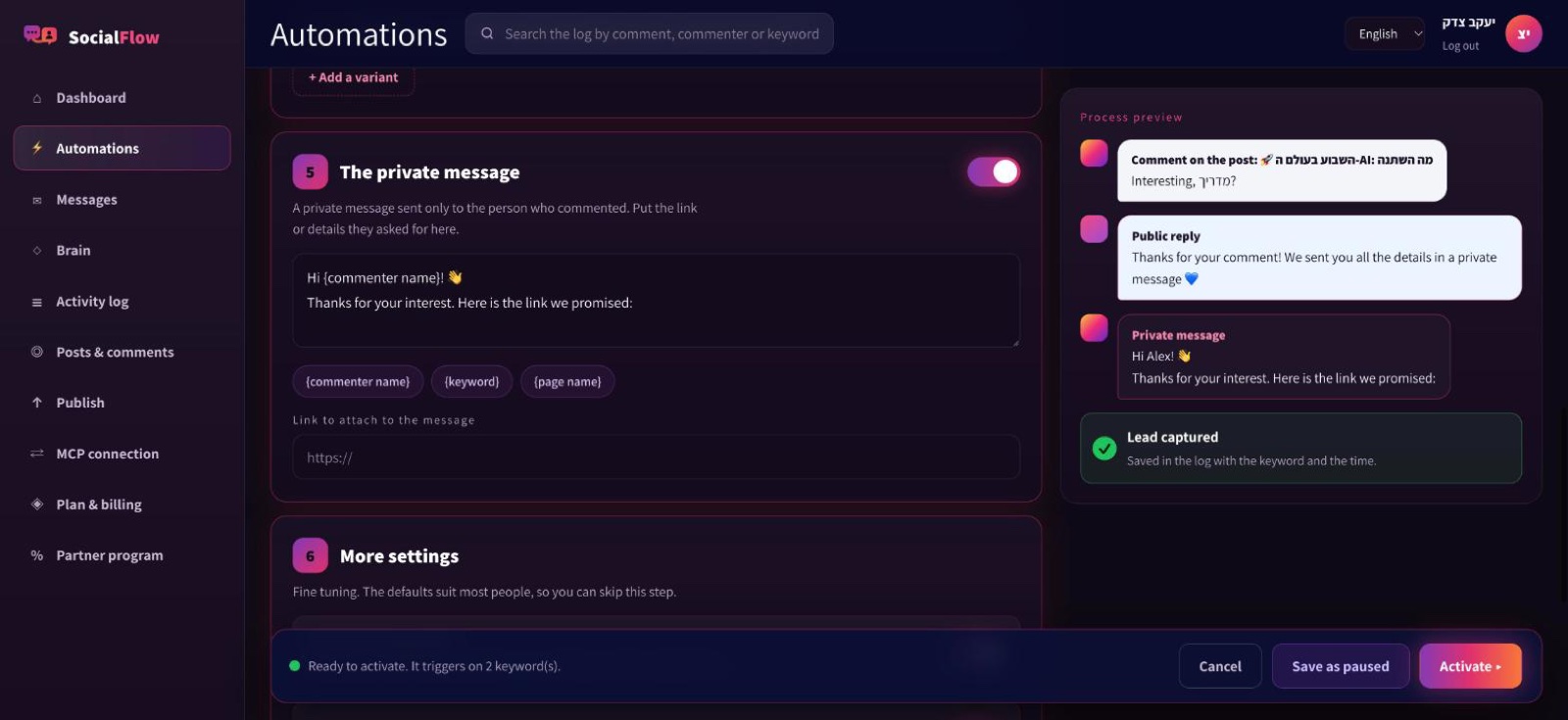 The private message: the default addresses the recipient by name, and the three variables below the text box are inserted into the text with one click.
Before you activate, the system spells out in plain language exactly what is about to happen: which post, which keywords, what the public reply will say, and that each person will receive a message once. You can save it as paused and activate it later.
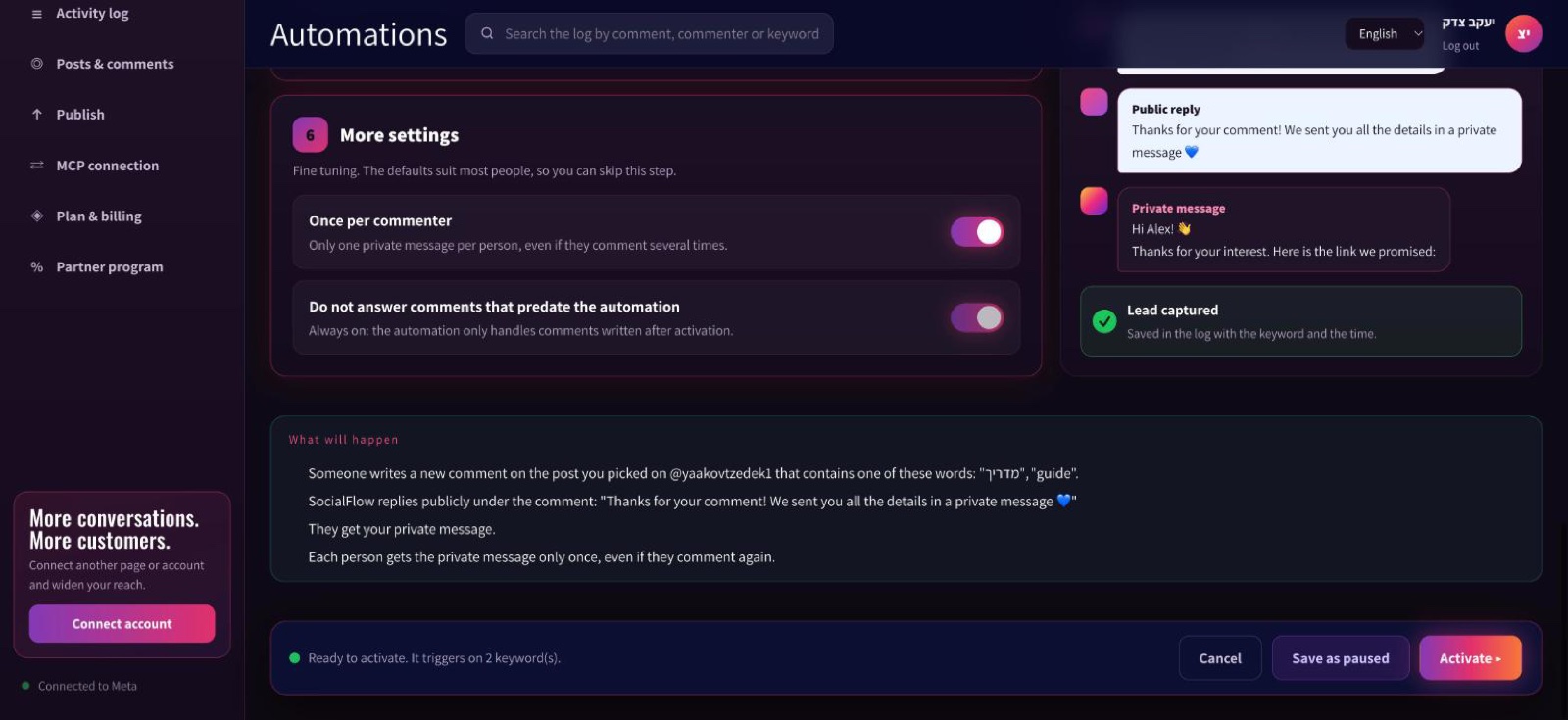 "What will happen": the sentence I trust most before activating. If it sounds off, something in the setup is wrong.
A full example with a fictional business: "Studio Shaket (demo)" posts a reel that ends with "comment 'schedule' and I'll send you the class timetable." The automation sits on that reel, the keyword is "schedule," the public reply says "Sent you a DM, check your message requests too 💬," and the private message contains the link to the timetable page.
Where do you see the leads?
There's no separate leads screen, and there's a reason for that: the lead is a row in the activity log. Each row shows the time, the commenter, the comment, the matched keyword, whether the public reply went out, whether the private message went out, and if there was an error, what it was. Above the table there are counters, and on the side a button to export a CSV.
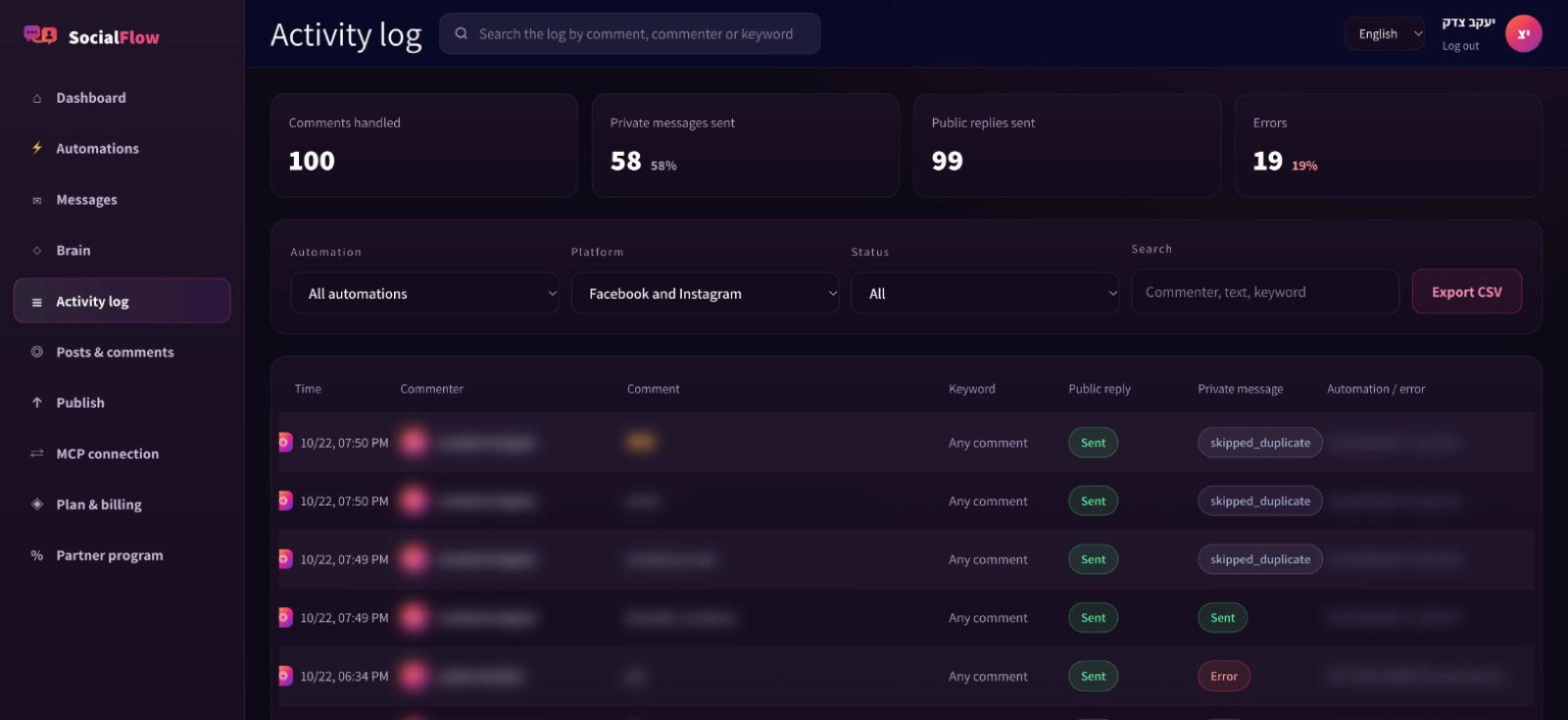 The activity log in my account. Commenter names, comments, and automation names are blurred.
Pay attention to the error percentage in the counter. Mine is not zero, and most failures are messages that Meta doesn't deliver, usually to people who don't follow the account or whose privacy settings block it. That's exactly what the log is meant to show: not just what was sent, but also what wasn't.
The moment I almost missed leads
On the first day the system ran for me, the log looked clean: all the public replies had gone out. Only when I checked row by row did I find that five private messages had failed and the system hadn't retried. People received "we sent you a message" and got nothing.
Today the system works differently: a message is counted as "sent" only when Meta returns a message ID, and a momentary failure gets an automatic retry. The lesson for any automation you're running, in any tool: don't settle for a "succeeded" counter. Open the log and check how many private messages actually went out.
Managing everything from inside Claude or ChatGPT
SocialFlow exposes an MCP server, so you can ask in chat instead of clicking through screens. MCP (Model Context Protocol) is an open standard that lets an AI assistant operate external tools. You connect once, then write in plain language, for example: "When someone comments 'price' on my latest reel, send them the price list in a private message," or "How many people received a message this week, and which post drove the most?"
How to connect:
- In Claude: Settings, Connectors, "Add custom connector," name it SocialFlow, and enter the address
https://isocialflow.com/api/mcp. A SocialFlow login window opens, approve it, and you're done. No key to copy. - In ChatGPT: Settings, Connectors, Advanced, turn on Developer mode, create a connector named SocialFlow with the same address and choose OAuth authentication.
- In other tools (Claude Code, Cursor, Grok Bot): the exact instructions for each appear on the connection screen inside the system.
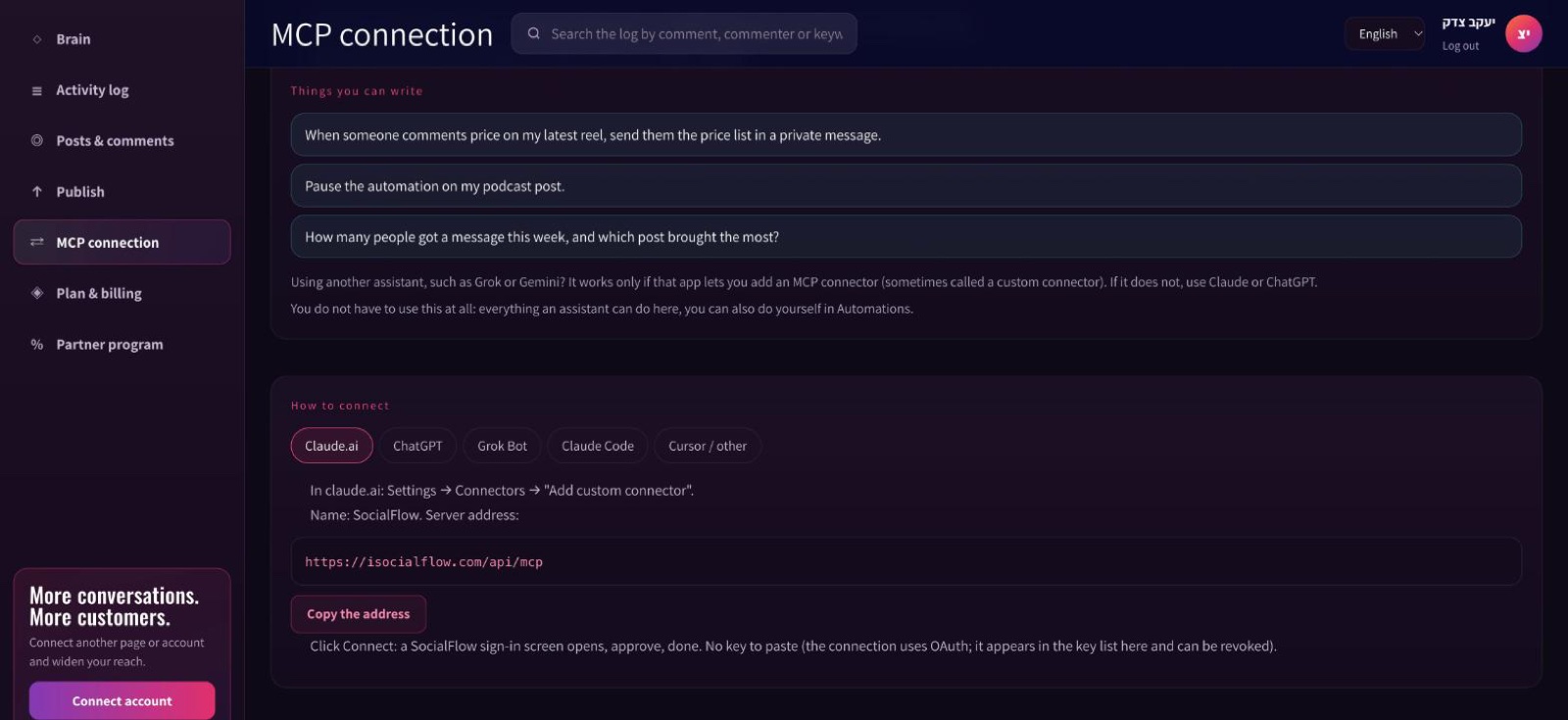 The "MCP connection" screen: a tab for each assistant, the address to copy, and an explanation that the Claude connection works via OAuth.
Two things worth knowing: the MCP connection is part of the Pro plan and above, and the first automation for each page is built inside the app itself so that Meta's permission is properly saved. After that you can work from chat. If you want to build on top of this with an agent that decides on its own which posts to activate automations on, see the guide to an Instagram leads agent with Grok Bot and SocialFlow.
How much does SocialFlow cost?
You start free and pay based on private messages actually sent. The prices below are from the pricing page on the site, as of October 22, 2026. Prices in shekels include VAT; outside Israel billing is in dollars, before local tax.
| Plan | Monthly price in Israel | Annual | Outside Israel | Private messages/month | Active automations | Connected accounts | Users | MCP |
|---|---|---|---|---|---|---|---|---|
| Free | 0 ILS | 0 ILS | 0 $ | 300 | 3 | 1 | 1 | No |
| Creator | 49 ILS | 490 ILS | 12 $ | 3,000 | Unlimited | 2 | 1 | No |
| Pro | 99 ILS | 990 ILS | 24 $ | 20,000 | Unlimited | 5 | 3 | Yes |
| Agency | 249 ILS | 2,490 ILS | 59 $ | 100,000 | Unlimited | 15 | 10 | Yes |
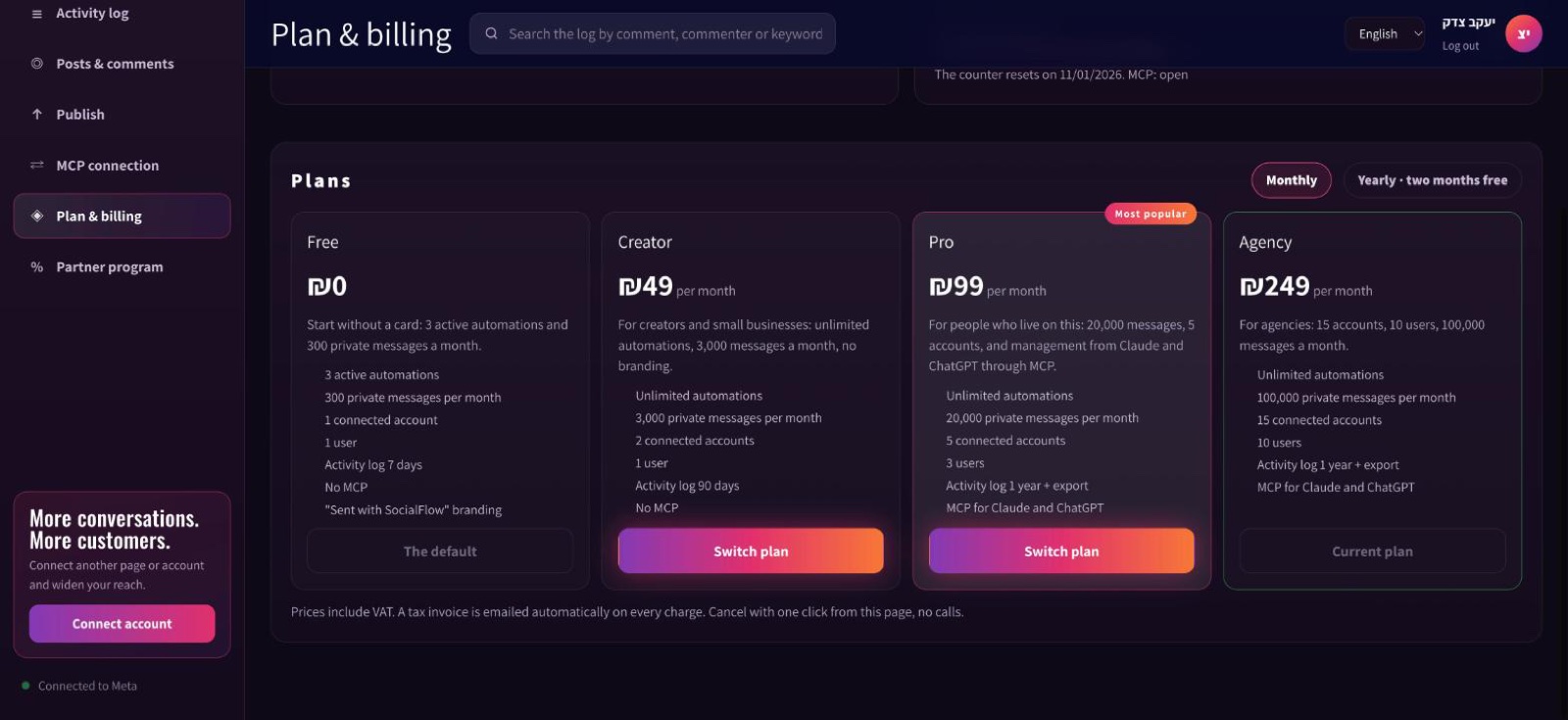 The "Plan & billing" screen as seen from an Israeli account. At the bottom: "Prices include VAT".
A few details worth knowing:
- Trial: 30 days of Pro for 1 ILS, with a saved card. If you don't cancel, it converts to a regular subscription, and a reminder is sent three days before the trial ends.
- When you hit the quota, sending stops. No overage charges. Upgrade, or wait for the next month.
- What doesn't count: a public reply without a private message, and a failed message.
- No commitment. Cancel with one click from the billing page; a tax invoice is emailed on every charge.
- Branding: On the free plan, every private message includes the line "Sent with SocialFlow." Paid plans do not.
SocialFlow vs. ManyChat, line by line
ManyChat data is from their official pricing page, as checked on September 14, 2026 in the ManyChat guide. Prices change, so it's worth verifying with them before deciding.
| Topic | SocialFlow | ManyChat |
|---|---|---|
| Billing basis | Private messages sent per month | Active contacts per month |
| Free plan | 300 messages, 3 automations, no card required | 25 active contacts, 4 active automations |
| Entry paid plan | Creator, 49 ILS (12 $) per month | Essential, 17 $ per month (14 $ annually), 250 contacts |
| Mid-tier plan | Pro, 99 ILS (24 $), 20,000 messages | Pro, 39 $ per month (29 $ annually), 2,500 contacts |
| Exceeding the quota | Sending stops, no additional charge | Continues running, charged per additional contact |
| Channels | Instagram and Facebook | Instagram, WhatsApp, Messenger, TikTok, Telegram, SMS and email |
| Building | Six-step wizard | Visual flow builder, conditions, tags, fields |
| AI | Follow-up step with intent detection, in beta, on Pro and Agency | Manychat AI, 29 $ per month add-on |
| Hebrew interface | Full, right-to-left | English interface, no right-to-left support |
| AI chat management | Built-in MCP server, from Pro plan | No official MCP server |
| Currency in Israel | Shekels, VAT included | Dollars, before tax |
When is it better to stay with ManyChat?
If any of the following applies to you, don't switch. A switch that doesn't fit costs you time and costs your audience duplicate messages.
- You need WhatsApp, TikTok or Telegram. SocialFlow works only on Instagram and Facebook.
- You have multi-step flows: questions, collecting email and phone into fields, tags, branching by answer. SocialFlow sends a reply and a message, and on Instagram there is a follow-up step in beta (up to three follow-up messages per person). It does not build flows.
- You send broadcasts to lists, or use ads that open a conversation with a full flow.
- You have integrations that work: CRM, Google Sheets or Zapier. In SocialFlow, data leaves via CSV export and via MCP, with no built-in integrations.
- You use "new follower to message," live-to-message, or QR codes that open a conversation. Those don't exist in SocialFlow.
And when to switch: when most of your use is "comment X and I'll send you Y" on Instagram and Facebook, when the ManyChat invoice spikes in good months, when you want a Hebrew interface, or when you're already working with Claude or ChatGPT and want to manage your automations from there.
What SocialFlow doesn't do, and what else is waiting on Meta
Meta's rules apply to everyone, including ManyChat: a private message is sent only to someone who commented or wrote first, one message per comment, and in the inbox you can reply only within 24 hours of the other person's last message. There's no proactive sending to a follower list, and that's a good thing: it's what keeps your account safe.
Two things I want to say plainly:
- Publishing posts from within the platform. The system has a publishing screen (image, video and Reel), but Meta's permission to publish to pages of users who don't hold a role in the app is still awaiting approval. Until it's approved, publishing is not open to everyone. The permissions for comments and messages were already approved in October 2026, and that's the part the automations need.
- Instagram must be a business account connected to a Facebook Page. A personal account will not appear in the list.
Looking for a tool that schedules and publishes posts to all networks and to WhatsApp groups? That's a different job, and I've written a complete guide to LazySocial.
How to move from ManyChat to SocialFlow
- Connect with Facebook at isocialflow.com/he, and choose your Page and business Instagram account. It's the same official Meta interface you already authorized for ManyChat.
- Rebuild only the automations you actually use. For each one: post, keyword, link. Minutes, not a project.
- Pause the matching automation in ManyChat, so every commenter gets one reply, not two.
- Test from a second account: comment on the post, wait up to two minutes, and confirm in the log that both the reply and the private message went out.
There's no export-import step, and no month where you're paying for both if you migrate post by post.
Partner program
For anyone who recommends tools to their audience: in the "Partner program" screen inside the platform you join with one click and get a personal link. According to the terms shown on that screen, the partner receives 50% of every payment made by someone who signs up through the link, for that person's first 12 months, with attribution determined by the first click.
Learning it step by step
Want to practice before connecting your page? The interactive SocialFlow course for 9.90 ILS: 14 short lessons in Hebrew, from your first automation through managing from the chat, with in-page exercises and a certificate. Prefer to see it on screen? The SocialFlow video course: 50 lessons on the real screens in my voice, with the first ten open to everyone for free. And if you're also evaluating ManyChat itself, the complete ManyChat guide covers WhatsApp, AI and pricing too.
The bottom line
A ManyChat alternative doesn't need to do everything ManyChat does. It needs to do well what you actually use. If that's "comment and I'll send you" on Instagram and Facebook, in Hebrew, at a price that doesn't spike in a good month, SocialFlow is built exactly for that. If you need WhatsApp and full flows, stay with ManyChat, and come back here when your needs change.
Yaakov Tzedek, AI lecturer, consultant and implementer for organizations, and leader of the largest Claude Code community in Israel.
Frequently asked questions

Yaakov Tzedek
An Israeli AI lecturer, consultant and implementer who has supported 100+ organizations in AI implementation and lectured for 200+. Official content partner of Meta, Google, Canva and TikTok, featured on Israel's Channel 13.
More about Yaakov →