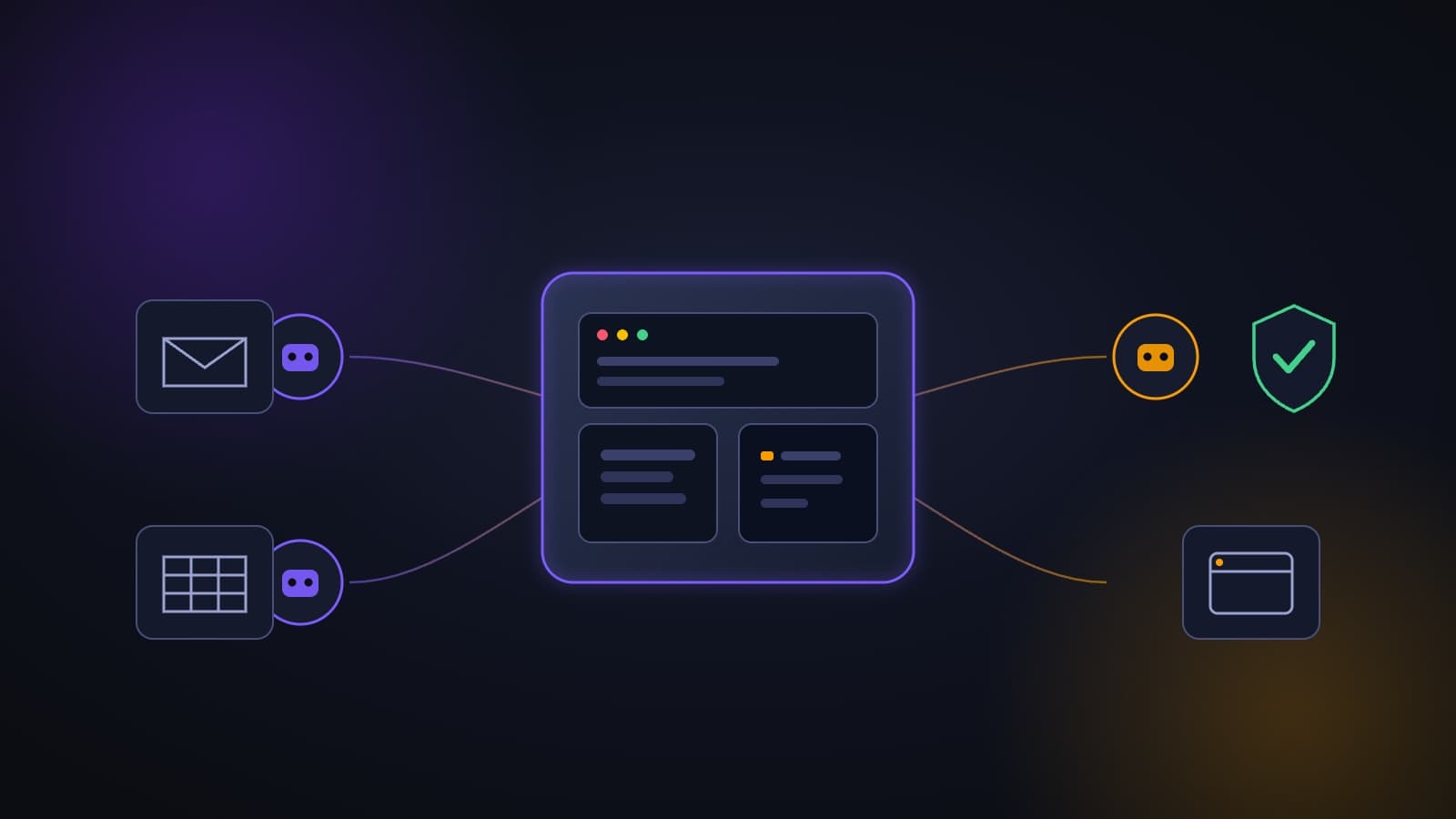
Grok Bot is the autonomous AI agent product from SpaceXSI (the company formerly known as xAI, briefly SpaceXAI). It launched in beta on August 11, 2026 and left beta as version 1.0 on November 2, 2026. Unlike the Grok chat, which answers questions and returns text, here you create a digital teammate with a name and a role, give it access to the tools you already use, and it does the work itself on its own cloud computer, even after you close your laptop and go home.
This is a conceptual leap, not just another feature. And like every leap, parts of it work brilliantly and parts of it break in ugly ways. This guide covers both, with sources, numbers and no PR spin.
Update, November 17, 2026: this guide was fully re-checked against the official documentation and pricing pages. Grok Bot is now out of beta (version 1.0), the pricing moved to The X Subscription tiers, and the enterprise controls and security documentation were updated. All of that is reflected below.
The short version: everything that matters in eight lines
- What it is: persistent AI agents ("teammates") with their own cloud computer: browser, file system and terminal.
- When it launched: beta on August 11, 2026; version 1.0 on November 2, 2026.
- What makes it different: it operates websites and apps through a real browser, even when there is no programmatic interface (API). That closes exactly the gap no other automation closes.
- Runs in the background: Bots keep working when your device is closed, because they run in the cloud.
- The model: the Grok 4.x family (Grok 4.6 at launch, grok-4.7 now the newest in the API), with a 500,000-token context window. You cannot pick the model.
- The price: no standalone subscription. Included in The X Subscription Premium ($30 per month), Super ($100) and Ultra ($200), plus Enterprise. Usage is a weekly pool that grows with the tier.
- The big risk: all of your Bots share one computer and the same sign-ins, and the docs say not to treat them as a security boundary.
- Who it fits today: draft work in tools nobody else can automate. Who it doesn't fit yet: anything that sends externally without controls, and any regulated environment without a proper review.
What changed since launch
This guide was first written on launch day, and the product has moved fast. These are the changes verified against the official documentation and product pages as of November 17, 2026:
- Version 1.0 is out of beta (November 2, 2026). Bots can now be shared with specific people or groups as Team Bots, brought into Slack, Microsoft Teams and video calls (Google Meet, Zoom and Teams), and they can spot work that needs doing, offer to take it on and follow up. The release also improved browser use, documents and presentations, added interactive Pages, and improved the Gmail, Google Calendar and GitHub connections.
- New pricing structure. Access now comes through The X Subscription: Premium $30, Super $100, Ultra $200 per month, plus Enterprise. Details in the pricing chapter.
- More platforms. Desktop apps for macOS, Windows and Linux, plus mobile apps for iPhone (iOS 18 or later) and Android (Android 9 or later). At launch there were only macOS, Windows and iPhone.
- Phone apps and saved sign-ins. In late October, Bots gained access to phone apps such as calendar, contacts and location, each with its own permission, and the desktop computer can sign in using saved Vault logins or a connected password manager such as 1Password.
- Enterprise layer. Teams and Enterprise plans gained team rules, Auto Review, action recording, audit logs and network controls. Details in the chapter "What organizations get".
What has not changed: all of one user's Bots still share one cloud computer, and the documentation still describes no dry-run mode. The risk chapters below remain fully relevant.
What is Grok Bot? A definition that stands on its own
Grok Bot is a persistent, named AI agent that runs on a virtual machine in the cloud and carries out multi-step tasks in real applications. The official documentation describes a Bot as a single, persistent, named agent, in effect one AI teammate. It keeps memory, files, browser sessions and preferences across requests, so context builds up instead of resetting with every conversation.
The difference from the chat is not the strength of the model but the line of responsibility. A chat returns text and you execute. An agent executes and you review.
Credit: the Grok Bot product page
Wait, there are two things called "Grok bot". Which one are you looking for?
This is the most common confusion around the name, and it is worth sorting out before going further.
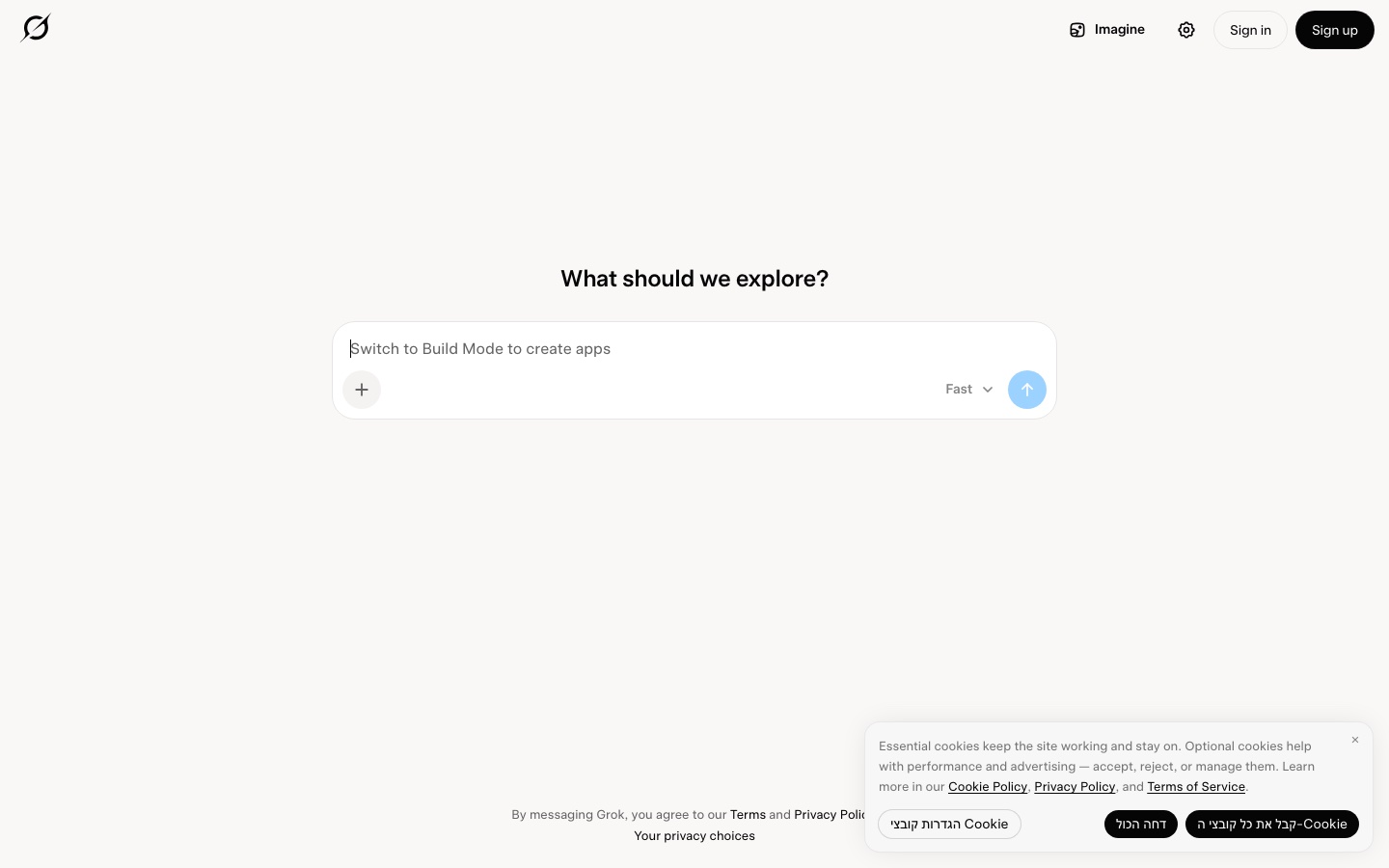
Option one: the bot you tag on X. If you have seen people write @grok in a reply to a post and get an answer in the thread, that is the Grok chat working as an account on X. It is free for basic use, connected to what is happening on the network in real time, and useful mainly for quickly checking a claim or understanding the context of a discussion. It does not do work for you, it answers.
Option two: the Grok Bot product. An app, launched in August 2026, where you create agents that carry out tasks. That is the subject of this guide.
How do you tell which one you mean? One question: is this something that answers me, or something that works for me? If it answers, go to the complete guide to Grok, which covers the chat, Grok Imagine and the plans. If it works for you, stay here.
Credit: xAI
Why does this matter right now?
For the past two years everyone has talked about "agents", and most of what was sold under that name was a chain of prompts with a nice interface. Three things change the picture with Grok Bot:
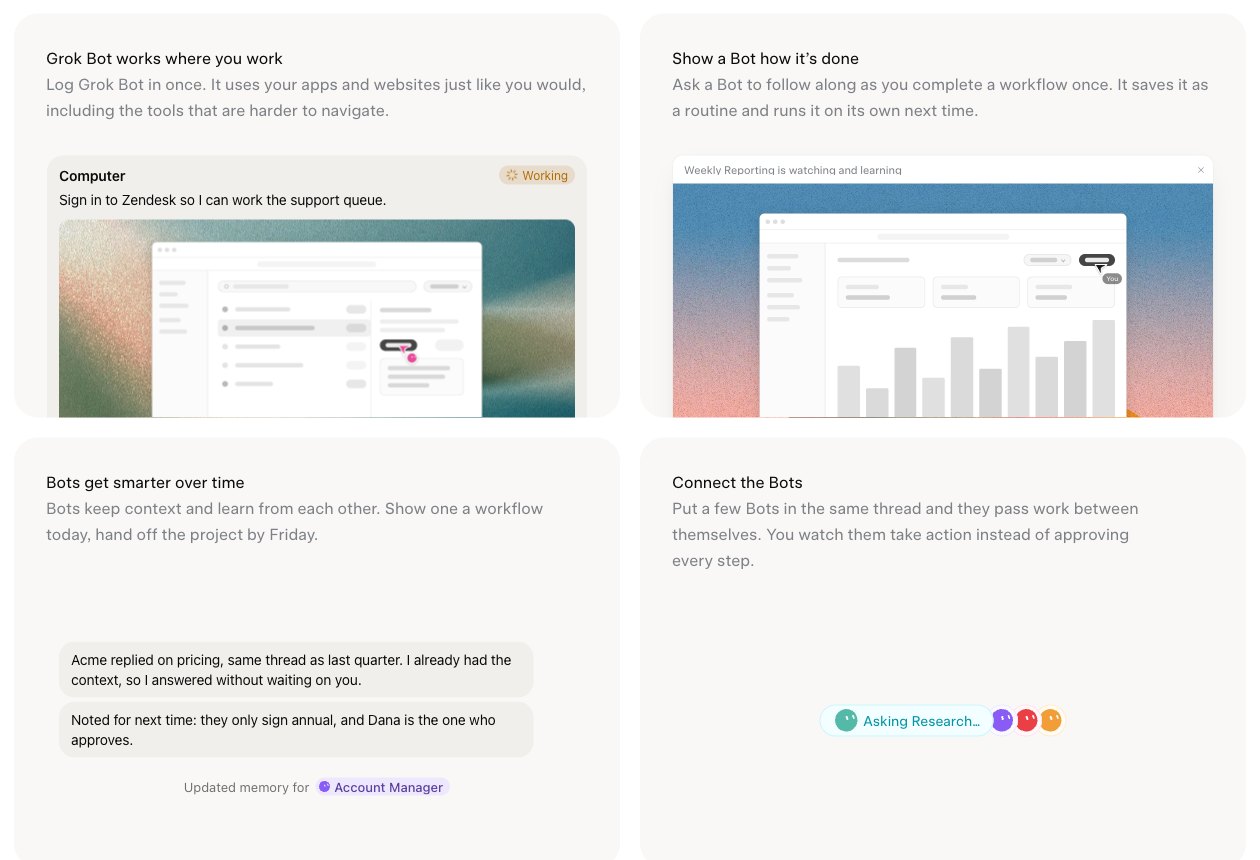
- A real computer, not just an API. Each user gets a persistent virtual machine in the cloud with a browser, files and a terminal. The Bot doesn't "talk about" the system, it operates it.
- It doesn't die when you close your computer. That sounds technical and it is critical for business: a four-hour task does not require you to leave your laptop open.
- It gets into places that have no back door. Legacy systems, supplier portals, old government interfaces. Anything without a programmatic interface has been dead ground for automation until now. A Bot that drives a browser solves that.
The third point is, in my view, the real reason to pay attention to this product. Even a very critical early review of the beta gave it 8 out of 10 in exactly this category: automating tools that have no API.
How does it work under the hood? A three-layer architecture
Layer 1: the cloud computer
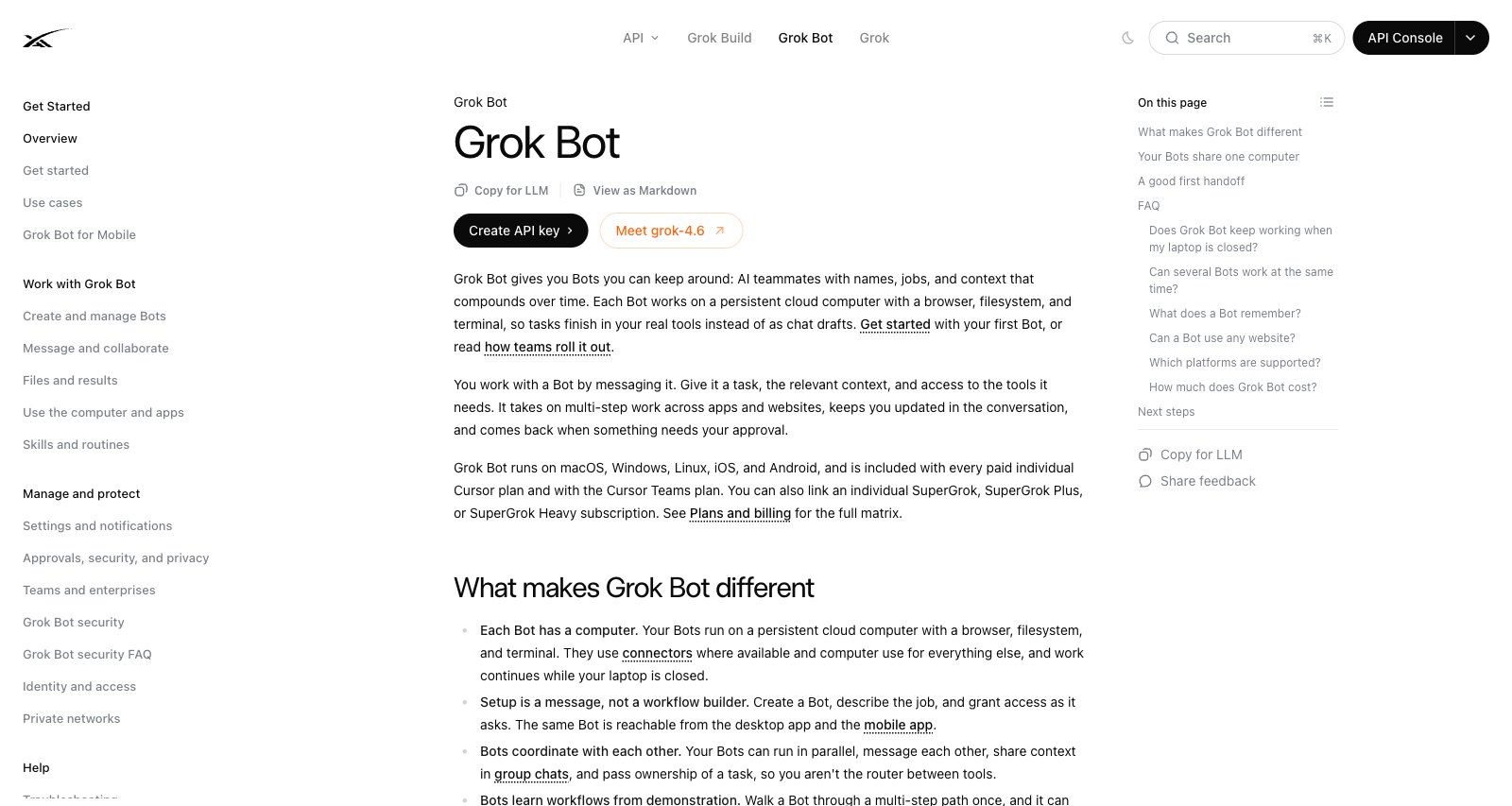
Each Bot works on a persistent cloud computer with a browser, a file system and a terminal. The key point to internalize: all of one user's Bots share one cloud computer. That lets them work in parallel and pick up sessions from one another, and it is also the root of the security problem we will get to later.
The documentation spells out exactly what is shared: browser cookies and signed-in sessions, files, and command-line credentials. Each Bot has its own screen on that computer, so several Bots can use a browser in parallel, but one Bot runs one computer-use task on its screen at a time, and the screens are explicitly "not separate security boundaries." Between different users the isolation is strict: each user's work runs in a dedicated Firecracker microVM, in Cursor's cloud, and no one can reach anyone else's computer. There is also a shared workspace folder, /workspace, where you should keep durable project files. Installed dependencies such as node_modules or a Python virtual environment are not preserved and must be reinstalled after an update, Recover or Reset.
The cloud computer is separate from your own Mac or PC. A Bot can run commands on your local machine only if that capability is enabled and you approve it under your local-computer policy, which defaults to "Ask every time".
Layer 2: tools and connections
Bots use connectors and the MCP protocol where they exist, and computer use (operating the screen like a person) for apps and websites without a clean programmatic interface. In other words, there are two paths: a proper connection when one is available, and driving the graphical interface like a human when there is no other choice.
In the app, you open Connect apps from the sidebar, browse or search, add the app, and finish any authorization in your browser. You can also simply ask a Bot to add an app ("Add the Linear app"). In chat, type @ to attach an app to a task. For a service with no ready-made connector, choose Add a custom connector: a Remote HTTPS connector takes a server URL and optional HTTP headers, and a Command connector takes a command and arguments. A server on a private network needs your approval first. Two notes from the docs: connected apps are account-wide, so every Bot you run can use them, and a teammate's Team Bot asks before it uses your accounts.
Credit: the Grok Bot product page
If you want to go deeper on MCP and why it changes the rules for connecting AI to business systems, see the guide to the best MCP servers to connect to Claude.
Layer 3: coordination between Bots
Bots can message each other, share context in threads or group chats, and hand off ownership of tasks. The idea is to reduce how much you have to route work yourself. In practice, during the beta, it was less rosy, as you will see below. Version 1.0 pushes further in this direction, with Bots that coordinate with other Bots and bring in people when a decision needs human judgment.
How to get started: the full process, step by step
According to the official documentation, this is the path:
Prerequisites: an eligible plan (see the pricing chapter); the desktop app for macOS (Apple silicon or Intel), Windows (x64 or Arm64) or Linux (x64 or Arm64), or the mobile app for iPhone or Android; and cloud data storage enabled. Grok Bot requires cloud storage, so the legacy Privacy Mode is not supported. On a team, an admin changes the team's privacy setting.
Credit: official Grok Bot documentation
1. Install the app. Download it from x.ai/bot and install it as usual for your operating system.
2. Sign in. Choose Sign in on the welcome screen and finish in your browser. Grok Bot uses your Cursor account, so there is no separate login, and your company's single sign-on (SSO) applies. If your access comes from a Grok Business seat, choose Sign in with Grok instead. If it comes from a SuperGrok or X Premium+ subscription, you link your Grok account.
3. Meet your first Bot. After a short intro, the app creates your first Bot, named "Grok Bot", and opens a chat with it. To create more Bots, choose New Bot (the + button) or press Cmd/Ctrl+N, give it a name and a clear role.
4. Give it the first task. This is where the professional part is, and I cover it in the next chapter. To repeat a task on a schedule, ask the Bot to make it a routine.
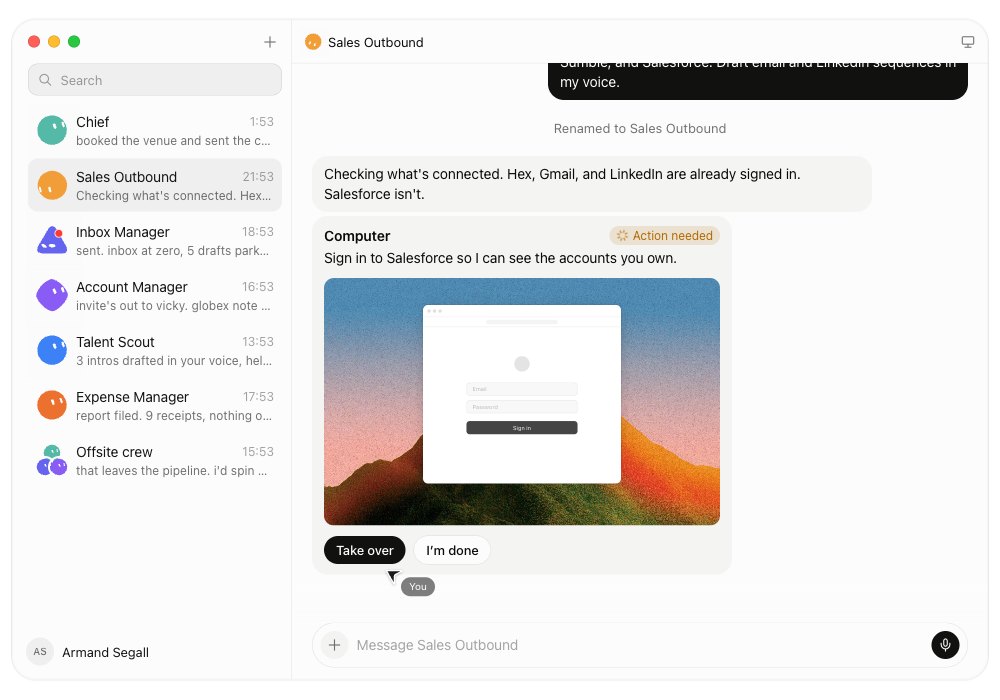
5. Grant access. A Bot can sign in using a saved Vault login, a connected password manager such as 1Password, or a secure form, and it can read one-time codes from a connected Gmail or Outlook account or from its own inbox. For steps a form can't handle, such as single sign-on, a passkey, a CAPTCHA or an approval on another device, it hands control to you: you open the computer, complete only the blocked step, and tell the Bot to continue. Never paste passwords or one-time codes into the ordinary chat. The fact that human-only steps stay with a human is deliberate, and it is a good thing.
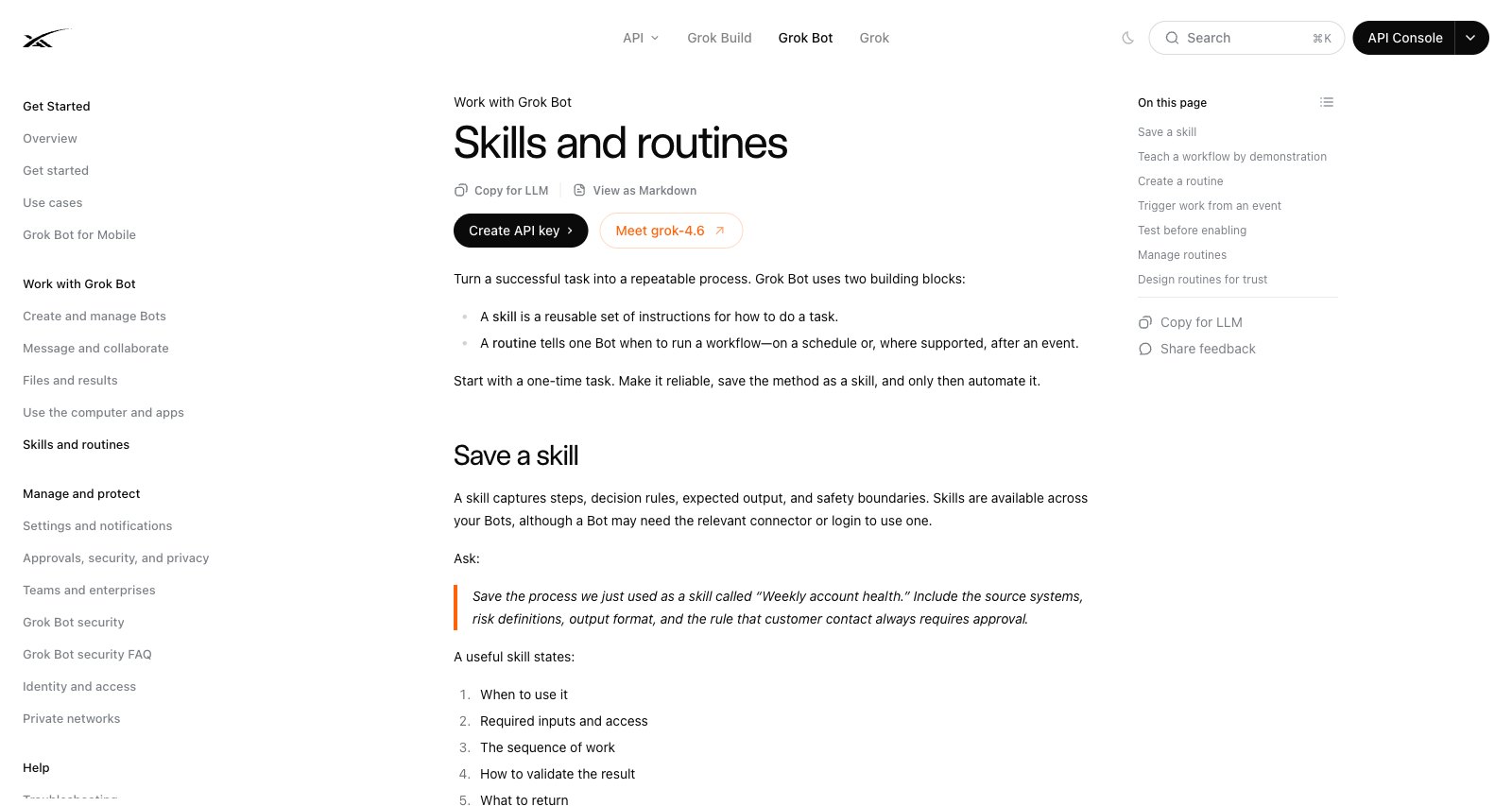
6. Review and refine. Ask for corrections, set standing preferences, and save stable processes as skills or routines for reuse. A skill captures steps, decision rules, expected output and safety boundaries. According to the docs, a useful skill specifies when to use it, the inputs and access it needs, the order of the work, how to check the result, what to return, and which actions need approval. A routine tells the Bot when to run it: on a schedule, or after an event such as a Slack mention or keyword, a GitHub, Linear, Sentry or PagerDuty event, an email sent to the Bot's own address, or a webhook call. A Bot can own up to 50 routines, and the app keeps the 20 most recent run records for each routine.
Credit: official Grok Bot documentation
The structure that turns a task into a result: five components
Grok Bot works best when every request is built from five parts. In my view this is the most practical insight in the whole product:
| Component | The question it answers |
|---|---|
| Outcome | What should exist at the end? |
| Sources | Where should information come from? |
| Constraints | What is off-limits, and in what style or format? |
| Deliverable | A file? A draft email? A row in a system? |
| Review point | When does the Bot stop and wait for you? |
The fifth component is the difference between a useful tool and an accident. Define the review point before you define the task.
An example of a well-built request
"You are my research assistant. Outcome: a comparison table of five phone-system vendors that serve businesses in our market. Sources: their official websites only, no third-party reviews. Constraints: no estimates that don't appear in the source, every number with a link to where it came from. Deliverable: a spreadsheet file in our shared folder. Review point: stop and show me the table before you send anything to anyone."
A request like this saves three rounds of corrections and, more importantly, states explicitly that nothing gets sent.
How much does it cost? The honest answer
Grok Bot has no standalone subscription. It is included in The X Subscription from the Premium tier up. According to the official pricing documentation (November 2026), the lineup looks like this:
| Plan | Monthly price | Grok Bot |
|---|---|---|
| Free | $0 | Not included |
| Plus | $8 | Not included |
| Premium | $30 | Included, with a weekly usage pool |
| Super | $100 | Included, 3.5x Premium usage, priority model access at peak times |
| Ultra | $200 | Included, 12x Premium usage, earliest access to new products and models |
| Enterprise | Contact sales | Included, with enterprise controls |
Rules worth knowing before you pay:
- Usage is a weekly pool, shared. Grok Bot draws from the same weekly pool that covers Grok models in Grok and in Cursor, not from a separate pool. A more expensive tier gives you a bigger pool, not a different product.
- Extra usage costs extra. Beyond the included amount, usage is billed on token cost through Additional Usage top-ups.
- Older routes still work, but don't stack. Legacy paid Cursor plans and linked SuperGrok, SuperGrok Plus, SuperGrok Heavy or X Premium+ subscriptions still grant access, as does a seat on a self-serve Grok Business plan. Grok Bot uses whichever grant gives more weekly usage; linking a second one does not add to it.
- Some features need specific tiers. Team Bots require a Team or Enterprise plan. Bots joining meetings require Team, Enterprise or Ultra.
How the price has moved
For context, this product has repriced twice in three months. At the August launch, beta access came mainly through the most expensive tiers (roughly $300 per month for SuperGrok Heavy, $200 for Cursor Ultra or $120 per seat for Cursor Teams Premium). By mid-September the product page showed entry points of $20 (Cursor Pro), $30 (SuperGrok) and $40 per seat (Cursor Teams):
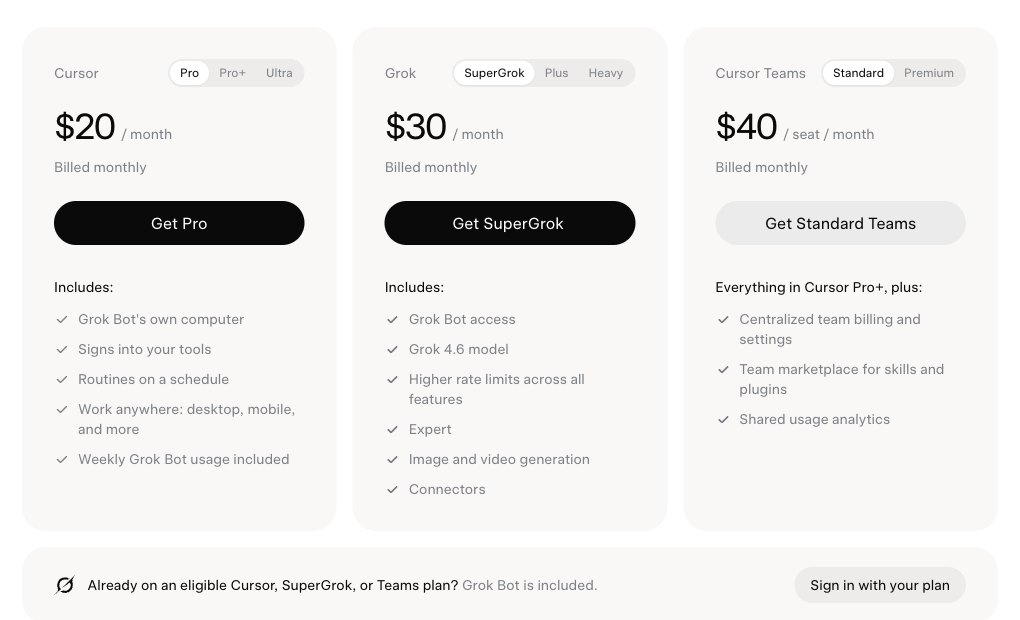
Credit: the Grok Bot product page, September 13, 2026 (superseded)
Today the entry point is The X Subscription Premium at $30. Even so, don't buy a plan based on this guide. Check the official pricing page for what is included today.
The important cost warning
Beyond the subscription fee, there is metered usage. Because the weekly pool is shared with Grok and Cursor and every Bot draws from it, running several Bots on long tasks can use up a week's allowance within days, and early reviewers reported exactly that during the beta. Anything beyond the pool is billed on token cost. If you go in, go in with an eye on the usage meter, start with one Bot, and decide in advance how much extra usage you are willing to buy.
What is it actually good at? And what breaks?
This is the chapter that justifies reading a guide rather than a press release.
What works
- Operating systems without a programmatic interface. This answers a real, painful problem, and it is where it earns its highest marks.
- Low startup friction. No workflow builder, no diagrams. Give it a name, describe a role, and start talking. That is a sharp contrast to automation platforms that make you build a graph before you see any value.
- Learning a task by demonstration. You can record up to ten minutes of work in the browser and teach a process from it. Important: the result needs decision rules and failure handling added by hand before you can trust it.
- Following a "draft only" instruction. In launch-day testing, a Bot that was told explicitly "draft only, I'll send" respected that instruction on a real customer outreach task.
What breaks
- One shared computer for all your Bots. All your Bots share a machine, browser sessions and sign-ins. If one Bot signed in to a system, the others inherit that access. The documentation says explicitly not to treat separate Bots as a security boundary, and recommends a separate Cursor user for any workload that needs separate credentials.
- No documented dry run. The documentation describes no dry-run or sandbox mode. A test run does real work: it navigates sites, changes files and calls tools.
- Approval does not undo. Auto Review (on Enterprise) can let an action proceed, require approval or deny it, but the documentation itself notes it "does not review every side effect", and nothing undoes work that has already been done. On other plans, approval rules rely on the instructions you give.
- Audit logs are Enterprise only. Action recording and audit logs exist only on the Enterprise plan. On personal plans you have each Bot's chat transcript, and routines keep only their 20 most recent runs.
- No model choice. You cannot choose or restrict which model handles a task. Grok Bot picks the model for each task, and that is a real blocker for organizations with cost, reliability or compliance requirements.
- Real growing pains. During the beta, a user who bought an especially expensive plan for the product described it as nearly unusable in those first days, because of capacity errors, agents stuck on basic tasks and a slow cloud computer. There were also documented cases of the shared computer freezing and taking all the Bots down at once. Version 1.0 promises better reliability, but the shared-computer design means one failure can still affect every Bot.
Scores by use case
A professional review of the early beta (eesel, August 2026) scored the product by use case, and it remains a useful summary for decision makers:
| Use case | Score | Reasoning |
|---|---|---|
| Automating tools with no API | 8/10 | Closes a real integration gap |
| Draft-first knowledge work | 7/10 | A mistake costs review time only |
| Customer support queues | 4/10 | No dry run, no confidence gate, no per-response record |
| Regulated organizations | 3/10 | No certification claimed at the time, cloud storage mandatory |
Since that review, the security documentation added that Anysphere holds ISO/IEC 27001 and ISO/IEC 42001 certifications with Grok Bot in scope, which partly addresses the last row. The rest of the reasoning still holds. The review's conclusion is well put: a good buy for draft work in tools nobody else can automate, and the wrong shape for anything that sends.
Which model is underneath? The numbers
At launch in August 2026, the flagship model was Grok 4.6:
- Context window: 500,000 tokens.
- Intelligence: a score of 61 on the Artificial Analysis Intelligence Index, level with GPT-5.6 Sol, one point below Claude Fable 5 (62) and two points below Claude Opus 5 (63).
Since then, the API documentation lists grok-4.7 as the newest model:
- Context window: 500,000 tokens.
- API pricing: $2 per million input tokens and $6 per million output tokens. When a prompt reaches 200,000 tokens, every token in that request is billed at the higher rate of $4 input and $12 output.
What this means in practice: Grok Bot still has no model picker. Bots run on whichever model Grok Bot picks for each task, not on a version you set. A stronger model improves reasoning and code quality, but it does not touch the two things that still decide whether to deploy a Bot in an organization: the shared cloud computer and the lack of a documented dry run.
As for Grok 5: as of mid-November 2026 it does not appear in the API documentation. Almost everything written about its specs is rumor presented as fact, so be careful with headlines.
Grok Bot vs. other tools: when to use what
| Tool | Real strength | When to choose it |
|---|---|---|
| Grok Bot | Operating websites and legacy systems through a browser, running continuously in the cloud | When the system you want to automate offers no programmatic access |
| Claude Code | Working on code, files and systems with precise control over permissions and tools | When you build a product, an automation or an organizational agent that needs clear boundaries |
| Workflow-based automation | Reliability, logs, repeatability | When the process is stable and known in advance |
Framing it as "who wins" misses the point. In real projects these tools complement each other: Grok Bot for the manual front end that has no API, and tools with defined boundaries for anything that touches customers, money or sensitive data. If you want to understand how to build an organizational agent with clear boundaries, read how to build an AI agent with Claude.
Working in languages other than English
Yes, Grok Bot works in other languages: you write the task in your language and drafts and summaries come back in it. Most of the friction is in how the instruction is written, not the language. Three tips:
- Name buttons as they appear on screen. The sites and tools the Bot operates are often in English, so describe buttons and fields by their on-screen names, not a translation.
- Check text direction. Output in right-to-left languages such as Arabic or Hebrew can come out left-aligned or mixed inside spreadsheets and documents. Ask for right alignment and review the result.
- Give names and values as a closed list. Customer names, addresses and amounts are best supplied rather than left for the Bot to find, to reduce transcription errors.
Five realistic uses for a business
These examples are deliberately generic, and they fit best where there is no programmatic interface:
- Extracting data from supplier portals. A supplier who publishes invoices or order status only in an old web interface. A Bot logs in once a day, pulls the rows and updates an internal spreadsheet.
- Structured competitor research. Scanning competitor websites into a comparison table with a source for every field, on a weekly cadence.
- Drafts only. Outreach material, summaries, first replies. The Bot prepares, a person sends. This is the safest use case today.
- Data quality control. Comparing records between two systems that don't talk to each other and flagging gaps for human review.
- The copy-and-paste jobs nobody wants. Exactly the kind of process that tends to show up first when you map an organization's work for AI implementation.
Seven copy-ready prompts
Each one follows the five-component structure, and every one has its review point defined in advance. They are generic templates you can adapt.
1. Extracting data from a portal with no API
"Every day at 08:00, log in to the supplier portal, download the list of open orders, and add only the new rows to our spreadsheet. Do not delete existing rows. If the page structure has changed, stop and tell me instead of guessing."
2. Competitor research with sources
"Build a comparison table of five competitors in our field. For every field, add a link to the page the information came from. Don't use estimates. If a figure doesn't appear on the official site, write 'not published'. Stop and show me before you export."
3. Drafts only
"Prepare reply drafts for the five inquiries in the inbox. Style: short, professional business language, no superlatives. Don't send anything. Save them as drafts only and tell me when you're done."
4. Quality control between two systems
"Compare the customer lists in the two systems. Produce a gap report only: what exists in one and is missing in the other, and what exists in both with different values. Don't fix anything, just report."
5. Structured weekly summary
"Every Thursday, collect the week's activity and prepare a one-page summary: what was done, what is stuck, and what needs a decision from me. Show me before you save."
6. Cleaning up and organizing files
"Go through the folder, identify duplicates by content rather than by name, and prepare a list of what you recommend deleting and why. Don't delete any file. I'll wait to approve."
7. Meeting prep
"Before every external meeting on the calendar, prepare a half-page brief: who they are, what has been published about them recently in official sources, and three questions worth asking. Put each meeting in its own file."
Notice the recurring pattern: every prompt includes an explicit sentence that forbids an irreversible action. That is not a writing style, it is your main layer of protection when there is no dry run and no undo.
How to build a team of Bots, and why to start with one
The practical recommendation: start with one Bot and one process, and add a second Bot only after the process runs stably. All your Bots share one computer, so more Bots don't create separation; they burn through your usage faster and make faults harder to trace. It is the same approach I recommend in every AI implementation: one well-defined process first, with clear ownership and an approval gate, and only then scale. Version 1.0's Team Bots make it easier to share a working Bot with colleagues, which is one more reason to get a single Bot right before you multiply it.
What organizations get: Teams and Enterprise
This chapter didn't exist at launch. According to the teams and enterprise documentation, the organizational layer looks like this:
| Control | Plan | What it does |
|---|---|---|
| Team Rules | Teams and Enterprise | Mandatory instructions that apply to the team's Bots (scoped to Cursor, Grok Bot or both) |
| Connector policy | Teams and Enterprise | Inherited from the team's Cursor connector policy |
| MCP allowlist | Enterprise | Restricts which MCP servers can be connected |
| Enforce Auto Review and team Auto Review rules | Enterprise | Lets an action proceed, require approval or be denied |
| Network controls | Enterprise | Restricts network access (on Teams, network access is allow-all by default) |
| Action recording | Enterprise (off by default) | Records Bot actions for review |
| Audit logs | Enterprise | Admin, security, authentication and Grok Bot control-plane events, with streaming to your SIEM |
| OpenTelemetry export | Enterprise | Sends telemetry to your observability stack |
| SCIM provisioning | Enterprise | Automatic user provisioning and deprovisioning |
Sign-in goes through your organization's identity provider (SSO) via Cursor. The product page also lists data loss prevention (DLP), certificates and proxies for Enterprise admins. The architecture: each user gets a dedicated Firecracker microVM, all of one user's Bots share it, and execution runs in Cursor's cloud.
On compliance, the security documentation states that Anysphere (the company behind Cursor) holds ISO/IEC 27001 and ISO/IEC 42001 certifications issued by Schellman, with Grok Bot in the current scope, and points to Cursor's trust center for certificates and reports. What is still missing, according to the same documentation: a dry-run mode, and separation between Bots of the same user. A regulated organization should review both, plus data residency and retention, before connecting real systems.
Common problems and what to do
| Symptom | Likely cause | What to do |
|---|---|---|
| The Bot gets stuck mid-task | The site requires sign-in, a passkey or a CAPTCHA | Take over the computer, complete only the blocked step, and tell the Bot to continue |
| All Bots stop working at once | The shared computer froze | Use Recover or restart; remember that installed dependencies may need reinstalling |
| Repeated capacity errors | Load on the infrastructure at peak hours | Schedule heavy tasks for other hours (higher tiers get priority model access at peak times) |
| The result is right but the writing is clunky | The model is strong at execution, weaker at polished prose in some languages | Split the work: the Bot executes, another tool or a person polishes |
| Usage runs out early | Many Bots and long tasks drawing on one weekly pool | Cut back to one task, and limit the scope of sources |
Checklist before bringing an agent like this into your organization
If you are considering this at the organizational level rather than as a personal experiment, these are the seven checks I would require:
- What can the Bot send externally? If the answer isn't "nothing without a person", stop here.
- Which accounts can it see? Remember the computer is shared. A dedicated service account (or a separate user) is far better than an employee's personal account.
- What happens when it makes a mistake? Not "if". Approval does not undo an action that has already been taken.
- How will you know what it did? Without Enterprise audit logs and action recording, who is responsible for documenting it?
- Who watches the cost? Someone has to own the usage meter and decide how much extra usage to buy.
- What is the data policy? Cloud storage is mandatory in this product. If you handle sensitive data, settle your data-handling rules before you connect anything.
- Is this process even right for an agent? Sometimes a simple automation delivers 90% of the value at a tenth of the risk.
Organizations that want to run this check properly, with their own team and on their own processes, do it in a hands-on AI workshop or as part of a full AI implementation project.
How to measure whether the agent paid off
This is the question almost nobody asks before buying a subscription that can run to hundreds of dollars a month, and then, a quarter later, they have no answer. Here is a simple calculation you can run in advance.
Three numbers before you start:
- How long the process takes today. Not a guess from memory: measure three real runs.
- How many times a month it happens.
- The hourly cost of whoever does it today.
Three numbers after a month:
- How long it takes now, including the person's review time. This is where most people fool themselves: an agent that saves 40 minutes but requires 25 minutes of review saved 15 minutes, not 40.
- How often it failed and needed full intervention.
- What you actually paid, including extra usage and not just the subscription.
The formula: (time saved per run × runs per month × hourly cost) minus (subscription and usage cost). If the result is negative, it can still be worth it during a learning phase, but then say so explicitly and set a date to check again.
The common trap: counting the time saved and not the time added, such as rewriting the task every morning and handling faults twice a week.
Where does this put the market?
2026 is the year the major players moved from "an assistant that answers" to "an agent that executes". The real difference between them is where the line of trust sits: how much the tool may do on its own, and what must go through a person. Grok Bot chose the aggressive end of the scale: a full computer, broad access, and Bots that now offer to take on work by themselves. Other tools chose less autonomy and more explicit control over permissions.
So the question for your organization is not "which tool is smartest" but "what level of autonomy are we willing to grant, and in which process". That is a management question, and it needs a written answer, ideally in an AI usage policy, before you connect any tool to real systems.
A note on pace: this guide was written during the early beta, updated in September 2026, and fully re-checked on November 17, 2026 after the 1.0 release and the move to The X Subscription. Some gaps (audit logs, network controls) have since closed on Enterprise; others (shared computer, no documented dry run) remain. I will keep updating it.
Bottom line
Grok Bot is the first product I have seen that seriously tackles the most frustrating gap in organizational automation: systems with no back door. The idea of a digital teammate with its own computer, who keeps working after you go home, is where the field is heading.
But even at version 1.0 the fundamentals call for care: a shared computer that is not a security boundary, testing that does real work, approval that doesn't undo, full audit logs only on Enterprise, and a usage pool that can run out mid-week.
My recommendation is simple. Try it on one internal process whose output is a draft, in a system no other tool can get into, with a dedicated account and a person who reviews before anything goes out. That is exactly where it delivers real value today, and where a mistake costs time, not money or trust.
Want to find out which of your processes really suit an agent, and which are better solved another way? Start with an AI workshop for your organization that maps your processes, or book a consultation and we will do the mapping together. For hands-on learning, see the courses.
Sources
- Grok Bot product page
- Grok Bot 1.0 announcement (November 2, 2026)
- Official docs: Grok Bot overview
- Official docs: getting started
- Official docs: FAQ
- Official docs: computer and apps
- Official docs: mobile
- Official docs: skills, routines and automations
- Official docs: teams and enterprises
- Official docs: security FAQ
- The X Subscription: plans and usage
- xAI API models and pricing
- Professional review of the early beta (eesel)
- Artificial Analysis: Grok 4.6 benchmarks and analysis
Frequently asked questions
What is Grok Bot?
Grok Bot is the autonomous AI agent product from SpaceXSI (formerly xAI). It launched in beta on August 11, 2026 and left beta as version 1.0 on November 2, 2026. Unlike the Grok chat, which answers questions, each Bot is a persistent, named digital teammate with its own cloud computer (browser, file system and terminal). It connects to the tools you already use and keeps working in the background even after you close your laptop.
What is the difference between Grok Bot and the regular Grok chat?
The Grok chat is a question-and-answer interface: you ask, it answers, and the work stays with you. Grok Bot executes: it goes into apps itself, fills in forms, pulls data, produces files and finishes tasks end to end. It is the difference between a consultant who gives advice and an employee who does the work.
How much does Grok Bot cost?
There is no standalone Grok Bot subscription. According to the official pricing documentation, it is included in the Premium ($30 per month), Super ($100 per month) and Ultra ($200 per month) tiers of The X Subscription, plus Enterprise (contact sales). The Free and Plus tiers do not include it. Legacy paid Cursor plans and linked SuperGrok or X Premium+ subscriptions also grant access. Usage comes from a weekly pool shared with Grok and Cursor, and extra usage is billed on token cost. Check the official pricing page before you buy, because the lineup has already changed several times.
Does Grok Bot keep working when I close my computer?
Yes. Bots run on cloud infrastructure, not on your computer, so they keep working in the background even when the app is closed and the device is off. That is the core difference from running an agent locally. One exception: phone features such as calendar or location work only while the Grok Bot app is open on your phone.
Is Grok Bot safe to use in an organization?
For sensitive processes, still with caution, even after the 1.0 release. Three reasons from the documentation: all of a user's Bots share one cloud computer and one set of sign-ins, and the docs say not to treat them as a security boundary; the docs describe no dry-run mode, so a test run does real work; and action recording and audit logs are Enterprise-only. Anysphere, the company behind Cursor, holds ISO/IEC 27001 and 42001 certifications with Grok Bot in scope. For internal draft-for-approval processes it is useful; for anything sent externally or for a regulated environment, set up strict controls first.
Grok Bot or Claude Code: which fits what?
They solve different problems. Grok Bot is especially strong at operating websites and legacy systems that have no programmatic interface, because it drives a real browser. Claude Code is strong at working on code, files and organizational systems, with precise control over permissions and tools. Many organizations will find they complement each other rather than compete.
Which model runs Grok Bot?
The latest Grok model family. At launch that was Grok 4.6, with a 500,000-token context window, which scored 61 on the Artificial Analysis Intelligence Index: level with GPT-5.6 Sol, one point below Claude Fable 5 and two points below Claude Opus 5. The newest model in the API documentation is now grok-4.7, also with a 500,000-token context window. In Grok Bot you cannot choose the model: Grok Bot picks the model for each task.
Where can I learn Grok Bot?
Start with the official documentation at docs.x.ai/grok-bot, which covers setup, computer and apps, skills and routines, security and enterprise controls. For hands-on training with your own team and processes, see the lectures and workshops at tzedek.me/en/ai-lectures.