- What Fathom offers on its free plan for Zoom, Meet and Teams, whether Hebrew is supported, HubSpot and Salesforce sync, full pricing from the official site, consent rules, privacy, and the Superhuman acquisition.
According to the Fathom Help Center, the recording-consent request email is sent to external participants 24 hours before the meeting. A meeting scheduled for the same day receives no email at all, so consent must be requested verbally.
Unlimited recordings and transcriptions, free, with no expiration date. That is not even the interesting part.
The interesting part is two things that happened at the same time. On September 14, 2026, Superhuman announced the acquisition of Fathom, and the official website already displays the banner "Fathom is now part of Superhuman." Meanwhile, Fathom's help center lists 38 supported transcription languages, and Hebrew is not among them. In other words: an excellent free tool that, for Israeli businesses, is best suited to meetings conducted in English.
This guide was built from the pricing page, the product page, the help center (languages, free plan, recording consent, HubSpot, Salesforce, security and data retention policy), and the official acquisition announcement. Everything was verified on September 15, 2026.
In short
| Question | Short answer |
|---|---|
| What is it? | An AI assistant that records, transcribes, and summarizes Zoom, Google Meet, and Teams meetings |
| Hebrew? | Not on the official list of 38 languages; best suited for meetings in English |
| How much does it cost? | Free; Premium $16/month billed annually; Team $15; Business $25; Enterprise custom |
| What runs out first on the free plan? | Advanced AI: advanced summaries limited to 5 calls per month, no Ask Fathom and no AI tasks |
| CRM? | HubSpot, Salesforce, and Close; field mapping only from Business tier |
| What's new? | Superhuman acquired Fathom on September 14, 2026; no pricing changes have been announced |
What is Fathom?
Fathom is an AI assistant for video meetings. It records the meeting, transcribes it, and immediately after it ends sends a summary with key points and action items, without anyone taking notes.
Definition: Fathom is an AI-based meeting summarizer (AI notetaker). It connects to your Google or Microsoft calendar, joins meetings on Zoom, Google Meet, and Microsoft Teams, records and transcribes in 38 languages, and produces a summary with speaker identification and action items. After the meeting you can ask Ask Fathom questions about the conversation, clip segments, and sync the summary to your CRM. As of September 2026, the company is part of Superhuman.
According to the official website, Fathom is used by more than 300,000 companies, and the homepage shows a 5.0 rating on G2 from more than 6,500 reviews. Those numbers come from the company itself, so take them accordingly.
The standout feature highlighted on the homepage is bot-free recording. According to the product page, the desktop app can detect a meeting and record it without adding an extra participant to the attendee list, currently on Mac only, with Windows support "coming soon." You can choose the capture mode: video and audio, audio and transcription, or transcription only.
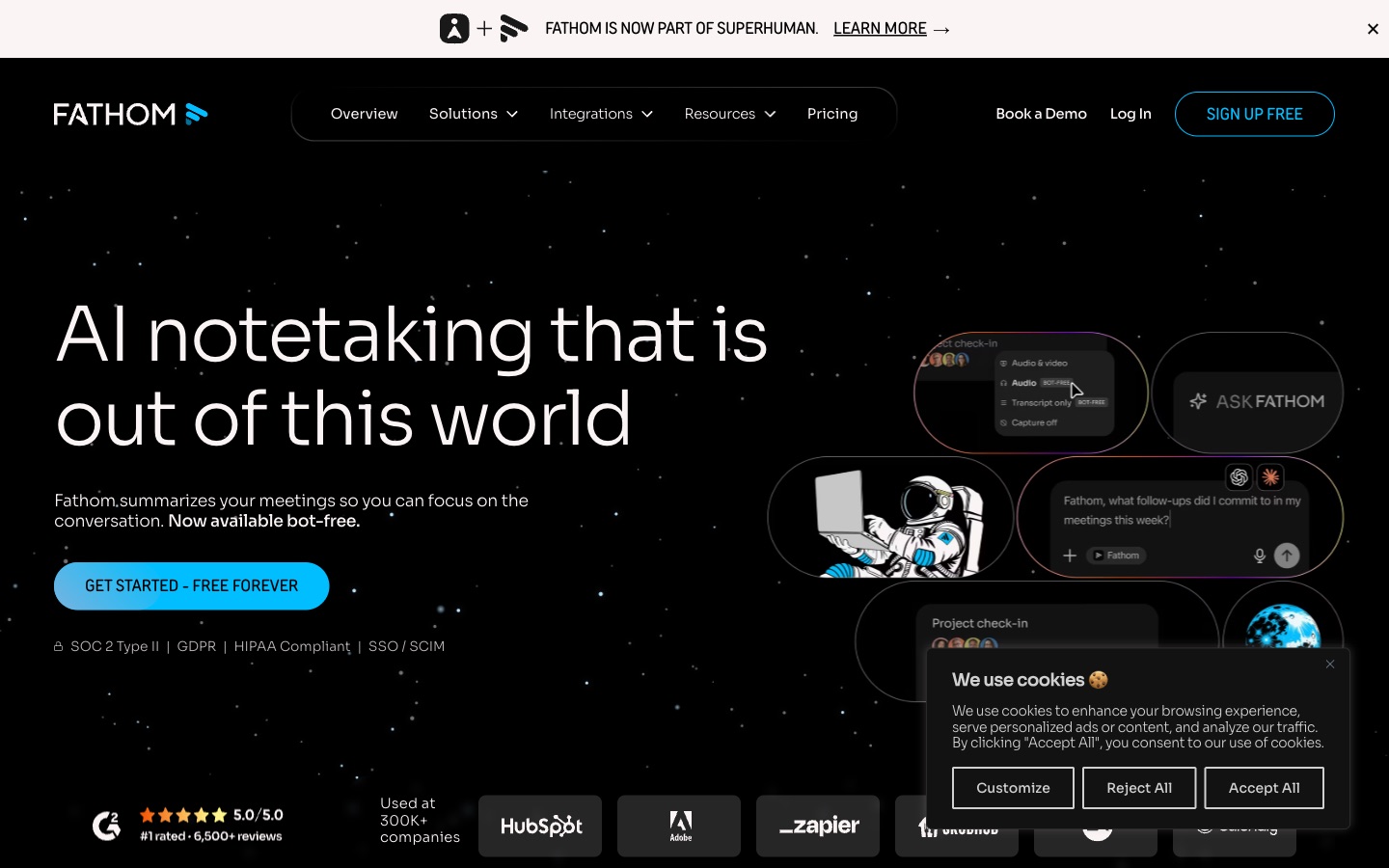 The official Fathom website, captured September 15, 2026. Credit: Fathom
What can Fathom do?
Fathom covers the full journey from calendar to CRM: recording, transcription, summarization, action items, search, and sharing. Here are the capabilities from the product page, pricing page, and help center, each paired with one practical business use case.
- Automatic calendar-based joining. Connect your Google or Microsoft calendar and Fathom records any meeting that has a video link. Use case: a manager jumping between meetings who doesn't need to remember to hit "Record."
- Transcription in 38 languages with speaker identification. According to the help center, unlimited even on the free plan. Use case: an English-language spec meeting with an international client that you can revisit instead of argue over.
- Instant AI summary. Every meeting receives a chronological or expanded summary immediately after it ends, on all plans. Use case: a summary email to the client five minutes after the call.
- Advanced summaries in 15+ templates. According to the pricing page, templates include BANT and Sandler for sales. Use case: every sales call comes out in the same structure, making them easy to compare.
- AI tasks and follow-up emails. According to the help center, available on Premium and above. Use case: a draft email saying "here's what we agreed and here are the next steps" waiting for your approval.
- Ask Fathom. Chat about the call: "what did the client say about the budget." According to the pricing page, available on Premium with limited usage and on Team and Business with unlimited usage on your own calls; there is also a beta version that covers all calls in the account. Use case: before a follow-up meeting, ask what was agreed last time.
- Clips and playlists. Cut a moment from the recording and share it. Use case: send your manager 40 seconds of the client's exact objection, not an hour-long recording.
- CRM sync. HubSpot, Salesforce, and Close. Use case: the call summary lands automatically in the client's record.
- Integrations with work tools and AI. According to the product page and pricing page: Slack, Notion, Asana, Zapier, Make, API and MCP, and connections to Claude and ChatGPT on all plans. Use case: ask Claude questions about the week's meetings.
- Team tools. Cross-team call search, comments, folders, and keyword alerts (Team); plus coaching metrics, AI scorecards, and Deal View (Business). Use case: a sales manager who gets an alert every time a competitor is mentioned on a call.
If you are already working with Make or Zapier, Fathom's summary is a useful trigger: a meeting ends, the summary is posted to a Slack channel, and a row opens in a spreadsheet.
How to get started: step by step
From sign-up to your first summary takes about 15 minutes, provided you have a real meeting on your calendar. Here is how to do it right the first time, based on the official getting-started guide.
- Sign up with your work email. Go to fathom.ai and register with the Google or Microsoft account that holds your meetings. According to the help center, anyone who signs up with a personal email (Gmail, Outlook) needs a meeting with a video link scheduled within the next 7 days.
- Connect your calendar. This is what allows Fathom to know when a meeting is happening and join automatically. During the onboarding you can also connect a CRM, but it is better to wait until step 6.
- Download the desktop app. Available for Windows and Mac. It delivers the full experience, especially when you are not the host. On Mac you can enable bot-free recording.
- Set up automatic recording and consent. In settings, connect Zoom, Meet, or Teams and enable automatic recording. On the same screen, enable Auto Request Recording Consent so that external participants receive an email notice beforehand. More on this in the privacy section.
- Run one real meeting. Not a one-minute test: a 20-minute meeting with two speakers, in the language you actually work in. Afterward, read the transcript and check names, numbers, and terminology.
- Connect one system. If you work in sales, HubSpot or Salesforce. If operations, Slack or Asana. Confirm that the first summary arrived in the right place, then add more integrations.
The check that saves the most trouble: after the first meeting, read the summary and verify that every commitment made during the call appears in it, with the right name attached. If it does, the tool will work for you. If it doesn't, first check the language setting and the audio quality.
Hebrew and RTL
Hebrew is not officially supported. Fathom's help center lists 38 transcription languages, and Hebrew is not among them. For that reason, Fathom is suited to Israeli businesses primarily for meetings held in English or in another language on the list.
What is officially listed. The 38 languages include, among others, English, Arabic, Russian, Ukrainian, French, Spanish, German, and Hindi. According to the same article, summaries are automatically translated into only six languages: Spanish, Portuguese, German, French, Italian, and Dutch, and manual translation between them is possible. The article says nothing about mixed-language meetings or manually selecting the meeting language.
What this means in practice for an Israeli business. There are three scenarios. Meetings in English with clients, investors, or overseas vendors: this is exactly what Fathom is built for. Meetings in Arabic or Russian, which are common for many businesses in Israel: those languages are on the list, and it is worth testing. Meetings in Hebrew: there is no official commitment, so do not build a workflow around them.
The interface. The interface is in English and is not RTL. Even if you paste Hebrew text into notes or comments, it will display inside a left-to-right interface.
What to test before deciding:
- A clean English meeting. One or two speakers, a decent microphone. This is your baseline for comparison.
- One Hebrew meeting, just one. If you do want to try it, read the transcript word for word. If it is not usable, that is your answer, and you stop recording client meetings in Hebrew.
- Hebrew and English in the same meeting. That describes most tech meetings in Israel. There is no official guidance, so test before relying on it.
- Names and numbers. People's names, company names, and figures are the weak point of every transcription tool, even in English.
- The language of the summary. Even when the transcript is accurate, check what language the summary comes out in and whether you can pass it on to a client.
The rule I give in workshops: if most of your meetings are in Hebrew, look for a tool that lists Hebrew in its official language support. The comparison section later in this guide covers that option.
Pricing: all plans from the official website
Five plans, priced per user per month, with a meaningful difference between annual and monthly billing. The table is from the official pricing page and help center, verified September 15, 2026:
| Plan | Price (per user/month) | What you get | Limits |
|---|---|---|---|
| Free | $0 | Unlimited recordings, transcriptions, and storage, instant summaries, clips, playlists, search, Claude and ChatGPT integration | Advanced summaries limited to 5 calls/month; no Ask Fathom, AI tasks, or follow-up emails; CRM sync up to 3 users per domain |
| Premium | $16 billed annually, $20 billed monthly | Unlimited advanced summaries for personal calls, AI tasks, follow-up emails, custom summaries, Ask Fathom, banner removal and bot renaming | Ask Fathom limited usage; single-user plan |
| Team | $15 billed annually, $19 billed monthly | Everything in Premium, unlimited Ask Fathom on your own calls, cross-team call search, team playlists, comments, folders, keyword alerts | Minimum 2 users; CRM sync up to 3 users per domain |
| Business | $25 billed annually, $34 billed monthly | Everything in Team, CRM field mapping, Deal View, coaching metrics, AI scorecards | Minimum 2 users |
| Enterprise | Custom pricing via sales | Everything in Business, SSO and SCIM, enterprise security controls, custom data retention policy, dedicated success manager | By inquiry only |
Two details from the pricing page worth knowing: all paid plans include a "90 day guarantee," and the product page displays "from $15 per user per month," which is the Team price billed annually, not the individual plan price.
What you are actually paying for. Not recordings, not storage, those are free. You pay for three things: advanced AI (templated summaries, tasks, follow-up emails, Ask Fathom), team collaboration (shared search, folders, alerts), and CRM depth (field mapping, Deal View). A five-person sales team on Business billed annually comes to $125 per month.
The cheapest plan that works for a small Israeli business. A freelancer whose meetings are mostly in English: start with the free plan. If 5 advanced summaries per month is not enough and you want tasks and follow-up emails, Premium billed annually at $16. A small team that needs the CRM kept current: Team, and pay attention to the 3-user-per-domain limit on sync. Prices may change, so verify on the official website.
Business Use Cases in Israel
The examples here are drawn from templates that come up repeatedly in workshops, with no names and no client data. The common thread: meetings in English, or in a language that appears on the supported list.
Business owner (a studio working with clients abroad). Every discovery call in English is recorded, and the summary with action items goes to the client the same day. The benefit is not just the time saved but the protection: when a client says "we never asked for that," there is a transcript with a timestamp.
Marketing (a marketing manager at a SaaS company). Customer interviews in English are a goldmine for copy. On Premium, Ask Fathom answers "how did the customer describe the problem," and clips pull out the 30 seconds where the customer said it in their own words. That material goes straight into the landing page and ads.
Operations (a project manager working with an overseas vendor). Weekly status meetings with the vendor are transcribed, and action items flow into Asana. After a month, search answers "when did the vendor commit to that date" without digging through emails. If all the meetings are on paid Zoom, it is worth checking the built-in summary first. More on that in the comparison section.
HR (recruiting for an international company). Interviews in English are summarized in a fixed template, and the interviewer stays focused on the candidate instead of the keyboard. Explicit consent is mandatory here, and recordings of candidates who were not hired must be deleted according to a written policy. Automatic deletion exists only on Enterprise, so on all other plans someone has to do it manually.
Sales (a team of five selling internationally). Every demo call lands in HubSpot with a summary and action items. On Business, coaching metrics and scorecards show the manager who is talking most of the time and who is asking questions. This is where AI for sales teams becomes something you can see in a report. Anyone who wants to go a step further can read about an AI sales agent.
How the CRM Sync Works in Practice
The sync works well once you understand how Fathom finds the contact: by the email address of the meeting participant as it appears in the calendar invite. Without that, the summary will not end up anywhere.
HubSpot. According to the help center, you need admin permissions in HubSpot to connect. The contact must be invited to the meeting through the primary calendar, and matching is by primary email address only. Sync works only for external contacts. The summary is logged under a Meeting activity, action items created in Fathom become tasks in HubSpot, and edits to the summary re-sync automatically. The HubSpot card shows the five most recent meetings. Deal field mapping is available on Business and Enterprise only.
Salesforce. According to the help center, Fathom matches each external meeting to a Contact, Account, and open Opportunity by name, email, and company, and writes a Task with the summary. The default is automatic sync when the summary is ready, and you can also click "Sync to CRM" manually.
The practical rule. Before connecting, make sure every sales meeting is scheduled in the calendar with the client's email address, not via a link sent over WhatsApp. That is the difference between a CRM that updates itself and an empty CRM.
Fathom vs. Fireflies vs. the Built-In AI of Zoom and Teams: An Honest Comparison
Fathom wins on the free tier for English meetings. Fireflies (Fireflies.ai) wins for Hebrew and for breadth of platform support. The built-in summary from Zoom or Teams wins when all meetings live in one place and there is no need for an additional vendor. Data is from the official sites:
| Fathom | Fireflies.ai | Zoom AI (My Notes) / Teams Recap | |
|---|---|---|---|
| Free tier | Unlimited recordings, transcripts, and storage; advanced AI for 5 calls per month | 400 minutes of team storage, no transcript downloads | Zoom: 3 uses per month on the free plan; Teams: requires a Teams Premium or Microsoft Copilot license |
| First paid plan | Premium $16/month billed annually / $20/month billed monthly | Pro $10/month billed annually / $18/month billed monthly | Zoom: included in paid Workplace plans, from $14.16 per user per month |
| Hebrew transcription | Not on the official list of 38 languages | Yes, on the official list of 117 languages | Zoom: 30+ languages for summaries; Hebrew does not appear on the product page |
| Platforms | Zoom, Meet, Teams (no phone, no mobile) | Zoom, Meet, Teams and more, mobile in-person | Only within its own platform |
| CRM | HubSpot, Salesforce, Close; field mapping from Business only | HubSpot, Salesforce and more | Via the platform |
| Recording without a bot | Yes, on Mac | Yes, from the desktop app | Built-in, no bot at all |
Fireflies data is from its pricing page and help center, as documented in the complete Fireflies guide (checked September 14, 2026). Zoom and Teams data is from official product pages.
When to choose each:
- Fathom: A freelancer or small team whose meetings are mostly in English, wants summaries without paying or thinking about storage, and works from a computer.
- Fireflies.ai: A team that speaks Hebrew, works across multiple platforms, records in-person meetings, and needs summaries in the CRM.
- Built-in Zoom or Teams summary: All meetings are on one paid platform, the audience is internal, and the IT department prefers not to bring in another vendor. If Hebrew is critical, test it on one meeting first.
Anyone weighing the platforms themselves will find that the comparison of Copilot, Gemini, and Claude for organizations also covers the meetings side.
And anyone who wants to skip the bot and the recording entirely: the complete Granola guide explains how it transcribes system audio and completes your notes, and Hebrew is on its language list in the desktop app.
Anyone comparing Fathom to Otter: the complete Otter.ai guide shows that Hebrew is not on its list either, and details the free plan's 30-minute-per-conversation limit.
Privacy and Limitations
Recording a meeting is different from any other AI tool: it involves people who did not choose the tool. That means two things to address: what Fathom does with the data, and what you do with the participants.
What happens to the data, according to the help center. Fathom declares HIPAA, SOC 2 Type II, and GDPR compliance, and notes it does not hold ISO 27001. Its AI vendors (Anthropic, OpenAI, and Google) are contractually prohibited from training models on the data. However, Fathom itself uses de-identified data to improve its own models, and you can opt out of this in personal settings or at the organization level on team plans. All data is stored in the United States, and Fathom states it will not sell data to third parties. When an account is deleted, recordings are removed, and from backups within 7 additional days.
Data retention. According to the help center, automatic deletion policies exist only on Enterprise, not on self-serve plans. You contact support to set them, and one rule applies to all conversations in the team with no separation between internal and external meetings. On other plans, no retention period is specified, so in practice recordings stay until you delete them.
What you do with participants. According to the help center there is no way to record silently: the bot appears in the participant list even if you remove the banner, and when recording without a bot a Recording Notice message is sent in chat. The rest you need to enable yourself:
- Consent request email. In Settings, under Options, enable Auto Request Recording Consent. The email goes to external participants 24 hours before the meeting. A meeting scheduled less than 24 hours before a future date gets the email immediately. A meeting scheduled for the same day gets no request.
- What happens when someone declines. Anyone who clicks "No, I'd prefer not to be recorded" cancels the automatic recording for that meeting. The host can still ask verbally and start recording manually.
- Team admin. On the Team plan you can enable the consent request for the entire organization. That is the right move.
In Israel, recording a call you are party to is permitted, but a client who discovers after the fact that they were recorded will remember it. And a recording is personal data, with the obligations that come with Amendment 13 to the Privacy Protection Law.
What not to record. Calls involving medical, legal, or financial information about private individuals without a decision from the organization's privacy officer. Board discussions and inside information. Any meeting where a participant asked not to be recorded. The rule from AI policy for organizations: if you would not send it to an outside vendor by email, do not record it in a cloud tool.
The Superhuman acquisition. According to the official announcement on September 14, 2026, Superhuman (formerly Grammarly, which changed its name in October 2025) will integrate Fathom into its email, calendar, documents, and agents, including Superhuman Go. The deal price, changes to plans, and the future of the free tier have not been disclosed. This is not a reason to leave, but it is a reason to read the terms and privacy documents when they are updated. Our analysis of the acquisition details what this means for businesses.
Honest limitations, as of September 2026:
- Hebrew is not on the official list. This is the most important limitation for an Israeli business.
- Desktop only. According to the help center: no mobile, no tablet, no Chromebook, no Linux.
- Link-based meetings only. No phone calls, no Zoom Phone, no webinars, no Breakout rooms.
- Bot-free recording only on Mac. On Windows, the bot is still required.
- Advanced AI is limited on the free tier. Advanced summaries for 5 calls per month, with no Ask Fathom and no AI action items.
- Product future is open. After the acquisition, plans and pricing may change.
Common Mistakes
- Recording meetings in Hebrew and concluding that "the tool is bad." Hebrew is not on the official list. The problem is the choice of tool, not the tool itself.
- Not enabling the consent request. You save a minute in settings and lose a client's trust. Remember that same-day meetings do not receive an email, so ask verbally in those cases.
- Sending an AI summary to a client without reading it. A wrong figure or wrong name in a summary you sent is your mistake.
- Connecting the CRM for the whole team and discovering the 3-user limit. On Free, Premium, and Team, sync is limited to 3 users per domain. A larger team needs Business.
- Forgetting to delete. There is no automatic deletion below Enterprise, and recordings accumulate. Set a monthly reminder to delete what you no longer need, especially hiring interview recordings.
- Trying to record from a phone or during a phone call. Fathom does not support this. Anyone who needs in-person or phone meetings should look at a different tool.
Frequently Asked Questions
What is Fathom?
An AI meeting assistant: it records and transcribes Zoom, Google Meet, and Microsoft Teams meetings, writes a summary with action items, and lets you ask questions about the conversation (Ask Fathom). The free plan includes unlimited recordings and transcriptions. As of September 2026, the company is part of Superhuman.
Does Fathom support Hebrew?
Not officially. The Help Center lists 38 supported transcription languages, and Hebrew is not among them (Arabic, Russian, and English are). For meetings in Hebrew, do not rely on the transcription without reviewing it. Fathom is best suited for meetings in English or in one of the listed languages.
How much does Fathom cost?
According to the official pricing page (checked September 15, 2026): Free; Premium at $16 per user per month billed annually or $20 monthly; Team at $15 or $19 (from two users); Business at $25 or $34; Enterprise at custom pricing. Prices are subject to change, so check the official site.
What are the limitations of the free plan?
Recordings, transcriptions, and storage are unlimited. The limitation is on advanced AI: according to the Help Center, advanced summaries are available for only the first 5 meetings each month, after which you get summaries in the standard template. AI action items, follow-up emails, and Ask Fathom require a paid plan.
Do participants know the meeting is being recorded?
Yes. According to the Help Center, there is no way to record silently: the bot appears in the participant list, and when recording without the bot a message is sent in the chat. You can enable a consent request email 24 hours before the meeting, and anyone who declines cancels the automatic recording.
Does Fathom connect to HubSpot and Salesforce?
Yes. The summary and action items are added to the contact record after the meeting. According to the pricing page, on the Free, Premium, and Team plans, sync is limited to 3 users per domain. CRM field mapping and Deal View are available from Business tier only. HubSpot requires admin permissions.
What does the Superhuman acquisition mean?
On September 14, 2026, Superhuman (the company formerly known as Grammarly) announced it had acquired Fathom and would integrate it into its suite: email, calendar, documents, and agents. According to the official announcement, the deal price and any changes to plans were not disclosed. For now, the product continues to operate as normal.
Fathom or Fireflies?
For meetings in Hebrew, Fireflies, because Hebrew is on its official supported language list. For a freelancer running meetings in English who wants a free plan with no storage limit, Fathom. For deep CRM integration and multi-platform use, test both on the same meeting.
The Bottom Line
Unlimited free recordings is a nice number, but that is not really why you bring a meeting assistant into the room. The point is that next week's argument over who committed to what simply ends, because there is a transcript, a summary, and action items. Fathom handles all of that beautifully, for free, on Zoom, Meet, and Teams. For an Israeli business there is one big asterisk: Hebrew is not on the list. So it is the right choice for English meetings, not for every meeting.
What to do this week: sign up for free, turn on the consent request, and run one meeting in English and one in Hebrew. Compare the two transcripts and decide based on what you see, not based on what it says on the website. And the transcripts you have been accumulating can go straight into NotebookLM so you can ask questions across months of meetings.
Want to practice this inside a guided page? The interactive Fathom course for 9.90 ILS, and the rest of the interactive courses, are all in the same place.
Sources
All sources checked September 15, 2026:
- Official homepage (300K+ companies, G2 rating, bot-free recording, Superhuman banner): https://www.fathom.ai/
- Official product page (platforms, capture modes, Ask Fathom, integrations, compliance standards, from $15): https://www.fathom.ai/overview
- Official pricing page (Free, Premium, Team, Business, Enterprise, CRM limit, 90-day guarantee): https://fathom.ai/pricing
- Help Center, supported languages (38 languages, summary translation): https://help.fathom.video/en/articles/296192
- Help Center, Free vs. Premium (5 advanced summaries per month): https://help.fathom.video/en/articles/5290881
- Help Center, quick start guide: https://help.fathom.video/en/articles/276608
- Help Center, supported devices and what is not supported: https://help.fathom.video/en/articles/296576
- Help Center, automatic recording consent request: https://help.fathom.video/en/articles/294272
- Help Center, can you record without asking permission: https://help.fathom.video/en/articles/6150977
- Help Center, security, model training, and data location: https://help.fathom.video/en/articles/296512
- Help Center, data retention policy (Enterprise): https://help.fathom.video/en/articles/6057089
- Help Center, connecting to HubSpot: https://help.fathom.video/en/articles/448832
- Help Center, connecting to Salesforce: https://help.fathom.video/en/articles/448640
- Superhuman official acquisition announcement (September 14, 2026): https://blog.superhuman.com/superhuman-acquires-fathom/
- Acquisition press release, Business Wire: https://www.businesswire.com/news/home/20260914813498/en/Superhuman-Acquires-Fathom-AI-Notetaker
- Official announcement of the Grammarly to Superhuman rebrand: https://www.grammarly.com/blog/company/announcing-company-rebrand-to-superhuman/
- Zoom, AI note taking (included in paid Workplace plans, 3 free uses, 30+ languages): https://www.zoom.com/en/products/ai-assistant/features/ai-note-taking/
- Microsoft, Intelligent recap in Teams: https://learn.microsoft.com/en-us/microsoftteams/intelligent-recap-calls-meetings
- Fireflies.ai pricing page (via our guide, checked September 14, 2026): https://fireflies.ai/pricing
Frequently asked questions

Yaakov Tzedek
An Israeli AI lecturer, consultant and implementer who has supported 100+ organizations in AI implementation and lectured for 200+. Official content partner of Meta, Google, Canva and TikTok, featured on Israel's Channel 13.
More about Yaakov →