- Picsart has evolved from a photo and video editor into a multimodal AI platform. The 2026 reality: Gold is now Pro, 140+ models and GPT Image 2 are in, and here is how to actually use it with Hebrew text.
Picsart was founded in 2011 after the young daughter of founder Hovhannes Avoyan posted one of her drawings online and was cyberbullied. He wanted to build a place where anyone could create and edit without fear, and that vision grew into an app with over one billion downloads.
What Is Picsart: The Honest Answer
Picsart is an AI-powered photo and video editor that runs primarily on mobile (and in the browser as well), with over one billion downloads worldwide. You upload a photo, or generate one from scratch, then crop, remove backgrounds, add effects, text, stickers and filters, and export to social media. That much most people already know. But here is what almost every article misses: in 2026, Picsart is no longer "just another editing app." It has become a multi-modal AI platform. Inside Picsart today sit over 140 generative models, including Nano Banana, Flux, Sora, Kling, Veo, ElevenLabs and GPT Image 2. Video generation, text-to-speech and text-to-sound have been added, the old "Gold" subscription tier is gone and has been replaced by "Pro," and the company has even released a command-line tool (CLI) and a developer API. In other words, Picsart has made a move similar to Adobe's: from a single tool to a studio that bundles dozens of models in one place. This is the guide that gives you the full truth: what changed in 2026, what actually works in Hebrew (and that part is surprising), and what it really costs.
This is the angle you will almost never find in any other Hebrew-language resource. Most Picsart guides were written two or three years ago and describe a simple editing app with filters and stickers. They talk about "Picsart Gold," which no longer exists. They do not mention the deep AI layer that has been added, and they typically dismiss the tool for Hebrew support for the wrong reasons. A reliable guide has to set the record straight, including the truth about Hebrew, where Picsart is actually a pleasant surprise compared with pure generators.
Definition: An "AI-powered photo editor" is a tool that combines two worlds: classic manual editing (layers, cropping, text, masks) together with AI-driven operations (automatic background removal, image expansion, text-to-image generation, object erasure). The difference from a pure generator like Midjourney is that in a generator you only describe and receive a result, while in an editor like Picsart you control every pixel after generation. That is a critical point for Hebrew, as we will see later.
This is one guide in a series in which we cover the leading AI tools in depth in Hebrew. If you are trying to understand the broader picture of AI image creation and editing tools, it is worth reading the full comparison of leading AI image tools, the Canva AI guide (the direct competitor in the social-media design space), and the Nano Banana guide (the only generator that renders readable Hebrew inside the image). And for an overall understanding of AI models, the comparison of leading AI models is worth your time.
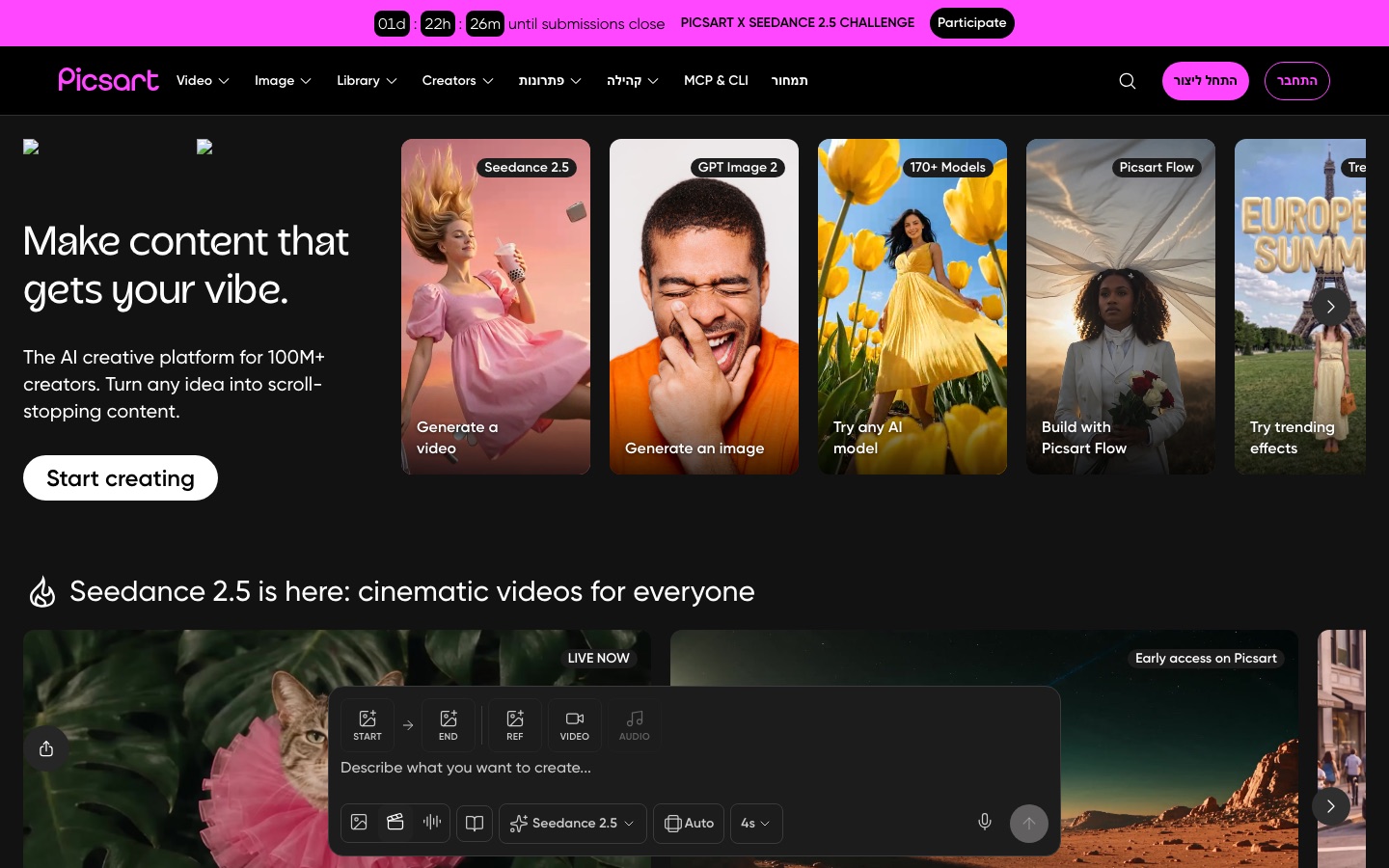 The official Picsart website, captured in September 2026. Credit: Picsart
Why Everyone Is Talking About Picsart: The Story Behind the Tool
To understand Picsart's place in 2026, it helps to know where it came from. Picsart was founded in November 2011 by Armenian-American entrepreneur Hovhannes Avoyan, together with engineers Artavazd Mehrabyan and Mikael Vardanyan. The founding story is genuine and moving: Avoyan's young daughter posted one of her drawings online and was bullied for it. Avoyan, a seasoned entrepreneur who had already built and sold five startups before this one (buyers included Lycos, Bertelsmann and TeamViewer), wanted to build a place where anyone, regardless of skill level, could create, edit and share without fear. That idea gave birth to an app that became one of the most widely used creative applications in the world.
The growth was meteoric. Picsart reached over one billion downloads, built an enormous creative community, and in 2021 crossed the unicorn threshold: a valuation above one billion dollars. Headquarters is in Miami, Florida, with a large engineering operation in Armenia. What began as a photo editor for teenagers became a global creative brand serving content creators, small businesses, marketers and designers.
Understanding that DNA matters, because it explains every product decision Picsart has made to this day. Unlike tools that were born on the desktop and added a mobile app as an afterthought, Picsart was born on the phone, from day one. That is why it is so fluid on mobile, why the interface is built for touch rather than a mouse, and why it naturally suits audiences who produce content on the go. Israeli creators making Reels and Stories feel it immediately: Picsart does not require you to sit in front of a computer for an hour to publish a single post. This is also the essential difference from Canva, which was born as a "design-in-the-browser" tool and is better suited to longer sessions in front of a large screen. Both tools are excellent. They were simply built for two different audiences and two different ways of working.
💡 From the field: When a small Israeli business comes to me and asks "which design tool should I use, without hiring a designer," I ask one question: "Where do you work, from a computer or from your phone?" If the answer is "mostly from my phone, and I need to put out a post or a Story quickly," Picsart is usually the right tool, because it was built from the ground up for mobile and for speed. If the answer is "I sit in front of a computer and I make presentations, logos and brand templates," I send them to Canva. The most common mistake I see is people trying to force one tool to do everything, instead of choosing based on how and where they actually work.
The reason everyone is talking about Picsart right now is not its historical growth, it is the deep transformation it went through in 2026, from an editing tool to an AI platform. Let us dive into that, because it is the heart of the matter.
The 2026 Shift: Picsart Becomes a Multi-Modal AI Platform
This is the most important part of the guide, and it is what every outdated article misses. During 2026, Picsart made a strategic move: instead of relying on a single internal AI model, it became a hub that bundles dozens of external models, much as Adobe Firefly became a multi-model studio. Here is what happened in practice.
AI Providers Hub: Dozens of Models, One Price
In January 2026, Picsart launched the "AI Providers Hub," a hub that brings over 20 image-generation models under a single price, so users can switch between different models for the same task without managing separate subscriptions. The same update added smart tools such as Smart Crop (prompt-based cropping), Selective Blur (selectively blurring faces or license plates, which is very useful for privacy), and the new Remove Background v10 became the default for background removal.
GPT Image 2 Inside Picsart
On April 21, 2026, the same day OpenAI launched GPT Image 2, the model was already available inside Picsart. This is OpenAI's most advanced image model, with native 4K resolution, a claimed 3.5x speed improvement over its predecessor, and according to OpenAI approximately 99% accuracy in text rendering along with improved multilingual support. The practical implication: if image generators were previously weak at rendering text inside an image, GPT Image 2 improved that dramatically, including a partial improvement for Hebrew. Even so, for critical Hebrew text I recommend not relying on it alone. If you want to understand this model in depth, read the GPT Image / DALL-E guide.
GenAI CLI: Picsart for Developers
In April 2026, Picsart launched a command-line tool (GenAI CLI) and a unified API for image, video and audio generation, with models including Nano Banana, Flux, Sora, Kling, Veo, Runway, Recraft, ElevenLabs, GPT Image and over 140 others, all through a single endpoint. Every new model that joins is added to that endpoint automatically, with no additional cost. This is a leap that moves Picsart from a consumer tool to an infrastructure layer on which automated content production pipelines can be built. Anyone working with automations and AI agents can connect Picsart into a broader content-creation workflow.
Taken together, all of this means: if you once thought of Picsart as "just another filters app," in 2026 you are looking at something fundamentally different, a creative studio that bundles the most powerful models in the world, from your phone all the way to the API.
💡 From the field: This multi-model strategy is not just "another feature," it is a shift in thinking worth internalizing. Two years ago, choosing an AI tool meant committing to a single model: you chose Midjourney and you were stuck with Midjourney's style and strengths. Today, platforms like Picsart and Adobe Firefly have understood that the user does not want a model, they want a result. So they let you choose, for the same task, between Nano Banana (for Hebrew and realism), Flux (for quality), Sora or Veo (for video), all under one subscription. That is a great deal for the user, and it also means that when a better new model comes out, you get it without switching platforms. I advise businesses to think in terms of "a platform that bundles models," not "a single model." That is what protects them from obsolescence.
Picsart's Core Capabilities
Picsart is a broad tool. Let's break it down to what actually matters.
Classic Photo Editing
The foundation everything is built on: cropping, rotation, color and exposure adjustments, layers, masks, filters and effects, stickers, and hundreds of ready-made templates for posts and Stories. This is the part that made Picsart popular in the first place, and it remains the central strength, especially on mobile.
AI Image Generator (Text-to-Image)
You write a text description and get an image. This is where all the models from the Providers Hub come in, and you can choose a model based on style and need. Note: as with all generators, writing your prompt in English produces better results (you can translate in a second with Claude or Gemini).
Background Removal and Smart Editing
One of the most useful tools: one-click background removal (v10 is the default in 2026), background replacement, unwanted-object removal (inpainting), image expansion (outpainting), and "prompt-based editing," meaning you describe the change you want in plain words and the model applies it to your existing image.
Video, Text-to-Speech, and Text-to-Sound
In 2026, Picsart expanded into video, covering both editing and creation, and added audio capabilities: text-to-speech (voiceover) and text-to-sound (generating sound effects from a prompt). This positions Picsart as a competitor in the Reels and short-video space as well. If your main focus is short social video, it's worth comparing with the CapCut guide before deciding.
Picsart Flow: Automated Workflows
For anyone who needs to produce graphics at volume (say, banners in hundreds of variations), Picsart offers the ability to build workflows that chain several AI operations together, for example: "take a product image, remove the background, place it on a branded background, add a frame, export in three sizes for Facebook, Instagram, and Stories." Instead of repeating the same manual sequence for every product in a catalog, you build the workflow once and feed it images. This is the part that speaks to businesses and marketing teams, not just individual creators, and it is the point where Picsart stops being an "app" and starts being a production infrastructure.
Stickers, Fonts, and Community Templates
Beyond AI, one of Picsart's biggest assets is the massive library built by its community over the years: millions of stickers, presets, fonts, and templates. For most everyday tasks a content creator faces, a Reels cover, a Story frame, a graphic element for a post, there is already a ready-made template that just needs minor adjustments. This saves enormous time, and it is often the real reason people stay with Picsart: not the sophisticated AI, but the instant availability of ready-made elements.
How to Get Started with Picsart: Step by Step
- Download the app or open it in a browser. Picsart is available on Android, iPhone, and in the browser at picsart.com. For most users, mobile is the natural experience; for more complex work, desktop is more comfortable.
- Create an account and start on the free plan. There is no need to pay to try it out. Start free, and upgrade only when you feel you are hitting a ceiling (watermarks, credits).
- Choose a starting point. Either upload an existing image to edit, generate a new image with the generator, or choose a ready-made template for a post or Story.
- Edit. Remove the background, add effects, arrange layers. Here you control every detail.
- Add text, and here is the trick for Hebrew. Add a text layer, choose a font that supports Hebrew, and make sure the direction is set to right-to-left (RTL). The result will be sharp and legible, unlike text you try to "paint" with AI.
- Export. Save at the resolution appropriate for your target platform. On the free plan, check that there is no watermark on the final result.
💡 From the field: I always recommend that businesses create a small "brand kit" in Picsart before they start: fixed colors, one or two Hebrew fonts, and a transparent logo (PNG with the background removed). Once you have those three things saved, producing a new post takes two minutes instead of twenty. Most people skip this step and pay for it in time, every single day.
Picsart for Israeli Businesses: Real Scenarios
- Sole proprietors / small businesses: Producing posts and product images for Instagram and Facebook without a designer. Photograph a product on your phone, remove the background, place it on a clean background, add Hebrew text, and upload.
- Real estate: Cleaning and enhancing apartment photos, blurring identifying details (apartment numbers, interiors), and adding the agency's branding. The Selective Blur added in 2026 is useful here for privacy.
- Restaurants and cafes: Attractive food photos for menus and Stories, with clean backgrounds and Hebrew price captions.
- Content creators and Reels: Reels covers, YouTube thumbnails, daily Stories, all from your phone, fast. This is Picsart's strongest audience in Israel.
- Marketing teams: Producing hundreds of banner variations for a campaign through Picsart Flow, instead of designing each one manually.
If you want to learn how to integrate tools like these into a complete business workflow, that is exactly what we teach in the free Academy courses and in private lessons.
Here is a full example of a workflow I teach small businesses: say you run an online store with 40 products, and every product was photographed on a phone on a kitchen table. Instead of hiring a photographer or designer, you open Picsart, remove the background from each image, place it on a clean uniform background (or an AI-generated background suited to the category), add the transparent logo in a corner and the product name in Hebrew as a text layer, and export. With Picsart Flow you can turn all of this into a single process that runs across all 40 products. What would have taken a designer a full day becomes an hour. That is how AI tools actually save a business money: not through magic, but by removing friction from repetitive tasks.
Picsart for Video and Social: A Closer Look
Picsart's expansion into video in 2026 makes it relevant to the Reels and TikTok crowd, not just static images. You can trim clips, add subtitles (including Hebrew, as a text layer, exactly as with images), music, effects, and transitions, and export in vertical format for Stories or Reels. The new text-to-speech capabilities also let you add an AI voiceover to a video without recording yourself, which is very useful for people who dislike their own voice or want to produce video at scale. That said, if video editing is your primary focus, a dedicated Reels tool may give you finer control. It is worth comparing with the CapCut guide before you decide.
Picsart, Claude, and Automation: Connecting to a Larger Workflow
The side that excites more advanced businesses is the API and the GenAI CLI. Once image and video creation is accessible through a command line and a single endpoint, you can embed it inside automated systems: for example, an AI agent that receives a new product in a system, automatically generates a banner, post, and Story for it, and uploads them, all without a human hand. Anyone working with Claude Code or building AI agents can connect Picsart as the "visual production" layer of a broader workflow, alongside text tools and automation. This is exactly the kind of integration that turns a single tool into a real force multiplier for a business.
Why Picsart Is So Popular in Israel
Picsart is one of the strongest tools in Israel, particularly among younger audiences and content creators, and that is no accident. Three main reasons. First, mobile-first: Israeli audiences consume and create content primarily on their phones, and Picsart is built exactly for that. Second, speed: Reels and Stories culture demands producing content fast and in volume, and Picsart lets you do in minutes what other tools take much longer to accomplish. Third, price: the free plan is genuinely usable, which lowers the barrier to entry for freelancers, students, and small businesses that do not want to commit.
That said, Israeli users always run into the same wall: Hebrew. And this is exactly the point where it matters to understand Picsart deeply, because unlike pure generators, there is actually an elegant solution here. Let's dive in.
Hebrew: What Works and What Doesn't (and It's Surprising)
This is the most important angle, and the one almost every Hebrew-language article misses. You need to separate three distinct things:
1. The interface: Picsart is available in Hebrew at the interface level on most platforms, so the work itself is comfortable even for users who are not strong in English.
2. The AI generator (text inside a generated image): Like almost all generators, the models in Picsart do not render readable Hebrew text inside an image created from scratch. GPT Image 2 significantly improved multilingual rendering, but I still would not trust it for critical Hebrew text. If you absolutely need Hebrew text generated directly inside the image, Nano Banana is still the most reliable choice on the market.
3. Adding Hebrew text as a layer (and this is where Picsart wins): Here is the key point. Because Picsart is a full editor and not just a generator, you can add Hebrew text as a separate layer on top of an image, with your chosen font, size, color, and RTL direction, and it will be completely sharp and legible. This breaks the familiar frustration: generate a beautiful background with AI (in English), and add the Hebrew caption manually on top. This is exactly Picsart's advantage over a pure generator like Midjourney, where you have no canvas to edit afterward. The practical rule: do not ask the AI to write Hebrew. Ask it for a background, and add the words yourself in the editor.
Picsart Gold Became Pro: The Truth About the Plans
Another point every outdated article gets wrong. In 2026, Picsart retired the "Gold" name and automatically upgraded all Gold subscribers to the "Pro" plan, keeping the same price and billing cycle but with the full Pro feature set. So if you are reading a guide that talks about "Picsart Gold" as the premium plan, it is not up to date. The current structure has three tiers: Free, Plus, and Pro.
Definition: A "credit-based model" means that heavy AI operations, such as image generation, advanced background removal, or video creation, consume "credits" from a monthly quota, on top of tool access. This is different from "everything included with no limits": the more AI you use, the more credits you consume, and at high usage levels you may need to upgrade to a higher plan. It is important to understand this before committing.
Comparison with Competitors
| Criterion | Picsart | Canva AI | Midjourney | Nano Banana |
|---|---|---|---|---|
| Tool type | Photo/video editor + AI | Design and layout + AI | Pure image generator | Image generator (Gemini) |
| Main strength | Pixel editing, mobile, social | Presentations, templates, teams | Artistic quality | Readable Hebrew text in images |
| Hebrew text in image | As a layer, excellent; in AI, weak | As a layer, excellent | Very weak | Excellent (native) |
| Mobile | Excellent (the core) | Good | Via website/Discord | Via the Gemini app |
| Number of models inside | 140+ (Providers Hub) | Limited number | One model (proprietary) | One model (Google's) |
| Best suited for | Social and Reels creators | Businesses and presentations | Artists and designers | Anyone who needs Hebrew in images |
The bottom line: there is no absolute "winner," only the right tool for the job. Picsart wins when you need fast mobile editing with a rich AI layer. For images with native Hebrew text, Nano Banana. For presentations and templates, Canva.
If your main work is product images for an online store, in dozens or hundreds of items, it is worth comparing against the complete Photoroom guide as well, which is built around backgrounds and batch editing.
Pricing and Plans
Picsart offers a genuine free tier that is sufficient for most casual users, with core editing tools and a limited number of AI actions, watermarks on some content, and a credit cap. Above that are two paid tiers: Plus (for individuals who want clean exports and more tools) and Pro (the full tier, which absorbed the old Gold subscriptions). Prices vary by promotions, platform (billing through the app store is usually more expensive than billing directly on the website), and billing cycle (annual is significantly cheaper than monthly). There are also Enterprise and Teams tiers for organizations, plus separate API/CLI pricing for developers.
Practical advice: Do not commit to an annual plan before you have tried the product for a month. Track how many AI actions you actually consume in a typical month, and only then choose a plan. As of August 2026, always verify the current price on the official pricing page, because it changes.
Advanced Tips
- Save recurring assets: a transparent logo, a fixed Hebrew font, and a color palette, so you are not building every post from scratch.
- Remove background, then add a new one: instead of shooting against a perfect background, shoot anything, remove the background, and place the subject on a clean or AI-generated backdrop.
- Hebrew always as a layer: do not fight the AI over Hebrew text. Add it in the editor.
- Take advantage of model selection: for the same task, try 2 or 3 models from the Providers Hub and see which delivers the better result. That is the real value of a multi-model platform.
- Connect to a broader workflow: if you produce content at volume, it is worth exploring Picsart Flow or the API, and connecting it to automation workflows.
- Blur for privacy: use Selective Blur to blur faces and license plates before publishing. This is both a legal requirement and an ethical one.
- Start with the right canvas size: before you begin, know which platform you are exporting for (square post, vertical story, YouTube cover) and choose the matching canvas. It saves tedious adjustments at the end.
- Save the source version: always save the project with its layers, not just a flattened image, so you can go back and edit the text or background without starting over.
Common Mistakes
- Asking the AI to write Hebrew text in an image. The result will be gibberish. Add Hebrew text as a layer instead.
- Paying for an annual plan too soon. Measure your monthly credit consumption first.
- Confusing the tiers. "Gold" no longer exists. The full tier is Pro.
- Expecting Midjourney-level quality from the generator. Picsart excels at editing and speed, not necessarily at peak artistic quality from its generator.
- Publishing images of people or brands without checking rights. Copyright and trademark rules apply with AI tools just as they do everywhere else.
- Relying on the free tier for a business. The watermarks and limitations will catch you at the worst possible moment.
The Limitations: Honestly
Picsart is an excellent tool, but it is not perfect, and it is important to say that plainly:
- The AI generator is not the strongest on the market in terms of pure artistic quality. Midjourney and FLUX lead there. Picsart wins on the combination of editing plus AI plus speed, not at the top of the quality ladder.
- Hebrew text generated directly in AI is unreliable (the solution: a manual text layer).
- The credit model can surprise you with heavy use. It is easy to burn through credits without noticing.
- The free tier is limited by watermarks and an AI quota.
- The sheer number of features can be overwhelming. The tool is dense, and it takes time to find your way around it.
- Billing through the app store is usually more expensive than billing directly on the website. Pay attention to that.
Privacy, Copyright, and Safety: What You Need to Know
Before uploading images of customers, products, or people to any AI tool, it is worth pausing for a moment. With Picsart, three principles are worth keeping in mind. First, rights to the output: images you generate are usable, but on the free tier some content comes with watermarks and licensing restrictions. For clean commercial use, you need a paid plan. Second, trademarks and others' rights: even if the tool "lets" you generate a well-known brand's logo or a celebrity's likeness, that does not mean you are allowed to publish it. The responsibility for use is yours. Third, privacy of people in images: when you publish images featuring people who are not you, whether customers, passersby, or children, there is a legal and ethical obligation to blur identifying details or obtain consent. This is exactly where the Selective Blur tool, added in 2026, is especially useful: it blurs faces and license plates in a few taps.
For organizations that need full, guaranteed legal protection for image originality (indemnification), Picsart is not the strongest option. There, Adobe Firefly with its native model offers explicit legal coverage. For the vast majority of ordinary business uses (backgrounds, banners, posts, product images), Picsart is excellent. For content that demands tight legal protection, it is worth considering an alternative.
Who Picsart Is Right For, and Who It Is Not
Especially well suited for:
- Content creators working in social, Reels, and Stories, particularly anyone working from their phone.
- Small businesses and freelancers who need fast graphics without a designer.
- Anyone who wants a full editor plus an AI layer in one place, including full control over Hebrew text.
- Anyone who wants to try many different models without managing separate subscriptions.
Less suited for:
- Anyone who primarily needs presentations, documents, and branded templates for a team. Canva is better there.
- Artists chasing maximum artistic quality from the generator. Midjourney/FLUX wins there.
- Anyone who needs native Hebrew text inside an image generated from scratch. Nano Banana wins there.
- Organizations that need full legal protection for image originality. It is worth checking Adobe Firefly there.
Frequently Asked Questions
Picsart free tier: what do you get and what is blocked?
There is a genuine free tier that includes the core editing tools (crop, filters, layers, text, stickers) and a small number of limited AI actions. The restrictions: watermarks on some content, a credit quota for AI actions, and limited access to the premium library. For simple use, free is enough. For business use or AI at volume, you upgrade to a paid plan.
What happened to Picsart Gold?
It was discontinued. In 2026, all Gold subscriptions were automatically upgraded to Pro, with the previous price locked in and full Pro capabilities included. The current structure is: Free, Plus, Pro. Any guide that still mentions "Gold" is out of date.
Can Picsart write Hebrew text in an image?
In the AI generator, not reliably (like every other generator). But in the editor itself, yes. You can add a Hebrew text layer with a font and RTL direction, and it will be sharp and legible. That is the advantage of an editor over a pure generator: generate the background with AI, then add Hebrew text manually on top.
Picsart vs. Canva: which is better?
It depends on the task. Canva is stronger for presentations, templates, and team collaboration. Picsart is stronger for pixel editing, effects, and fast mobile work for social media. Many creators in Israel use both side by side.
Can Picsart be used commercially?
Yes, but on the free tier some content comes with watermarks and licensing restrictions. For clean business use, a paid plan is recommended. As with any AI tool, check usage rights when generating images of people, brands, or logos.
How many models are actually inside Picsart?
Over 140 models through the GenAI CLI/API (including Nano Banana, Flux, Sora, Kling, Veo, GPT Image 2, ElevenLabs, and more), and over 20 image models through the consumer AI Providers Hub. This has transformed Picsart from a single tool into a multi-model platform.
Picsart or Midjourney for image generation?
If the goal is maximum artistic quality from the generator, Midjourney. If the goal is to generate and edit, add Hebrew text, and work fast from your phone, Picsart. They serve different needs.
How long does it take to learn Picsart?
The basics, uploading an image, removing the background, adding text, and exporting, take about half an hour, even without a design background. The tool is built to be especially intuitive on mobile. What takes longer is getting to know the AI layer in depth (which model fits which task) and Picsart Flow for automated workflows, but those are not necessary for everyday use. My recommendation: do not try to learn the entire tool at once. Start with one real task (for example, "a product post for Instagram"), complete it end to end, and expand from there. That is how you learn a tool like this, through doing, not through watching dozens of tutorials.
Does Picsart work from a computer, not just from a phone?
Yes. There is a full browser version at picsart.com and a desktop app as well. That said, Picsart's historical and natural strength is on mobile, where it is at its fastest. For complex, extended work on a large screen, some users prefer the browser version, and many combine the two: creating and designing on the computer, then making quick edits on the phone.
The bottom line
Picsart in 2026 is no longer what most articles describe. It has moved from "a photo editor with filters" to a multi-modal AI platform, with over 140 models inside, GPT Image 2, video and audio generation, a developer API, and a new tier structure where Gold has become Pro. Its real strength is the combination: a full editor plus an AI layer plus phone-speed workflow, and that is precisely why it wins specifically in Hebrew, because you can add readable Hebrew text as a layer instead of fighting the AI. It is not the most artistic generator and not the most powerful presentation tool, but for anyone producing content for social media, Reels, and Stories, especially from mobile, it is one of the best choices on the market. Most importantly: do not choose a tool based on what is "most powerful" in general terms, but based on how you work and from where. For a fast mobile editor with a rich AI layer and genuine Hebrew text support, Picsart is hard to beat. As always with AI tools, the right move is not to consume more and more guides, but to open the tool, pick one real task, and finish it today.
Want to learn how to integrate Picsart and other AI tools into a real business workflow, without wasting hours on trial and error? Start with the free courses at our academy, and if you want fast, personal guidance, a private lesson will cut the learning curve. And if you are an organization looking to implement AI tools in a structured way, talk to us about AI consulting and implementation.
Frequently asked questions

Yaakov Tzedek
An Israeli AI lecturer, consultant and implementer who has supported 100+ organizations in AI implementation and lectured for 200+. Official content partner of Meta, Google, Canva and TikTok, featured on Israel's Channel 13.
More about Yaakov →