
- Why Windsurf is now Devin Desktop, what replaced Cascade, rules and MCP, all plans, privacy, and how it compares to Cursor and Claude Code.
According to Cognition's launch announcement, Devin Desktop shipped with ACP protocol support, which means you can run OpenAI's Codex, Anthropic's Claude Agent, and OpenCode directly inside it and manage them all on the same Kanban board alongside Devin. The editor hosts the competition's agents too.
On June 2, 2026, Windsurf, one of the most widely recognized AI-powered code editors in the world, received a new name: Devin Desktop. The update arrived like any other update, with no reinstallation required, and the product and pricing stayed exactly as they were. The name is not even the interesting part.
The interesting part is what happened beneath the name. The Cascade agent, the reason many people chose Windsurf in the first place, was removed on September 8, 2026. In its place: a new agent rewritten from scratch, a home screen built as a kanban board of agents rather than a file explorer, and the ability to hand off a task with a single click to an agent running on its own cloud machine. Anyone still thinking of this tool as "the second Cursor" is missing where it has actually gone.
This guide was built from the official Devin Desktop documentation, the pricing page, the Cognition security page, the rebrand announcement, and the changelog (all verified September 15, 2026): what it is, what changed after the acquisition, how to get started, how much it costs, what happens with non-English languages, and when Cursor or Claude Code might be a better fit.
In short
| Question | Short answer |
|---|---|
| What is it? | A full code editor by Cognition with a built-in agent manager, the current name for Windsurf |
| What changed? | New name on 2.6.2026, Devin Local replaces Cascade, kanban board and cloud agents |
| How much does it cost? | Free at $0. Pro at $20. Max at $200. Teams from $80/month. Enterprise by quote |
| Non-English languages? | You can write to the agent in Hebrew. A Hebrew UI is not officially listed; RTL in files needs testing |
| The differentiator | Local agents, Devin in the cloud, and external agents (Codex, Claude Agent) all in the same board |
| Who is it for? | Developers and teams who want a full editor and want to delegate tasks to multiple agents in parallel |
What is Devin Desktop?
Devin Desktop is an AI-powered code editor (IDE) by Cognition, and the current name for Windsurf. It has everything a standard editor has: files, extensions, keyboard shortcuts, and a terminal, with an agent manager layered on top where you plan, delegate, review, and integrate work from multiple AI agents.
Definition: Devin Desktop (formerly Windsurf) is a development environment for Mac, Windows, and Linux, built by Cognition, the company behind Devin. According to the official FAQ, it is "the same IDE, the same editor, and the same capabilities," unified under the Devin brand, with the Agent Command Center as the main screen and the classic editor fully available alongside it.
Understanding the name requires three dates. On July 14, 2025, Cognition announced it had signed an agreement to acquire Windsurf: according to the CEO's announcement, the deal included the intellectual property, the product, the trademark, and the team, and according to that same announcement Windsurf came with $82 million in annual recurring revenue and 350+ enterprise customers. In March 2026, the credits system was replaced with usage quotas. And on June 2, 2026, all products were unified under Devin: Devin Cloud, Devin Desktop, Devin CLI, and Devin Review.
The old name has not entirely disappeared: the surf command was replaced by devin-desktop, the .windsurf/rules/ directory is still read as a fallback, and the update servers still run on Windsurf and Codeium domains. An older guide is still partially relevant, but not for anything related to Cascade.
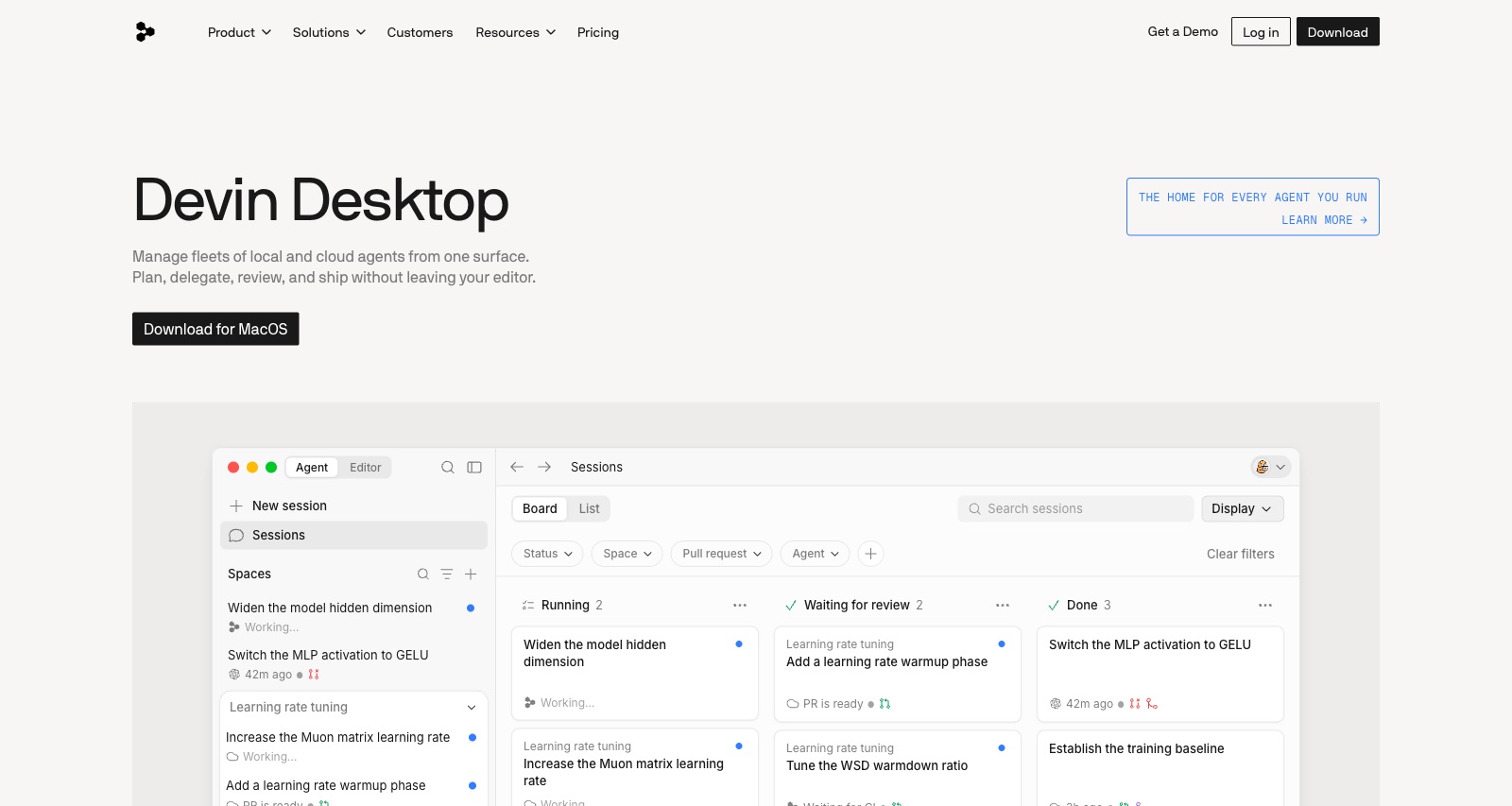 The official Devin Desktop website, photographed in September 2026. Credit: Cognition
What can Devin Desktop do?
The official feature list breaks down into three layers: an editor with completions, a local agent, and cloud agent management. Every capability here is taken from the documentation or the changelog, with one practical business use case alongside each.
- Tab and completions. An internal model trained from scratch offers edits before and after the cursor, "Tab to Jump" to the next position, and "Tab to Import" for package imports. On the free tier this is unlimited. Use case: a developer renaming a field and moving through every occurrence with Tab presses.
- Command for inline editing. Cmd/Ctrl+I, describe in natural language what to change in a selected block. According to the documentation this does not consume premium credits. Use case: "add validation to the phone field" without opening an agent session.
- The Devin Local agent. Creates, edits, and deletes files, runs commands, installs dependencies, and spawns sub-agents. According to the announcement it was rewritten in Rust and saves up to 30% fewer tokens compared to Cascade. Use case: "migrate the lead form to the new API and run the tests."
- Three modes and permissions. Normal, Plan, and Ask (read-only), with Deny, Ask, and Allow permissions for files, commands, network requests, and MCP tools. Use case: a team that approves every terminal command but allows file reads freely.
- Worktrees. The agent works on a separate git branch, and at the end you click Merge. Use case: two agents on two tasks without overwriting each other.
- Devin Cloud. According to the documentation, every session runs on its own virtual machine with a browser and desktop, and continues working even after you close your computer. You can build a plan with the local agent and send it to Devin with one click. Included in Pro, Max, and Teams. Use case: writing tests for an entire module overnight.
- Agent Command Center and Spaces. A kanban board of all agents by status (running, awaiting review, completed), and a Space that groups sessions, Pull Requests, files, and shared context. Use case: "redesign the registration flow" with one agent on the UI and two on the API.
- External agents (ACP). According to the announcement, Codex, Claude Agent, OpenCode, and any ACP-compatible agent run inside the editor, including agents built in-house. Use case: a team already paying for Claude Code that wants to manage it from the same board.
- Previews. Ask the agent to display the site, inside the editor or in a browser, and send it an element you selected or a console error. Use case: "this button" instead of describing it in words.
- Rules, AGENTS.md, and Skills. Persistent instructions for the agent at the project, folder, or user level, and Skills that the agent activates when relevant. Use case: "we use pnpm, all user-facing text in Hebrew, do not touch the payments directory."
- MCP. Connect the agent to external tools like GitHub or a database, through config files or the Marketplace. Use case: the agent reads sprint tasks directly from the tool where they are managed.
- Models. Internal SWE models (SWE-2, SWE-1.7, SWE-1.6), alongside Claude Opus 5, the GPT-5.6 family (in Devin Local only), Gemini, Grok, and Kimi, plus an automatic router called Adaptive that selects a model for each request.
How to get started: step by step
From zero to a real change merged into the project, in six steps, on the free tier. The process is based on the official getting-started guide and the Devin Local documentation.
- Download and sign up. From devin.ai/desktop, available for Windows 10 and above, Mac, and Linux according to the documentation. During the onboarding flow you can import settings and extensions from VS Code or Cursor, then sign up for a free Devin account.
- Open a real, small folder. A portfolio site, an internal script, not the core system. If the editor opens it in Restricted Mode, approve "trust workspace," otherwise all agents are disabled.
- Write an AGENTS.md file in the root. Five lines: what the project is, which package manager you use, "all user-facing text in Hebrew with RTL direction," and what must not be touched. According to the documentation, Devin Local reads this file at the start of every session.
- Start in Plan, not in Code. Select Plan mode, or type the word megaplan in a message. The agent explores the codebase, asks clarifying questions, and writes a plan to a Markdown file. It only touches files after you click Implement.
- Run on a separate branch and review with your own eyes. Select New worktree in the location picker, leave permissions on Ask, and ask the agent to display the site in preview. Something doesn't look right? Select the element and send it to the agent.
- Merge and check your quota. Click Merge, write a commit message, and check the usage meter to see how much of the daily quota was consumed. After a week of working this way you will know whether the free tier is enough.
Anyone who wants to practice these six steps interactively, with exercises and a certificate, can find that in the interactive Windsurf course for 9.90 ILS, part of the interactive AI courses series.
Hebrew and RTL
Talking to the agent in Hebrew works in practice; a Hebrew UI and full RTL support in the editor are not officially listed. What is documented is limited, so this section is primarily a checklist.
What is officially stated. The changelog for the February 12, 2026 release notes "improved right-to-left language display in the agent's task lists." In the Devin documentation, Devin Review allows choosing Hebrew as the comment language, and DeepWiki generates Hebrew documentation according to the November 2025 release announcement. For the editor UI itself in Hebrew there is no mention, so we write: not officially listed.
What to check after every major task:
- Instructions in Hebrew. Write the task in Hebrew and ask that the plan be written in Hebrew. Verify that the agent does not translate variable names or file names into Hebrew without being asked.
- Strings in code. Hebrew text inside a JSX or JSON file, especially when mixed with numbers, punctuation, or English words. Check both in the editor and in the preview, because that is where the truth shows.
- Site direction. Did the
htmlelement receivedir="rtl"andlang="he", and were spacing values written as logical properties (ms, me) rather than ml and mr, which stick to the wrong side? - Terminal and logs. Check how Hebrew output is displayed in the terminal and in error messages. If the display looks garbled, open the file itself before concluding it is broken.
- Commit messages and PRs. If the team writes them in English, add that to AGENTS.md, otherwise the agent will mirror the language of the conversation.
The rule that saves the most corrections: put the Hebrew and RTL rules in AGENTS.md on day one, and do not repeat them in every message. We wrote about the Hebrew checks we run on every project with a code agent in the Hebrew and RTL guide.
How Much It Costs: Every Plan from the Official Site
Free is enough to get acquainted; a developer who works every day needs Pro, at $20 a month. The table below is drawn from the official pricing page and the plans page in the documentation, as of September 15, 2026.
| Plan | Monthly Price | What You Get | Limitations |
|---|---|---|---|
| Free | $0 | A light quota for agent work, unlimited Tab and inline edits | Limited model availability; when the quota runs out you wait for the reset |
| Pro | $20 | Higher quotas, OpenAI, Claude and Gemini models, free use of SWE-2 and leading open-source models, access to Devin Cloud | Single user; usage beyond the quota is purchased at API pricing |
| Max | $200 | Everything in Pro plus a significantly higher quota; per the documentation, a weekly quota only, no daily cap | Single user |
| Teams | $80 for the team, plus $40 per full developer seat | Consolidated billing, management dashboard with analytics, sharing, priority support; a full seat includes a Pro-level quota and access to Devin Desktop | Free Flex seats do not include Devin Desktop; SSO not included |
| Enterprise | Contact for pricing | SAML/OIDC SSO, centralized admin controls, VPC deployment, dedicated account manager | Billed in ACU units per contract |
Notes from the documentation: according to the pricing page, free use of SWE-2 on Pro runs until October 10, 2026 (the models page in the documentation shows October 15, so worth checking). Legacy Pro subscribers at $15 and Teams subscribers at $30 per seat keep their old pricing. The pricing page states unlimited team members, while the documentation says up to 200 members on Teams. Prices change, so check the official site.
What you actually pay for. According to the quotas page, since March 2026 there are no credits in personal plans: each plan has a daily and weekly budget measured in tokens, and each model is priced differently. A short request involving a few files is cheap; a long conversation about a large project with an advanced model burns through a lot. Free models are not counted at all. Beyond the quota, on paid plans, you pay according to the model's API price list, and "Fast" versions cost more. The daily quota is larger than one-seventh of the weekly quota, so users who work on weekends can still use the full amount. Devin Cloud also draws from the same quota, and according to the documentation, users who connect a GitHub account receive up to $50 in additional usage for trial purposes.
The cheapest plan that works for a small Israeli business: start on Free for a week on one project, to see how quickly the quota runs out. A single developer working on the business's codebase every day moves to Pro at $20, which unlocks the advanced models and Devin Cloud. Two developers or more: Teams with two full seats comes to $80, exactly the minimum. Max is worth considering only after a month in which you purchased a meaningful amount of additional usage.
Use Cases for Businesses in Israel
Five role-based scenarios, all synthetic, and in every one of them someone reads the code before it goes live.
Business owner: the company website was built three years ago and nobody has touched it since. A freelancer or technical employee opens it in Devin Desktop, uses Ask mode to get an explanation of the structure, then uses Plan mode for upgrading the contact form. Every change is made in a separate branch and shown in preview before merging, so the business owner approves what they actually see.
Marketing: three versions of a landing page for a campaign, each in its own session and branch within the same Space. The marketer flags a headline that needs changing directly in the preview and sends it to the agent. When the copy itself comes from a separate agent, as in the marketing agent guide, the work in the editor stays purely technical.
Operations: a script that reads a daily orders file, summarizes anomalies and sends a report. Start with megaplan, because the agent asks at least one clarifying question before writing a plan, then add the file structure to AGENTS.md. Send the edge-case tests to Devin Cloud to work on overnight.
HR: an internal employee onboarding form. Files containing real employee data do not enter the project at all, and if they must sit in a folder, add them to .devinignore so the editor does not index them. Build with sample data only.
Sales: a quote calculator that connects to a CRM. The CRM's MCP server is configured in the project's .devin/config.json file, so the entire team gets it, and the agent requests confirmation before every tool call. We covered that kind of connection in detail in the MCP guide.
Devin Desktop vs. Cursor, Claude Code and GitHub Copilot: An Honest Comparison
All four write code with AI; the difference is where you work and how many agents you manage. Devin Desktop data comes from its own documentation; the rest comes from the official pricing pages and our guides to Cursor and GitHub Copilot.
| Devin Desktop (Windsurf) | Cursor | Claude Code | GitHub Copilot | |
|---|---|---|---|---|
| Behind it | Cognition | Anysphere | Anthropic | GitHub (Microsoft) |
| Form | Full editor with agent manager | Full editor based on VS Code | Agent in the terminal | Plugin for existing editors |
| Cloud agent | Devin Cloud, one machine per session | Cloud agents | Not covered in this guide | Asynchronous agent in GitHub |
| Third-party agents | Codex, Claude Agent, OpenCode via ACP | Not a focus | Not applicable | Claude Code and Codex on Pro plan |
| Free tier | Light quota, unlimited Tab | Hobby with limited usage | Not included in the free plan | 2,000 completions per month |
| Entry plan | Pro at $20 | Pro around $20 | Included in Claude Pro, $20 monthly billing | Pro at $10 |
| Instructions file | AGENTS.md, .devin/rules/ | .cursor/rules | CLAUDE.md | Custom instructions |
When to choose Devin Desktop: when you want a full editor with the ability to manage several agents in parallel, when you have long tasks worth handing off to a cloud agent, or when the team uses multiple agents and wants a single dashboard. A bonus: it reads .cursor/rules and ~/.claude/CLAUDE.md as global rules, so switching to it does not reset your instructions.
When to choose Cursor: when the work is primarily interactive editing inside files and a large community with plenty of learning materials matters. All the details, including pricing and an in-depth comparison, are in the complete Cursor guide and in the Cursor vs. Claude Code comparison.
When to choose Claude Code: when you want the agent to work in the terminal across the entire project, run commands and complete a task end to end, without depending on a specific editor. Many teams combine the two: an editor for daily work and a terminal agent for large tasks.
When to choose GitHub Copilot: when the organization already lives in GitHub, when support for JetBrains, Visual Studio or Xcode is needed, and there is no desire to switch editors (the Windsurf JetBrains plugin is listed in the documentation as being in maintenance mode).
And what about Codex from OpenAI? It runs inside Devin Desktop via ACP, so the question becomes less "which tool" and more "which agent for which task."
Privacy and Limitations
The default allows data to be used for training, and opting out is only available on paid plans; code containing customer data should never be opened with any agent. This section draws on Cognition's security page (windsurf.com/security redirects to it), the Devin Local documentation and the FAQ.
Model training and data retention. According to the security page: "By default, we may use your data for model training." On a paid plan you can opt out at any time on the Data Controls page, and after opting out your data is not used for training and Zero Data Retention is activated with model providers. On Teams, only an admin can opt out. For Enterprise customers, Cognition commits not to train without explicit written consent. Data is retained for the duration of the subscription, and according to the FAQ you can also disable code-snippet telemetry in the account settings. The takeaway for anyone on Free: there is no opt-out button, so treat everything you send as potentially available for training.
What Cognition states about security. Encryption in transit and at rest, and SOC 2 Type II certification. On the tool side: Devin Local supports OS-level sandboxing with file isolation and network filtering, admins can enforce it for the entire organization, and by default it requests confirmation before every MCP tool call. According to the security page, generated code belongs to the user.
What not to put in, on any plan: real customer files, .env files and API keys inside a message to the agent, and internal documents you would not send to an outside vendor. Add sensitive folders to .devinignore, and any real document you must work with should be stripped of identifying details beforehand, using a tool like Balmas AI.
Honest limitations, as of September 2026:
- The move away from Cascade left gaps. According to the documentation, Devin Local does not preserve memories between sessions, does not support Workflows and does not support Arena Mode. Transfer what matters to Skills using "Devin: Open Cascade Migration Wizard."
- One-click deployment is gone. App Deploys to Netlify, using the windsurf.build domain, ran only through Cascade. The documentation notes that Devin Local does not support them, and the September 10, 2026 update also removed the Deploy entry point. Publish through your own hosting service.
- Quotas are hard to predict. Tokens are counted per model, both daily and weekly. A heavy week with an advanced model can run out by Wednesday.
- Three names floating around. Windsurf, Codeium and Devin appear in paths, domains and commands. In an organization with device management policies, according to the FAQ, you need to approve the application under its new name, Devin.
- A free trial is not available to everyone. According to the documentation, paid-plan trials are generally not offered to anyone who has previously used Devin, Windsurf or Codeium.
- Generated code is not reviewed code. The security page itself notes that Devin may hallucinate, introduce bugs and suggest insecure code, and recommends code review and branch protections.
Common Mistakes
- Reading an old Cascade guide and looking for buttons that no longer exist. Anything written before September 2026 about memories, Workflows and Deploy needs to be checked against the current documentation.
- Skipping Plan mode. The agent writes fast, and that is precisely the problem. A plan in a Markdown file that you read before hitting Implement saves hours and quota.
- Working on the main branch. A Worktree for every task, Merge only after you have seen the change in preview.
- Switching models with every message. According to the quotas page, requests to the same model benefit from caching and consume less.
- Leaving permissions set to Allow for everything. Start with Ask, and permanently allow only commands that repeat and that you recognize.
- Waiting for the invoice to discover your usage. The usage meter in the editor shows how much is left and when the reset happens. Check it for two weeks before switching plans.
Frequently Asked Questions
What is Devin Desktop?
Devin Desktop is the current name for Windsurf, Cognition's AI-powered code editor. It is a full editor for Windows, Mac, and Linux, with a built-in agent manager: the local agent Devin Local, the cloud agent Devin Cloud, and external agents via ACP, all in a single Kanban board.
What happened to Windsurf?
Cognition, the company behind Devin, signed the acquisition of Windsurf on July 14, 2025. On June 2, 2026, the product was renamed Devin Desktop in a routine update. According to the official FAQ, the plan, pricing, settings, extensions, and MCP connections carried over as-is.
Is Devin Desktop free?
There is a Free tier at $0: according to the pricing page it includes a light quota for agent work, limited model availability, and unlimited Tab completions and inline edits. When the quota runs out you wait for the daily or weekly reset, because on the free plan there is no way to purchase additional usage.
How much does Devin Desktop cost?
According to the pricing page (checked September 15, 2026): Free at $0, Pro at $20/month, Max at $200/month, Teams at $80/month per team plus $40 per full developer seat, and Enterprise by quote. Beyond the quota you pay per API pricing. Prices may change, so check the site.
What happened to the Cascade agent?
Devin Local replaced it. According to the announcement, it was rewritten in Rust, is up to 30% more token-efficient, and supports sub-agents and a sandbox. According to the changelog, Cascade was fully removed on September 8, 2026. Memories and Workflows did not carry over and need to be migrated to Skills using the migration wizard.
Does Cognition train models on my code?
According to the security page, by default your data may be used for training. On a paid plan you can opt out in Data Controls settings, which also activates Zero Data Retention with model providers. On Teams only an admin can opt out, and on Enterprise no training happens without written consent.
Devin Desktop vs. Cursor vs. Claude Code?
Devin Desktop is the right fit for anyone who wants a full editor and wants to manage multiple agents inside it, including Devin in the cloud. Cursor is a focused AI editor with a large community. Claude Code is a terminal-based agent that works across the entire project. My recommendation: run the same task in two tools for one week, then decide.
Can I work in Devin Desktop in Hebrew?
A Hebrew interface is not officially listed. You can write to the agent in Hebrew and ask for a work plan in Hebrew, and the February 2026 changelog notes improved right-to-left rendering in task lists. Test Hebrew strings in files, the terminal, and commit messages.
The Bottom Line
The new name arrived in a quiet update, and the Pro plan still costs $20. But what Cognition is selling in 2026 is no longer "an editor with a chat": it is an editor where you decide what to build, divide the work between a local agent, a cloud agent, and third-party agents, and review everything in a single board. Anyone who wants to work that way, without leaving the editor, will find one of the most complete implementations of that idea here.
It is not perfect: the migration away from Cascade wiped memories, Workflows, and one-click deploys, the quotas are hard to predict, and three different names are still scattered across the docs and file paths. And anyone on the free plan needs to remember there is no way to opt out of data being used for training.
The practical recommendation: AGENTS.md on day one, Plan before every task, Worktree for every change, and two weeks watching the usage meter before you pick a plan. Then run the same task in Cursor or Claude Code as well, because a comparison on real code is worth more than any table. Want to practice this inside the page? The interactive Windsurf course for 9.90 ILS. For a development team that wants to build a solid working routine with code agents, our AI workshops are built around exactly that.
Sources
All facts in this guide were taken from the official pages listed below, checked September 15, 2026:
- Devin Desktop product page: https://devin.ai/desktop
- Official pricing page: https://devin.ai/pricing
- "Windsurf is now Devin Desktop" announcement (ACP, Devin Local, Spaces): https://devin.ai/blog/windsurf-is-now-devin-desktop
- Cognition's announcement of the Windsurf acquisition (July 14, 2025): https://cognition.com/blog/windsurf
- FAQ on the transition from Windsurf to Devin Desktop (rules, paths, commands): https://docs.devin.ai/desktop/devin-desktop-faq
- Getting started and installation guide: https://docs.devin.ai/desktop/getting-started
- Devin Local agent (modes, permissions, Worktrees, MCP, limitations): https://docs.devin.ai/desktop/devin-local
- Devin inside Devin Desktop (cloud agent and its pricing): https://docs.devin.ai/desktop/devin
- Agent Command Center: https://docs.devin.ai/desktop/agent-command-center
- Spaces: https://docs.devin.ai/desktop/spaces
- Previews: https://docs.devin.ai/desktop/previews
- App Deploys: https://docs.devin.ai/desktop/cascade/app-deploys
- Rules and Memories: https://docs.devin.ai/desktop/cascade/memories
- Rules and AGENTS.md in Devin CLI and Devin Local: https://docs.devin.ai/cli/extensibility/rules
- Devin Desktop Tab: https://docs.devin.ai/desktop/tab/overview
- Models and token pricing: https://docs.devin.ai/desktop/models
- Adaptive router: https://docs.devin.ai/desktop/adaptive
- Plans and usage: https://docs.devin.ai/desktop/accounts/usage
- Usage quotas (migration from credits, March 2026): https://docs.devin.ai/desktop/accounts/quota
- Self-serve plans (Pro, Max, Teams, seats): https://docs.devin.ai/admin/billing/self-serve
- Cognition security and privacy (training, data retention, SOC 2): https://docs.devin.ai/admin/security
- Devin Desktop changelog (Cascade removal, RTL, rename): https://docs.devin.ai/desktop/changelog
- GitHub Copilot pricing: https://github.com/features/copilot/plans
- Claude pricing (plans that include Claude Code): https://claude.com/pricing
Frequently asked questions

Yaakov Tzedek
An Israeli AI lecturer, consultant and implementer who has supported 100+ organizations in AI implementation and lectured for 200+. Official content partner of Meta, Google, Canva and TikTok, featured on Israel's Channel 13.
More about Yaakov →