- MCP = Model Context Protocol, an open Anthropic protocol for connecting AI models to external systems
- Not to be confused with the McCulloch-Pitts neuron from 1943, a completely different academic concept that shares the same acronym
- The architecture: a client (the application running the model) talks to MCP servers that expose tools and data sources
The acronym MCP also refers to the McCulloch-Pitts neuron from 1943, which is why AI search engines occasionally confuse the two. When people talk about MCP in the context of AI tools today, they almost always mean Anthropic's Model Context Protocol, published in 2024.
MCP (short for Model Context Protocol) is an open protocol developed by Anthropic and launched in November 2024. It defines a standard way to connect AI models to external tools and data sources: files, databases, emails, and business systems. Instead of building a separate integration for every system, you connect an MCP server once, and every model that supports the protocol works with it.
Want to connect AI to your actual business systems, step by step? There is an MCP video course in Hebrew.
In short
- MCP = Model Context Protocol, an open Anthropic protocol for connecting AI models to external systems
- Not to be confused with the McCulloch-Pitts neuron from 1943, a completely different academic concept that shares the same acronym
- The architecture: a client (the application running the model) talks to MCP servers that expose tools and data sources
- Why it matters: instead of a separate integration for every model-system combination, one standard that everything connects to
- Who adopted it: Anthropic launched it in 2024, and throughout 2025 OpenAI, Google, and Microsoft all joined as well
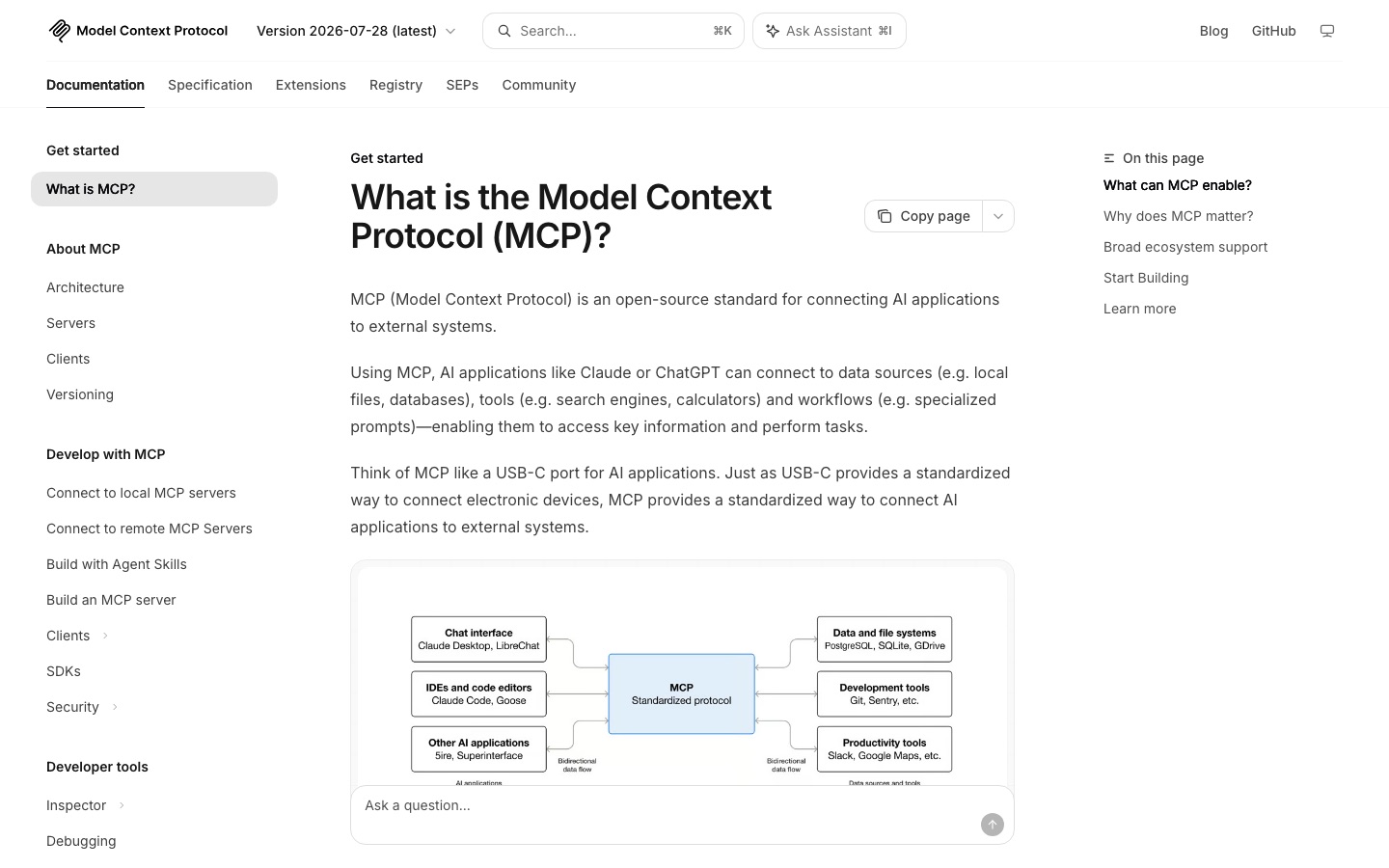 The official MCP website, photographed in September 2026. Credit: MCP
Wait, isn't MCP a neuron from 1943?
It is worth clearing this up right at the start, because the confusion shows up even in AI engine responses. The acronym MCP is also used in academic contexts for the McCulloch-Pitts neuron: a simple mathematical model of a nerve cell introduced by researchers Warren McCulloch and Walter Pitts in 1943, considered one of the theoretical cornerstones of neural networks.
The two concepts have nothing to do with each other. When people talk about MCP today in the context of practical AI tools, they almost always mean Model Context Protocol. A quick way to tell them apart: if the article in front of you is about weights and activation thresholds, you have landed on the 1943 neuron. If it is about servers, tools, and system connections, you are in the right place.
What is MCP in plain language?
Definition: Model Context Protocol is an open communication standard that specifies how an AI application talks to external systems. The protocol defines a uniform format in which a system tells the model what actions it allows, what data it exposes, and how to call it.
The standard analogy is USB-C: before the standard, every device had its own cable. After the standard, one connector fits everything. The same applies here: before MCP, every connection between an AI model and a business system required custom development. With MCP, a system that has had an MCP server written for it once is accessible to every supporting model, including Claude.
Official sources: The definition, full specification, and server list are documented on the protocol's official website, modelcontextprotocol.io, and in Anthropic's documentation at docs.anthropic.com. All the information in this guide is based on that official documentation.
The problem the protocol solved is known in the industry as the "N times M problem": there are N models and M systems, and every combination between them required a separate integration. The evidence that the solution worked is the adoption rate: Anthropic released the protocol as open source in November 2024, and throughout 2025 OpenAI, Google, and Microsoft all formally adopted it. When all the competitors agree on a single standard, you are looking at infrastructure, not a trend.
How does MCP work?
The architecture is built from three components:
- Host: The application in which the model runs, for example the Claude app or Claude Code.
- Client: The component inside the host that manages communication with the servers.
- Server: A small piece of software that wraps a specific system, such as your database, and exposes it to the model in the standard format.
Each server offers the model two main types of capabilities:
- Tools: Actions the model can perform. Search an email, run a query, update a CRM record.
- Resources: Data the model can read. Files, tables, documents.
The important point: the model discovers on its own what the server offers. When you connect a new server, the model receives a list of tools and resources with a description of each, and decides for itself when to use what. Sensitive actions go through you for approval before execution. That is what turns the connection from a development project into a configuration task.
Why does MCP matter for businesses?
A language model without connections is a brilliant consultant locked in a room: it knows how to write, analyze, and plan, but it cannot see your data and cannot do anything. MCP is the door. In practice, here is what opens up for an organization:
- Access to real data: The model answers from your database, not from general knowledge.
- Execution of actions: Not just "draft me an email" but "send the email, update the CRM, and open a task."
- Foundation for AI agents: A real AI agent needs arms. MCP servers are those arms: without them, the agent only talks.
- Development savings: For most common systems, a ready-made server already exists. What used to be a weeks-long project becomes an hour of configuration.
Yaakov Tzedek, an AI lecturer and implementer who has worked with more than 100 organizations, puts it this way in his workshops: the difference between an organization that "plays with chat" and one that actually works with AI is almost always the connections. The moment the model can see the real systems, you save hours of work, not minutes of wording. We went deeper on the scenarios and the financial case in the guide MCP for businesses.
Which common MCP servers are worth knowing?
A few categories most businesses start with:
- Email and calendar: Searching and summarizing emails, checking availability, and scheduling meetings
- Documents and files: Google Drive, local folders, SharePoint
- Databases: PostgreSQL, Supabase, and similar, with queries in natural language
- CRM and business systems: HubSpot, Salesforce, monday
- Development and automation tools: GitHub, browser, task management systems
We put together an organized list with installation recommendations in the guide Recommended MCP servers.
How do you get started with MCP in Claude?
The shortest path, without a single line of code:
- Choose an environment: The Claude desktop app is a convenient starting point.
- Connect a first server with clear value: Through the Connectors screen in settings, for example Google Drive or your calendar.
- Approve permissions: Usually a few clicks and signing into an account.
- Give it a real task: For example, "summarize the emails I haven't replied to this week and suggest a priority order."
- Expand gradually: Add another server, then connect between servers, then set up recurring automation.
The full steps with screenshots are in the guide How to work with MCP.
MCP in Claude Code
Claude Code is Anthropic's AI agent that runs in the terminal and in the Claude Desktop app, and it is the most natural environment for working with MCP: add a server with a single command, and its tools are available to the agent in every conversation.
The combination is especially powerful because Claude Code carries out multi-step tasks: it reads data from one server, processes it, and writes the result through another server, all from a single instruction. We walked through the process step by step in the guide Working with MCP in Claude Code.
What is important to know about security and permissions?
An MCP server receives exactly the permissions you give it. Four rules of thumb:
- Trusted sources only: Install official servers or community-vetted ones, not any code you found online.
- Minimum permissions: Start with read-only, and expand to write access only after the server has proven itself.
- Manual approval for sensitive actions: Sending an email or modifying a database goes through you, at least at first.
- Organizational policy: Decide in advance which servers are approved and who is authorized to connect them.
The bottom line
MCP turned connecting AI to business systems from an expensive development project into a quick configuration task, and that is why it is the foundation of every serious AI agent today. Start with one server that solves a real pain point, and within a week you will understand why the entire industry aligned around this standard. And if you want to learn to build complete workflows with it yourself, that is exactly what happens live in the Intro to Claude Code session.
Frequently asked questions

Yaakov Tzedek
An Israeli AI lecturer, consultant and implementer who has supported 100+ organizations in AI implementation and lectured for 200+. Official content partner of Meta, Google, Canva and TikTok, featured on Israel's Channel 13.
More about Yaakov →