- What Balmas AI is, how it strips identifying details from documents before you upload to ChatGPT or Claude, what Round-Trip Restore does, and why browser-side processing changes the security conversation. Step-by-step guide, including limitations.
According to Cyberhaven, the share of sensitive data among all content employees enter into AI tools jumped from 10.7% to 34.8% in two years. The problem that anonymization tools are trying to solve is not going away, it is growing.
In nearly every organization, it's happening right now, at this very moment: someone copies a contract, a report, or a client list into ChatGPT to save an hour of work. According to Harmonic Security, sensitive information appears in 20% of the files employees upload to AI tools. And according to Cyberhaven, the share of sensitive data within all content fed into AI tools jumped from 10.7% to 34.8% in just two years.
The result is a quiet war between two sides that are both right: employees are right that AI saves them hours, and information security officers are right that client details must never reach a third-party vendor's servers. Until now, the solution was manual: delete names by hand, replace them with placeholders, and hope nothing slipped through.
Balmas AI is an Israeli tool built for exactly this gap. This guide covers everything you need to know: how the tool works, what it detects, what capability sets it apart, and, just as importantly, what it does not solve.
What is Balmas AI?
BALMAS AI is a tool that turns a sensitive document into a safer copy for working with AI: you upload a file, the tool identifies personally identifiable and sensitive details, presents them for approval, and replaces them with consistent substitutes. Detection runs in the browser, and the system is built so that document content is not retained after the process ends. The tool's tagline sums up the idea in three words: Clean. Anonymize. Work with AI.
The tool supports the formats most common in organizations: PDF, Word, Excel, PowerPoint, TXT, and CSV, and the interface is available in full Hebrew and in English. You start for free, with 10 documents per month, no credit card required.
Why do you even need a tool like this? The problem in three sentences
A document uploaded to a public AI tool leaves your computer and travels to the vendor's servers, and on some plans it may also be used for model training. Amendment 13 to the Privacy Protection Law significantly raised the cost of a mistake: fines and enforcement actions for unprotected use of personal data. And the manual solution, deleting names one by one, is slow, inconsistent, and almost always misses what the eye can't see: the author's name embedded in the file, old comments, and tracked changes.
Anyone who wants to go deeper on the methodological side, what exactly happens to a document at AI vendors and how to build an organizational workflow, will find that in the complete guide to working safely with AI on sensitive documents. Here, the focus is on the tool itself.
The core idea: processing happens in the browser
This is the differentiator that matters most to understand, because it fundamentally changes the security conversation. Document scanning and sensitive detail detection run in the user's browser, not on the tool's server. In the system's own words: "Your document never leaves this device".
Beyond that, the system declares a Zero-Retention architecture: when the process ends, the original document, the preview, and the replacement map are all deleted. System logs store event types only ("document cleaned") and not content. For an organization evaluating a tool, that is an entirely different starting point than a service that receives the file on its servers and promises in a privacy statement to behave nicely.
For organizations with even stricter requirements, a local Desktop mode and an on-premises installation inside the organization's own environment are also available, so that even network traffic stays internal.
How it works: five steps
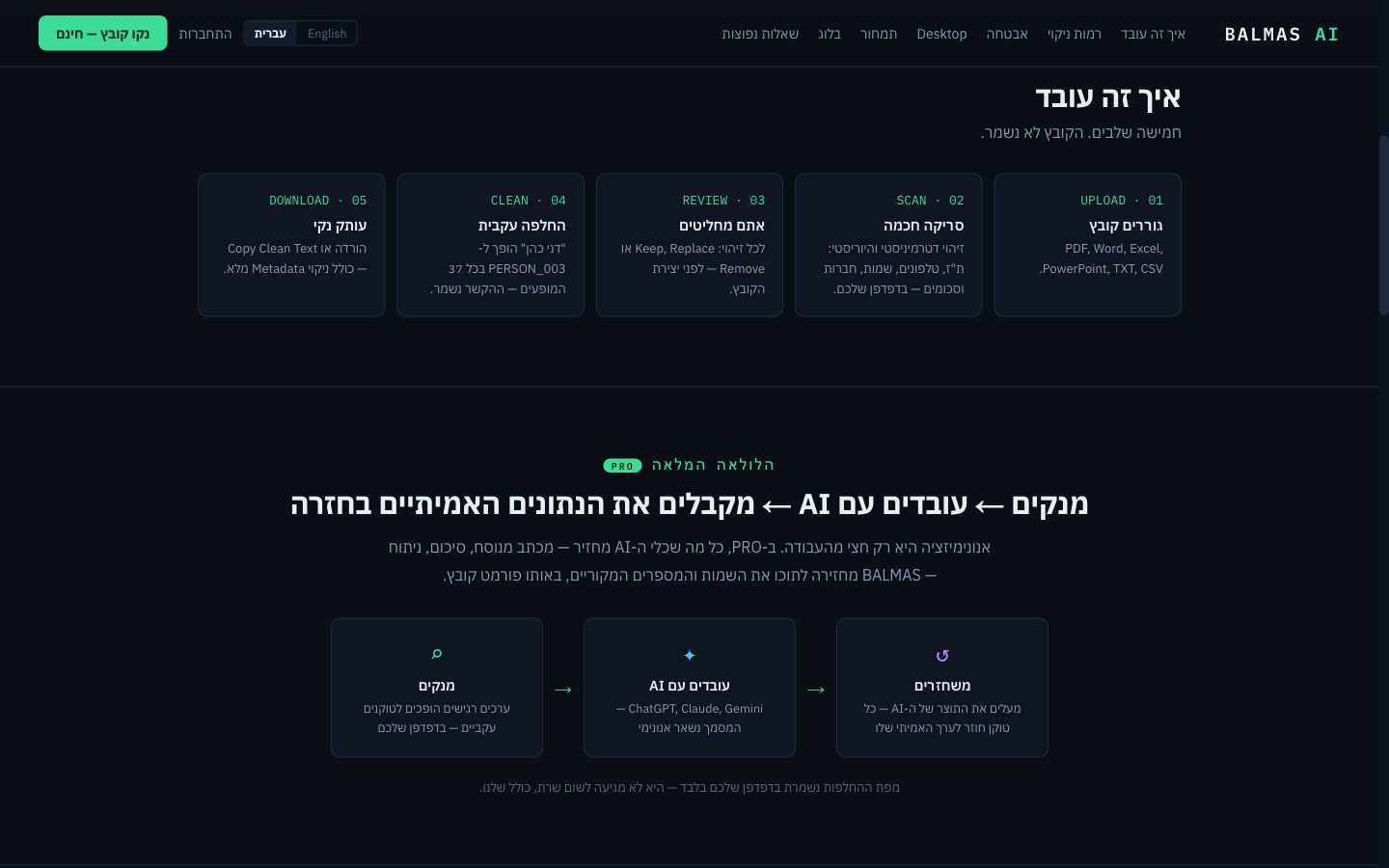
Step 1: Upload
Drag a file into the browser: PDF, Word, Excel, PowerPoint, TXT, or CSV. No installation required.
Step 2: Scan
The tool runs two detection layers in parallel:
- A deterministic layer, clear patterns with validation: ID numbers (including check-digit verification, so that a random nine-digit number isn't flagged by mistake), phone numbers in every Israeli format, emails, addresses, bank accounts, and monetary amounts.
- A heuristic layer, context-based detection: names of people, companies, clients, and projects.
The scan also includes metadata cleaning, the part that manual cleaning almost always misses: author name, comments, tracked changes, hidden Excel sheets, and EXIF data. Lawyers and public bodies have been burned more than once by a "clean" document that revealed more in its comments than in the body text.
Step 3: Review, the most important screen
The tool does not clean blindly. Every finding is presented for approval, with three options for each item: Keep (leave it, it was misidentified), Replace (substitute it with a placeholder), or Remove (delete it entirely). You can also manually mark a passage the system missed, and add your own word list, such as internal project names, that will always be detected in every future document.
This principle, a human approves before the file is created, is not just a matter of convenience. No automatic detection is perfect, and this screen is what turns the tool from a black box into a process you can actually trust.
Step 4: Clean with consistent replacement
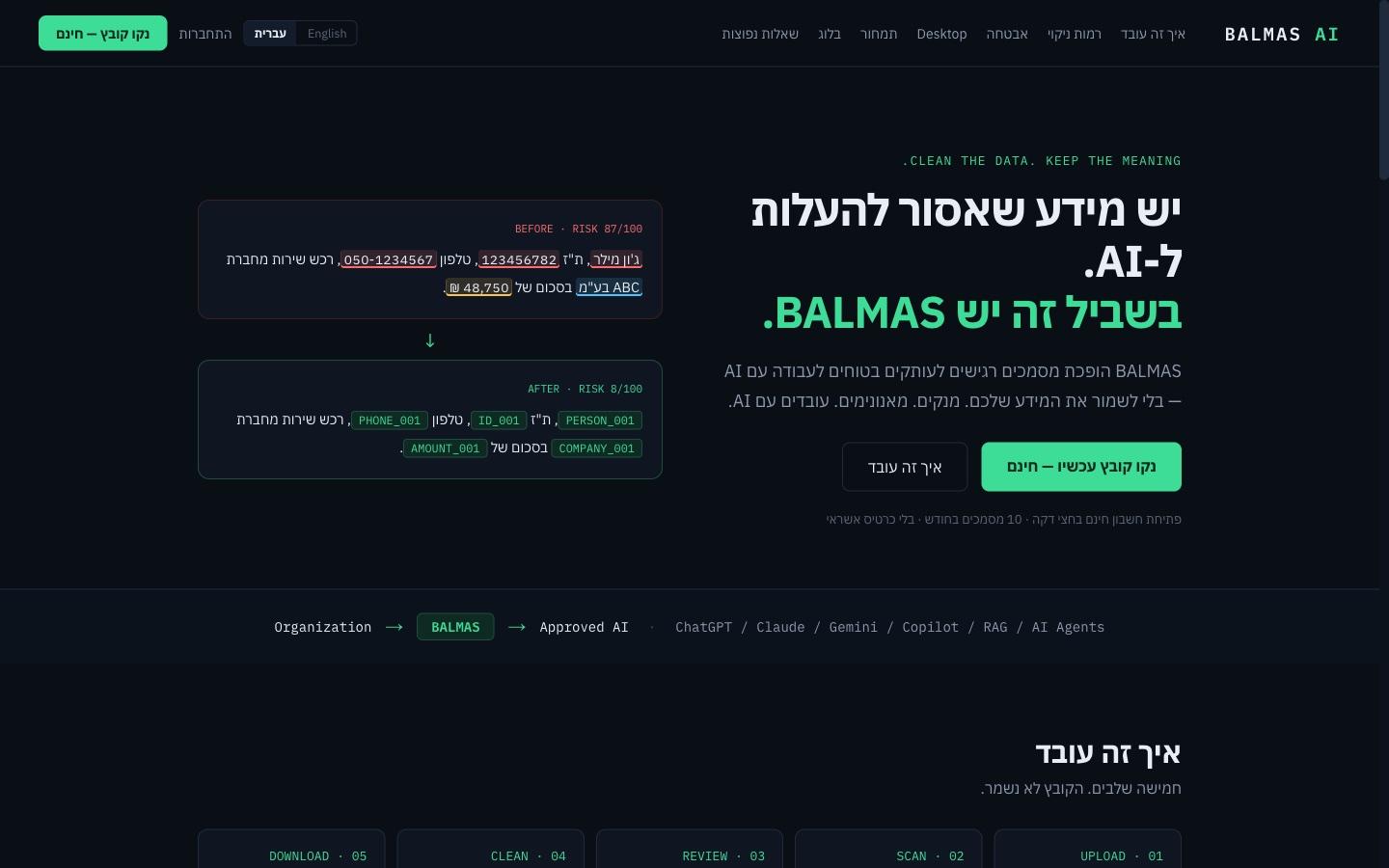
This is where the detail that separates proper anonymization from censorship lives: the same person receives the same substitute throughout the entire document. "Dani Cohen" becomes PERSON_003 in all 37 of his appearances, the company becomes COMPANY_001, and the amount becomes AMOUNT_001.
Why does this matter? Because the AI doesn't need to know who Dani Cohen is in order to summarize a contract. It does need to know that the person who signed on page 2 is the same one mentioned in the breach clause on page 7. Consistent replacement preserves the context, so the analysis you get back is accurate. A document cleaned by the method of "replace every name with something random" produces a broken analysis.
The tool also displays a risk score before and after, for example 87/100 before cleaning and 8/100 after, so you can see exactly how much exposure was removed from the document.
Step 5: Download
Download a clean copy in the same format, or click Copy Clean Text and paste directly into whichever AI tool your organization approves: ChatGPT, Claude, Gemini, Copilot, or anything else.
Three cleaning levels: not every document needs the same level of caution
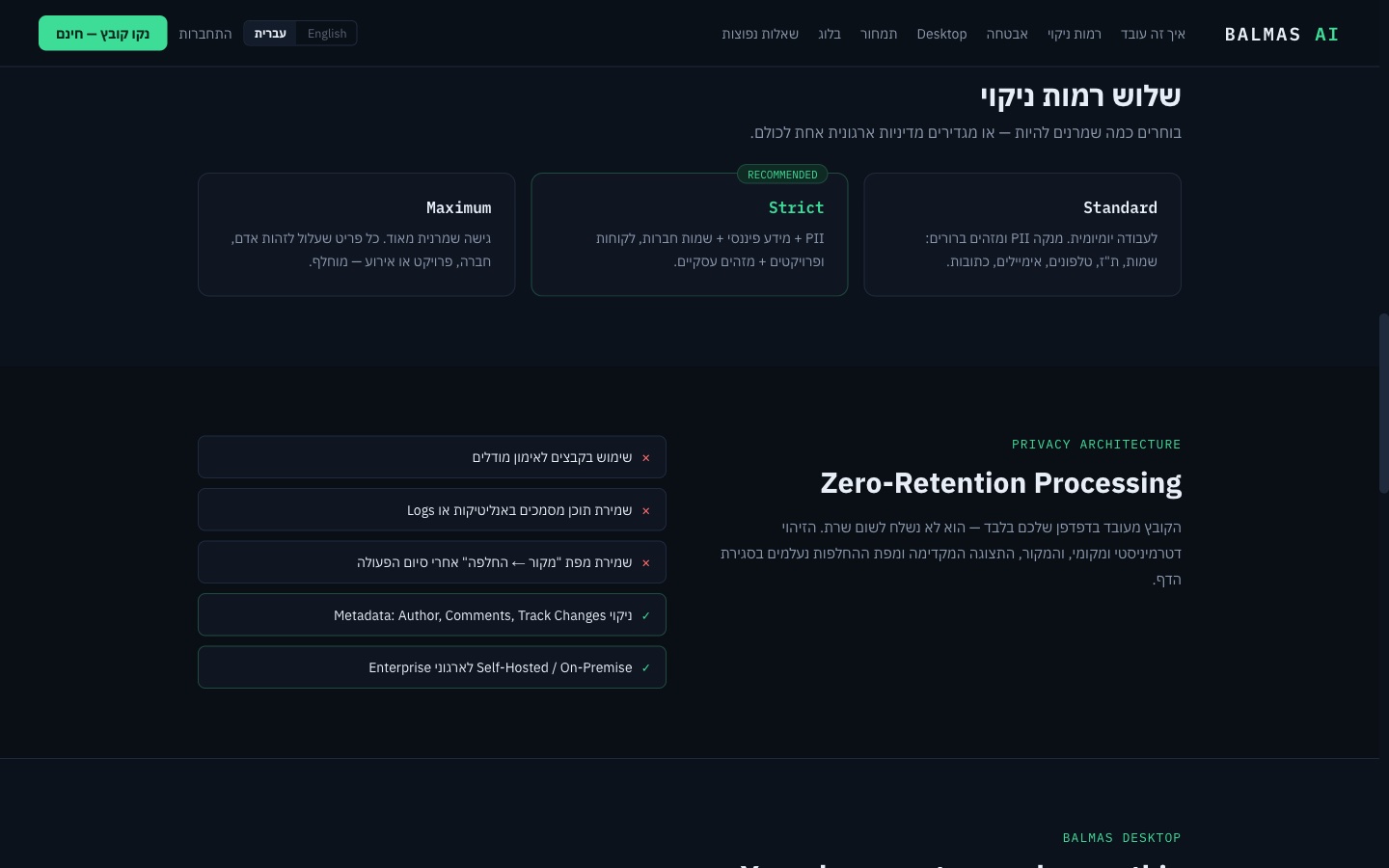
| Level | What is replaced | When to use it |
|---|---|---|
| Standard | Clear personal identifiers: names, ID numbers, phone numbers, emails, addresses | Everyday work on internal documents |
| Strict | Everything in Standard, plus financial information and names of companies, clients, and projects | Contracts, quotes, documents involving third parties |
| Maximum | A conservative approach: any entity that could identify a person, company, project, or event | The most sensitive documents, or whenever there is any doubt |
Choosing between levels is essentially a policy decision, which is why the organizational plan lets you set a uniform cleaning level for the entire organization, so that employees don't have to decide on their own how cautious to be.
Round-Trip Restore: the capability that closes the loop
Most tools in this category stop at cleaning, and that is only half the job. Say you cleaned a client letter, the AI drafted a beautiful new version, and now you have a polished letter that reads PERSON_001. Someone has to go through and restore the names by hand, which is exactly the manual work you were trying to eliminate.
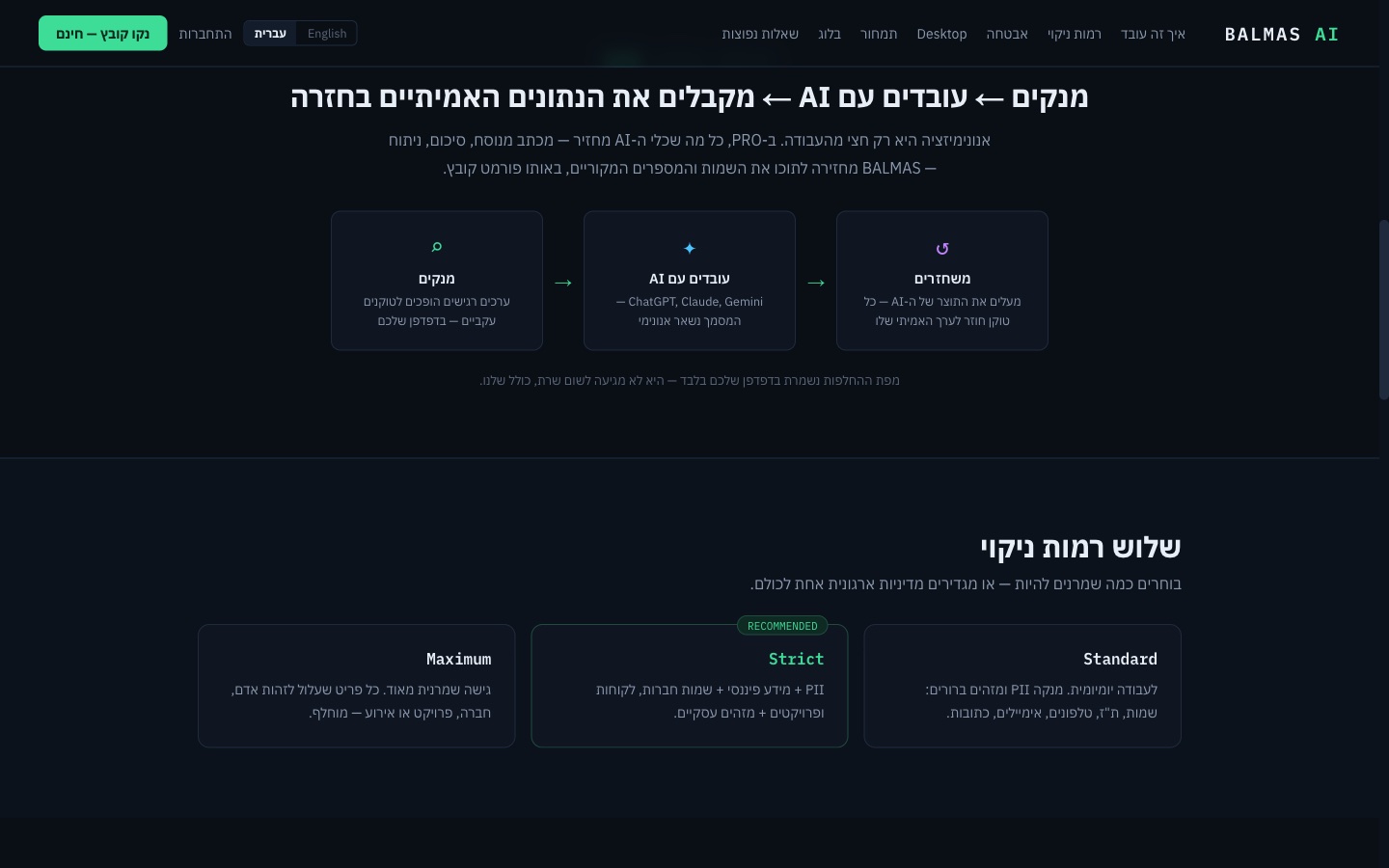
The capability called Round-Trip Restore (available on paid plans) solves this: upload the AI's output back into the tool, and every substitute reverts to its real value, in the same file format. PERSON_001 becomes the actual client again, AMOUNT_001 becomes the actual figure. The replacement map that makes this possible is stored in the browser only and never reaches any server.
In practice this changes the nature of the tool entirely. It is no longer just a "document cleaner" but a middleware layer between the organization and AI tools. The document leaves anonymized, comes back with the AI's value added, and receives its real data back without that data ever having gone outside.
What Balmas AI does not do: three limits worth knowing
An honest guide owes you this section, and this is actually where the tool surprises you with its own candor.
1. It does not declassify documents. A classified document remains classified even after a perfect cleaning. Declassification is a formal authority held by an authorized party, and no software replaces it. The tool is designed for sensitive but non-classified information, and its use is subject to the organization's information security policy. Any body that tries to "get around" its own classification rules with a tool is making a mistake, and that is true of every tool in this category.
2. Detection is not perfect, which is exactly why there is a review screen. The detection layer is good, but no system catches 100% of cases across every possible phrasing. That is why the review step is not a recommendation but a required part of the process, and the final responsibility for the document that goes out rests with the user. A tool that promised "perfect cleaning in one click, no review needed" would be more dangerous, not less.
3. It is not an organizational policy. The tool is a means to an end. An organization that wants to work with AI properly also needs a written usage policy, employee training, and a list of approved tools. Anonymization is one central step within a broader process.
Who is this tool for? Five scenarios
- Legal departments and lawyers: cleaning a contract before asking the AI to summarize its risks. The comments and tracked changes that reveal strategy are removed along with the names.
- Healthcare organizations: summarizing documents containing patient details is precisely the case that Amendment 13 tightens, and precisely where consistent replacement preserves the medical logic of the document.
- Public bodies and authorities: internal reports with names of residents and employees. The combination of browser-based processing and an on-premises installation option answers the requirements that a public-sector information security officer sets. The natural follow-up guide: AI in the public sector.
- HR and finance: CVs, salaries, employee evaluations. The most sensitive data in any organization, and the most tempting to feed into AI.
- Anyone already pasting text into ChatGPT: even a freelancer with ten clients holds documents that cannot afford to leak. The free plan, 10 documents per month, covers exactly this use case.
Balmas AI versus the alternatives
| Manual cleaning | "Privacy mode" in the AI tool | Balmas AI | |
|---|---|---|---|
| Document leaves the device before cleaning | No | Yes, in full | No, detection is in the browser |
| Metadata cleaning | Almost never | No | Yes, automatic |
| Consistency of substitutes | Depends on patience | No replacement at all | Automatic |
| Restoring real values to the output | Manual | Not applicable | Round-Trip Restore |
| Time for a 20-page document | An hour or more | Immediate but exposed | Minutes |
One important clarification about the middle column: privacy settings within AI tools themselves (such as turning off conversation training) are a correct and important step, but they govern what the vendor does with your data after it has already arrived. Anonymization ensures that the identifying information never arrives in the first place. These are two different layers of protection, and the right approach is to use both.
Getting Started: A 15-Minute Walkthrough
- Go to balmasai.com (full Hebrew interface available), open a free account in about 30 seconds, no credit card required. The free plan includes 10 documents per month.
- Choose a real document for your first try, but not a critical one, for example an old contract or an internal report.
- Upload it, select a cleaning level (Standard for a first run), and go through the review screen carefully. Notice how many things the system caught that you would not have thought of, and check whether it missed anything.
- Download the clean copy, paste it into whichever AI tool you work with, and ask for a summary or analysis.
- Compare: does the analysis still make sense even though the names were replaced? In most cases the answer is yes, thanks to consistent substitution.
For teams: it is worth running this test together with your information security officer. The argument "processing runs in the browser, disconnect the network and watch" is a completely different conversation from "the vendor promises they don't store anything."
The Bottom Line
The "no AI on documents" approach loses twice over: it gives up real time savings, and it is not actually enforced, because employees use AI anyway. The "upload everything and trust the vendor" approach is dangerous, and since Amendment 13, it is also expensive. Balmas AI takes the practical middle ground: the document stays with you, what goes out is anonymous and consistent, and what comes back gets the real data restored.
It does not eliminate responsibility, replace policy, or lower a classification level. But as the layer that lets an organization say "yes" to AI without losing sleep at night, it is one of the most focused tools we have seen in this category, and you can try it for free, on 10 documents per month, starting today.
Want to build a complete organizational workflow around this? Start with the guide to working safely with AI on sensitive documents, and if you are just beginning your AI journey as an organization, the free AI implementer course is a good starting point.
Frequently asked questions

Yaakov Tzedek
An Israeli AI lecturer, consultant and implementer who has supported 100+ organizations in AI implementation and lectured for 200+. Official content partner of Meta, Google, Canva and TikTok, featured on Israel's Channel 13.
More about Yaakov →