
- What Hailuo AI by MiniMax is, what the H3 model does (up to 15 sec, 2K, audio), every plan and credit tier from the official site, API, commercial rights, privacy, and how it stacks up against Kling and Luma.
MiniMax launched the H3 video model on July 31, 2026, and three days later, on August 3, released the model weights for download on Hugging Face and ModelScope under a community license. That means the same model running on the Hailuo site can, in theory, be run on your own server.
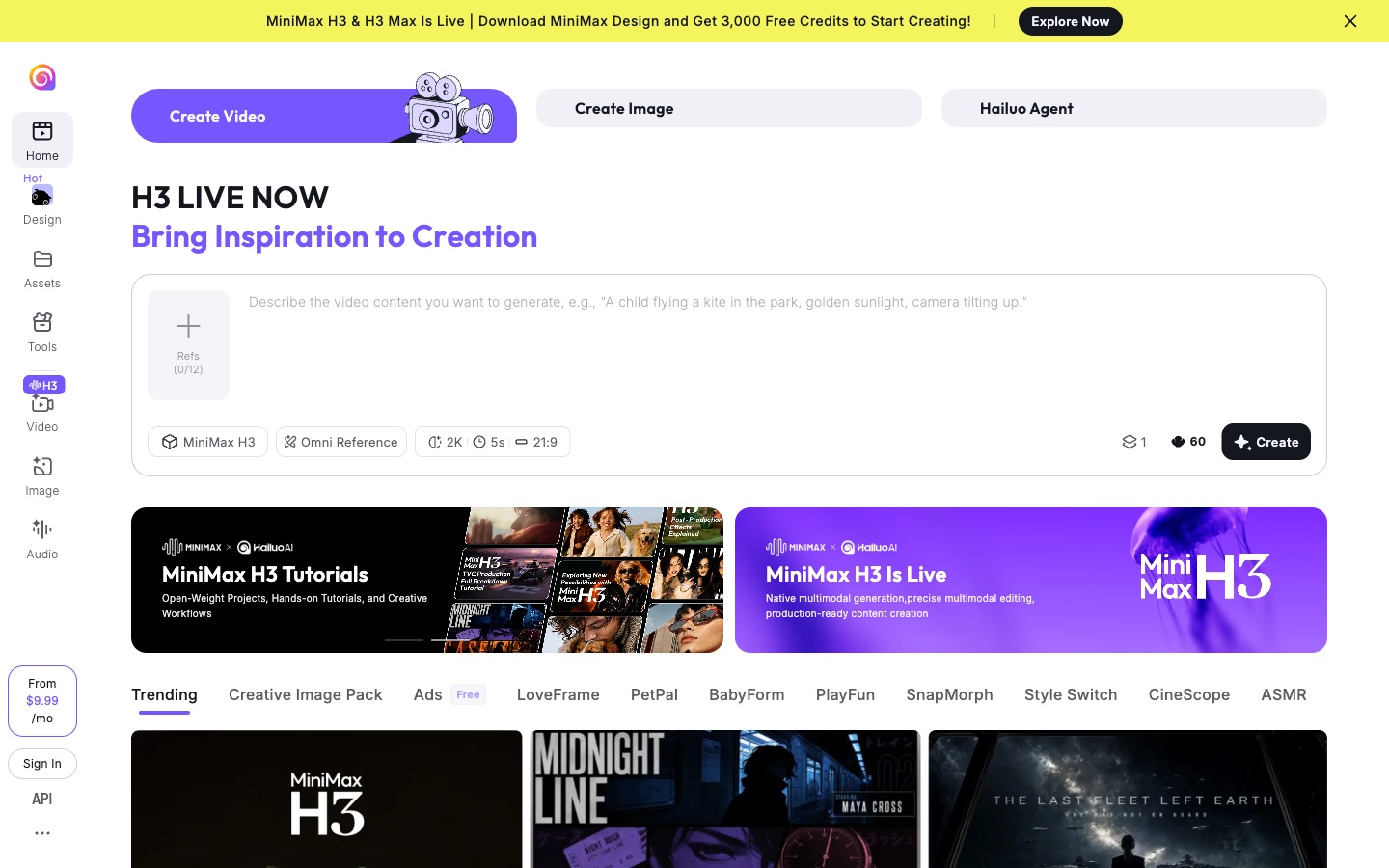
A 5-second clip at 2K costs 60 credits on Hailuo, and the cheapest paid plan gives you 1,000 credits a month. That sounds like a lot of video. In practice it comes out to 84 seconds, and most people who sign up burn through them on experiments before they have a single publishable shot.
That's a shame, because Hailuo AI by MiniMax is one of the more capable video generators out there today. The H3 model, launched in July 2026, produces clips up to 15 seconds long, up to 2K resolution, with sound, and accepts images, video clips, and audio as reference in a single request. The tool isn't the problem. The workflow is.
This guide was built from Hailuo's official subscription page, the H3 model page, the terms of service and privacy policy, MiniMax announcements, the API documentation, and MiniMax platform pricing pages. All pages were checked on September 15, 2026.
In short
| Question | Short answer |
|---|---|
| What it is | MiniMax's video and image generator, available via browser and app |
| Current model | MiniMax H3: text, image and up to 12 reference files, 4 to 15 seconds, up to 2K, stereo sound |
| How much it costs | Free with trial credits. Standard, Pro, Master and Max paid plans, with variable discounts |
| What you pay for | Credits priced by model, length and resolution. An H3 clip, 5 seconds at 2K, is listed at 60 credits |
| Hebrew | Not officially supported. Use English prompts; add Hebrew voiceover and subtitles in post |
| Rights | A clip downloaded without a watermark is commercially licensed per the FAQ, and that requires a paid subscription |
What is Hailuo?
Hailuo is the website and app through which MiniMax makes its video models publicly available. You describe what you want to see, add images or clips as reference, and get a short video clip, now with sound included.
Definition: Hailuo AI is a MiniMax cloud service for AI video and image generation. The main model as of September 2026 is MiniMax H3, which takes text, images, video and audio as input and returns a clip of 4 to 15 seconds at up to 2K with sound. You pay in credits.
The name has been a source of confusion because it changed several times. First Hailuo 01, then Hailuo 02, then in October 2025 Hailuo 2.3 and 2.3 Fast. On July 31, 2026, MiniMax H3 arrived. The model itself is no longer called "Hailuo," but it runs on the same site, hailuoai.video.
Behind the product is MiniMax, a Chinese AI company that listed on the Hong Kong Stock Exchange in January 2026. According to the terms of service, the international service is operated by a Singapore-registered entity. More on that in the privacy section.
What can Hailuo do?
It can generate a clip from text, animate a still image, preserve a character across shots using reference files, and move the camera on command. These are the core capabilities listed on the H3 model page, in MiniMax announcements, and on the subscription page. For each one, a practical business use:
- Text to video. Describe a scene and receive a clip. Use case: an atmospheric opening shot for a brand video, no shoot required.
- Image to video, including first and last frame. According to MiniMax documentation, H3 accepts both an opening frame and an ending frame. Use case: a product photo that becomes a 6-second clip for a Story.
- Multi-reference input (Omni Reference). According to the H3 page, up to 12 files per request: up to 9 images, 3 video clips and 3 audio files, for character, motion, camera and voice reference. Use case: the same brand character across five different clips.
- Built-in sound. H3 generates stereo sound alongside the visuals. Use case: a clip with natural ambient audio, no sound library needed.
- Instruction-based editing. According to the H3 page, you can replace, add or remove people and objects, and change background, lighting, effects and dialogue. Use case: swap the background on a good shot instead of regenerating it from scratch.
- Camera moves. The API documentation lists 15 camera commands in square brackets, such as [Pan left] and [Push in]. Use case: a slow push into a product on a table.
- Aspect ratios. 21:9, 16:9, 4:3, 1:1, 3:4 and 9:16, per the H3 page. Use case: the same concept adapted for a vertical reel and a wide banner.
- Additional models inside the same platform. According to the subscription page, paid plans also include access to Veo 3.1 and Sora 2, and image models such as Nano Banana Pro and Seedream. Use case: compare the same shot across models without opening another subscription.
- Hailuo Agent. An agent that selects a model and generates content from a single instruction, per the Hailuo 2.3 launch announcement. Use case: a quick rough draft of an idea before investing in a precise prompt.
Anyone familiar with the complete Kling guide will recognize the category. The main difference here is the number of reference files accepted in a single request and the built-in sound.
Getting started: step by step
In the first hour, the goal is one good shot at 768P, not a full video at 2K. That approach alone saves most of your credits.
- Sign up at hailuoai.video and receive your one-time trial credits. According to the Free plan card, they apply to Hailuo models only.
- Write one shot description in English, in four parts: who or what, what happens, where, and how the camera moves. For example: "A ceramic coffee cup on a wooden table, steam rising, morning window light, [Push in]".
- Generate at low resolution and short duration. Check motion and lighting, not fine detail. Change one thing per attempt.
- Add reference. Upload a product image or character photo and specify in the prompt what to take from it. Check whether the character holds across generations.
- Only after the shot works, render at high quality. For H3 that means 2K, and only as long as the clip actually needs to be.
- Download and finish in post. Hebrew subtitles, logo and voiceover go in a video editor like the one covered in the CapCut guide, not inside the generator.
One tip that saves real pain: save every prompt that works to a text file, together with the model settings. A month from now, when you need another clip in the same style, that file is the difference between ten minutes and two hours.
How to write camera instructions
MiniMax's API documentation lists 15 camera commands, and you can combine up to three inside a single set of brackets. According to the documentation they work in models Hailuo 2.3 and 02, and plain descriptive language works too, just less precisely.
The commands: [Truck left], [Truck right], [Pan left], [Pan right], [Push in], [Pull out], [Pedestal up], [Pedestal down], [Tilt up], [Tilt down], [Zoom in], [Zoom out], [Shake], [Tracking shot], [Static shot].
Two rules from the documentation: multiple commands inside the same brackets happen simultaneously, for example [Pan left,Pedestal up]. Commands in separate brackets happen in sequence. In H3, per the model page, you can also supply a video clip as camera-motion reference, meaning you show the model the move instead of describing it.
Hebrew and RTL
Hebrew is not officially listed anywhere, and the interface is in English. MiniMax states stable dialogue support in 11 languages: Arabic, Chinese, English, French, German, Italian, Japanese, Korean, Portuguese, Russian and Spanish. Hebrew is not on the list.
What that means in practice, across three layers:
- The prompt. Write in English. Draft the idea in Hebrew, then translate it into short, clear English.
- Dialogue inside the clip. Spoken Hebrew is not guaranteed. Generate Hebrew voiceover separately, for example using the workflow in the ElevenLabs guide, and add it in post.
- On-screen text. Signs or titles in Hebrew inside the video frame will almost always come out garbled. Add subtitles and titles in an editor.
A practical Hebrew test protocol (15 minutes, minimal credits): Pick one simple shot. Run it twice in Hebrew and twice in English, same settings, lowest resolution. Check three things: whether the action was performed, whether the environment is correct, and whether strange text appeared in the frame. If two of the three fail in Hebrew, switch to English and stop spending credits. If you want to test Hebrew dialogue specifically, use one short line and listen to it before building anything around it.
What it costs: all plans from the official site
Five plans: one free with trial credits, and four paid plans by credit volume. According to the official subscription page as of September 15, 2026:
| Plan | Price (list price, and on the page as of September 15, 2026) | What you get | Limits |
|---|---|---|---|
| Free | $0 | One-time trial credits | Hailuo models only, watermark, queue of 4 tasks and 1 concurrent task |
| Standard | List price $14.99. On the page: $10.50/month monthly, or $8.40/month on annual billing ($100.80) | 1,000 credits/month, watermark-free downloads, access to Veo 3.1 and Sora 2 | Approximately 84 seconds of H3 at 2K or 143 seconds at 768P; 1 concurrent task |
| Pro | List price $54.99. On the page: $38/month monthly, or $30.40/month on annual billing ($364.80) | 4,500 credits, plus unlimited images on select image models with annual billing | Approximately 375 seconds of H3 at 2K; 2 concurrent tasks |
| Master | List price $119.99. On the page: $89/month monthly, or $71.20/month on annual billing ($854.40) | 10,500 credits | Approximately 875 seconds of H3 at 2K |
| Max | On the page: $216/month monthly, or $184/month on annual billing ($2,208) | 27,000 credits, unlimited Hailuo 2.0 and 2.3 | Approximately 2,250 seconds of H3 at 2K |
The second-per-plan estimates in the table come from the page itself. The discounts are presented as temporary and prices may revert to list. Prices change, so check the official site.
Important note: the FAQ at the bottom of the same page still shows older figures (for example, Master with 10,000 credits and Max at $199.99). When there is a conflict, the plan cards at the top of the page are the current ones. It is worth taking a screenshot before paying.
What you are actually paying for. Credits, priced by model, length and resolution. In the interface, an H3 clip of 5 seconds at 2K is shown as 60 credits. Per the FAQ, in Hailuo 2.3 a 6-second clip at 768p costs 25 credits, at 1080p it costs 80, and 10 seconds at 768p costs 50. Hailuo 2.3 Fast is cheaper: 15, 50 and 30. According to the same page, a failed generation is not charged, subscriptions are non-refundable, and video quality is identical across all plans. Per the payment policy, subscription credits do not roll over to the next month, and purchasing credits without a subscription does not remove the watermark.
The lowest-cost plan that works for a small Israeli business: Standard, billed monthly for the first month. 1,000 credits is enough for a handful of finished clips per month, provided experiments are done cheaply. If credits run out in the first week, the problem is almost always rendering at 2K for every test, not the plan itself.
API through the MiniMax platform
For anyone who wants to integrate video into a system, there is a pay-per-use API. According to the MiniMax pricing page: H3 costs $0.08 per second at 768P and $0.13 per second at 2K. H3 Max costs $0.05 per second at 480P and $0.08 at 768P. The first five reference images are free, and each additional image costs $0.04. Audio as input is free; video as input is charged by duration. There is also an upscale from 768P to 2K at $0.05 per second. Hailuo 2.3 and 02 are marked as legacy models on that page. Monthly API video bundles start at $1,000, and according to the page they do not yet include H3.
Business Use Cases in Israel
The right approach is short clips that complement existing content, not a full video born from a single prompt. Five scenarios by role:
- Business owner: An existing product photo becomes a 6-second clip for a Story, with a camera push inward. A short Hebrew voiceover is added in editing.
- Marketing: Three versions of the same opening shot for an ad (morning, evening, rain) in 9:16, testing which holds more watch time. The same character is preserved using reference images.
- Operations: An illustration clip for a safety procedure from an existing graphic, for example "how to lift a box correctly," so training is less text-heavy.
- HR: An animated intro for a new-employee onboarding video in an illustrated style, without the faces of real employees.
- Sales: A before-and-after visualization for a sales meeting, for example how a space will look after renovation, with a clear note to the client that this is an illustration.
Hailuo vs. Kling vs. Luma: An Honest Comparison
There is no overall winner. There is a model that fits the shot. The comparison is based on the Hailuo and MiniMax pages, and on our guides to Kling (updated August 13, 2026) and Luma (reviewed September 15, 2026):
| Criterion | Hailuo (MiniMax H3) | Kling (Kling 3) | Luma (Ray3.2) |
|---|---|---|---|
| Company | MiniMax (China) | Kuaishou (China) | Luma AI (USA) |
| Standout strength | Up to 12 reference files, 15 seconds, 2K, built-in sound | Control tools: motion brush, Elements, lip-sync | Up to 16 keyframes, HDR, canvas with additional models |
| Built-in sound | Yes | Yes (no Hebrew) | Not by default |
| Free tier | One-time trial credits | Small daily quota | No permanent free plan |
| Paid entry | Standard, list price $14.99 | Standard, around $10 | Plus, $30 |
| Open source | H3 weights are open | No | No |
| Hebrew | Not officially supported | Weak | Weak, no RTL |
When to choose which. Hailuo when you need a relatively long shot with sound, or when you want to feed a character image, a motion clip, and an audio file all at once. Kling when the shot requires precise motion control or a character that recurs across a series. Luma when you need keyframes, HDR for professional color, or collaborative work on a shared canvas.
And the rule that saves the most money: take one shot from real work and run it through every tool you have access to. Within an hour it is clear which tool fits your style. For a review of the entire category, see Leading AI Video Tools.
Anyone who wants to try H3 without a separate subscription can also find it in PixVerse's paid plans, alongside viral effects templates. Details in the Complete PixVerse Guide.
Privacy and Limitations
The service is operated from Singapore, backed by a Chinese company, and the terms of service grant the company a broad license over content you upload. So upload only what you are comfortable leaving with them.
What the official documents say:
- Operator: Nanonoble Pte. Ltd., Singapore, and Singapore law governs.
- Data location: According to the privacy policy (updated December 9, 2025), personal data is not ordinarily transferred outside Singapore. If it is transferred to affiliates or third parties, equivalent protection is required.
- Data retention: "As long as necessary" for the purpose or as required by law. No specific period is defined.
- Uploaded content: Under the terms of service (updated August 19, 2026), the user grants the company a worldwide, permanent, and irrevocable license to use, reproduce, and process the content. We found no explicit reference in the policy to using prompts for model training.
- Facial data: The facial data section states that in certain app features, images and the facial data derived from them are permanently deleted once video generation is complete.
- Age: 16 and older.
What not to upload: Photos of clients or employees without consent, documents or screens containing internal information, designs of an unreleased product, another brand's logo or character, and faces of recognizable individuals. The terms of service prohibit impersonation and content that could mislead.
On commercial rights, honestly. The FAQ on the subscription page says that any video you can download without a watermark belongs to you and is permitted for commercial use. The terms of service, on the other hand, include a general clause prohibiting commercial use of "any part of the services" and state that commercial use of outputs is your responsibility. They also prohibit removing watermarks or AI labels, and require you to disclose AI-generated content when the law demands it. The takeaway: commercial use only on a paid subscription, keep a screenshot of the FAQ on the day of download, and for a major campaign get a legal review.
Honest limitations: Short clips (up to 15 seconds in H3), text inside the frame is unreliable, hands and complex movements still break sometimes, and MiniMax itself writes that in some scenarios there is room for improvement in visual detail. And an organization that cannot send materials to a foreign cloud can explore the open H3 weights on its own server, subject to the license.
Common Mistakes
- Rendering in 2K for every attempt. Draft at low resolution and short length, and render at high quality only what already works.
- A long prompt in Hebrew. Write in short English and save Hebrew for the voiceover and subtitles.
- Trusting the old FAQ on the subscription page. The cards at the top of the page are more current. Take a screenshot before paying.
- Using a clip from the free plan commercially. It carries a watermark, and removing it is prohibited.
- Uploading photos of real people without consent. Even when the result is impressive, this is a legal and reputational risk.
- Changing five things with every attempt. Change one variable at a time, otherwise you will not know what worked.
FAQ
What is Hailuo AI?
A video and image generator in the browser and app from MiniMax. You write a description, upload reference images or clips, and receive a clip. As of September 15, 2026, the main model on the site is MiniMax H3: 4 to 15 seconds, up to 2K, and built-in stereo sound.
How much does Hailuo cost?
According to the official subscription page (reviewed September 15, 2026): Free with one-time trial credits, Standard 1,000 credits, Pro 4,500, Master 10,500, and Max 27,000 per month. List prices are $14.99, $54.99, and $119.99, with discounts shown on the page. Prices change, so check the official site.
How many credits does a clip cost?
In the interface, an H3 clip of 5 seconds at 2K is shown as 60 credits. According to the FAQ on the subscription page, Hailuo 2.3 costs 25 credits for 6 seconds at 768p and 80 credits at 1080p. According to the same page, failed generations are not charged.
Is commercial use of Hailuo videos allowed?
According to the FAQ on the subscription page, any video you can download without a watermark belongs to you and is permitted for commercial use, which requires a paid subscription. The terms of service include stricter general clauses, so for a major campaign a legal review is advisable.
Does Hailuo work in Hebrew?
Not officially supported. The interface is in English, and MiniMax states stable dialogue support in 11 languages, Hebrew not among them. In practice: write the prompt in English, test Hebrew with a short protocol, and add voiceover and subtitles in Hebrew during editing.
Where is data stored?
The service is operated by Nanonoble Pte. Ltd. from Singapore. According to the privacy policy, personal data is not ordinarily transferred outside Singapore, and when it is, equivalent protection is ensured. MiniMax itself is a Chinese company listed in Hong Kong.
Hailuo or Kling?
Hailuo when you want a relatively long clip with built-in sound and many reference files in a single request. Kling when you need dedicated control tools such as a motion brush, consistent characters, and lip-sync. The right approach: the same shot in both, then compare.
Is there an API for Hailuo?
Yes, through the MiniMax platform. According to the usage-based pricing page, H3 costs $0.08 per second at 768P and $0.13 per second at 2K, and the first five reference images are free. Hailuo 2.3 is listed there as a legacy model.
The Bottom Line
Hailuo is not a machine that produces a finished video from a single prompt. It is a machine that produces excellent shots, for those who work with a method: cheap experiments, one change at a time, expensive renders only at the end, and Hebrew added in editing.
And to return to the opening: 84 seconds of 2K per month is genuinely not a lot. But 84 seconds of shots already selected cheaply is more video than most businesses publish in a month.
Want to practice this directly on the page? The interactive Hailuo course for 9.90 ILS, part of the interactive AI courses series.
Further reading: Kling: The Complete Guide · Luma: The Complete Guide · Veo in English · Sora 2 in English · CapCut: The Complete Guide · The Interactive Kling Course
Sources
All pages were checked on September 15, 2026. Prices are subject to change; verify on the official site.
- Hailuo AI official subscription page: https://hailuoai.video/subscribe (plans, prices and discounts, credits, estimated seconds, models per plan, parallel tasks, FAQ on clip cost, commercial rights, refunds, and failed generations)
- Hailuo AI home screen: https://hailuoai.video (cost of a 5-second H3 clip in 2K as shown in the interface, up to 12 reference files)
- MiniMax H3 model page on Hailuo: https://hailuoai.video/tools/minimax-h3 (up to 2K, 5 to 15 seconds, 24FPS, stereo sound, 9 images, 3 video and 3 audio reference files, editing, aspect ratios)
- Hailuo AI payment policy: https://hailuoai.video/doc/payment-policy.html (subscription credits do not roll over to the next month, no refunds)
- Hailuo AI terms of service: https://hailuoai.video/doc/terms-of-service.html (operator based in Singapore, content license, watermarks and AI labels, age 16, commercial use)
- Hailuo AI privacy policy: https://hailuoai.video/doc/privacy-policy.html (transfer of data outside Singapore, data retention, facial data)
- MiniMax announcement for Hailuo 2.3: https://www.minimax.io/news/minimax-hailuo-23 (launch date, 2.3 Fast, Hailuo Agent)
- MiniMax blog on H3: https://www.minimax.io/blog/minimax-h3 (launched July 31, 2026, stated limitations)
- MiniMax announcement on H3 open release: https://www.minimax.io/news/minimax-h3-open-source (open weights August 3, 2026, 4 to 15 seconds, 11 dialogue languages, community license)
- MiniMax model documentation: https://platform.minimax.io/docs/guides/models-intro (H3, H3 Max, first and last frame, legacy models)
- Text-to-video API documentation: https://platform.minimax.io/docs/api-reference/video-generation-t2v (15 camera commands, combination rules)
- Pay-as-you-go API pricing: https://platform.minimax.io/docs/guides/pricing-paygo (H3 and H3 Max prices per second, reference files)
- Video packages for API: https://platform.minimax.io/docs/guides/pricing-video (monthly packages, H3 not yet supported)
- MiniMax investor relations: https://ir.minimax.io/news-events/new-releases (listed on the Hong Kong Stock Exchange)
- Rest of World on the MiniMax IPO: https://restofworld.org/2026/zhipu-ai-minimax-ipo/ (Chinese company, IPO in January 2026)
- For comparison: our guide to Kling and our guide to Luma, and the official sources listed in each
Yaakov Tzedek is an AI lecturer, consultant, and organizational AI implementer, and leads the Daily AI Tip community. Join the WhatsApp group.
Frequently asked questions

Yaakov Tzedek
An Israeli AI lecturer, consultant and implementer who has supported 100+ organizations in AI implementation and lectured for 200+. Official content partner of Meta, Google, Canva and TikTok, featured on Israel's Channel 13.
More about Yaakov →