
- Security firm Apiiro found that clicking "Yes, and don't ask again" in Claude Code saves the full command, including passwords and keys, to .claude/settings.local.json. A GitHub scan turned up 2,539 secrets across 1,994 repositories. What happened, what Anthropic says, and 5 steps to check and fix it. Plus: Meta adds Active Memory and personal spaces to Muse.
The two most popular secret-scanning tools, gitleaks and TruffleHog, together caught only a portion of the leaked files: according to the research, 215 files containing real secrets were missed by both. In other words, an automated scanner is a solid layer of protection, but it is not a substitute for manually inspecting the file.
You clicked "Yes, and don't ask again" once. The command was saved to a file, and the password inside it was saved with it. Security firm Apiiro scanned GitHub and found more than 104,000 copies of that file in public repositories, along with 2,539 real passwords, keys, and tokens. And this is not a model bug at all: it is a button most of us click several times a day.
In short:
- What happened: Research by Apiiro, reported this week in iTnews and The Hacker News, found that Claude Code saves commands you approved in a file called
.claude/settings.local.json, including any secrets that were inside them.- The scope: 1,122 public files containing at least one real secret. Adding git history, the shared settings file, and saved conversation transcripts: 2,539 secrets across 1,994 repositories.
- What leaked: 379 database passwords, 122 Supabase service keys, 43 SSH logins to servers, 42 GitHub, GitLab, and npm tokens, and 23 AWS keys.
- What to do: Check whether the file is in your repository, rotate every secret that was ever in it, add it to the project's .gitignore, and stop typing secrets inside commands.
- Also today: Meta is rolling out models with "Active Memory" to Muse and Meta AI, and launching personal spaces inside the app.
What exactly happens when you click "Yes, and don't ask again"?
Claude Code saves what you approved as a permanent permission rule. According to the official documentation, the first time you grant permanent approval for a command, Claude Code creates the file .claude/settings.local.json in your project directory and stores the approval there as an allow rule. From that point on, the same command runs without asking.
The problem starts when the rule records the exact command rather than a pattern. If Claude Code ran a database connection command with the password inline, or an API call with the token in the header, and you approved "don't ask again," the password is stored in that file as plain text. According to iTnews, the researchers reproduced this with Anthropic's current models, Opus 5.5 and Fable 5.1, and classified it as a feature of the tool, not the model.
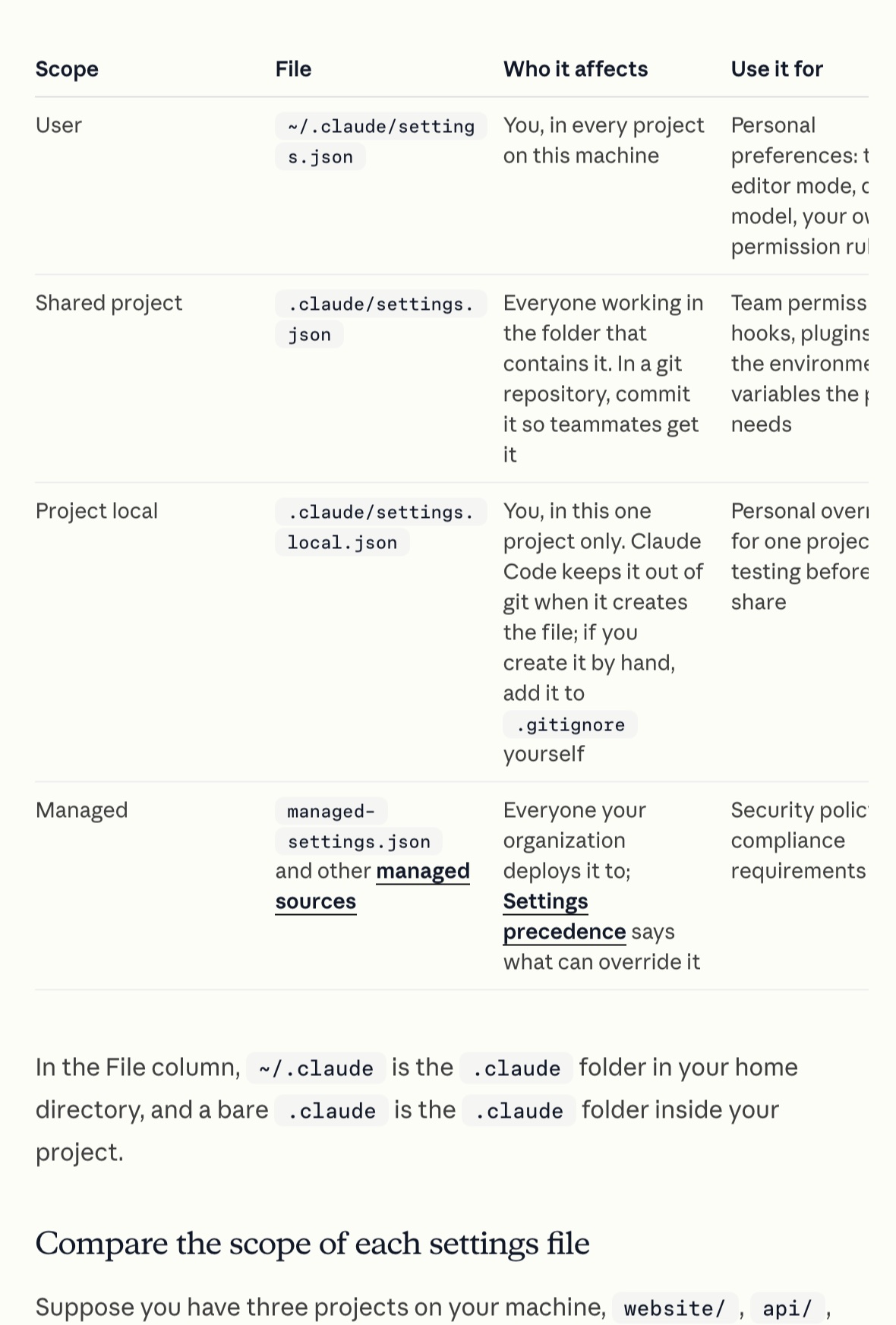
Screenshot: settings page in the official Claude Code documentation, code.claude.com, November 9, 2026
If the file is excluded from git, how did it end up on GitHub?
The exclusion exists, but it is global to your machine and not part of the project. According to the documentation, the first time Claude Code writes the file in a repository that does not yet exclude it, it adds **/.claude/settings.local.json to your machine's global git exclusion file. The documentation also notes: if you created the file manually, add it to .gitignore yourself.
I checked this on our repositories this morning. The file is not tracked and contains no secrets, but when I ran git check-ignore -v it turned out that the only protection on it is the global exclusion file on one Mac. It did not appear in the project's own .gitignore. A new machine, a server, or another tool working on the same repository would have no knowledge of that exclusion. I added the line to the site's .gitignore in the same update that published this article.
In practice, according to Apiiro, 104,185 copies of the file were found in 103,617 public repositories. In roughly 1.1% of them, 1,122 files, there was at least one real secret, totaling 1,379 distinct secrets. When the researchers added old versions from git history, the shared settings file, and saved conversation transcripts, the number reached 2,539 secrets across 1,994 repositories belonging to 63 organizations.
What leaked, and why is it especially dangerous?
More than a third of the secrets open a database directly. According to the breakdown in iTnews: 379 database passwords, 122 Supabase service role keys (the key that bypasses all security permissions in the database), 43 SSH login credentials for public servers, some of them root passwords, 42 GitHub, GitLab, and npm tokens, and 23 AWS keys.
Among the examples the researchers cited: a cloud key with admin permissions belonging to a database company, a production token for a payment system at a software firm, and the owner password of a database in a medical records application. Apiiro did not verify whether the secrets were still active, but one of the organizations that received an alert confirmed that its key was live.
And the figure worth remembering most: the two popular scanners, gitleaks and TruffleHog, identified 564 and 643 files respectively. 215 files containing real secrets passed both without being detected. Anyone relying solely on an automated scanner may be missing things.
What does Anthropic say?
Anthropic acknowledges that the tool does not filter secrets, and is looking into a fix. According to iTnews, Boris Cherny, who leads Claude Code at Anthropic, wrote in a Hacker News discussion: "Historically Claude Code has not done secret scrubbing (there are many good tools for that), but we are looking into what we can do to prevent this". When a commenter pointed out that the same problem can occur in auto mode, he replied "Yeah good catch".
According to the report, the team plans to build a prototype in which auto mode detects such commands, as well as basic secret scanning. Cherny argued that the leaked copies were created manually and committed to the repository, since Claude Code excludes the file when it creates it, and recommended using auto mode instead of permission rules, together with server-side secret scanning. According to iTnews, users have been reporting the issue on the Claude Code GitHub since August 2025.
Sources: the iTnews report, the Apiiro research, and the settings page in the Claude Code documentation.
What to do right now: 5 steps for everyone working with Claude Code
Five minutes per project, starting with the projects that have a repository on GitHub. The steps are based on Apiiro's recommendations and the official documentation:
- Check whether the file is in the repository now or was there in the past. In the project directory:
git ls-files | grep settings.local.jsonfor the current state, andgit log --all --oneline -- '**/.claude/settings.local.json'for history. Even with no results, it is worth opening the file and seeing what was saved in it. - If a secret was in a file that was pushed, rotate it before anything else. Deleting the file does not remove the secret from git history, from forks, or from anyone who already cloned the repository. Generate a new Supabase key, change the database password, revoke the GitHub token. Only then clean up.
- Remove the file from tracking and add it to the project's .gitignore.
git rm --cached .claude/settings.local.json, then add the line.claude/settings.local.jsonto .gitignore. This way the exclusion travels with the project to every machine, and is not dependent on a global setting on one computer. - Stop typing secrets inside commands. Passwords and keys belong in an environment file (such as
.env.local, which also goes in .gitignore) or in a secrets manager, with the command referencing a variable, for example$DATABASE_URL. When approving "don't ask again," it is better to approve a pattern likeBash(npm run test *)rather than a full command with literal values. - Enable secret scanning, and do not rely on it alone. GitHub has secret scanning and push protection, and you can add gitleaks or TruffleHog before every commit. But as we saw, 215 files passed both scanners, so steps 1 through 4 are what matters most.
One more word about the shared file, .claude/settings.json: it is designed from the start to be committed to the repository so the whole team receives it. It must not contain a single secret.
What does this mean for your business?
Every employee running Claude Code on a company project is a potential leak point, even when doing everything right. The "don't ask again" button is designed to save time, and it really does. But it turns a split-second decision into a permanent rule stored in a file, and nobody ever goes back to read that file.
For an organization, this means three things: establish a rule that secrets are never typed into commands, only passed through environment variables. Add .claude/settings.local.json to .gitignore in the template for every new project. And configure managed settings that block reading of secret files, as described in the documentation. Anyone building with Supabase will find an explanation of the keys and the difference between the public key and the service key in the guide to Claude Code with Supabase, and anyone who wants a broader checklist will find it in security basics for applications built with AI.
And if you are just getting started with the tool, the beginner's guide to Claude Code explains how permissions work from day one, and the October update covers what has changed in the tool recently.
Also today in leading tools
Meta Muse: Active Memory, and spaces you build inside the app
Meta is rolling out focused versions of its models to Muse and Meta AI, trained with the help of Muse Wonder, the company's most advanced model. According to a post from Meta's research lab on November 6, 2026, these versions receive two of Wonder's capabilities: "Active Memory," which distinguishes between temporary and permanent information and recognizes when something you said earlier becomes relevant, and "Active Focus," which keeps working toward the goal even when something goes wrong along the way.
Meta's figures, all for Muse and compared to the previous version: correct use of critical information in 90% of tasks versus 76%, a 2.4x reduction in forgetting critical information, and a 67% improvement on everyday tasks where something unexpected happens. Meta did not publish a rollout timeline or list of countries. Meta's official post on the focused models.
On the same day, Meta launched spaces in the Muse app: you describe in plain language a small tool you want, such as a holiday gift tracker or a renovation planning board, and Muse builds it inside the app. You can pin it to the menu, schedule when it appears, and if you connect apps, it updates in the background. According to Meta, spaces are available everywhere Muse is available. The official announcement on spaces. The voice mode and avatar Meta launched the day before are covered in the article on Muse Voice, and the full picture is in the guide to Muse.
And one more agent that entered daily life this week: Amazon opened its shopping agent to text messages, and the question of whose interests it actually serves is covered in the article on Alexa Shopping.
Want to work with agents without handing them the keys?
Today's story is not a reason to stop using Claude Code. It is a reason to give any agent that runs commands on your machine clear boundaries: what it can do without asking, where secrets are stored, and what must never enter any repository. That is exactly what the agents bundle covers: how to give an agent a real task, set it proper limits, and review what it actually did.
The AI agents bundle includes the Claude Code video course and the Grok Bot video course, plus the SocialFlow course as a free bonus. Price: 297 ILS + VAT (350.46 ILS including VAT), through November 12 at 23:59.
Frequently asked questions

Yaakov Tzedek
An Israeli AI lecturer, consultant and implementer who has supported 100+ organizations in AI implementation and lectured for 200+. Official content partner of Meta, Google, Canva and TikTok, featured on Israel's Channel 13.
More about Yaakov →