- Full review of Grok Bot updates from October 19-24, 2026: calendar, reminders, contacts, messages, location, smart home, a Vault for passwords and cards, iPhone Action Button, and Android default assistant.
According to the official documentation, when you share a name, address, phone number or email with Grok Bot in chat, it saves those details to the Vault as a contact entry at the end of the task and notifies you what it saved. If you don't want a detail stored, you need to say so explicitly.
On October 22, 2026, Grok Bot gained access to the calendar, reminders, contacts, and messages on your phone. That same week it got a vault for passwords, credit cards, and contact details. The interesting part is not what the bot can see. It's what it can't see, and what it can still do.
In short:
- Phone apps: Calendar, Reminders, Contacts, Messages, Location, and Home. On iPhone and Android, in a gradual rollout, with a separate permission toggle for each app.
- The Vault: Logins, cards, and contact details. The bot never sees a password, card number, or security code.
- Also this week: The Action Button on iPhone opens a voice conversation with the bot, and you can set it as the default assistant on Android.
- What's missing: iMessage is not part of the update. No information about Israel or Hebrew.
- The bottom line: "Doesn't see the password" does not mean "can't cause harm." Grant permissions for Messages, Home, and cards with care.
What can Grok Bot do on your phone now?
It can read and write in six built-in phone apps, after you approve each one separately. The official announcement from the Grok Bot account on X was brief: the bot "can now use Calendar, Reminders, Contacts, and more apps on your phone," with the rollout going out on iPhone and Android.
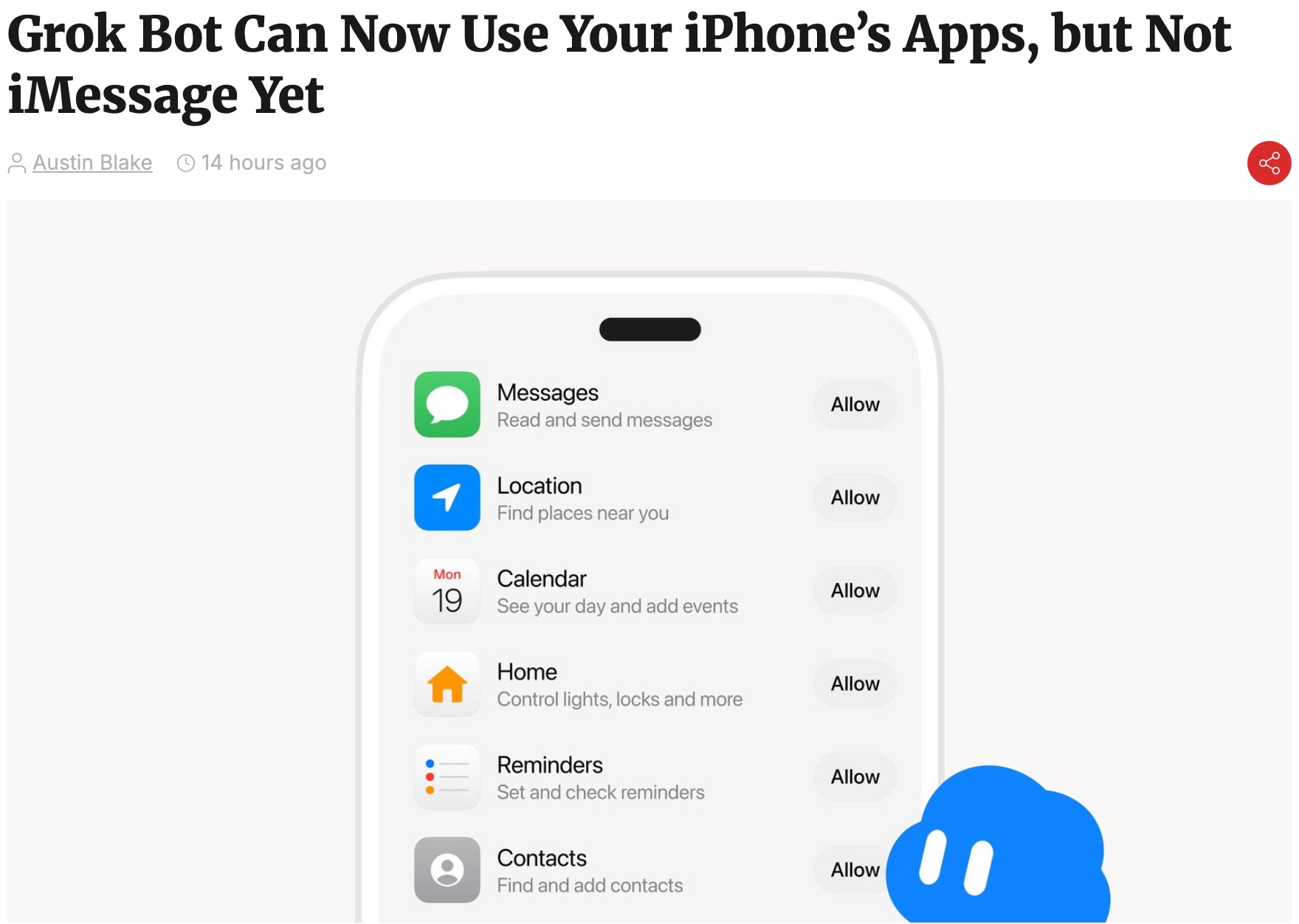 Screenshot: iPhone in Canada, article from October 23, 2026, with the official Grok Bot image
According to the permissions screen, here is what each app unlocks:
| App | What the bot can do |
|---|---|
| Calendar | See your day and add events |
| Reminders | Set reminders and check them |
| Contacts | Find a contact and add a new one |
| Messages | Read messages and send them |
| Location | Find nearby places |
| Home | Control lights, locks, and other devices |
According to iPhone in Canada, the Grok Bot account confirmed in a reply that iMessage is not part of the update. On iPhone, in other words, don't expect the bot to manage your Apple Messages conversations.
What is the Grok Bot Vault, and what does it store?
The Vault is a permanent section in Settings where you save website logins, credit cards, and contact details so the bot can log in and make purchases on your behalf without ever seeing the secret values. It lives under Settings, then Vault, on both desktop and mobile.
According to the official Grok Bot Help Center, the Vault holds three types of items:
- Logins: Website, username or email, and password.
- Cards: Number, expiry, security code, cardholder name, and billing address.
- Contact details: Names, addresses, phone numbers, and emails, for shipping and billing.
You can add a "hint" to each item that tells the bot when to use it, for example "for work purchases." You can also import logins from a CSV file exported by popular password managers. According to the documentation, the file is read on your computer and not uploaded to a server, and you should delete it when done, because passwords are stored in it without encryption.
The Vault joins the 1Password (password manager) integration that arrived in September. The bot checks the Vault first, then 1Password, and only asks you for a login directly, through a secure form, if neither has one.
What else changed in Grok Bot this week?
Alongside the two major updates, three smaller ones arrived, and all of them point in the same direction: your phone.
- iPhone Action Button (October 19): One press opens a voice conversation with the bot without opening the app. According to iPhone in Canada, the button is available only on iPhone 15 Pro and later.
- Default assistant on Android (October 20): According to TeslaNorth, you can now set Grok Bot as the phone's digital assistant. The same update added the ability to read and reply to private messages on X.
- New company name: The company behind Grok Bot is now called SpaceXSI (formerly SpaceXAI). Nothing changes for users.
SpaceXSI also published on October 20 how its own support team uses two internal bots, IncidentWatch and IncidentSweep. The first scans incoming tickets every five minutes and flags a surge of related issues; the second closes those related tickets as a group. According to the company, on September 18 it closed 204 tickets in about ten minutes, and a support engineer reviewed and approved the batch before it went out. These are not customer-facing products, but they illustrate the principle well: the bot prepares, a human approves.
How does a business owner in Israel use this on a regular day?
The real value is managing your calendar and follow-ups in a single message, the same way you'd text an assistant on WhatsApp. Three examples that work with the new permissions, without touching the Vault at all:
- After a meeting: "Add Dani from today's meeting to my contacts with the phone number from his business card, and remind me Sunday at ten to send him a quote." One contact, one reminder, one message.
- Scheduling: "Put a call with my accountant in my calendar on Tuesday afternoon, in an open slot." The bot sees your day and adds the event.
- Morning summary: A Routine that runs every morning and sends you what's on the calendar today and which reminders are still open. We covered Routines and splitting work between multiple bots in the guide to a Grok Bot team.
Notice that in every example the bot only writes to your own apps: Calendar, Reminders, and Contacts. None of them send anything outward on your behalf.
How safe is it to give Grok Bot your passwords and card details?
The Vault is built correctly: the bot never sees a password, card number, or security code, and it asks before using a card. The save form states that the value is "Stored securely, never shown to your Bot."
But that statement protects exactly one thing: the value itself. Here is what it does not cover:
- Once logged in, the bot is inside. It doesn't know the password, but it operates within the connected account like any user: reading, changing things, and clicking buttons.
- Contact details are visible to the bot. According to the documentation, it can see names, addresses, and phone numbers, as well as the list of sites that have saved logins.
- All bots share one workspace. As explained in the complete Grok Bot guide, the company warns against treating separate bots as a security boundary. A connected app is available to all bots in the same account.
- An empty field is not proof of deletion. That is a direct quote from the official documentation. Deletion only happens through Remove in the Vault.
Which permissions to grant, and which to skip?
- Calendar, Reminders, and Contacts: Yes. The worst realistic outcome is a duplicate event or a duplicate contact.
- Location: As needed. Useful for finding nearby places; not required for office work.
- Messages: With great care. This is a permission to read and send in your name, and the same inbox receives SMS verification codes from your bank and other services.
- Home: Not at this stage. A door lock is not the place to try a product in a gradual rollout.
- Cards: Only a virtual card or a card with a low limit, not your main business card.
- Logins: Only for sites where you genuinely need it. Not for your bank, and not for any system that can move money.
How do you revoke access?
- A Vault item: Settings, then Vault, select the item, and click Remove. On mobile you currently cannot edit a saved card, only remove it and add it again.
- 1Password: Under Connect apps, open 1Password and choose Disconnect.
- Phone apps: Access was granted with the Allow button, so you revoke it in your phone's own privacy settings.
This question, what is safe to hand to an agent and what is not, is covered in more depth in the article Grok Bot and remote desktop: how safe is it to give an agent access to your Google account.
Grok Bot vs. Claude Duet vs. ChatGPT dots: who protects what?
All three are cloud-based agents, but only Grok Bot already has access to built-in phone apps. The comparison covers only the points relevant to this update:
| Grok Bot | Claude Duet | ChatGPT dots | |
|---|---|---|---|
| Phone apps | Calendar, Reminders, Contacts, Messages, Location, and Home, with per-app approval | No published access to built-in phone apps | Text messages reportedly on the way, per OpenAI |
| Passwords | Vault and 1Password, and the bot never sees the values | Does not see passwords; logins run inside your private cloud | Sensitive actions like changing a password stay on your side |
| Payment | Saved card in the Vault, and the bot asks before using it | Asks before every payment | Governed by custom rules: allowed, requires approval, or blocked |
| Availability | iOS and Android, gradual rollout | Pro and Max in the US, waitlist | Pro and Business Premium |
Full details are in the Claude Duet review and the ChatGPT dots guide.
What is still unknown
- Availability in Israel: The rollout is gradual and global, but no list of countries has been published.
- Hebrew: It has not been confirmed whether the bot handles events and contacts in Hebrew correctly.
- Which devices: No version requirements have been published for the new app integrations. Only the Action Button has a known requirement: iPhone 15 Pro or later.
- Plan and pricing: It has not been confirmed whether the app integrations and the Vault are limited to a specific plan. The Vault is not supported for Team Bots, according to the documentation.
The bottom line
This week, Grok Bot moved from the cloud to your pocket. That makes it a much more useful personal assistant, and also an agent with more to touch. The Vault protects the password itself, but the limits on what the bot is allowed to do once it's inside are limits you have to set yourself.
Anyone who wants to learn the tool thoroughly, step by step, can start with the interactive Grok Bot course or the Grok Bot video course.
Want to learn how to work with AI agents in your business, without putting it at risk?
Yaakov Tzedek runs AI workshops for organizations and businesses, where participants build workflows with agents together and define in advance what the agents are and are not allowed to do. Details on the AI Workshops page. Anyone who wants to build agents and automations on their own can join the Claude Code Workshops.
Sources:
- iPhone in Canada: Grok Bot gets access to iPhone apps, without iMessage
- Digital Trends on Grok Bot's phone apps
- TeslaNorth on the October 22 announcement
- Grok Bot Help Center: the vault and secrets storage
- Grok Bot Help Center: connecting apps and 1Password
- HuggingNews: Grok Bot saves logins, cards, and contact details
- iPhone in Canada on the Action Button
- TeslaNorth on X messages and the default Android assistant
- SpaceXSI on IncidentWatch and IncidentSweep
Frequently asked questions

Yaakov Tzedek
An Israeli AI lecturer, consultant and implementer who has supported 100+ organizations in AI implementation and lectured for 200+. Official content partner of Meta, Google, Canva and TikTok, featured on Israel's Channel 13.
More about Yaakov →