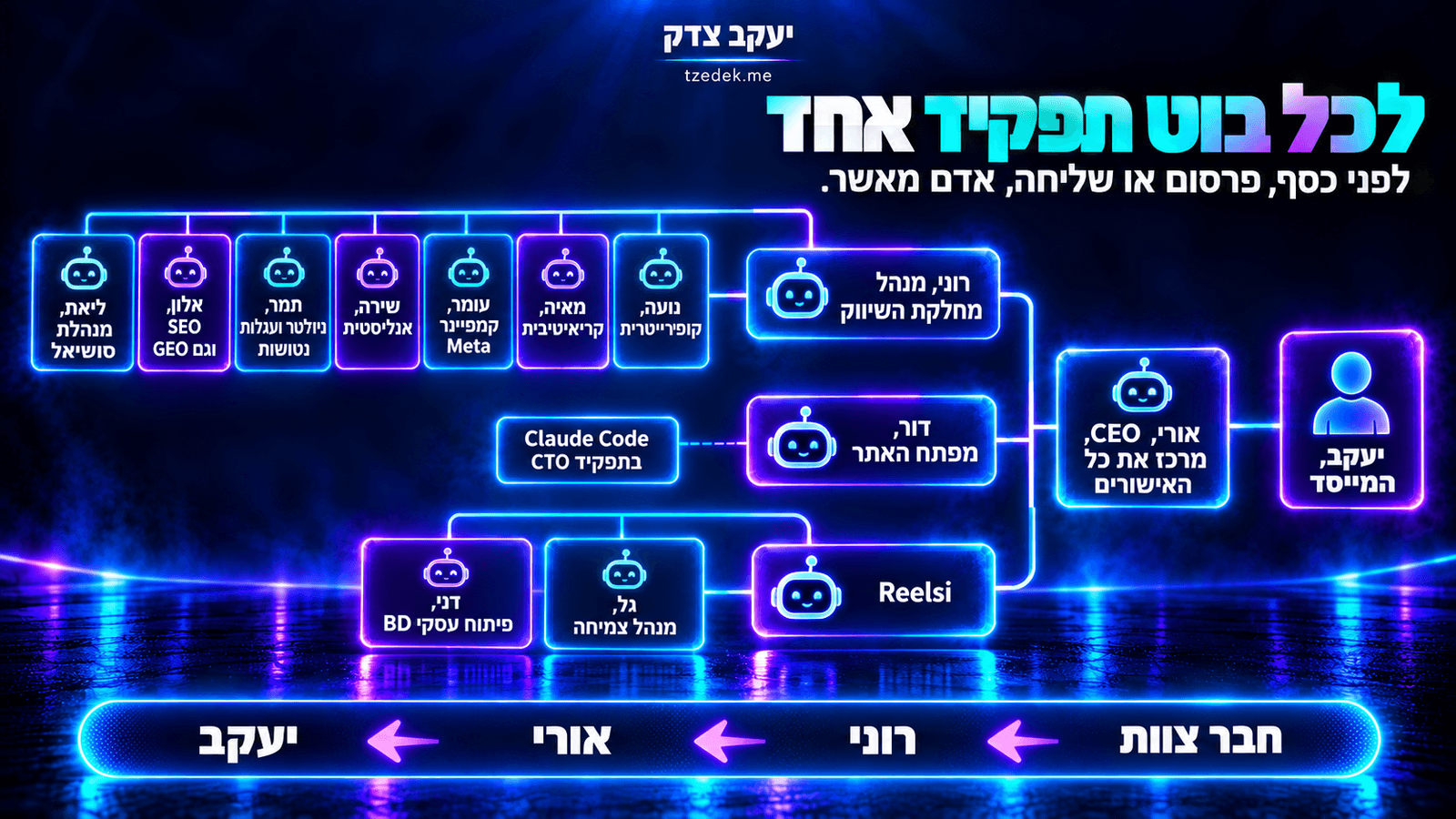
How do you build a team of AI agents in Grok Bot, divide responsibilities, set permissions, and run automated workflows? A practical guide with examples from the team I built for my own business.
By Yaakov Tzedek | AI Expert October 10, 2026 | Estimated reading time: 12 minutes
Instead of one bot that does everything, you can build an entire team
Until not long ago, most people used AI tools in a pretty straightforward way: open a chat, ask for something, get an answer, and move on to the next task.
But what happens when you have ten tasks that need to run in parallel? Writing website content, preparing an ad campaign, reviewing data, designing images, and scheduling next week's posts, all at the same time?
That is where the idea of an AI agent team comes in.
Instead of piling all the work onto a single bot, you can create several bots, each with a defined role. One bot handles content, another handles publishing, a third handles data analysis, and one more manages the whole process.
In Grok Bot you can build exactly that kind of team, letting bots work in parallel, communicate with each other, and hand tasks off from one to the next. [1]
The difference between creating a few bots and building a team that actually works in an organized way is significant, though.
Without defined roles, permissions, and working rules, problems pile up fast: two bots performing the same task, information crossing between clients, posts going live without approval, or actions being taken in the wrong system.
In this guide I will explain how to build a bot team in Grok Bot, how to manage it, and what rules to set before giving agents access to your business systems.
I will also walk through the structure of the bot team I set up for my own operation, including real examples of the workflows we actually run.
What is important to know before you start?
Before we get into the setup steps, there are a few principles worth understanding.
- Every bot needs a clear role. Just like a human team, everyone needs to know what falls within their area of responsibility.
- It is worth appointing a manager bot. It receives tasks, distributes them among team members, checks results, and consolidates approvals.
- Decide in advance which actions require human approval. Especially when it comes to spending money, publishing, sending messages, or making changes to live systems.
- Separate bots are not necessarily isolated environments. According to the system documentation, bots operating under the same account share computing resources, files, and connections. [2]
- Good automation starts with a manual process that already works well. First confirm the process produces the result you want, then turn it into a recurring automated action.
- You do not need to launch ten bots on day one. It is better to start small, make sure everything works properly, and expand the team gradually.
If you have not yet created your first bot, I recommend starting with the basic Grok Bot guide and getting familiar with the system before building a team.
1. How does a bot team work in Grok Bot?
Think of a small marketing agency.
It has a manager, a content writer, a designer, a campaign manager, and an analyst responsible for reviewing results.
Each person specializes in different work, but everyone needs to collaborate to reach the final outcome.
That is exactly the structure you can create with AI agents.
Say you want to launch a new campaign for a digital course.
Instead of asking one bot to do everything, you can define a process like this:
- The manager bot receives the course details and campaign goals.
- The content bot prepares marketing messages and ad copy.
- The design bot prepares the graphic materials based on the approved messages.
- The campaign bot builds the campaign in the advertising platform but leaves it turned off.
- The analytics bot reviews the settings, budget, and metrics you want to track.
- The manager bot reviews all the deliverables and consolidates everything that needs approval.
At the end of the process, the campaign is ready to launch, but no ad goes live without the pre-defined approval.
The main advantage is that each agent focuses on the area where it is supposed to excel, while the manager is responsible for the overall picture.
What is the difference between a manager bot and a regular bot?
The manager bot handles task distribution, coordination between team members, reviewing deliverables, and tracking progress on assignments.
The specialist bots handle the actual execution. Each one receives tasks within its area of expertise and returns a result according to the instructions set for it.
For example, a bot responsible for writing content should not decide on its own to launch a paid campaign. Its job is to produce quality content and pass it along to the next stage of the process.
This division matters especially as the number of agents grows and as you start connecting them to real business systems.
2. How do you define a role and responsibilities for each bot?
One of the most common mistakes when building AI agents is giving them instructions that are too general.
For example:
"You are my marketing manager. Take care of everything."
The problem is that this instruction does not define what exactly the agent needs to do, what decisions it is allowed to make, or when it needs to stop.
Instead, it is worth preparing a standing instruction document for each bot, which I call a mandate.
A mandate is essentially the agent's job description.
Just like onboarding a new employee, it is important to explain what is expected, who they report to, and what authority they have.
What should appear in the mandate?
Take a bot responsible for content writing as an example.
Bot name: Noa
Role: Copywriter on the marketing team.
Areas of responsibility: Writing ads, posts, landing pages, and marketing content in line with brand guidelines.
Direct manager: Roni, head of the marketing department.
Sources of information: The company website, brand documents, approved product information, and research materials provided to the team.
Actions permitted without approval: Research, information analysis, preparing drafts, and improving copy.
Actions requiring approval: Publishing content, sending messages to clients, changing content on the website, or any action that affects a live system.
Working rules: Do not invent data, do not promise results that cannot be substantiated, and do not use information belonging to another business.
Reporting format: At the end of each task, deliver the output to the manager, state what was completed, and flag any open questions or issues.
This is an example, of course. Every role requires instructions tailored to the nature of that work.
Why is it worth giving each bot a single role?
When a bot takes on too many areas of responsibility, it becomes harder to verify that it is doing each one well.
There is no reason, for instance, for a bot responsible for organic search to also manage a paid advertising account, unless there is a clear need for it.
On the other hand, there is no need to create a new bot for every small task either.
The goal is a logical division of work, where each agent has clear accountability and does not collide with another agent's work.
3. Permissions and approvals: how do you stay in control of the team?
This is one of the most important parts of the entire process.
When an AI agent is only writing drafts or analyzing information, a mistake is usually relatively straightforward to correct.
But the moment you give it access to an ad account, a website, email, or a payment system, the consequences of a mistake can be far more serious.
That is why you need to distinguish between two categories of actions.
Actions you can allow without additional approval
- Reading information from pre-defined sources.
- Conducting research and preparing summaries.
- Writing drafts and marketing content.
- Analyzing data and generating reports.
- Preparing campaigns without activating them.
- Creating files or working documents in an approved environment.
Actions worth requiring human approval for
- Activating campaigns and changing advertising budgets.
- Sending messages or emails to external parties.
- Publishing content on social media or the website.
- Making purchases or financial transactions.
- Deleting information or modifying important data.
- Making changes to live systems, especially when they affect clients.
This separation lets agents handle a large portion of the work independently, without giving them unlimited authority.
What protection mechanisms exist in Grok Bot?
According to the official documentation, Grok Bot includes mechanisms that allow you to require approval before certain actions, review sensitive operations, and hand control back to the user when human verification is needed. [4]
For example, when an action requiring approval is requested, the user can see what the agent is about to do and decide whether to allow it.
It is important to understand that the approval relates to the proposed action. It does not automatically undo actions that have already been carried out.
That is why relying solely on the system's built-in security mechanisms is not enough.
It is worth setting clear internal rules as well, especially when working with multiple bots and multiple systems.
How does this work in my team?
In the marketing department I set up, approval requests follow a defined path:
Team member, marketing department manager, manager bot, Yaakov
That way I do not need to receive a separate notification from every agent about every small action.
The manager consolidates the work, checks what is ready, and surfaces only the decisions that require my approval.
For me, this is the right way to combine advanced automation with control over the processes that matter in the business.
4. How do you prevent information from crossing between clients and businesses?
If you run an agency, work with several brands, or handle different clients, this section is especially important.
Suppose you manage two businesses: a course website and a social media management platform.
Each business has a different target audience, different pricing, campaigns, working documents, and sometimes sensitive information.
You certainly do not want an agent preparing a proposal for one business to accidentally use data from the other.
Does a separate bot provide full separation?
No.
According to Grok Bot's documentation, bots operating under the same account share a computing environment and certain resources, including files and connections. [2]
That means creating a new bot does not necessarily create a separate security environment.
This is why it is important to set working rules that prevent information from getting mixed up.
How to organize your working environment
A separate folder for each client or brand
Each client gets a dedicated working folder containing the documents, files, and materials relevant to them.
Clear information rules
The agent's mandate should specify which sources it is allowed to draw information from and which sources it must not use.
Separate accounts when necessary
When sensitive information is involved, or when mandatory separation is required, it is worth using separate accounts rather than relying on folders and agent instructions alone.
Check sources before using information
Whenever a bot prepares content, a report, or a proposal, it should always be possible to trace where the data came from.
Clean up the working environment when a project ends
When work with a client concludes, check which files, connections, and automations remain active and remove anything that is no longer needed.
In our case, for example, the activity of the course website tzedek.me is separated from the activity of Reelsi at the level of folders, information sources, and team working instructions.
It is important to emphasize that this is operational separation, not a substitute for genuine security isolation.
5. How Do You Turn Recurring Tasks into Automations?
Once you have a bot that works well, the next step is letting it handle repeating tasks without you having to trigger it manually every time.
In Grok Bot you can work with Skills and with automated Routines. [3]
The two concepts are related, but each one plays a different role.
What is a Skill?
A skill is a set of instructions that defines how to carry out a specific task.
For example, you can create a skill for producing a weekly marketing report.
It defines which sources to pull data from, which metrics to check, how to spot meaningful changes, and what format to use when presenting the results.
That way you don't have to explain the entire process from scratch every time.
What is a Routine?
A routine determines when to trigger a skill.
For example:
"Every Sunday morning, prepare a report on campaign performance from the past week and send it for review."
The routine kicks off the process at the scheduled time, and the bot carries out the work according to the instructions set in advance.
According to the documentation, routines can run even when your personal computer is off, at a fixed schedule or, where the connection is supported, in response to an event such as a Slack message or a GitHub alert. [3]
An Example of a Useful Routine in a Marketing Department
Say we want a morning summary of active campaigns every day.
You can define the following process for the bot:
- Connect to the approved data sources.
- Collect the previous day's data.
- Compare it to the prior period.
- Identify anomalies, such as a significant rise in cost per lead.
- Prepare a brief report presenting the findings.
- Send the report to the department head with recommendations for next steps.
The agent can handle all the research and analysis steps on its own.
But if it spots a campaign that needs a budget change, it doesn't have to make that change immediately. Depending on the rules you've set, it can prepare a recommendation and pass it on for approval.
This is an example of a process where AI saves daily work without giving up human oversight in the places where it's needed.
How Do You Know the Routine Actually Ran?
Setting up an automation and hoping it works is not enough.
Every routine needs to produce an output you can verify.
It's worth including in the report:
- When it ran.
- What task was performed.
- What deliverables were produced.
- Any problems encountered during the work.
- Actions waiting for approval or a decision.
According to the official documentation, the system also lets you review the execution history of your routines. [3]
We decided that every deliverable should include a clear status, so the managing bot can quickly identify which tasks are done and which still need attention.
6. Common Mistakes When Setting Up an AI Agent Team
You can create several AI agents in a relatively short time. The real challenge is getting them to work together reliably.
Here are some mistakes worth avoiding.
Trying to Build a Large Team on Day One
It's easy to get excited and create a bot for every conceivable role.
But if you haven't yet confirmed that even one workflow runs the way it should, adding more and more agents will only make it harder to track down problems.
Better to start with one bot, improve its instructions, and only then expand the team.
Not Defining Who Is Responsible for Each Task
When several bots share similar responsibilities, they can end up duplicating work or handing tasks back and forth with no one actually accountable for the outcome.
Every task should have a single responsible party.
Giving Agents Permissions That Are Too Broad
An agent responsible for writing content doesn't necessarily need permission to change ad budgets or make purchases.
The recommendation is to give each agent only the permissions its role requires, to whatever extent the connected system allows.
Relying on a Separation That Doesn't Really Exist
As we saw earlier, different bots in the same account may share files and access credentials.
So it's wrong to assume that simply creating separate bots prevents information from passing between them.
Running Tests in a Live System
Even an action defined as a test can change data or trigger a real process.
That's why we make sure that tests on a live site are read-only unless a different action has been explicitly approved.
When a significant change needs to be tested, a separate testing environment is preferable.
Letting an Agent Invent Missing Information
An AI agent may fill in details in a way that sounds convincing, even when the information has no basis.
That is exactly why you need to define how the agent behaves when information is missing.
One of our rules is that every important factual claim must be grounded in a source that can be verified.
If no suitable source exists, the agent should say so rather than present a guess as a fact.
Forgetting to Check for Conflicts Between Automations
Say you already have an automation that responds to a certain word in social media comments.
If you create another automation with a similar trigger word, both could fire at the same time.
Before activating a new automation, check the rules that are already in place in the system.
7. A Look at the Bot Team I Built in My Business
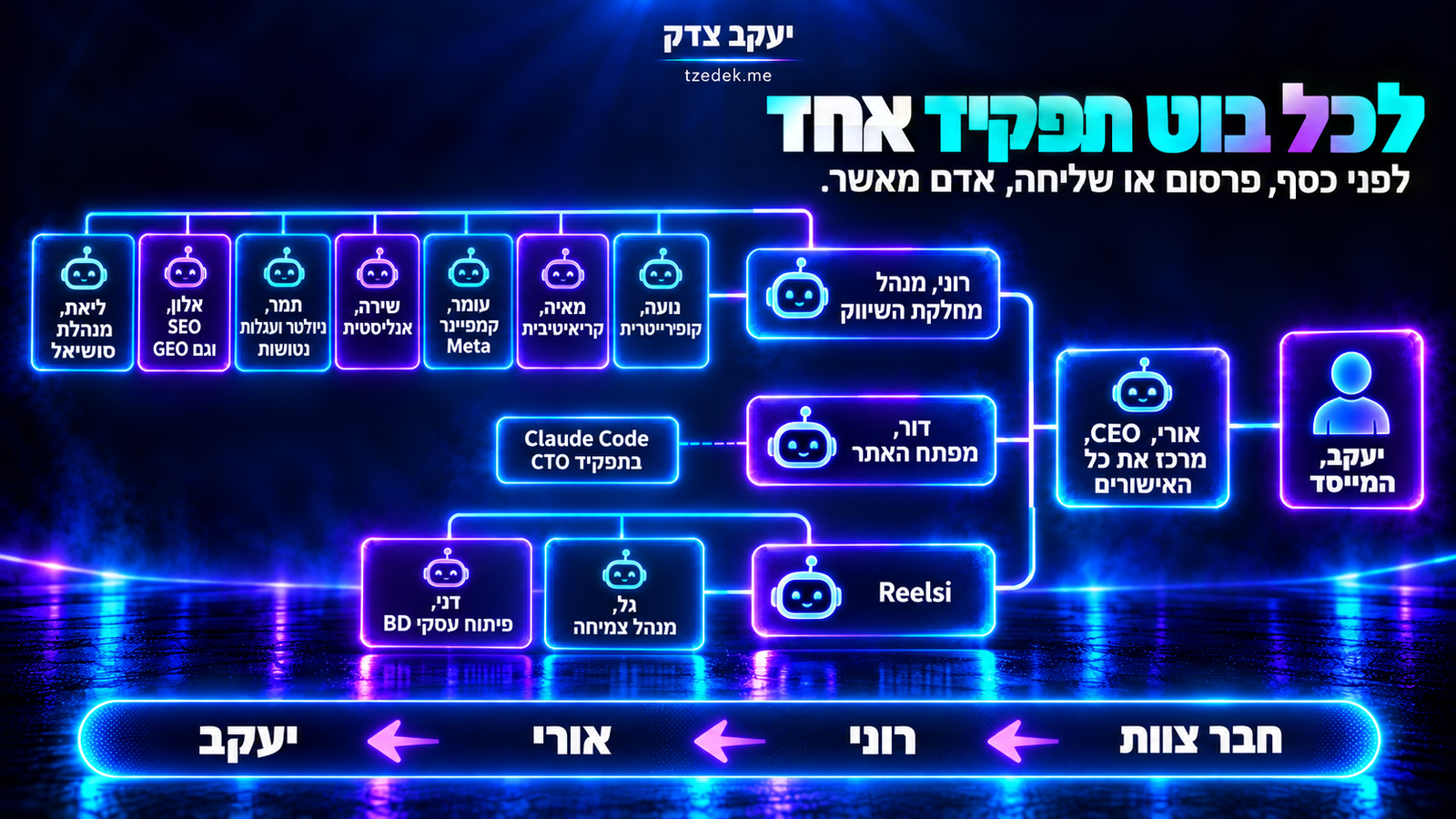
Up to this point we've been talking about principles. Now I want to show how they play out in real work.
My operation covers several areas that require ongoing work: content, marketing, campaigns, websites, business development, and digital products.
Instead of managing every task separately, I built a team structure where AI agents have defined roles and operate according to shared rules.
At the top of the structure is Uri, the bot who serves as the team's general manager.
Beneath him, department heads oversee the work of the specialist agents.
How the Team Is Built
| Name | Role | Responsibility |
|---|---|---|
| Yaakov | Founder | Final decisions and approvals |
| Uri | General Manager (CEO) | Team management and centralizing approvals |
| Roni | Marketing Manager | Coordinating the marketing department's work |
| Noa | Copywriter | Writing marketing content |
| Maya | Creative Designer | Preparing graphic materials |
| Omer | Campaigns Manager | Building campaigns in the Meta platform |
| Shira | Analyst | Data analysis and report production |
| Tamar | Email Marketing Lead | Newsletters and abandoned-cart workflows |
| Alon | SEO and GEO Expert | Organic promotion and visibility in AI engines |
| Liat | Social Media Manager | Content and activity management on social networks |
| Dor | Web Developer | Site maintenance and development |
| Gal | Growth Manager at Reelsi | Developing growth channels |
| Danny | Business Development at Reelsi | Business opportunities and partnerships |
In the development area, Claude Code is also used in a technical role. It is an external tool integrated into the workflow, not an additional Grok Bot agent.
It's important to note that not all agents operate with complete autonomy. Each one has defined areas of responsibility, information sources, and rules about which actions it may take.
How Does the Work Actually Run?
When I want to move a marketing task forward, I don't need to reach out separately to the copywriter, the designer, and the campaigns manager.
The task flows through the management structure I defined.
Roni is responsible for distributing tasks within the marketing department and reviewing the deliverables.
Uri coordinates team activity and the required approvals.
When an action requires my decision, the request reaches me after it has gone through the relevant review steps.
In other teams, such as the Reelsi operation, there is a management structure tailored to their area.
The goal is not to add management layers just for the sake of order, but to reduce the volume of manual work and route to me only the decisions that genuinely require my involvement.
8. Four Examples from Working with the Team
The best way to understand the advantages of an AI agent team is to look at real situations.
Here are four examples from our work over the course of a week.
First Example: Campaigns Built Without Going Live
The team was given a task to prepare campaigns for the video courses.
The agents built out the campaign structures, audiences, ads, and links.
But according to the rules we defined, all campaigns remained switched off.
They can only be activated after review and approval.
This lets you enjoy nearly fully automated work throughout the entire process, without risking ads going live before everything has been checked.
Second Example: Catching a Conflict Between Automations
In one workflow we prepared a series of posts asking users to reply with a keyword to receive additional information.
The chosen word was "bots."
During the review it turned out that an automation already existed that responded to the word "bot."
Because the two words are so similar, there was a real chance both automations would fire in response to the same comment.
The team caught the conflict before publication, and the trigger word was changed.
Since then we've required that every new trigger word be checked against existing automations.
It's a small example, but it illustrates why it matters to give agents instructions that account for the systems and processes already running in the business.
Third Example: Testing the Site Without Making Purchases
When an agent tests a website, it may encounter buttons, forms, and purchase flows.
Even if its only goal is to verify the site is working, clicking the wrong button can trigger a real process.
That's why we defined that routine checks on the live site are read-only.
The agent can open pages, read content, and analyze information, but it does not complete purchases or make changes without appropriate approval.
Fourth Example: Using Reliable Information Sources
For writing marketing content we set a simple rule: no inventing facts.
When a bot writes copy about a course, product, or service, it must rely on information from sources that have been approved for use.
If a detail is factually important, it should be possible to trace where it came from.
For this purpose we also use saved copies of pages and source documents, so it's possible to go back to the information the agent relied on.
If a specific detail is missing or unclear, the bot is not supposed to fill it in from imagination.
It should note that information is missing and request clarification.
9. How to Start Building Your Own Bot Team
You don't need a complex system to get started.
In fact, I recommend beginning with just one process.
Step One: Choose a Repeating Task
Look for something you do over and over in your business.
It could be summarizing meetings, preparing a report, writing content, or reviewing campaign performance.
It's best to pick a task with a clear, measurable outcome, so you can easily check whether the agent did it properly.
Step Two: Create a Bot with a System Prompt
Define the role, standing instructions, information sources, and working rules.
The clearer the instructions, the easier it is to evaluate the quality of the output and improve it.
Step Three: Test the Bot on Real Tasks
Before setting up any automation, run the bot manually a few times.
Check whether it understands the task, uses the right sources, and produces output you can actually use.
If the same mistakes keep coming up, fix the instructions before moving on.
Step Four: Save the Process as a Skill
Once you've reached a stable working process, you can turn it into a permanent skill.
That way the agent can run the same task again, following the working method you defined.
Step Five: Add an Automated Routine
If it's a task that repeats every day or every week, you can assign it a fixed scheduled time.
Make sure the routine uses up-to-date information, handles errors properly, and doesn't perform any unauthorized actions.
Step Six: Expand the Team Gradually
Only after the first process is working well should you add another bot.
Once you have several agents that need to work together, you can also create a manager bot to coordinate between them.
That's how you build a team gradually, out of genuine need, not just because the technology makes it possible.
The Bottom Line: A Good AI Agent Team Starts with Proper Management
The ability to run multiple AI agents in parallel opens up some genuinely interesting possibilities for businesses.
Tasks that once required coordination across several employees can now be handled by a team of digital agents, with each one responsible for a different part of the process.
But for that to work, it's not enough to create a few bots and connect them together.
You need to define roles, areas of responsibility, information sources, permissions, review processes, and approval rules.
In my experience, the meaningful difference isn't in the number of bots you have. It's in their ability to work together in an organized way and produce output you can actually rely on.
If you want to get started, pick one task you do repeatedly. Build an AI agent for it, give it a clear role, and verify that the output is good. Only then should you expand the process.
That's how you gradually build a digital team that does real work, rather than just another collection of AI chat windows.
Want to Learn How to Work with Grok Bot?
Grok Bot Video Course: From Chat to Digital Employee
In the course you'll learn how to set up AI agents, define their roles, connect them to business tools, and build automated workflows.
The learning is based on hands-on demonstrations, with real processes you can apply in your own business.
The first 3 lessons are free, no registration required.
Full course price: 297 ILS + VAT.
Sources and Further Reading
This article is based on the official Grok Bot documentation, the course training materials, and the workflows defined within Yaakov Tzedek's team.
[1] Grok Bot Documentation: General Overview https://docs.x.ai/grok-bot/overview
[2] The Computer and Apps Environment https://docs.x.ai/grok-bot/computer-and-apps
[3] Skills, Routines, and Automations https://docs.x.ai/grok-bot/skills-routines-and-automations
[4] Security, Permissions, and Approval Mechanisms https://docs.x.ai/grok-bot/security
[5] Grok Bot Video Course: Yaakov Tzedek https://tzedek.me/course/grok-bot-video-course
The case study is based on the team structure and workflows from October 9-10, 2026.
Yaakov Tzedek | AI Expert and Entrepreneur
Founder of Tzedek Media, Tzedek Academy, and a partner in technology and artificial intelligence ventures. He works on integrating AI into businesses and organizations, developing automation solutions, and training professionals in the practical use of artificial intelligence tools.
Frequently asked questions

Yaakov Tzedek
An Israeli AI lecturer, consultant and implementer who has supported 100+ organizations in AI implementation and lectured for 200+. Official content partner of Meta, Google, Canva and TikTok, featured on Israel's Channel 13.
More about Yaakov →