- Do: sort resident inquiries into a draft queue with human approval, draft minutes from notes, draft a weekly community update, summarize long email threads and prepare materials for a council meeting.
- Do not: residents' personal data, anything sent without a person, payments, and decisions.
- Cost: no standalone subscription. Entry points shown on the product page: 20, 30 or 40 dollars a month (the last one per seat).
In Grok Bot, all bots of the same user share one cloud computer and the same logins. A resident inquiries bot and a community updates bot on the same account are not separated from each other, even if you give them different names and roles.
Grok Bot came out of beta on 9 November 2026, and according to the company's announcement the new version brings shared bots for the whole team. On paper, a small village committee could get a digital secretary tomorrow morning that keeps working at night. That is not what will decide whether it works for you.
What decides it is where you draw the line between what the bot prepares and what a person sends. In a council, facing residents, that line matters more than in any business.
In short
- Do: sort resident inquiries into a draft queue with human approval, draft minutes from notes, draft a weekly community update, summarize long email threads and prepare materials for a council meeting.
- Do not: residents' personal data, anything sent without a person, payments, and decisions.
- Cost: no standalone subscription. Entry points shown on the product page: 20, 30 or 40 dollars a month (the last one per seat).
- How to start: one process, four weeks, one named owner, and only then expand.
- When not to start with a tool: when the team does not yet know how to work with AI. Then you start with training for the council.
What is Grok Bot?
Grok Bot is the agents product from SpaceXAI, launched on 11 August 2026 together with Cursor. Each bot is a persistent digital colleague with a name and a role, working on a cloud computer with a browser, files and a terminal, and carrying out tasks in real applications even when your own computer is closed.
The difference from a regular chat is the line of responsibility. A chat returns text and you act on it. A bot acts and you review. The full product review, including the model and the risks, is in the complete Grok Bot guide.
What can a village committee or council really do with it?
A professional review of the beta gave draft-first knowledge work a score of 7 out of 10, because a mistake only costs review time. That is exactly the kind of work that fills the day of a committee office or a council department:
- Sorting inquiries into a draft queue. The bot reads inquiries with identifying details removed, classifies them by topic (maintenance, education, events, billing) and prepares a draft reply. A person approves, edits and sends.
- Draft minutes from notes. A committee member uploads the meeting notes, and the bot returns a draft in a fixed structure: attendees, topics, decisions as recorded, tasks and owners. The decisions are checked against the notes, word for word.
- A draft weekly community update. The bot gathers what happened this week from documents you give it and prepares a short update. Posting to the group or the website stays in human hands.
- Summarizing long email threads. A fifty message thread with a contractor or a government ministry becomes one page: what was agreed, what is open, who needs to reply.
- Preparing for a council meeting. Collecting documents into one folder, a one page brief for each agenda item, and a list of open questions.
What does a good instruction for an inquiries bot look like?
The official documentation recommends building every request from five components: outcome, sources, constraints, deliverable and review point. In practice it looks like this:
"Outcome: a draft reply for every new inquiry in the folder, with a topic label. Sources: only the inquiry itself and the committee's procedures document. Constraints: plain, respectful Hebrew, no commitment to a date or a budget, and if the information is not in the procedures write 'complete manually'. Deliverable: one drafts file. Review point: do not send anything. Stop and tell me you are done."
According to the full guide, in a test on launch day a bot given an explicit "draft only" instruction respected it. Even so, the sentence that forbids sending is your main layer of protection, not a stylistic extra.
What should a council keep out of the bot?
Four areas stay outside the bot, even after the beta:
- Residents' personal data. All bots of the same user share a cloud computer and logins, and SpaceXAI explicitly warns that separate bots are not a security boundary. Cloud storage is mandatory in the product, and according to the documentation there are no documented compliance attestations (SOC 2, ISO 27001, GDPR, HIPAA). Before connecting anything, read the guide to working safely with AI on sensitive documents.
- Anything sent without a person. The product has no dry run, a test run does real work, and approval does not undo an action already taken. The same review rated customer service queues 4 out of 10.
- Payments and billing. No payment account, no billing portal and no financial action.
- Decisions. The bot summarizes and suggests. The committee or council decides, and the minutes record what was actually decided.
How much does it cost?
Grok Bot has no standalone subscription. As of 13 September 2026, the product page showed three entry points:
| Plan | Price on the product page | Who it fits in a committee or council |
|---|---|---|
| Cursor Pro | 20 dollars a month | One person running a pilot |
| SuperGrok | 30 dollars a month | One person who already uses Grok |
| Cursor Teams Standard | 40 dollars per seat a month | A team, with centralized billing and settings |
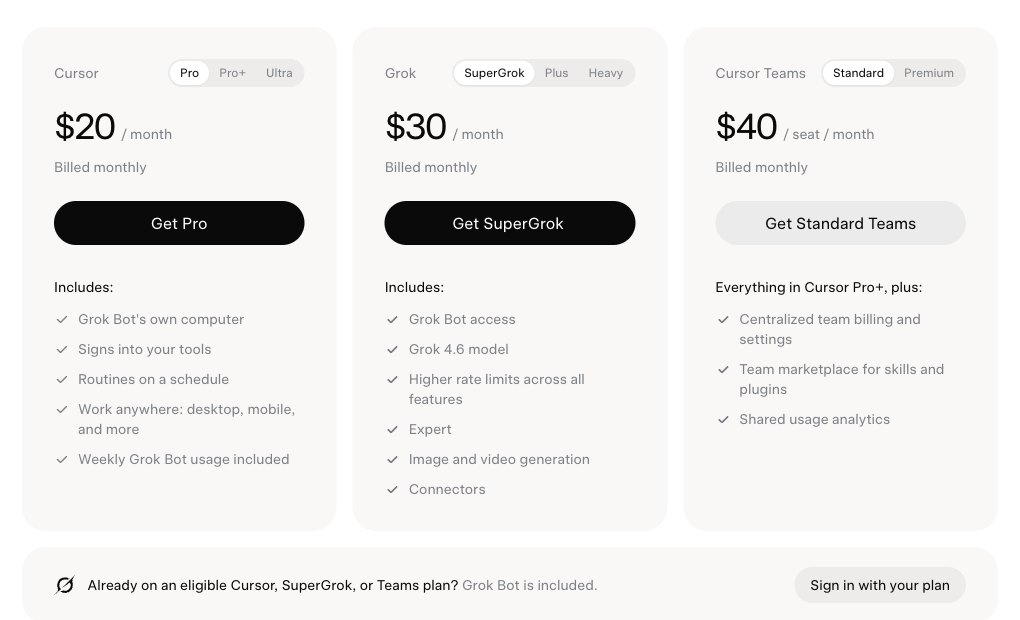
Credit: SpaceXAI, Grok Bot product page, 13.9.2026
Three rules from the plans page: the quota is weekly and resets every week, when it runs out you can continue with on demand usage against a monthly cap you set in the settings, and the free trial is a seven day usage credit. Check the official plans page for what is included today before you pay.
What does a council get on the organizational plans?
On Teams and above there are team rules that apply to all bots and automatic review instructions. Action recording, audit logs and network controls exist on the Enterprise plan. For a council that needs to know who did what and when, that is the difference between an experiment and a working tool.
How do you start safely? A four week plan
- Week 1: pick one process. Minutes or email summaries are best, because they are fully internal. Measure how long the process takes today, on three real occasions.
- Week 2: one bot, run manually. Write a charter with the five components, run it manually on real material with identifying details removed, and review every output.
- Week 3: fix and save. Fix recurring mistakes in the instructions. Save a stable process as a skill. Add a scheduled routine only if the output is reviewed every time.
- Week 4: decide by the numbers. How much time was saved, including review time, how often the bot failed, and what was actually paid. If it works, add a second process. Not a second bot before that.
Building a bot team, with a manager bot and approval gates, is covered in the guide to building a bot team in Grok Bot.
Who should own the bot?
One named person, not "IT" and not "everyone". In a council this is usually the head of the department whose process it is, and in a village committee it is the secretary or the committee member who writes the minutes today.
Ownership covers three things: who approves each draft before it goes out, who watches the usage quota and the cost, and who records what the bot did. On the personal plans there is no full audit log, so record keeping is a human job. An organization that already wrote an AI usage policy will find that some of these questions already have answers.
When does a council need training rather than a tool?
A bot speeds up what already exists. If the team knows how to write an instruction and review a draft, it speeds up good work. If not, it speeds up mistakes. Three signs that training should come first:
- Employees do not work with a chat tool at all yet, or use it only for general questions.
- There is no written policy on what may and may not go into an AI tool.
- Nobody knows how to spot a mistake in draft minutes or in a reply to a resident.
In that situation the right start is AI training for regional and local councils, where council employees practice on their own processes, or an AI lecture to open the process. An authority building a wider program will find the framework in the guide to an AI program for a local authority, and the budget and procurement questions in the guide to the cost of an AI workshop for a local authority and the guide to procuring an AI workshop.
What does this mean for your committee or council?
The right question is not "which bot should we buy" but "which single internal process eats most of our time, and can we check its output in ten minutes". If you have an answer, you have a pilot.
Grok Bot works in Hebrew and returns drafts and summaries in Hebrew. When the bot operates English websites, write the button name in the instruction exactly as it appears on screen. And for any Hebrew file, ask explicitly for right to left alignment and review the result.
Want your council or committee team to learn to work this way?
Yaakov Tzedek, AI lecturer, consultant and implementer in organizations, has lectured in more than 200 organizations and worked with authorities such as the Kfar Saba, Modiin and Maale Adumim municipalities. In the council training, employees practice on their own tasks: replying to inquiries, minutes, documents and updates for residents, with one clear first rule: identifiable resident details do not go into AI tools.
- AI training for regional and local councils: hands-on workshops for council employees.
- AI for local authorities: the wider picture for municipalities and authorities.
- Send a WhatsApp message or leave your details on the contact page.
Bottom line
Grok Bot can save a village committee or council hours of internal work: inquiries, minutes, updates and emails. It does that well when it prepares a draft and a person sends it.
What stays out of the bot: residents' personal data, sending without a person, money and decisions. Start with one process and one owner, and measure after four weeks. And if the team is not there yet, start with training.
Frequently asked questions

Yaakov Tzedek
An Israeli AI lecturer, consultant and implementer who has supported 100+ organizations in AI implementation and lectured for 200+. Official content partner of Meta, Google, Canva and TikTok, featured on Israel's Channel 13.
More about Yaakov →