
- On October 28, 2026, Google announced Chrome enhanced autofill can suggest form details from Gmail, including order numbers, shipment tracking, and flight bookings, powered by Gemini with Personal Intelligence. Launching in the US only, on desktop, Android, and iOS. What it is, what it means for Israel, a privacy checklist, and what businesses need to check in their forms.
In Google's official demo video, suggestions that come from Gmail are labeled "Suggested by Gemini · Gmail", with two options alongside: remove the suggestion or open the enhanced autofill settings. In other words, the menu itself shows you exactly where the information came from.
Chrome already knows your name, address, and credit card. Now it knows how to search your inbox too. Google announced that the browser's autofill will suggest order numbers, tracking numbers, and flight details in forms, pulled directly from Gmail. The convenience is obvious. The interesting question is who decides what the browser is allowed to open.
In short:
- What was announced: Chrome's enhanced autofill suggests details from Gmail in forms, using Gemini with Personal Intelligence. The announcement was published on Google's official blog on October 28, 2026.
- What details: Google's examples are order numbers, shipment tracking information, and flight reservations.
- Where: The United States only, on desktop, Android, and iOS, for Gemini in Chrome users who have enabled Personal Intelligence. Not in Israel.
- Control: According to Google, sensitive information is encrypted, and Chrome's settings let you determine whether the feature is active and what it can access.
- For businesses: Your site's forms are going to be filled in more and more by the browser. Now is the time to make sure they are built for it.
What exactly did Google announce?
Chrome can now suggest, while filling out a form, information pulled directly from your Gmail messages. The work is done by Gemini, Google's AI model, through a layer called Personal Intelligence that connects the assistant to the personal data in your Google account.
The announcement was written by a product manager on the Chrome team, and it is very short: four paragraphs. It explains that autofill has always handled the "basics" (name, address, credit card), and now it handles more. The examples Google chose are exactly the details we find ourselves hunting for every time: order number, tracking number, and flight booking code.
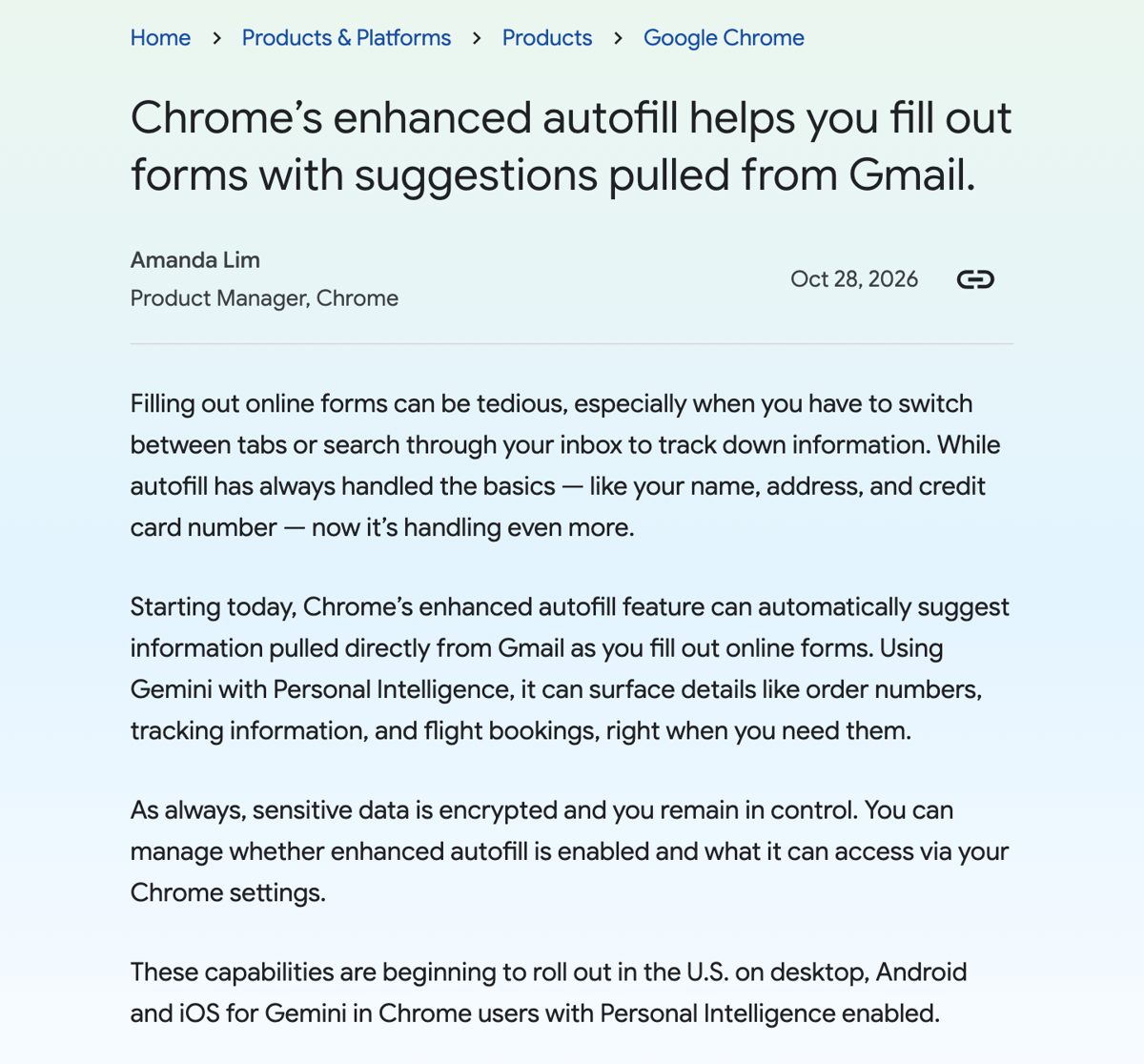 Screenshot: The official announcement on Google's blog, blog.google, October 28, 2026
What does it look like in practice?
In the demo video Google included, a user opens the check-in page of an airline (a mock site). She clicks on the "booking code" field, and below the field the standard autofill menu opens. Inside it, however, a new section appears: "Suggested by Gemini," with her flight booking code.
The important part of the demo is the sub-menu. Next to the suggestion, the source is shown as "Suggested by Gemini · Gmail," along with two options: remove the suggestion, or open enhanced autofill management. In other words, you can see where the information came from before you choose it.
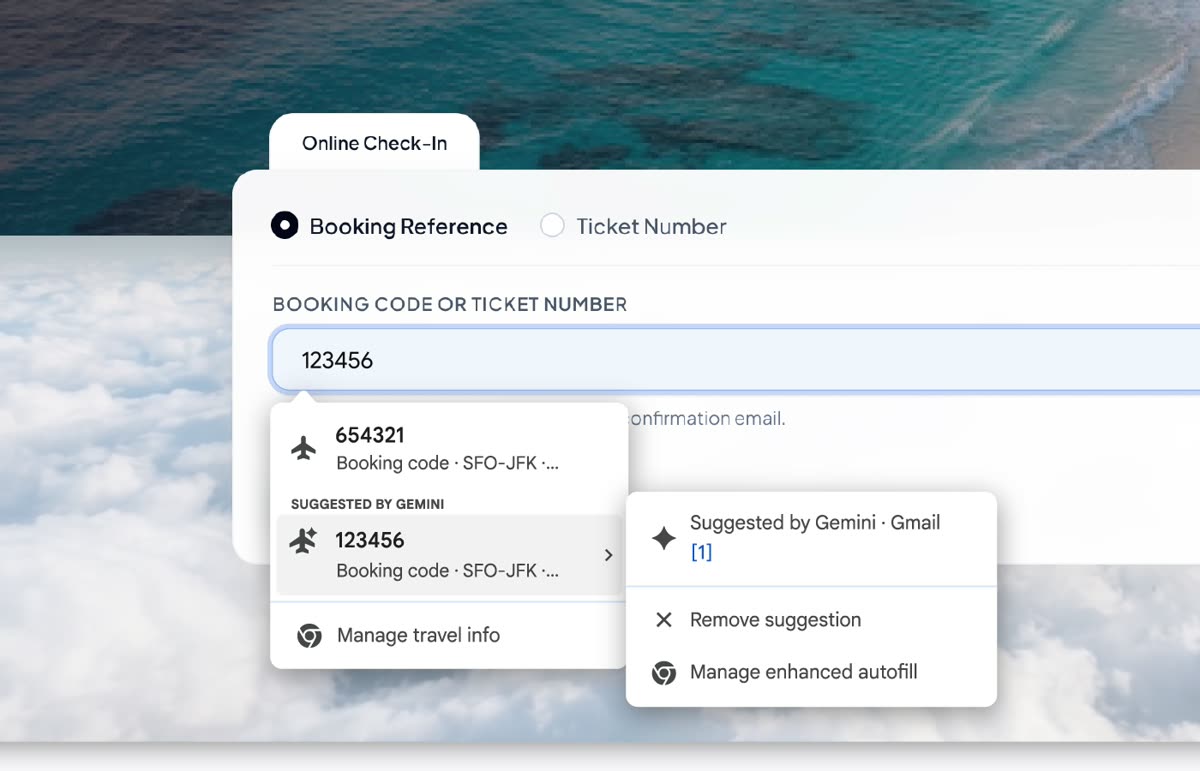 Screenshot: From Google's official demo video attached to the announcement, blog.google
Is this completely new, or a continuation of something existing?
A continuation. "Enhanced autofill" is not a new name, and what has been added now is Gmail as a source. Already at the end of 2025, Google expanded Chrome's autofill to pull details from your Google account and from Google Wallet, such as flight details saved in the wallet.
In the summer of 2026, an experimental version called Find and Fill with Gemini also surfaced in the Chrome development build (Chrome Canary). According to Android Authority's report from July 20, it searched for information in Gmail, Google Photos, and additional connected apps, and was triggered by typing "@@" in a field. Yesterday's announcement mentions only Gmail, and does not refer to Photos or that shortcut. It is therefore worth not assuming that everything seen in the experiment made it into the released version.
What is the situation in Israel?
The short answer: the new feature is not available in Israel. According to the announcement, the rollout "begins" in the United States, on desktop, Android, and iOS, and only for users of Gemini in Chrome who have enabled Personal Intelligence. Google gave no timeline for expansion.
There are two conditions here, and both need to be met. The first is Gemini in Chrome itself: in June 2026 Google expanded it to Latin America, Africa, and the Middle East, but in the lists we checked we found no explicit official confirmation that Israel is included. The second is Personal Intelligence, which Google described in June as available on desktop to Google AI Plus, Pro, and Ultra subscribers. The new announcement does not specify whether a subscription is required.
The practical bottom line: if you are in Israel, you will not see suggestions from Gmail for the time being. Anyone who wants to understand how Gemini works today and what is already available here will find the full picture in the complete guide to Gemini.
Privacy checklist: what to check before turning it on?
Google writes that sensitive information is encrypted and that you decide whether the feature is active and what it can access. That is a general commitment. Before enabling it, when the time comes, it is worth going through five points:
- Where to turn it off. In the experimental version, the setting sat in Chrome's settings under Autofill and passwords, then Enhanced autofill. It is worth knowing where the toggle is before something surprises you.
- What is sent to Google. The settings of the experimental version stated that the titles and addresses of pages where the feature is used are sent to Google and may be reviewed by humans, and that the information actually filled in is not visible to anyone and is not used to train models. It is not clear whether the wording is identical in the final version, so it is worth reading the actual screen.
- Separating personal from work. One Google account in the browser is also the work inbox, if it serves both purposes. Anyone who keeps client emails in the same account needs to ask whether they want the browser searching through them.
- Shared computers. On a computer used by multiple people, suggestions from your email will appear to anyone who opens your profile in Chrome.
- Removing individual suggestions. According to the demo, every Gmail suggestion is labeled as such and can be removed. Use this when a suggestion is not appropriate, rather than turning everything off.
For anyone managing client data in an organization, the next step is understanding what the law requires. We have written a detailed guide on this: AI and Amendment 13 to the Privacy Protection Law.
What does this mean for your business?
The browser is becoming an intermediary layer between the customer and your form. It no longer just remembers what people typed before; it actively searches for relevant information on its own. From this come three practical implications, even before the feature arrives in Israel.
Customer service forms. The "order number" field is one of the places where customers get stuck, type incorrectly, or simply give up and call. When the browser suggests the number from the confirmation email, there is a better chance the inquiry will arrive with the correct detail. That does not guarantee fewer inquiries, but it does reduce friction at a painful point.
Forms need to be machine-readable. Autofill, with or without AI, works better when fields are built correctly. Three checks you can do in a single workday:
- Clear labels. "Order number," not "code." A field with an ambiguous name is hard to match.
- Proper autocomplete attributes. Name, phone, email, and address with the standard HTML values, so the browser does not have to guess.
- Consistent formatting. The order number in the confirmation email should appear in the same format and under the same label as in the inquiry form. If the email says "Order no. 4471" and the form asks for "Transaction ID," you are making things harder for every tool, and for the customer too.
Checkout and confirmation emails. Your confirmation email becomes a data source for the customer's browser. A well-structured confirmation email, with a prominent order number and clear shipping details, is not just good service. It is also what will allow tools like this to work in your favor. Anyone building their own service assistant will find a complete process in the guide to building an AI customer service agent in Hebrew.
On the organizational side: it is worth deciding now what your policy is on AI assistants in the browser, before every employee decides on their own. Google's feature is just one of several. Claude for Chrome also brings an AI assistant into the browser, with similar questions around permissions. The principle we recommend is the same across all tools: the draft rule. The AI suggests, a human approves.
What is still unknown?
The announcement is short, and several open questions remain. Will the feature work in organizational Google Workspace accounts, and what control options will system administrators have? Is a paid subscription required? And when, if ever, will it expand to additional countries and to Hebrew?
Until there are answers, now is the time to get your forms and your policies in order. The related story from today: Google is also expanding Gemini's integration with your apps, and we covered its new advanced model, Gemini 4 Carbon, separately. All of these are parts of the same picture: an assistant that knows your data and operates inside the tools you already work with.
The bottom line
An order number is a small detail, but it signals a large shift: the browser is no longer waiting for you to type, it is searching on your behalf. For users, that saves minutes. For businesses, it is a reminder that their forms and confirmation emails are now being read by machines too, and that it is worth building them accordingly.
Want your team to work with AI assistants without exposing sensitive information?
Every organization already has employees running AI assistants in the browser and in email, usually without a written policy. In AI workshops for organizations, the team learns to work with these tools in practice, and in the same session you define what is permitted to connect, to which accounts, and with what approval. Anyone who wants a situation assessment first can start with the AI readiness scan, which takes just a few minutes.
Sources:
- Google: Chrome's enhanced autofill helps you fill out forms with suggestions pulled from Gmail (28.10.2026)
- Google: Gemini in Chrome expands to Latin America, Africa, the Middle East and more (10.6.2026)
- Android Authority: Find and Fill with Gemini in Chrome Canary (20.7.2026)
- Google: 4 new ways Chrome autofill will simplify your holidays
Frequently asked questions

Yaakov Tzedek
An Israeli AI lecturer, consultant and implementer who has supported 100+ organizations in AI implementation and lectured for 200+. Official content partner of Meta, Google, Canva and TikTok, featured on Israel's Channel 13.
More about Yaakov →