- ChatPDF lets you chat with any PDF and get answers with page citations. How it works, pricing, Hebrew support, the scanned-file problem, and how it compares to NotebookLM and Claude.
ChatPDF does not actually "read" your document the way a person does. It breaks the file into chunks, converts each chunk into a numeric vector, and on every question it retrieves only the relevant chunks to send to GPT. That is why it is blindingly fast (3-5 seconds) even on a 1,000-page document, and also why it sometimes misses the big picture that only emerges from reading the whole thing in sequence.
What Is ChatPDF: The Short Answer
ChatPDF is a tool that lets you upload a PDF and have a natural-language conversation with it: ask questions, request a summary, pull out a specific figure, or make sense of a complicated clause, and get an answer in seconds, including a reference to the exact page the information came from. It was one of the first AI products to explode in popularity in early 2023, built around a simple idea: connecting ChatGPT's capabilities to your own specific document. But before you go any further, there is one critical fact that Israeli readers need to know: ChatPDF can only read documents that contain a text layer. A scanned document, a photographed government form, an old contract that went through a scanner, a filed invoice, simply will not be read, because the tool has no real OCR engine. In other words: if your PDF was created digitally (from Word, Google Docs, or a system export), ChatPDF will work great in Hebrew too. If it is a scan of paper, you will need to convert it to text first.
That is the point that almost every Hebrew article about this tool skips over, which is why it opens this guide. In practice, a large share of the documents Israelis want to "question", forms, contracts, legal documents, old study materials, are scanned. If that is your situation, jump straight to the Hebrew section below.
Definition: "Chatting with a PDF" (Chat with PDF) refers to a method in which a large language model (LLM) is given access to the contents of a document and can answer free-form questions about it, instead of searching for keywords or scrolling manually. Under the hood, the document is broken into chunks, each chunk is converted into a numerical "vector" that represents its meaning, and with every question only the relevant chunks are retrieved and fed into the model alongside the question. This method is called RAG (Retrieval-Augmented Generation), and it is the foundation of virtually every "chat with your documents" tool available today, from the smallest to the enterprise-grade.
This guide is part of a series in which we cover the leading AI tools in depth. If you want the big picture of who leads in each category, it is worth reading the comparison of leading AI models as well. And if your real task is researching a collection of documents rather than a single file, it is worth getting familiar with the complete guide to NotebookLM first. It is probably a better fit, and it is also free.
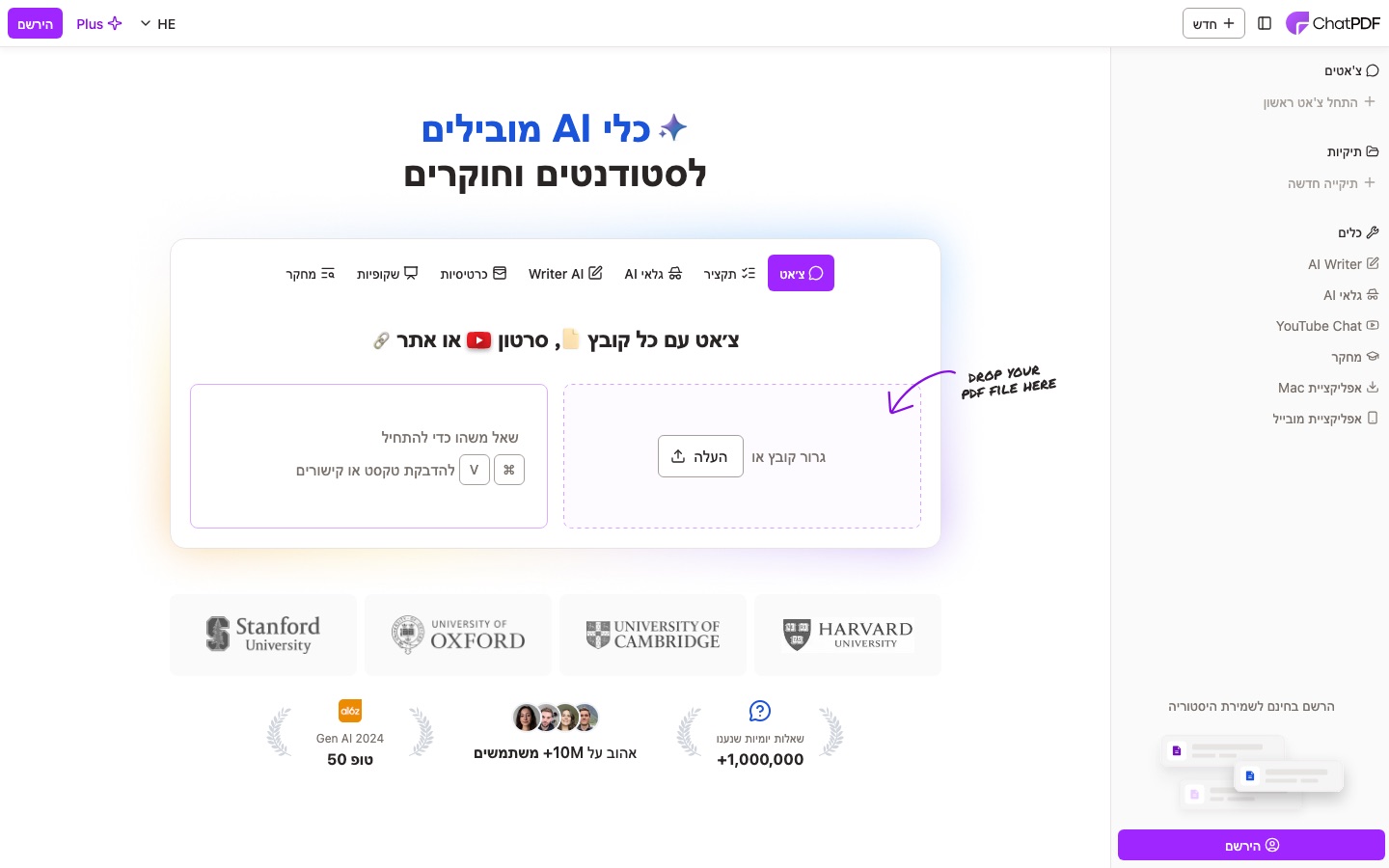 The official ChatPDF website, photographed in September 2026. Credit: ChatPDF
Why Everyone Was Talking About ChatPDF: The Story Behind the Tool
To understand ChatPDF in 2026, you need to go back to early 2023. ChatGPT had just exploded into public consciousness, but it had one glaring limitation: it could talk about general knowledge, but it could not read your specific document. Mathis Lichtenberger, an independent developer from Germany, spotted the gap and quickly built a simple product that addressed it precisely: upload a PDF, get a chat. The product launched in early 2023 and rapidly became one of the first success stories of the AI wave. Within a year of launch, ChatPDF ranked among the most-visited sites in the Generative AI category worldwide.
It is important to understand the fundamentals: technically, ChatPDF is a smart wrapper around OpenAI's API. Early versions ran on GPT-3.5, and later versions were upgraded to more powerful models from the GPT family. It never trained its own model. Its value lies in the user experience: a clean, fast workflow with no complicated sign-up process, turning a document into a "conversation" in a matter of seconds. That is also why it is so fast, and also why it does not, at its core, do anything that a general-purpose language model cannot do on its own today.
This story matters not for nostalgia, but because it teaches a lesson that keeps repeating itself across the AI market: a product that is entirely a wrapper over a large model's capability is living on borrowed time. The moment the capability itself (reading a PDF and answering questions about it) becomes a standard, free feature built into general-purpose models, the wrapper loses its reason to exist, unless it adds its own unique value through workflow, integrations, or a distinctive experience. That is exactly what happened to "chat with PDF": in 2023 it was a product; in 2026 it is a button inside ChatGPT, Claude, and Gemini. ChatPDF survived on the strength of speed and simplicity, but its territory has shrunk.
💡 From the field: ChatPDF is a perfect example of what happened to the entire generation of "single-task" tools from 2023. When I built my first tool on top of the OpenAI API, I also thought the wrapper was the product. But in 2026, my clients ask me exactly the opposite question: "Why should I pay for a wrapper when Claude or Gemini will read the same PDF for free inside the regular chat?" It is a legitimate question, and we will come back to it honestly in the comparison section.
How ChatPDF Works: Step by Step
The basic workflow is deliberately simple, and that is a large part of its appeal:
- Upload the document. Go to the ChatPDF website (or the iPhone app), drag a PDF into the window or paste a link to a document. The free tier has a file-size limit and a cap on the number of pages.
- Processing (indexing). The tool breaks the document into chunks, converts each chunk into a vector, and builds an internal index. This takes a few seconds even for long documents.
- Ask a question in natural language. In the chat box, type a question: "What is the advance notice period in this contract?" or "Summarize chapter 4 for me in three sentences." You can write in Hebrew.
- Answer with a citation. The tool retrieves the relevant chunks, feeds them to the model, and returns an answer, usually with a reference to the page number from which the information was drawn. This lets you verify and return to the source.
- Follow-up questions. You can keep asking about the same document, ask for clarifications, translate a passage, or request a list of key points.
The standout advantage of this workflow is speed: on a clean textual PDF, ChatPDF returns an answer in 3-5 seconds regardless of the document's length, because it never "reads" the entire document. It retrieves only what is relevant to the question.
What This Means in Practice: And Why You Need to Understand It
Understanding that ChatPDF retrieves chunks rather than reading everything sequentially is not a minor technical detail. It changes how you need to work with it. When you ask a specific, targeted question ("What is the penalty for late payment in clause 12?"), the tool is in its element: it will find the relevant chunk accurately and answer well. But when you ask a question that requires reading the entire document and drawing an overall picture ("Is the tone of this report optimistic or cautious?", "Is there a contradiction between chapter 2 and chapter 9?"), this method is prone to failure, because the retrieved chunks do not necessarily cover everything needed to answer.
This is precisely the difference that separates ChatPDF from a model that reads the whole document in its context window, like Claude with long documents. So the practical rule is: ChatPDF is excellent for "find me X," less good for "understand the document as a whole." Once you recognize that you are asking for a broad, holistic understanding rather than a specific retrieval, that is the signal to switch to a more capable tool.
Definition: A context window is the amount of text a language model can "hold in mind" at once while generating a response. Modern models can hold hundreds of thousands of words at a time, enough to read an entire book in sequence. A retrieval-based tool like ChatPDF, by contrast, feeds the model only selected chunks, which saves on cost and time but gives up the "full picture" view.
Core Capabilities
Free-Form Questions with Page Citations
The core feature. Instead of running a "Ctrl+F" search for an exact word, you ask a question as you would to a person. Answers come with page references, which makes the tool genuinely useful for research, study, and verification. You can always return to the original page and check that the answer was not fabricated.
Fast Summarization of Long Documents
One of the most popular use cases: upload a 30-page academic paper or a 200-page report and ask for a summary, the key points, or "what is new here." This saves hours of initial reading.
Support for Multiple File Types (New in 2026)
ChatPDF previously supported only PDFs. The 2026 versions expanded support to PowerPoint presentations (PPTX) and ePub files (digital books), a natural extension for the student and researcher audience it serves. It still handles one file at a time.
Multilingual Responses
The tool supports questions and answers in more than 20 languages. You can, for example, upload an article in English, ask about it in Hebrew, and receive an answer in Hebrew. This is highly practical for anyone reading professional material in a foreign language. Important: this only works when the document contains a readable text layer.
Conversation History and Document Storage
ChatPDF saves the documents you have uploaded and your past conversations, so you can return to a document weeks after questioning it and pick up where you left off. The free tier has a limit on the number of saved documents; paid plans unlock a much larger library. You can also share a conversation or document with a colleague, which makes the tool useful for small teams working on the same material.
Mobile App
Beyond the browser version, there is an official iPhone app that lets you upload a document from your phone (for example, a file that arrived by email or WhatsApp) and question it on the go. This is especially useful for grabbing a quick answer from a document while moving around, but again, subject to the same constraint: the document must be text-based, not a scan.
Hebrew: What Works and What Doesn't (The Most Important Section)
This is the section that prompted this guide, because this is where most Israeli users run into trouble.
What works: If your PDF was created digitally, meaning it has a real text layer you can select and copy, ChatPDF handles Hebrew just fine. You can upload a Hebrew article, presentation, or report, ask in Hebrew, and get an answer in Hebrew. The engine behind the tool is from the GPT family, which is very strong in Hebrew, so the quality of comprehension and phrasing in Hebrew ranges from reasonable to good. Quick test: if you can select text in the file with your mouse and copy it, there is a text layer, and ChatPDF will work.
What doesn't work, and this is the big problem: ChatPDF has no real OCR engine. A scanned document is essentially an image of pages stored inside a PDF. There is no text the computer can read, only pixels. When you upload such a document, the tool simply finds no text, and you get a response along the lines of "I was unable to read the text from the scanned document." In Israel this is a particularly concrete problem, because a large share of the documents people want to query are scanned: government forms, old rental contracts, bank documents, photographed study materials, old court rulings.
The solution: You first need to run the document through OCR software to generate a text layer, and only then upload it to ChatPDF. But pay close attention to Hebrew: generic OCR that is not adapted for right-to-left (RTL) writing can reverse the letter order and produce gibberish. For Hebrew you need an OCR tool that explicitly supports RTL. Adobe Acrobat does this reasonably well, and there are also dedicated Hebrew tools. A more practical and faster alternative: simply upload the photo or scan directly to Claude or Gemini. Both models include computer vision and can "read" an image of a Hebrew page and answer questions about it, including reasonable handwriting, with no separate OCR step. This is exactly the case where a general-purpose tool beats the specialized one.
💡 From the field: When a client sends me a scanned government form and asks "why does ChatPDF say it can't read this," my answer is always the same: your document is an image, not text. I tell them to simply photograph the page, drag the image into Claude or Gemini, and ask there. In 2023 that felt like magic; in 2026 it is routine. This is the most important mindset shift I teach in every AI workshop for organizations: don't go looking for a tool for every task. Understand when a general-purpose model already gets the job done.
How to convert a scanned document to readable text, step by step:
- Check whether the document is actually scanned. Try to select text in the file with your mouse. If you cannot select a single letter, it is a scan and you will need OCR.
- Choose an OCR tool that supports Hebrew RTL. Adobe Acrobat (paid) does this reasonably well. Dedicated Hebrew services and free OCR tools exist as well, but many of them reverse the letter order in Hebrew. Test on one page before you trust them.
- Run OCR and save a new PDF with an embedded text layer ("Searchable PDF").
- Upload the new file to ChatPDF. It will now be readable.
- The fast alternative: Skip the whole process. Photograph the page with your phone, drag the image into Claude or Gemini, and ask directly. These models "see" the Hebrew page and handle reasonable handwriting too, with no separate OCR step.
Business Use Cases in Israel: Real Scenarios
Lawyers and legal professionals. Receiving a 40-page contract before a meeting? Instead of reading the whole thing, upload the file (the digital one!) and ask focused questions: "What are the exit clauses and what are the conditions for invoking them?", "What is the minimum commitment period?", "Is there an indemnification clause, and in whose favor?", "What is the dispute resolution mechanism: arbitration or court?" Every answer comes with a page number, so you can jump straight to the clause and verify with your own eyes. Double warning: for scanned contracts you need OCR first, and for documents covered by attorney-client privilege, do not upload without a secure business environment.
Academia and research. Upload a paper, chapter, or thesis and ask: "Summarize the research question, methodology, and central finding in three sentences," "What limitations do the researchers acknowledge?", "What is the contribution relative to prior research?" Especially useful for quickly screening a large number of papers before deciding which ones deserve a full read. Important: for working on a collection of papers at once, NotebookLM is better because of its multi-source support.
Analysts and finance. A financial report, market report, or long prospectus: "What is the bottom line?", "What risks are mentioned in the risk section?", "What grew, by what percentage, and compared to which period?" Here extra caution is mandatory. Extracting data from complex tables is a known weak point of every "chat with PDF" tool, ChatPDF included. Always open the page the tool cited and verify every number before using it in a decision.
Human resources and operations. Query a procedures manual, collective agreement, or policy document: "What is the procedure for reporting absence?", "How many sick days are provided under the agreement?" A fast way to give employees answers without manually searching through a long document, as long as the document is not confidential.
Students. Upload a course presentation (PPTX) or textbook (ePub), request a summary before an exam, practice questions, and ask for explanations of complex concepts. A nice combination: query the material in ChatPDF while building a broader study workflow around it with the tools we cover in the free courses.
For anyone who wants to take this further and connect document querying into an organization's automated workflow, it is worth understanding the concept of AI agents and the MCP protocol, which lets you connect data sources (including document repositories) directly to Claude. In that direction, a consumer tool like ChatPDF is only the starting point. That is exactly what we cover in AI consulting and implementation for organizations.
💡 From the field: One line I repeat most often in front of managers: "A consumer tool solves a task for you; a workflow solves a process for you." ChatPDF solves "I have a document, I have a question." But a real organization does not want to answer one question. It wants every new incoming contract to be read automatically, checked against a list of red-flag clauses, and flagged if something is missing. No "chat with PDF" tool does that, and that is exactly where agents come in.
What Is New in ChatPDF in 2026
Anyone who knew the tool in its original 2023 form will find several cumulative changes:
- Beyond the PDF-only world. Support has been added for PowerPoint (PPTX) presentations and digital books in ePub format, an adaptation aimed at students and researchers.
- Much longer documents. The per-file page limit has increased significantly on higher-tier plans (up to thousands of pages per file), making it possible to query books and especially long reports.
- A more generous free tier than before in terms of permitted file size.
- An official mobile app.
- A more up-to-date model. While the first version ran on GPT-3.5, the tool now relies on stronger models from the GPT family, improving comprehension quality, including in Hebrew.
What has not changed, and this is worth saying honestly: the tool still works on one document at a time, and it still has no real OCR. Both core limitations remain.
ChatPDF vs. the Competition: Comparison Table
| Criterion | ChatPDF | NotebookLM (Google) | Claude, Projects | Adobe Acrobat AI |
|---|---|---|---|---|
| Single document vs. collection | Primarily one document | Up to dozens of sources in a notebook | Multiple documents in a project | One document or a few files |
| Response speed | Fastest (3-5 seconds) | Fast | Medium (deep analysis) | Medium |
| Understanding long or dense documents | Solid basic | Good, source-grounded | Strongest | Reasonable |
| Source citations | Page numbers | Citation by source | Citation in the response body | Reference in document |
| Scanned document (OCR) | Not supported | Partial | Reads as image (vision) | Built-in OCR |
| Hebrew | Good (text only) | Good | Very good | Good (including OCR) |
| Price | Free / ~$5-20 | Free | Part of subscription | Part of Acrobat subscription |
The honest conclusion: ChatPDF is no longer the only tool in town, and it is not the best for most serious tasks. The advantage that remains is speed and simplicity for the classic case: a quick question about a single text-based PDF, no sign-up, no effort. For anything beyond that, there are stronger tools. For a detailed look at the differences between the leading models, see the comparison of Claude and ChatGPT and the overview of leading AI models. And for anyone looking for web-sourced search rather than a single document, Perplexity is a completely different direction.
A Simple Decision Tree: What to Choose When
To save you the deliberation, here is the rule I give clients:
- One document, text-based, a specific question, and you want an answer now → ChatPDF. Speed and simplicity win.
- Multiple documents, and you want to ask a question that cuts across all of them → NotebookLM. It was built exactly for that, and it is free.
- A long, dense document that requires deep understanding, drawing conclusions, or producing a report → Claude with documents. It reads everything in sequence and reasons deeply.
- The document is scanned (an image) → Claude or Gemini with vision, or OCR first and then any of the tools.
- Confidential or sensitive documents at an organizational scale → a secure business environment, not a consumer tool.
- You already pay for ChatGPT, Claude, or Gemini → just upload the PDF to the regular chat. There is no reason to pay for a separate wrapper.
The right choice is almost never "the most sophisticated tool" but rather "the tool that fits the specific task." That is exactly the skill I try to teach. See the guide to choosing an AI model.
Pricing and Plans
ChatPDF offers a genuinely usable free tier, typically limited to a small number of files per day, a quota of questions per file, and a cap on pages per document. For occasional use, the free tier is usually enough.
The paid plans (known by names such as Plus and Max) dramatically raise those limits: more files per day, much longer documents (up to thousands of pages per file), and higher question quotas. On exact pricing, sources differ: some cite around $5 per month for the basic paid plan and around $15 for the top tier, while others mention a more expensive plan at around $20 per month. The discrepancy likely reflects plans that changed over time. For that reason, as of July 2026, it is worth verifying the current price directly on the site before purchasing, and bear in mind that billing is in dollars.
A simple financial tip: before paying for ChatPDF, ask yourself whether Claude or Gemini, which you may already have, can handle the same task within an existing subscription.
Privacy and Security: What You Need to Know
This is a section you cannot skip, especially if you are considering uploading work documents.
What is protected: The traffic between your browser and ChatPDF's servers is encrypted with SSL, just like any modern website. This protects the document in transit, during the upload.
What is less protected: The document itself is uploaded to an external server and processed through OpenAI's API. That means the text of your document passes through at least two third parties (ChatPDF and OpenAI). For a personal document, a public article, or study material, that is perfectly fine. But for a document containing sensitive personal information (ID numbers, medical records), trade secrets, or data subject to regulatory or legal confidentiality obligations, this is a real risk. Do not upload such documents without explicit authorization and without understanding the data retention policy.
For organizations: If you need to process sensitive documents at scale, this consumer tool is not the solution. A better option is a business environment with a clear contractual commitment that your data will not be used for model training, with access controls in place, such as Claude in an enterprise configuration or running the model through a cloud provider you already work with under an existing agreement. These privacy and architecture considerations are the kind of thing we work through together with organizations in AI implementation consulting.
Advanced Tips
- Specific questions, not general ones. Instead of "What is this document about?", ask "What are the three main risks mentioned in the risks chapter?" The sharper the question, the more accurate the retrieved passages.
- Request explicit citations. Add "quote the exact sentence and page number" to force verification and reduce hallucinations.
- Break up a massive document. If a document exceeds the page limit, split it into files by chapter and query each one separately.
- Convert scans in advance. If the document is scanned, run a Hebrew-supporting OCR tool before uploading, or skip the tool entirely and upload the image directly to Claude or Gemini, which can "see" and read a page without a separate OCR step.
- Cross-check critical data. For every number, date, or amount that matters to you, open the page the tool cited and verify it with your own eyes. Never copy a financial or legal figure without checking the source.
- Ask for what is missing. A technique that works well: "List three important questions this document does not answer." This reveals gaps before a meeting or decision.
- Enforce a format. If you want the answer as a table, a list, or a short paragraph, say so explicitly in the question. The tool follows the requested format and returns something much easier to copy.
- One question, one topic. Do not stack five different questions in a single message. One focused question at a time improves retrieval accuracy and answer quality.
Common Mistakes
- Believing it read the entire document. It did not. It only retrieved passages relevant to the question. For questions that require a bird's-eye view ("What is the general tone throughout the report?"), it may miss the mark.
- Uploading a scan and expecting magic. Without a text layer, there is no answer. This is the number-one mistake Israeli users make.
- Trusting tables and numbers. Extracting data from complex tables is a known weak point of "chat with PDF" tools. Always verify.
- Uploading a confidential document. Sensitive information is uploaded to an external server and processed through a third-party API. Do not upload documents under a confidentiality obligation without authorization and without understanding the data policy.
- Paying before checking for an alternative. In many cases, a tool you already have does the job for free.
The Limitations: Honestly
- One document at a time. There is no way to ask a question that spans multiple documents simultaneously. For multi-source research, this is a decisive limitation, and NotebookLM or Claude are better options.
- No real OCR. Scans are not supported, as explained above.
- Weakness with structured data. Tables, graphs, and precise numerical data are not its strong suit.
- Full dependence on OpenAI. The tool is a wrapper around OpenAI's API, so its quality and availability derive from the model behind it, not from any proprietary technology of its own.
- Privacy. Suitable for non-sensitive documents; not for confidential material without a dedicated business environment.
Who This Is Right For, and Who It Is Not
Right for: Anyone who needs a quick answer on a single, clean text-based document, a student reviewing an article, an individual trying to understand a digital contract, a professional summarizing a report before a meeting. The simplicity and speed are the real advantage.
Less right for: Anyone working with a collection of documents (better: NotebookLM), anyone who needs deep understanding and complex inference (better: Claude), anyone working primarily with scanned documents (needs OCR or a vision-capable tool), and anyone already paying for ChatGPT, Claude, or Gemini, all of which can read a PDF inside the regular chat interface.
In other words: ChatPDF is an excellent tool for one specific moment in a workflow, the moment when you have a single document in front of you and a single question in mind. It is not infrastructure, not an enterprise solution, and not a substitute for fluency with a general-purpose language model. Anyone who understands that boundary will get exactly what it offers, speed and simplicity, without expecting things it was never designed to do.
Frequently Asked Questions
Does ChatPDF work in Hebrew? Yes, on PDF documents with a text layer: you can upload Hebrew text, ask in Hebrew, and receive an answer in Hebrew, because the tool is built on GPT models that are strong in Hebrew. No, on scanned documents: it has no real OCR, and a scanned Hebrew page will not be read at all.
What do you do with a scanned Hebrew document? Run it first through an OCR program that supports right-to-left text (such as Adobe Acrobat), or, more simply, upload the image directly to Claude or Gemini, which can "see" and read an image of a Hebrew page without a separate OCR step.
How much does ChatPDF cost in 2026? There is a usable free tier. Paid plans range from roughly 5 to 20 dollars per month (sources vary; worth verifying on the site), and they increase the number of files, the page limit, and the question quota. As of July 2026.
Is ChatPDF safe for sensitive documents? Traffic is encrypted, but the document is uploaded to an external server and processed through OpenAI. Not recommended for confidential documents or documents under a confidentiality obligation without authorization and without an appropriate business environment.
What is better, ChatPDF or NotebookLM? For a single document and a quick answer, ChatPDF. For a collection of documents, synthesis across sources, and per-source citation, NotebookLM, which is also free. See the complete NotebookLM guide.
Can ChatPDF summarize a document hundreds of pages long? Yes, and that is one of its popular uses. But because it retrieves passages rather than reading everything sequentially, summaries of very long documents may miss broader context. For higher-quality summaries of dense documents, Claude is better.
What model does ChatPDF run on? It is a wrapper around OpenAI's API. Early versions ran on GPT-3.5, and it was later upgraded to stronger models from the GPT family. It has no independent language model of its own.
What file types does ChatPDF support in 2026? Beyond PDF, support has been added for PowerPoint presentations (PPTX) and digital books in ePub format. It is still one file at a time, and here too, the file must contain readable text, not a scan.
Can ChatPDF make mistakes or "hallucinate"? Yes, like any language-model-based tool. It reduces hallucinations through document retrieval and page-level citation, but it can still phrase things inaccurately, especially with numerical data and tables. The rule: for any critical data point, open the cited page and verify at the source.
What is better for querying Hebrew documents, ChatPDF or Claude? For most Hebrew tasks, Claude is better: it reads scans too (via vision), reads the entire document rather than just excerpts, and writes in high-quality Hebrew. ChatPDF is mainly worth it when you want an especially quick answer on a single text-based document. See the complete Claude guide.
The Bottom Line
ChatPDF was a genuine pioneer: it showed the world in 2023 how powerful it is to have a conversation with a document rather than search through it. In 2026 it is still a nice, fast tool for one precise use case, a quick question about a single text-based PDF. But two things change the picture for Israeli readers: first, scanned Hebrew documents simply do not work in it, and there is a simpler solution for that (Claude or Gemini with vision). Second, the task it did on its own in 2023 has become a given, every major language model can read a PDF inside the regular chat interface, and for multi-document research there are dedicated, free tools like NotebookLM.
Our recommendation: use ChatPDF when you want a quick answer on a single clean file, and do not pay for it before you have checked whether a tool you already have does the same job. And before you rely on an answer about a legal, financial, or medical document, open the page the tool cited and verify it with your own eyes. Good AI saves time; it does not relieve you of responsibility for the outcome. And if you want to genuinely extract value from AI at work, not a single tool for a single task but a complete working method, start with the free courses at our academy, or book a private lesson where we build together the workflow that fits your documents and tasks exactly.
Frequently asked questions

Yaakov Tzedek
An Israeli AI lecturer, consultant and implementer who has supported 100+ organizations in AI implementation and lectured for 200+. Official content partner of Meta, Google, Canva and TikTok, featured on Israel's Channel 13.
More about Yaakov →