- What it is: Microsoft's AI design tool, at designer.microsoft.com and in apps for iPhone and Android. Three modes: create with AI, edit with AI, and design from scratch.
- What it costs: According to Microsoft, "free to use," with a subscription that "may be required for those who want to create more frequently." AI use is metered in monthly credits.
- The important clause: According to the official FAQ, the license covers personal and non-commercial use only.
Every image created or edited in Microsoft Designer receives a Content Credentials certificate based on the C2PA standard, a digital signature that makes it possible to identify that the image was created or edited using AI. Microsoft notes this in its official FAQ, and it is one of the quiet differences between Designer and most other image generators.
Microsoft Designer is Microsoft's AI-powered graphic design tool: type a sentence and it generates an image, post, invitation, or banner; upload a photo and it removes the background, erases objects, and adds text. It's free with a Microsoft account, available in the browser and on your phone, and the interface comes up in Hebrew. That's not the interesting part. The interesting part is buried in the official FAQ: "Designer is licensed for personal and non-commercial use with your Microsoft account." In other words, that post you designed for your business for free rests on a clause worth reading carefully. This guide covers what the tool does, what it costs, how it connects to Copilot, where Hebrew support stands, and when Canva is simply the better choice.
In short
- What it is: Microsoft's AI design tool, at designer.microsoft.com and in apps for iPhone and Android. Three modes: create with AI, edit with AI, and design from scratch.
- What it costs: According to Microsoft, "free to use," with a subscription that "may be required for those who want to create more frequently." AI use is metered in monthly credits.
- The important clause: According to the official FAQ, the license covers personal and non-commercial use only.
- Hebrew: The interface is in Hebrew; text inside AI-generated images is unreliable in Hebrew according to Microsoft itself; "Edit with Designer" on Windows is available in only six languages, and Hebrew is not among them.
- Copilot: Microsoft 365 AI credits are shared between Copilot and Designer, and the Designer engine generates images inside Word and PowerPoint.
- Versus Canva: Designer is the right pick for a quick AI image at no cost and for anyone already living inside Microsoft 365; Canva is the right pick for business use, templates, collaboration, and full Hebrew support.
What is Microsoft Designer?
Definition: Microsoft Designer is a Microsoft graphic design application that uses artificial intelligence to generate and edit images and designs from text descriptions. According to Microsoft, it is "a graphic design app that helps you create, design, and edit effortlessly, whenever and wherever you need it." It is available in the browser, in apps for iPhone and Android, and is integrated into Microsoft 365 applications through Copilot.
The idea is simple: instead of starting from a blank canvas and picking fonts, you describe what you want ("an Instagram post for a winter sale at a flower shop, minimalist style") and receive several ready-made design suggestions you can edit. According to the "Welcome" page in the Microsoft Help Center, the image engine is based on DALL-E, OpenAI's image generation model.
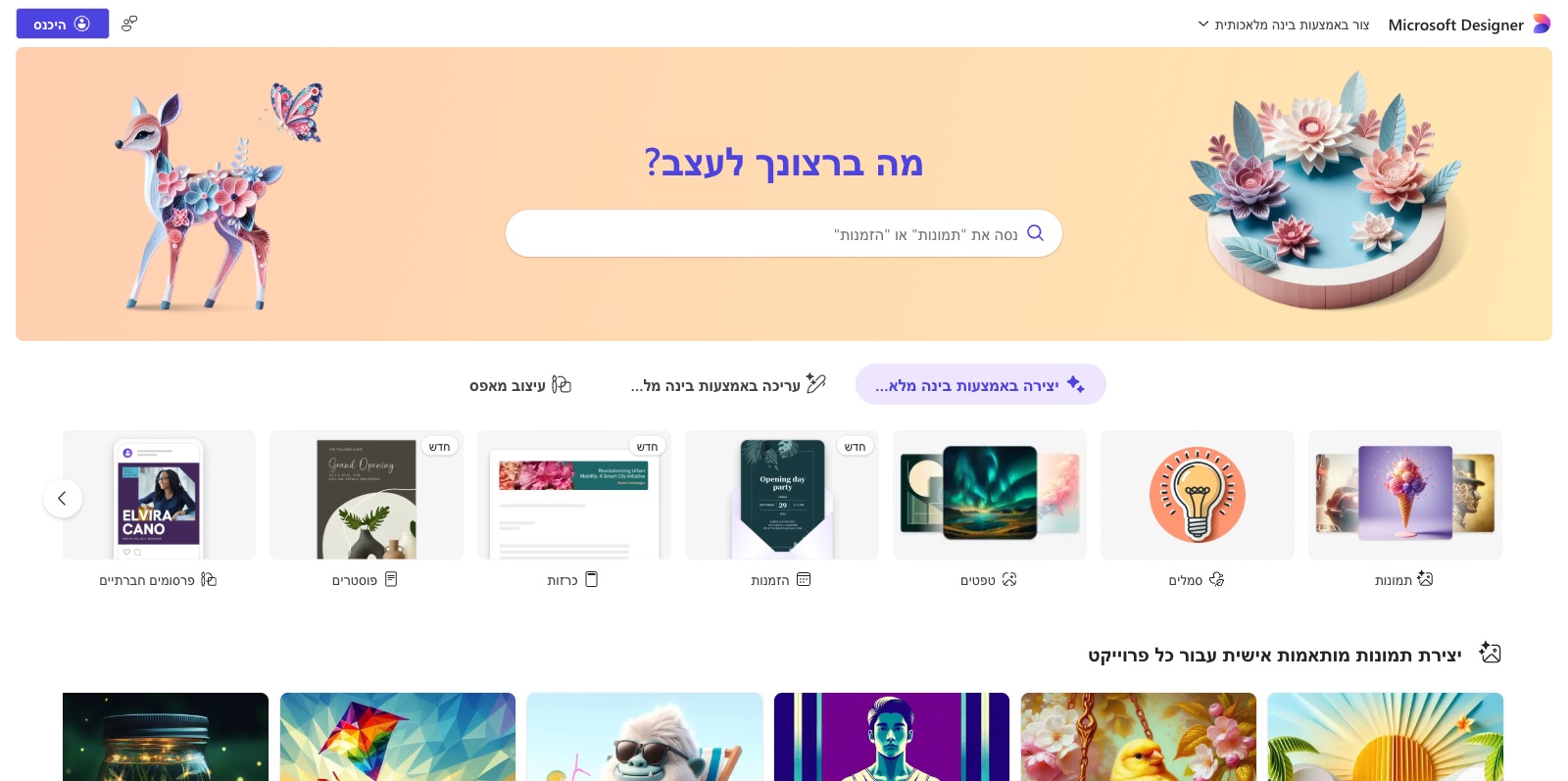 "What would you like to design?": The Microsoft Designer homepage as it appears from Israel, captured on September 20, 2026. Credit: Microsoft
What can Microsoft Designer do?
The short answer: three things, across three tabs: create with AI, edit with AI, and design from scratch. Here is what appears on the Hebrew homepage (checked September 20, 2026) and what Microsoft details in the Help Center:
| Mode | What you get | Examples from the Hebrew interface |
|---|---|---|
| Create using artificial intelligence | A text description becomes a finished design, in multiple versions | Images, icons, wallpapers, invitations, banners, posters, social posts, greeting cards, stickers, monograms, coloring book pages, backgrounds, avatars, collages, emoji, photo collections |
| Edit using artificial intelligence | Upload a photo and modify it | Background removal or blurring, cropping and rotating, adjustments and filters, adding text, and generative erasure of an area in the image (per the Help Center) |
| Design from scratch | Blank canvas with templates, text, and images | Post, short presentation, flyer |
Two details Microsoft itself highlights that are worth knowing before you start generating: Text in images. According to the FAQ, "due to image generation technology, text in generated images may not be in the requested language or may contain spelling errors." In other words, don't ask the model to write "Winter Sale" inside the image; generate the image, then add the text as a separate layer in the editor. Content credentials. "For all images created with Designer's editing tools, we have applied Content Credentials, originally according to the C2PA standard, to help people identify whether images were edited or created with AI." This doesn't affect how you use the tool, but anyone who uploads such an image to a platform that reads the standard will see an "AI-generated" label.
How much does Microsoft Designer cost, and what are AI credits?
The short answer: the tool is free, and the use of AI features is metered in monthly credits. According to the official FAQ: "Yes, Designer is free to use. A subscription may be required for those who want to create more frequently."
How credits work: According to Microsoft's support page on AI credits, "AI credits measure your use of AI features within Microsoft 365 apps and Windows," and each action, for example asking Copilot to summarize your inbox or generating an image in Designer, deducts one credit. Microsoft's blog (January 2025) announced that Microsoft 365 Personal and Family subscribers "will receive a monthly allocation of AI credits" and that the credits "are also used for creating and editing images in Designer."
What are the actual numbers? It's important to be precise about sources here. Microsoft itself, on the support pages I reviewed, writes "monthly allocation" without specifying a number. The figures that recur across all independent reviews (including tooljunction and office-watch) and in a response from an independent consultant on the Microsoft Q&A forum from January 2025 are: 15 credits per month for a free account, and 60 credits per month for Microsoft 365 Personal and Family subscribers, shared with Copilot, resetting at the start of each month with no rollover. The tooljunction review also notes that only the holder of the family subscription receives the 60 credits; other family members remain on 15. Before relying on any number, check your balance in your Microsoft account under "Services and subscriptions," as Microsoft directs.
What this means in practice: 15 credits means 15 creations per month. For experimenting, an occasional post, or a profile picture, that's enough. For a business publishing every day, the credits run out in the first week, and the choice then is a Microsoft 365 subscription (with 60 credits, which also run out) or a different tool.
How does Microsoft Designer connect to Copilot and Microsoft 365?
The short answer: Designer is the image engine for Copilot inside Office applications, and they share the same credits.
According to the Help Center, Designer works with Teams, Outlook, Word for the browser, OneNote, and PowerPoint, and the FAQ adds that the Word and PowerPoint integration requires a Copilot subscription. In practice it works like this: in PowerPoint you ask Copilot to "add an image of a modern office with plants," and the Designer engine generates it directly in the slide. In Word, the same thing happens inside the document. In Windows, the Photos app offers "Edit with Designer," but, according to the support page, the feature is "available in the following languages: English, Spanish, French, Portuguese (Brazil), German, Italian." Hebrew is not on the list as of September 2026.
For an organization already paying for Microsoft 365, this is the central advantage: no additional tool to onboard, no extra account, and the images land directly in OneDrive. For anyone who wants to understand Copilot in depth, I've written a complete guide in Hebrew.
Does Microsoft Designer work in Hebrew?
The short answer: the interface does, images partially, and the Windows editing feature does not.
The interface. When you browse to designer.microsoft.com from Israel, the site loads in Hebrew: the heading "What would you like to design?", the search field "Try 'images' or 'invitations'", and the categories all appear in Hebrew. You can write a prompt in Hebrew, and according to a Netolink review, the tool accepts text input in many languages including Hebrew and lets you choose matching fonts.
Text inside AI images. This is where Microsoft itself warns, as I quoted above: the text "may not be in the requested language or may contain spelling errors." In Hebrew this is doubly true, because image models struggle with Hebrew characters. The fix: generate a clean image from the model and add Hebrew text in the editor.
Prompts. As with most image generators, an English description generally produces a more accurate result. Write the prompt in English and add the Hebrew text to the design in the editor.
"Edit with Designer" on Windows. According to Microsoft, only six languages are supported, and Hebrew is not among them. On the website and in the app, the editing tools work regardless of your system language.
How do you create your first post in Microsoft Designer in five steps?
- Go to designer.microsoft.com and sign in with a Microsoft account (free). Without an account you cannot use the AI features, according to the support page.
- Choose "Social posts" under the "Create using artificial intelligence" tab. Describe in English: subject, style, colors, no text inside the image.
- Choose a version from the suggestions and open it in the editor.
- Add your Hebrew text as a text layer, choose a Hebrew font, and align it to the right.
- Download and check your balance: each creation has drawn from your monthly credits.
One tip that saves credits: generate one strong image and make three versions from it (story, post, banner) in the editor, with no additional generations.
Microsoft Designer versus Canva: which should you choose?
The short answer: for an Israeli business, Canva is the default; Designer is a free add-on for anyone already working in Microsoft 365.
| Criterion | Microsoft Designer | Canva |
|---|---|---|
| Price | Free, 15 AI credits per month (per reviews); 60 with Microsoft 365 | Free with limits; Pro is paid |
| Business license | Per the FAQ: personal and non-commercial use | Commercial use on a paid plan (see our guide) |
| Templates | Relatively small library; tooljunction review: "sparse compared to Canva" | Very large library, brand kits |
| AI image generation | Built-in, DALL-E-based, free up to the credit limit | Dream Lab and Magic Studio, within quotas |
| Hebrew | Interface in Hebrew; text in AI images unreliable | Interface in Hebrew, full RTL, hundreds of Hebrew fonts |
| Collaboration | Basic | Full: teams, comments, brand kits |
| Office integration | Built into Word, PowerPoint, and Outlook via Copilot | Add-ins, not built-in |
| Independent rating | tooljunction: 3.3 out of 5 | Covered in depth in the Canva AI guide |
The tooljunction review summarizes the gap this way: Designer offers free DALL-E image generation and Microsoft 365 integration, but "Canva offers a much larger template library, more advanced design control, better collaboration capabilities, and a more mature platform."
What This Means for Your Business
Three questions to answer before you decide:
1. Is the design for business use? If so, read the Designer license section ("personal and non-commercial use") and the Microsoft 365 organizational subscription terms, or switch to a tool that explicitly permits commercial use. This is not a technical footnote; it is the difference between a post and a legal liability.
2. How many designs per month? Up to 15: the free Designer tier is enough to try it out. Dozens: a Microsoft 365 subscription (60 credits) or Canva. Hundreds: Canva with a brand kit, and if you need unique AI-generated images, a dedicated image generator.
3. Where does the team work? A team that lives in Word, PowerPoint, and Teams will get value from Designer without any onboarding friction. A marketing team that collaborates on designs will get more from Canva.
If you want to learn how to use Designer properly, including English prompts with Hebrew text, credit management, the Copilot integration, and when to switch to Canva, there is an interactive Hebrew course on Microsoft Designer.
Frequently Asked Questions
Do you need Microsoft 365 to use Designer? No. According to Microsoft, the tool is free with a Microsoft account. A Microsoft 365 subscription increases your credit allocation and unlocks the Word and PowerPoint integration.
What happens when you run out of credits? The AI features (image generation, generative erase) stop until the beginning of the next month, according to reviews. The regular editor, templates, and text continue to work. Credits do not roll over to the next month.
Does Designer replace Canva? Not for business. It replaces "I need a quick image for a slide" and "one post for a personal account." For ongoing brand work, Canva remains the tool.
Do I own the images I generate? Microsoft's terms of use are the binding source, and the license per the FAQ is for personal, non-commercial use. Each image includes a C2PA content credential marking it as AI-generated.
Can you create a logo in Microsoft Designer? You can generate ideas ("symbols" and "monograms" are categories in the interface), but a business logo requires a vector file and a commercial license, and neither is part of Designer's free tier. For ideas, yes; for a final logo, a designer or a vector tool.
Designer or Bing Image Creator? Both are Microsoft products running on the same engine. Image Creator generates images only; Designer adds an editor, templates, and image editing. If you only need an image, Image Creator; if you need a finished post, Designer.
The Bottom Line
Microsoft Designer is the cheapest way to get an AI-generated image and a designed post in a Hebrew-language interface: free, in the browser, and inside Word and PowerPoint for anyone with Copilot. The limits are clear and published by Microsoft itself: monthly credits that run out quickly, unreliable Hebrew text rendering in images, and a personal, non-commercial license. For an Israeli business, it is a tool for experimentation and slides; ongoing brand work stays in Canva.
For all our guides and courses on AI tools for business: interactive AI courses at 9.90 ILS and our implementations.
Sources: Microsoft Designer (official site) · Official FAQ for Microsoft Designer · Welcome to Microsoft Designer (Help Center) · Edit images with Designer in the Windows Photos app (supported languages) · AI credits and limits for Microsoft 365 subscriptions · Copilot is now included in Microsoft 365 Personal and Family (Microsoft Blog, January 2025) · Microsoft Q&A on Designer credits · Independent review: tooljunction · Hebrew review: Netolink. All data is accurate as of September 20, 2026, and is subject to change.
Yaakov Tzedek, AI lecturer, consultant, and organizational AI implementer, and leader of the largest Claude Code community in Israel.
Frequently asked questions

Yaakov Tzedek
An Israeli AI lecturer, consultant and implementer who has supported 100+ organizations in AI implementation and lectured for 200+. Official content partner of Meta, Google, Canva and TikTok, featured on Israel's Channel 13.
More about Yaakov →