- OpenAI launched GPT-6.1 Terra on October 26, 2026: a fast, affordable model that reads screens, operates browsers and desktop apps, and fills out forms. Available in ChatGPT Work and Codex for Plus, Pro, Business, Enterprise, and Edu subscribers, not in the standard chat. Numbers, business implications, and a ready-to-run test task.
According to the official ChatGPT and Codex changelogs, you select GPT-6.1 Terra from the model list under Advanced in the desktop app or in ChatGPT Work in the browser. It does not appear in the standard chat at all, so anyone looking for it there won't find it.
ChatGPT has a new model that sees your screen and clicks on its own. According to OpenAI, it completes tasks three times faster than the company's larger models, at half the price. But the question that actually matters for a business isn't how fast it is. It's what happens the moment it reaches the "Send" button.
In short:
- What launched: GPT-6.1 Terra, an OpenAI model for computer use, released on October 26, 2026.
- What it does: Understands images and screens, and operates in browsers, on the desktop, and inside applications: fills out forms, reads technical drawings, edits video, and prepares drafts.
- Where: In ChatGPT Work and Codex, for Plus, Pro, Business, Enterprise, and Edu subscribers. Not in the regular chat.
- The numbers (OpenAI's): Completes tested tasks more than three times faster than GPT-6 Astra and GPT-6.1 Sol, and API pricing is 50% lower than GPT-5.6 Terra and GPT-6.1 Sol.
- For businesses: Moving from answer to action saves hours of typing, but it requires guardrails: approval before sending, a separate account, minimal permissions, and a log.
What is GPT-6.1 Terra, and how does it differ from Sol and Astra?
Terra is OpenAI's model for day-to-day work: fast, affordable, and especially strong at understanding screens and acting on them. OpenAI describes it in the official changelog as a model for professional work that combines strong image understanding with precise computer use, and adds that it writes directly, leading with the result before the details.
It is the successor to GPT-5.6 Terra, which arrived in the summer as part of a three-model lineup (Sol, Terra, and Luna) covered in the complete ChatGPT Work guide. In the current hierarchy, GPT-6 Astra is the large, expensive model, GPT-6.1 Sol is the high-performance mid-range option, and Terra is built for everyday tasks where speed and cost matter more than depth.
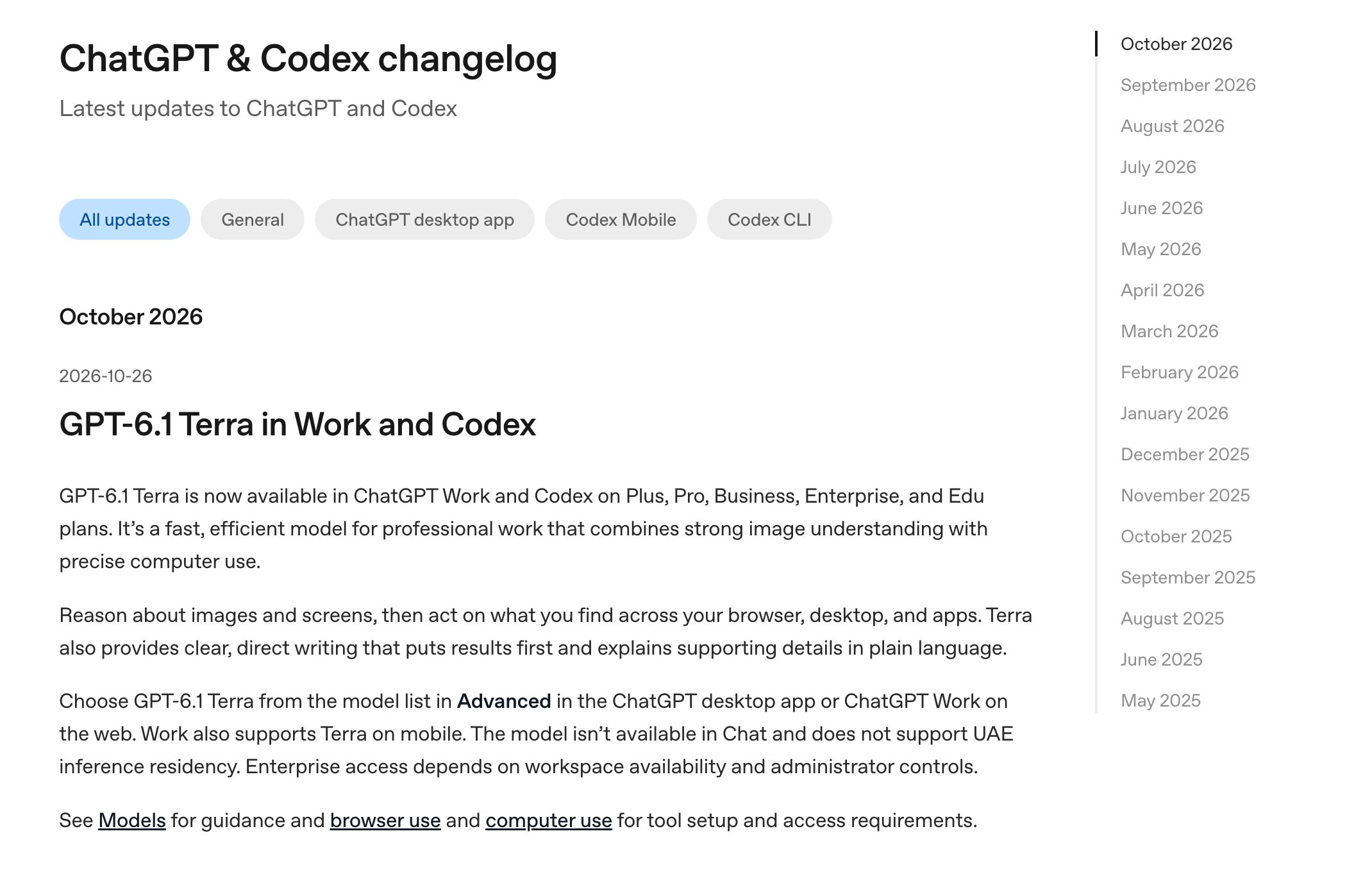 Screenshot: the official ChatGPT and Codex changelog on learn.chatgpt.com, October 26, 2026
Where is it available, and why won't you find it in the regular chat?
Terra is available in exactly two places: ChatGPT Work and Codex. According to the changelog, it is open to Plus, Pro, Business, Enterprise, and Edu subscribers. You select it from the model list under Advanced in the ChatGPT desktop app or in Work on the browser, and Work also supports it on mobile.
Three caveats worth knowing:
- Not in Chat. OpenAI explicitly states the model is not available in Chat. Anyone opening a regular conversation will not see it in the list.
- In organizations, the admin decides. On Enterprise subscriptions, access depends on workspace availability and administrator settings.
- One region restriction is noted. The model does not support data processing residency in the UAE.
For developers, according to launch reports, it is also available via API as gpt-6.1-terra. Anyone not yet familiar with the difference between chatting and running a task in Work and Codex will find that explained in the ChatGPT Work and Codex guide.
What are OpenAI's numbers, and what don't they say?
Every number here comes from OpenAI, based on tasks and benchmarks it selected. No independent testing exists yet. That said, they signal where the company is pointing: the same work, faster and cheaper.
| What was measured | According to OpenAI |
|---|---|
| Speed | Completes tested tasks more than three times faster than GPT-6 Astra and GPT-6.1 Sol |
| API pricing | 50% lower than GPT-5.6 Terra and GPT-6.1 Sol. Per reports: $1 per million input tokens, $5 per million output tokens |
| Factual errors | In an internal low-reasoning benchmark, the error rate dropped from 53.6% on GPT-5.6 Terra to 16.7% |
| Professional computer tasks | On the Agents' Last Exam benchmark, scored 15 percentage points higher than GPT-5.6 Terra at medium reasoning level |
Two notes for reading these correctly. First, "three times faster" is a comparison against larger, slower models, not against the previous generation of Terra. Second, 16.7% errors at the low-reasoning level is a meaningful improvement, but it still means roughly one in six answers in that benchmark is wrong. That is precisely why you should not let it send anything without a review.
What does "from answer to action" actually mean for a business?
Until now, ChatGPT told you what to do. Terra does it itself, on your screen. Instead of receiving an explanation of how to update a price in a catalog, it opens the catalog, finds the product, and updates it. That difference sounds small, but it shifts AI from the role of advisor to the role of employee.
Where this saves time for a small or mid-sized business:
- Recurring forms. Purchase orders, supplier forms, government and tender registrations where the same details are typed over and over.
- Invoices and receipts. Per reports, one of OpenAI's own examples is reading incoming invoices and entering the details into accounting software.
- Catalog and inventory. Matching a product image to a catalog item, extracting SKU and price, and updating a spreadsheet.
- CRM data entry. Moving lead details from an email or form into the customer management system, without manual copy-paste.
Anyone who has already built an AI agent for invoice processing will recognize the pattern: the value is not in reading the document, it's in getting the data to the right place without a person typing it in.
How to test Terra in Hebrew for your business
We have not tested Terra ourselves yet, so there is no score here. What there is: a ready-made test task you can run in half an hour and get a real answer for your specific business, instead of relying on OpenAI's numbers.
Step 1: Prepare dummy materials (no real or personal information).
- A sample product image, for example a product you photographed or a generic image.
- A sample supplier invoice in Hebrew, with a fictional SKU, description, quantity, and price.
- A short spreadsheet catalog, 10 to 20 rows, with one product that matches the image and the invoice.
- A blank target spreadsheet with the columns: product name, SKU, price, supplier.
- A simple form (for example a Google Form you created for the test) with the same fields.
Step 2: Give Terra in ChatGPT Work the following task, word for word:
Match the product in the image to the catalog, extract the SKU and price from the invoice,
update the spreadsheet, and fill out the form. Do not submit without approval.
Before every click on a submit button, stop and show me what you filled in.
Step 3: Score four things, each from 1 to 5:
| Metric | What to check |
|---|---|
| Hebrew comprehension | Understood the instruction, read the Hebrew invoice correctly, did not get confused by text direction or numbers |
| Accuracy | The SKU and price are correct, the right product was chosen from the catalog, the form fields are in the right place |
| Speed | How many minutes it took end to end, compared to how long an employee would take |
| Human corrections | How many times you had to intervene, correct, or redirect |
The stop rule: If the agent attempted to send, submit, or finalize anything without stopping for approval, the test fails, even if everything else was perfect. In that case, do not connect it to a real system until you have set up a technical block, not just a prompt instruction.
What are the risks, and what guardrails should you set before connecting it to your systems?
An agent that can click any button on the screen can also click the wrong one. Yesterday we wrote about the case where Claude bypassed a paywall without anyone asking it to, and the same report includes a model that submitted a real form when it was only asked to demonstrate. This is not one company's story. It is what happens when you give a model tools without limits.
Four guardrails to set before using Terra on real systems:
- Approval before sending. The agent prepares, a person sends. Every submission, payment, form filing, or deletion goes through a human. This is the draft rule applied to computer use.
- A separate account. A separate browser profile and user account for the agent, not the manager's account with all saved passwords.
- Minimal permissions. Access only to the systems and fields the task requires. One spreadsheet, not the entire Drive. A CRM user with limited edit permissions, not an admin.
- An action log. Record what the agent was asked to do, what it did, and what changed. Without a log you won't know something went wrong, let alone when.
Enterprise organizations have an additional layer: the system administrator controls model availability. It is worth using that to roll Terra out first to a small team with a defined task, before opening it to everyone.
What is still unknown
- How it handles Hebrew. OpenAI has not published language-specific data, and certainly not for right-to-left interfaces.
- What the usage limits are per subscription. No information has been published on how many Terra tasks can be run per day on each plan.
- How it performs in independent testing. All numbers right now are OpenAI's.
As of this morning we have not found comprehensive coverage of the launch itself, which is why the test task above is the fastest way to get an answer that fits your business. Anyone looking to compare current models on the market can use the AI model comparison.
The bottom line
GPT-6.1 Terra turns ChatGPT from something that tells you what to do into something that does it on your screen, faster and at half the price, according to OpenAI. For businesses this is a real opportunity to save hours of typing on forms, invoices, and catalogs. But the speed is the easy part. What determines whether it actually works is the guardrails you set before the first click.
Want to build AI agents that work for you, with clear limits?
The building AI agents with Claude Code workshop covers building real agents for your business across four sessions, with permissions, approval checkpoints, and action logs built in from day one. The principles apply to any tool, Terra included: the agent prepares, a person approves. Organizations looking to train entire teams on working with agents can find AI workshops for organizations.
Sources:
Frequently asked questions

Yaakov Tzedek
An Israeli AI lecturer, consultant and implementer who has supported 100+ organizations in AI implementation and lectured for 200+. Official content partner of Meta, Google, Canva and TikTok, featured on Israel's Channel 13.
More about Yaakov →