- OpenAI launched Businesses in ChatGPT in beta: businesses can claim and verify their profile, update details and products, and see how often ChatGPT mentions them. Here is what Business Hub and Business Agents are, who qualifies outside the US, and what it means for your GEO strategy.
According to OpenAI, signing up for Business Hub does not guarantee a higher position in answers. The model still decides whether to recommend you, based on what is written about you online. The profile simply ensures that the details the model reads are accurate.
Until yesterday, no business had an official way to know how many times ChatGPT had recommended it. As of yesterday, there is one: OpenAI launched Businesses in ChatGPT in beta, with a verified business profile and a dashboard showing mentions and clicks. And this is not the button that will shoot you to the top of responses.
In short:
- On November 10, 2026, OpenAI launched Businesses in ChatGPT in beta, with two parts: Business Hub and Business Agents.
- In Business Hub you claim your business, verify it, update details and products, and see mentions, clicks to your site, and conversation topics.
- Claiming is open to eligible businesses everywhere ChatGPT is available. Business Agents are currently open only to online businesses in the US.
- OpenAI states explicitly: the profile does not guarantee a higher position in responses. It does give you, for the first time, official GEO measurement.
- Free for now. Ads in ChatGPT remain a separate paid product.
- Also today: Claude Sheets and Claude Whiteboards in beta, and Claude Data available to all paid subscribers.
What exactly did OpenAI launch?
A new layer called Businesses in ChatGPT, connecting businesses to ChatGPT in two directions: your profile, and your agent.
The launch went live on Tuesday, November 10, in beta. According to TechCrunch, OpenAI described this as "an early step in bringing businesses more deeply into ChatGPT," and the comparison that comes up immediately is Google Business Profile: same idea, but inside a chat.
The two parts:
- Business Hub: The place where you claim your business, manage its details, and see data on how people encounter it in ChatGPT.
- Business Agents: A branded agent that answers customers about the business's products and policies, in a separate, labeled chat that opens from the profile.
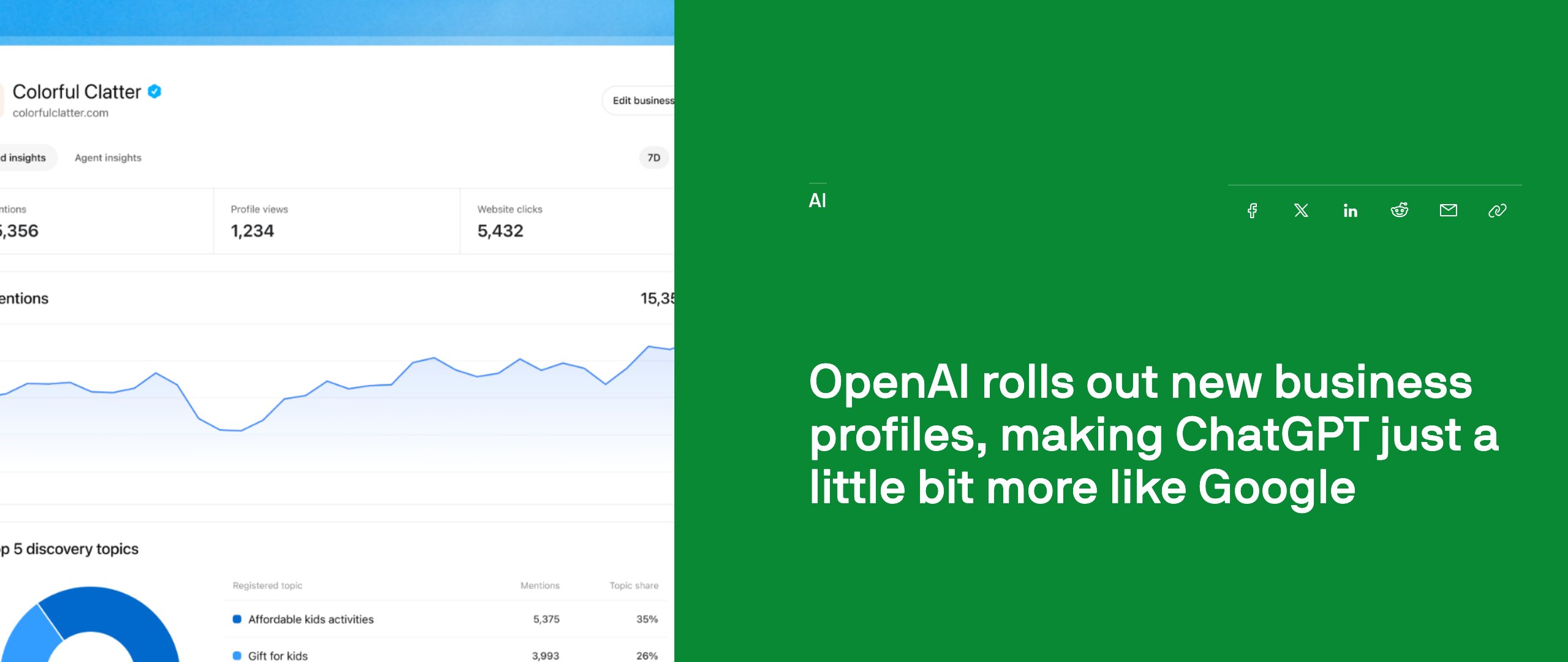
Screenshot: TechCrunch, 10.11.2026, featuring the interface image released by OpenAI (demo data)
What does the dashboard show, and what doesn't it show?
Three numbers and one topic category: mentions, clicks to site, profile views, and which conversation topics the business came up in.
Here is what is known from the documentation and launch-day reports:
- Mentions: For an online business, a mention is counted only when ChatGPT links to your site. The brand name alone does not count.
- Clicks to site: Clicks on the link. According to OpenAI this does not confirm a site visit and certainly not a conversion.
- Discovery topics: Topic clusters, for example "affordable activities for kids." Not the actual questions, and not the conversations.
- Reporting threshold: Below a certain number of interactions you will not see a figure. An empty field is not zero.
What is absent: you will not see user conversations, the exact questions asked, or a comparison to competitors. OpenAI writes that it does not share prompts or conversations with the business, including conversations with the business's own agent.
Will this push your business higher in responses?
No. And that is the most important detail in this entire launch.
OpenAI writes on the product page that claiming a profile does not guarantee a higher position or sales. Benji Shomair, OpenAI's VP of Monetization, told Digiday that joining should not affect how often a business appears, because ChatGPT needs to maintain objectivity. He added that more accurate information can help a business appear in more relevant conversations.
In other words: what causes ChatGPT to recommend you has not changed. It is still what is written about you online, on your site, in articles, reviews, and guides. I covered this in depth in the full GEO guide. What has changed is that now you can measure it.
And that is a significant shift. Until now, anyone working on GEO was guessing: asking ChatGPT questions and checking whether the business came up, or using external tools that simulate the same thing. TrendingTopics has already written that the official dashboard makes OpenAI a competitor to the small GEO companies that were selling exactly this kind of measurement.
Who can claim their business, including an Israeli business?
According to OpenAI, any eligible business located where ChatGPT is available and where verification is supported. No country list has been published.
Based on documentation from a developer who went through the process from Italy on launch day, the distinction is by business type:
- Online business with a website: Can add itself even if it has no existing listing in ChatGPT. For that developer it worked from Italy, as an online store.
- Local physical business (store, restaurant, clinic): Can currently only claim an existing listing, and only in the US.
- Service providers (freelancers, agencies, consultants): The "via service" option is marked as "coming soon."
Verification happens through one of several methods, depending on what the system offers you: a code sent to the business phone or email, a TXT record in the site's DNS, or connecting a Shopify store. After that comes an identity check through an external verification provider, which may request a government-issued ID and business registration details.
One detail worth knowing before you click: according to the same documentation, a new profile is published automatically after approval, and OpenAI support cannot delete or hide it afterward. So prepare your description, logo, and policies before you submit, not after.
What about Business Agents?
An agent that answers customers on behalf of the business, inside ChatGPT. Currently only for e-commerce and online service businesses in the US.
The agent is built from instructions you write, background documents, and your product feed. It answers questions about products and policies, but does not process purchases, book appointments, or look up orders. According to Shomair, OpenAI does not allow you to bring your own agent: you build it inside their system.
This is where the money comes in: that same agent can be funded as the destination of a ChatGPT ad. Someone who clicks the ad enters a conversation with the agent, not your website. OpenAI says sponsored placements are labeled and separate from responses. If you are already advertising there, the ChatGPT Ads Manager guide explains how the system is built.
What to do this week?
Five steps, in order:
- Check what ChatGPT says about you today. Ask it three questions a real customer would ask, and write down what it answers and who it recommends. This is the baseline you will compare against.
- Try to claim your business. Go to chatgpt.com/business-hub, search for your business, and see which options are available to you. If you have an online store, it will likely work.
- Prepare your materials before approval. A short, clear description, logo, cover image, shipping policy, and returns policy. They will publish immediately.
- Keep working on your content. The profile does not replace what drives recommendations: pages that answer real questions, mentions on other sites, consistent information. If you are not sure where to start, there is a GEO page with the method.
- Measure once a month. The dashboard shows the last 28 days. Screenshot it every month, because this is the only official data point that currently exists.
What does this mean for your business?
ChatGPT has officially become a marketing channel, with a profile, data, and ads. Anyone still treating it as just a chat tool is falling behind.
This launch is reminiscent of the early days of Google Business Profile. At first it looked like a form. A few years later, anyone who had not managed their profile simply did not exist on the map.
The difference here is that there is no "first place" you can buy or claim. The model decides, and all you can do is make sure it has good material to decide from: a clear website, accurate information, and an agent that answers customers the way you would. Anyone who wants to build that kind of agent right now, outside of ChatGPT as well, will find the steps in how to build an AI agent for your business.
Also today in leading tools
Claude Sheets and Claude Whiteboards in beta, and Claude Data available to everyone
Anthropic launched two new tools inside Claude on November 10, in beta for all paid plans. Claude Sheets is a spreadsheet that Claude builds and edits with you, with tabs, formulas, formatting, and dropdowns. Every change it makes is marked, you can share it with your team, and export to xlsx or CSV. Claude Whiteboards is a collaborative board for brainstorming: you describe a plan, and Claude lays it out on the board with a timeline, owners, and dates, then converts it into a document or presentation.
At the same time, Claude Dashboards, launched in beta in October, is now called Claude Data and is available to everyone. It requires a connection to a data source, such as a data warehouse or CRM, and has gained approved metric definitions, live sharing, and version history. Everything works in the browser, on desktop, and on mobile. On the Team plan all three tools are active by default; on Enterprise, Sheets and Whiteboards are off, and Claude Data will be enabled there automatically on November 19. Anthropic also announced that Claude Meetings, which joins calls, writes a summary, and updates documents during the meeting, is "coming soon," with no date given. Anyone already connecting Claude to business data can start with the guide to connecting Priority ERP to Claude dashboards, and all three tools are covered in the full guide to Claude Whiteboards, Sheets, and Data.
Screenshot: Announcement of Claude Whiteboards, Sheets, and Data, claude.com, 10.11.2026
Sources: OpenAI's announcement of Businesses in ChatGPT · TechCrunch article · Anthropic's announcement of Sheets, Whiteboards, and Data
Want an agent answering your customers right now?
ChatGPT's Business Agents are currently open only to businesses in the US. An agent that answers your customers on WhatsApp, organizes leads, and prepares reports is something you can build this week, without waiting for anyone.
The AI agents bundle includes the Claude Code video course and the Grok Bot video course, plus the SocialFlow course as a gift. Price: 297 ILS + VAT (350.46 ILS including VAT), until November 12 at 23:59.
Frequently asked questions

Yaakov Tzedek
An Israeli AI lecturer, consultant and implementer who has supported 100+ organizations in AI implementation and lectured for 200+. Official content partner of Meta, Google, Canva and TikTok, featured on Israel's Channel 13.
More about Yaakov →