
- Get a daily list of relevant posts from LinkedIn, Facebook and X without risking your account: what the ToS actually prohibits, the safe methods (X search via Grok Bot, Google Alerts, notifications), and how to build a human-paced reading assistant with Claude Code, including the risks and the lines you do not cross.
Grok Bot's official documentation explicitly states that a site can block automation or require a human step, and that the bot passes that step back to you instead of bypassing it. In other words, the AI agent itself is designed to stop at exactly the point where most people asking about "scraping without getting banned" are trying to push through.
The question came up this week in a Facebook automation group: "Is there a way to scrape posts on LinkedIn and other networks without getting blocked?" It got 21 replies, most of them guesses: proxies, Chrome extensions, "try it this way." Not one of them said the most important thing.
There is no method that is immune to blocking. Anyone who promises otherwise is selling something. But there is a way to get a list of relevant posts from LinkedIn, Facebook, and X every morning, in small volume, from your own account, without bypassing any protection mechanism. That is exactly what we run, and this guide breaks it down step by step.
In short:
- Truth first: LinkedIn, Meta, and X prohibit automated collection without permission in their terms of service. Any automation on a connected account is your risk.
- Start with what is allowed: searching X through Grok Bot, Google Alerts, and notifications from groups and people you follow.
- The middle path: a small assistant built with Claude Code and Playwright, running on your browser profile, at a human pace, 25 to 45 actions per day, read-only.
- The limit: no CAPTCHA bypassing, no fake accounts, no mass scraping, and no automated replies at scale.
What do the terms of service actually say?
All three networks prohibit automated collection without permission, and that includes you, even at low volume. It is worth reading the original wording before deciding how much risk to take:
- LinkedIn: Under the "prohibited" section of the user agreement (in effect from November 3, 2025), it is forbidden to develop or use software, scripts, robots, scrapers, and browser extensions to scrape or copy the service, and also to use bots to reply, like, or share.
- Meta (Facebook and Instagram): The terms of service state: "You may not access or collect data from our Products using automated means (without our prior permission)."
- X: Since September 2023, the terms of service prohibit scraping or crawling "in any form and for any purpose" without prior written consent. Before that, crawling was permitted according to the robots.txt file.
What about the hiQ vs. LinkedIn case that everyone cites as "proof that it's allowed"? The U.S. Court of Appeals ruled that scraping public pages likely does not violate the federal Computer Fraud and Abuse Act. But in November 2022, the district court ruled that hiQ violated LinkedIn's user agreement, and in December 2022 the parties reached a settlement: a $500,000 judgment against hiQ, a permanent injunction against scraping, and deletion of all data and code. The lesson: "public" does not mean "permitted under the contract," and the contract is what matters for your account. (This is not legal advice, and any commercial case requires a lawyer.)
What is fully permitted, and covers more than you might think?
Before writing a single line of code, it is worth exhausting the options that carry no risk at all. They cover a large portion of the need:
- X through Grok Bot. Since October 7, 2026, Grok Bot can search, read, and monitor public posts on X without connecting an account and without API credits. Details in the next section.
- The official X API. For anyone building a product, this is the proper way to receive posts by keyword, paid by plan.
- Google Alerts and site: search. An alert for a phrase like
"looking for a recommendation" automationor a search forsite:linkedin.com/posts automationsurfaces public posts that Google has already indexed. Not everything gets in, and there is a delay, but it is free and allowed. - RSS. Blogs, newsletters, and many forums still offer RSS. The major social networks do not.
- In-network notifications. On LinkedIn: follow relevant people and companies and turn on their bell notifications, and save a post search sorted by "Latest." On Facebook: in every important group, set notifications to "All posts."
For most businesses, a combination of items 1, 3, and 5 is enough. Move to the next step only when the closed groups and feeds, the ones Google cannot see, are exactly where your customers are asking questions.
How does Grok Bot deliver posts from X and the web every morning?
Grok Bot runs Routines in the cloud, even when your computer is off, and since October, X search has been built in. According to the official documentation, you set up a routine simply by making a request in the chat, in plain language ("every weekday at eight in the morning"), and the bot confirms the details: owner, schedule, source, expected output, and approval limit.
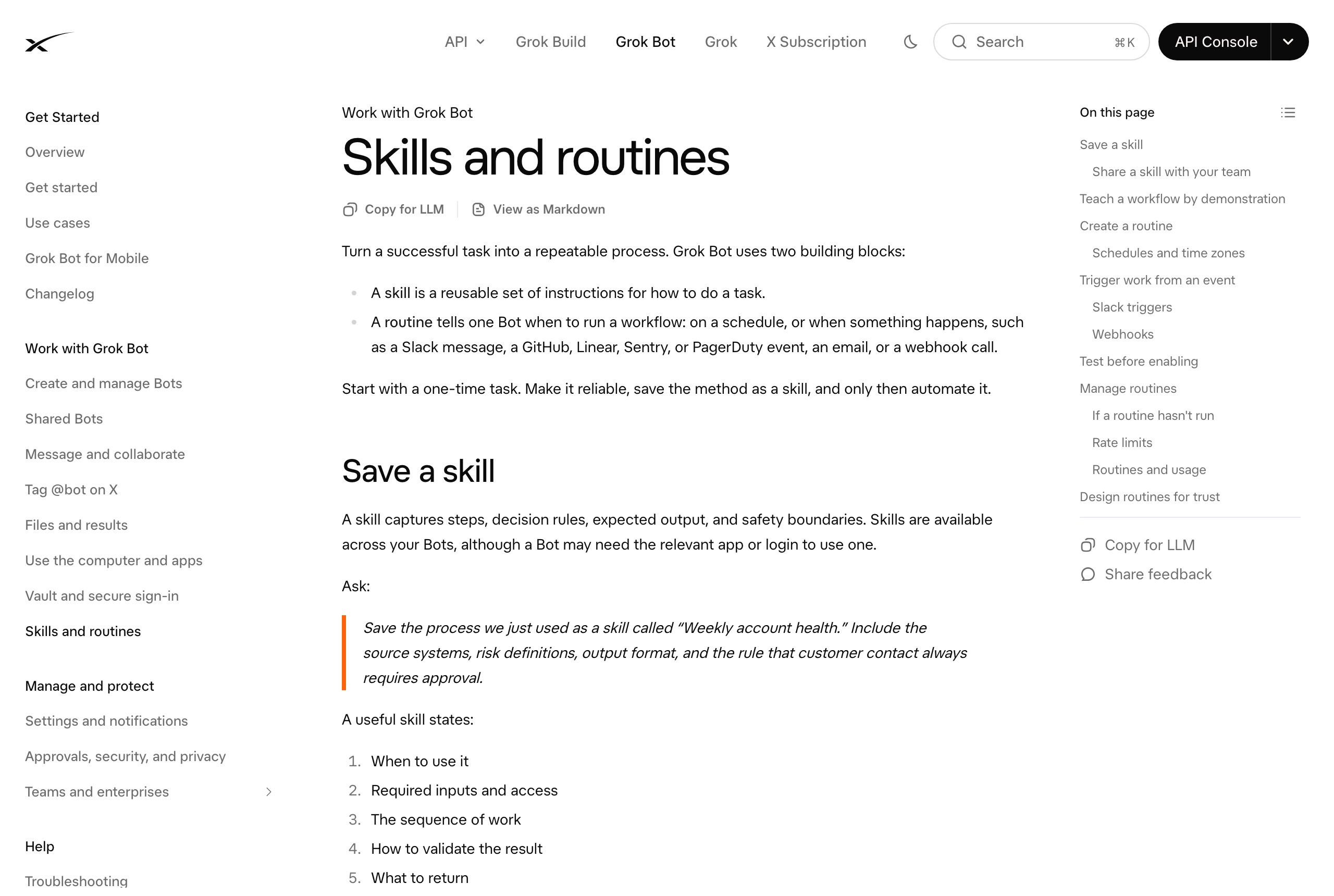 Screenshot: official Grok Bot documentation, docs.x.ai
A prompt that works, ready to copy:
"Every weekday at eight in the morning, search X for posts from the past 24 hours, in Hebrew and English, where people are asking for a recommendation or help with business automation, AI agents, or Make. Also search the open web, forums, and blogs. Return a table: link, one-line summary, why it is relevant, and a score of 1 to 5. No posting, no replying, no sending messages. If you find nothing, say so."
A few data points from the documentation worth knowing: a new routine does not run immediately but waits for the next scheduled time (there is a Test button), each bot can have up to 50 routines, and the minimum interval between runs is five minutes. Each run draws from your usage quota, so once a day is preferable to once an hour.
Where Grok Bot stops: LinkedIn and Facebook. The bot does operate a real browser, but content in groups and feeds requires login, and the terms we quoted apply to it as well. The documentation itself states that a site can block automation, that a login may expire, or that a human step may be required, and that the bot passes that step back to you instead of bypassing it. Beyond that, all your bots share a cloud computer and logins, so a LinkedIn account connected there is accessible to every bot (more on this in the safety guide).
What it looks like in practice, and what almost went wrong
We run a small assistant on a Mac in the office that reads Facebook groups we are members of and looks for people asking questions we know how to answer. Its principles are simple:
- A real browser profile from our own account. Login happens once, manually, by a person. No password in the code.
- Human pace. Scrolling in random increments, a one to three second pause between scrolls, up to 20 posts per group, one run per hour with a random delay, and silence at night.
- Daily ceiling. 25 to 45 actions per account per day, with no parallel runs on the same profile.
- Read and filter. Posts go through a filter, Claude classifies what is relevant and drafts a reply, and a person approves each one individually.
Now for the failure. For debugging purposes, the assistant saved a screenshot and an HTML copy of the page every time something was not found. Each copy weighed about 20 MB. Within a few weeks it had accumulated 11 GB, the Mac's disk filled up, and an entirely different system running on the same machine stopped. The fix was three lines: every debug screenshot gets deleted after 24 hours. The lesson: a small automation that runs every hour needs automatic cleanup just as much as it needs a human pace.
How to build this with Claude Code, step by step
Claude Code writes, runs, and fixes the script from a plain-language description. You do not need to know how to code. You need to know how to define limits.
1. Installation. Install Claude Code following the official instructions, open a new folder (for example post-radar) and run claude inside it.
2. A dedicated browser profile. The first prompt:
"Create a Node project with Playwright. Write a script called login.js that opens Chrome with a persistent profile stored in the ./profile folder, in a visible window, and waits for me to log in manually to Facebook and LinkedIn. Do not save any password in the code."
Run it, log in yourself, close it.
3. The reading script.
"Write read.js that opens the same profile, navigates to the URLs listed in sources.json (groups I am a member of and a saved post search), scrolls slowly with random pauses of 1.2 to 2.6 seconds, and reads up to 20 posts per source. Read only: no likes, no replies, no messages. Save only the link, text, and date, without names or personal details. Filter by the keywords in keywords.txt, skip posts already seen, and write new ones to posts.csv. Stop after 40 actions per day. If the page asks for login, verification, or a CAPTCHA, stop immediately and write to the log. Do not attempt to bypass."
4. The skeleton that comes out, in brief:
// skeleton only, inside an async function
const { chromium } = require("playwright");
const sleep = (a, b) => new Promise(r => setTimeout(r, a + Math.random() * (b - a)));

const ctx = await chromium.launchPersistentContext("./profile", { channel: "chrome", headless: false });
const page = ctx.pages()[0] || await ctx.newPage();
for (const src of sources) {
  if (actionsToday >= 40) break;
  await page.goto(src.url, { waitUntil: "domcontentloaded" });
  if (/login|checkpoint|captcha/i.test(page.url())) { log("stop: human step needed"); break; }
  for (let i = 0; i < 6; i++) { await page.mouse.wheel(0, 700 + Math.random() * 400); await sleep(1200, 2600); }
  const posts = await page.$$eval('[role="article"]', els => els.slice(0, 20).map(e => e.innerText));
  saveMatches(posts.filter(t => keywords.some(k => t.includes(k))));
  actionsToday++;
  await sleep(20000, 60000);
}
await ctx.close();
Notice what is not in the skeleton: no browser fingerprint spoofing, no proxy rotation, no CAPTCHA solving. Those are exactly the tools of mass scraping, and they are what turns "personal monitoring" into something else entirely.
5. Output destination. A CSV is enough to start. Anyone who wants more can ask Claude Code to append rows to Google Sheets or Notion through their official connectors.
6. Daily scheduling.
"Create a launchd task on Mac that runs read.js once a day at seven in the morning, with a random delay of up to 15 minutes, and does not run if the previous run is still active. Add deletion of debug files older than 24 hours."
On Windows or a Linux server it will prepare the equivalent (Task Scheduler or cron). More on this in the Claude Code scheduled tasks guide.
7. AI summary. At the end of each run, one call to Claude ranks the posts and drafts a reply for each one. The draft stays a draft.
Which method is right for you?
| Method | What it covers | Block risk | Effort |
|---|---|---|---|
| Grok Bot, built-in X search | Public posts on X + the open web | None | Low, one prompt |
| X's official API | X posts by query | None (permitted) | Medium, paid |
| Google Alerts and site: search | What Google indexes from LinkedIn and the web | None | Low |
| In-network notifications | Groups and people you follow | None | Low, manual |
| Playwright assistant at human pace | Closed groups and feeds you are a member of | Low to medium, violates terms of service | Medium |
| Mass scraping, proxies, fake accounts | Everything, briefly | Very high | High, not recommended |
Where is the line?
The rule is simple: one account that is yours, low volume, read-only, and a human making the decisions. Everything beyond that is no longer monitoring:
- No mass scraping. Thousands of pages a day is exactly what the protection systems are built to catch.
- No fake accounts. That is one of the precise reasons hiQ lost its case.
- No bypassing CAPTCHAs and protection mechanisms. When the site stops you, the script stops too.
- No collecting personal data. Phone numbers, email addresses, and name lists are a privacy-law problem, not just a terms-of-service problem.
- No automated replies or messages in bulk. That is the single fastest way to get an account taken down.
And you have to accept the risk: even with the careful approach, your account can be restricted. Do not run this on the one account your business depends on without understanding that.
What do you do with the posts you find?
Reply manually, with value, and only when you have something to add. The morning list is not a spam target list. It is a list of people with a problem. A good reply solves the problem inside the reply itself: three steps, an example, a mistake worth avoiding. A link, if at all, comes at the end and only if it genuinely deepens the answer.
A rule of thumb that works: if the reply would be useful without the link, it is a good reply. If nothing is left without the link, it is an ad. And the numbers are intentionally small. Five excellent replies a day build a reputation in a group. Fifty generic replies get you removed from it.
Want to build this with both tools, step by step?
This guide uses exactly two tools: Grok Bot for searching X and running cloud routines, and Claude Code for the assistant that runs on your own machine. The AI Agents Bundle includes both video courses, the Grok Bot course and the Claude Code course, plus the SocialFlow course as a free bonus. 297 ILS + VAT (350.46 ILS) instead of double, until November 12, with 16 lessons available to watch for free.
Sources:
- LinkedIn User Agreement, section 8.2 "Don'ts" (in effect from November 3, 2025)
- Meta Terms of Service, section 3.2
- TechCrunch: X updates its terms to ban crawling and scraping (September 8, 2023)
- Proskauer: hiQ and LinkedIn reach proposed settlement in landmark scraping case (December 2022)
- Grok Bot docs: Skills and routines
- Grok Bot docs: Overview
- Social Media Today: X's Grok bots get analytic search capabilities
Frequently asked questions

Yaakov Tzedek
An Israeli AI lecturer, consultant and implementer who has supported 100+ organizations in AI implementation and lectured for 200+. Official content partner of Meta, Google, Canva and TikTok, featured on Israel's Channel 13.
More about Yaakov →