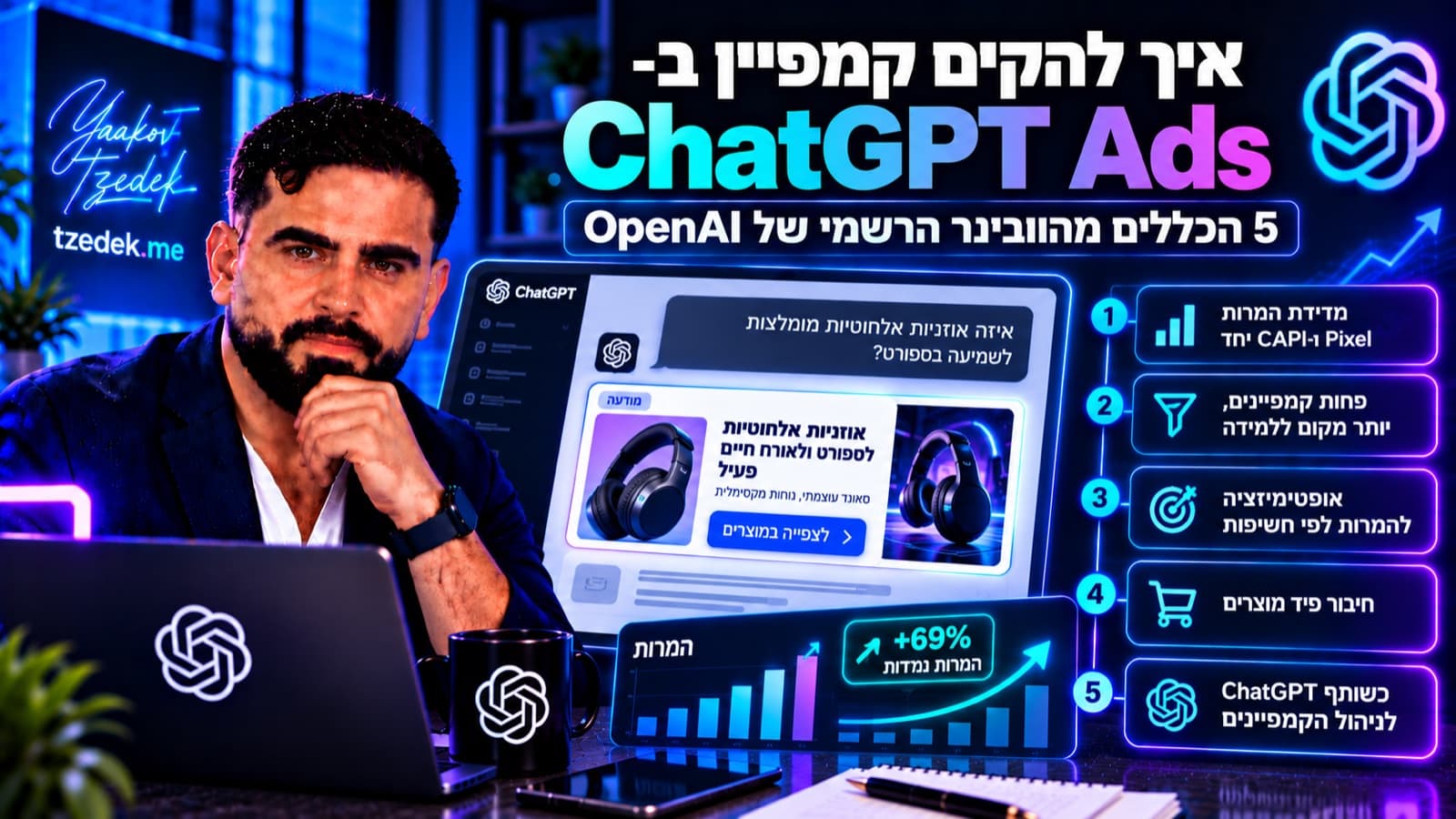
- Full summary of OpenAI's official ChatGPT Ads webinar: Pixel plus CAPI together (69% more measured conversions), fewer campaigns, view-through conversions, product feeds (74% higher CTR), and the plugin that manages campaigns from inside ChatGPT.
According to data OpenAI presented in the webinar, 52.7% of conversions that happened after a user saw an ad (without clicking) occurred within the first hour after the impression. A campaign that learns only from clicks simply never sees most of those customers.
OpenAI held an official 33-minute webinar this week on setting up campaigns in ChatGPT Ads. I recorded it, transcribed every word, and translated it into Hebrew, including subtitles for the video. The most impressive demo in it is not actually the important part.
The important part is four numbers the OpenAI team presented almost in passing: 69%, 22%, 52.7%, and 74%. Each one marks a spot where an advertiser coming from Google or Meta might set up their campaign "the usual way" and pay for it in the first month.
In this guide: the five rules presented by Abhi and Minna from the OpenAI team, screenshots from the webinar, what I did with them in my own account, and what it means for your business.
Watch the official videos
ChatGPT Ads: Best practices for campaign setup
OpenAI · September 24, 2026
In short
| Rule | What to do in practice | The number behind it |
|---|---|---|
| 1. Conversion measurement | Pixel on the site and also Conversion API from the server | 69% more conversions measured, CPA lower by 22% |
| 2. Room to learn | Fewer campaigns, more budget per campaign, Maximize results | Budget of 100,000: two campaigns beat ten |
| 3. Optimize for the right outcome | Conversions objective billed on impressions | 52.7% of view-through conversions happen in the first hour |
| 4. Product feed | CSV, link, SFTP, or the Shopify app | CTR approximately 74% higher |
| 5. ChatGPT as a partner | The ChatGPT Ads Manager plugin | Create, manage, and measure in natural language |
What is ChatGPT Ads, in one line?
ChatGPT Ads is OpenAI's advertising platform, where a business creates a campaign that appears below ChatGPT's answers. You sign in at ads.openai.com with an existing ChatGPT account. According to the webinar, the platform is live in more than 40 markets and expanding quickly. For a full explanation of the platform, budgets, and limitations in Israel, see the complete guide to ChatGPT Ads Manager.
Who can advertise, and what are early advertisers seeing?
Three conditions: operating in a country where the platform is available, complying with the advertising policy, and passing verification that the business is legitimate. According to what was said in the webinar, categories like finance, health, and legal require additional review, and sensitive categories like gambling and alcohol are prohibited.
OpenAI presented three examples from early advertisers:
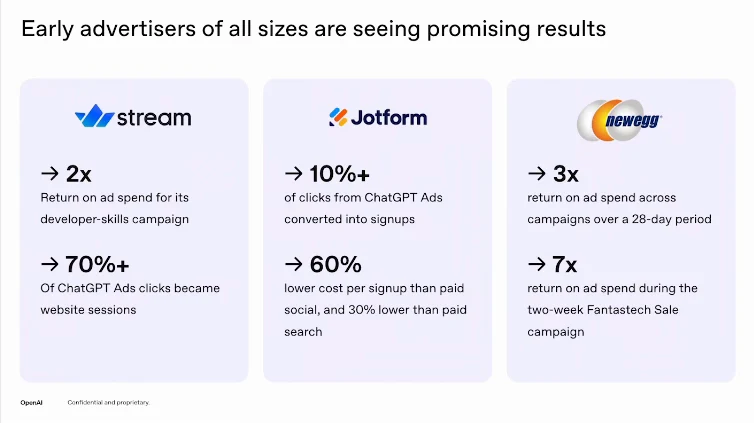 Early advertisers: Stream (more than 70% of clicks converted to site visits), Jotform (cost per sign-up 60% lower than paid social), and Newegg (3x return, and 7x during a seasonal promotion). Screenshot from the official OpenAI webinar
What does the setup itself look like?
You paste your website URL, and ChatGPT scans it and suggests a first ad. In the demo, Minna pasted the site of a fictional headphone company called Nova One, and the system figured out on its own what the company sells and wrote a headline. Abhi timed it: the entire setup took under 30 seconds.
One point that came up throughout the entire webinar: the AI suggests, you decide. Every ad and every setting can be edited before it goes live. And one important thing to know: without payment details, the account will not serve ads.
 "Spend less time learning a new platform. Spend more time growing your business." Screenshot from the official OpenAI webinar
Rule 1: Why install both a Pixel and CAPI?
Because together they see more. According to OpenAI data, the combination produced a median 69% increase in measured conversion coverage and a median CPA 22% lower compared to Pixel alone.
- Pixel: Code added to the head of every page on your site, which reports on browser-side actions.
- Conversion API (CAPI): Direct reporting from your server, not blocked by ad blockers or browsers.
When you send the same event through both channels, the system deduplicates them automatically.
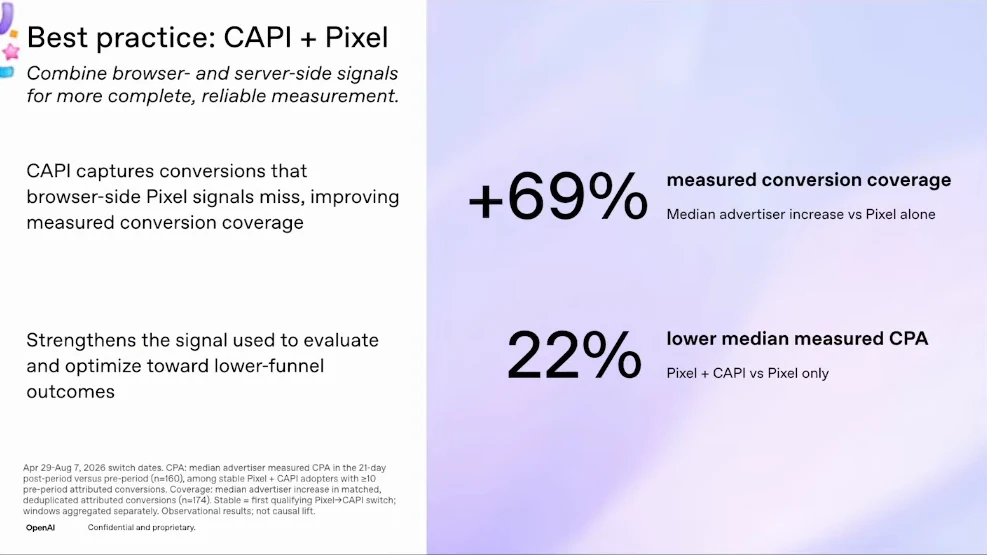 +69% in measured conversion coverage and CPA 22% lower (median across advertisers). Screenshot from the official OpenAI webinar
Where to set it up: In Ads Manager, under Tools and then Conversions. You create a data source, receive a Pixel ID and installation code, and configure an event, for example Order Created for a purchase. CAPI requires a dedicated API key that you generate on the same screen. There is also a button that sets all of this up with Codex.
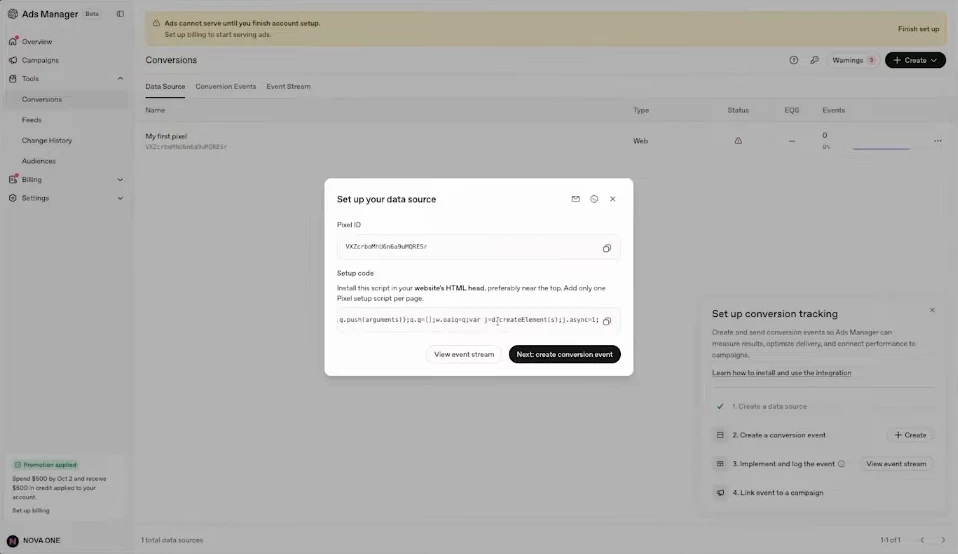 The Pixel creation screen in Ads Manager. Screenshot from the official OpenAI webinar
What is the Event Quality Score (EQS)?
A score from 1 to 10 that rates each data source and flags issues: missing identifiers, late events, or duplicates. The warnings appear on the same screen, and OpenAI recommends checking it regularly. High-quality events are not just a technical matter: the system learns from them who to show your ad to.
 Event Quality Score: 8 out of 10, with a breakdown by identifier type (email, external ID, phone, IP address). Screenshot from the official OpenAI webinar
What I did in my own account: When I connected the Pixel to this site, the first conversions did not register correctly due to implementation bugs, and it took time before the lead and purchase events started coming through cleanly. In hindsight, that is exactly what EQS is designed to catch. The lesson: after installation, check the event stream before you turn on any budget.
Rule 2: How many campaigns should you open?
As few as possible. "There are no bonus points for a large number of campaigns," in Abhi's words. Campaigns with the same objective, the same budget strategy, and the same region are worth consolidating, so that budget concentrates and the system has enough data to learn from.
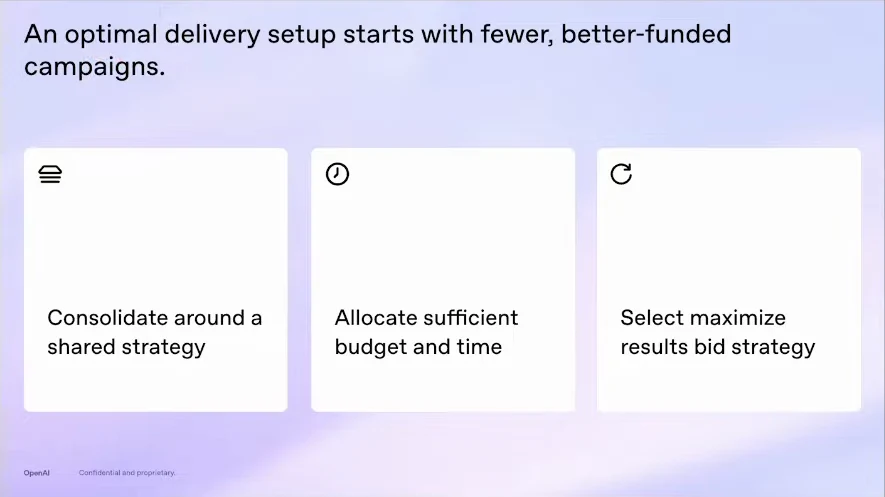 "An optimal delivery setup starts with fewer, better-funded campaigns." Screenshot from the official OpenAI webinar
The example presented: with a budget of 100,000, two campaigns of 50,000 are far better than ten small campaigns. On bidding, the recommendation is Maximize results: the system manages the bidding itself, and you do not need to adjust it every morning.
Rule 3: Which objective should you optimize for?
Conversions billed on impressions. This is the objective that learns from both people who clicked and people who saw the ad, did not click, and came back to buy later.
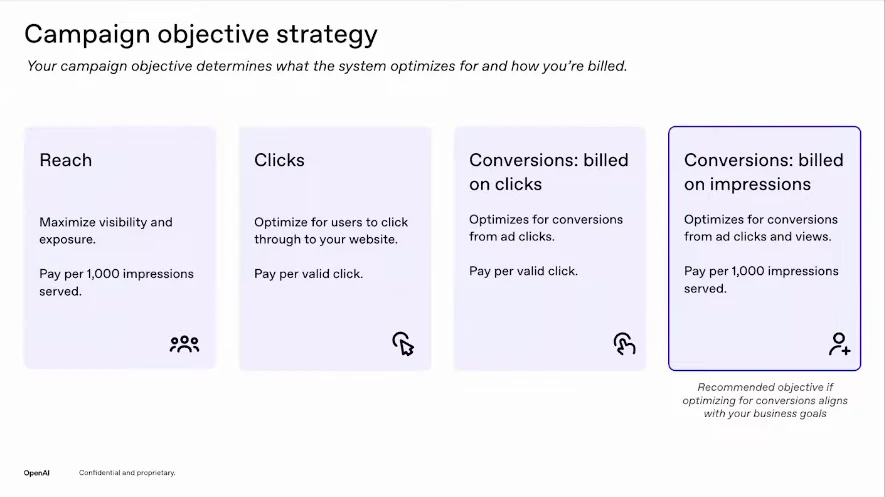 Four objectives: awareness, clicks, conversions billed on clicks, and conversions billed on impressions (the recommended one). Screenshot from the official OpenAI webinar
Why does this matter? Because people do not always click and buy. Some see the ad, check elsewhere, and come back later, sometimes from a different device. And the most surprising stat in the webinar:
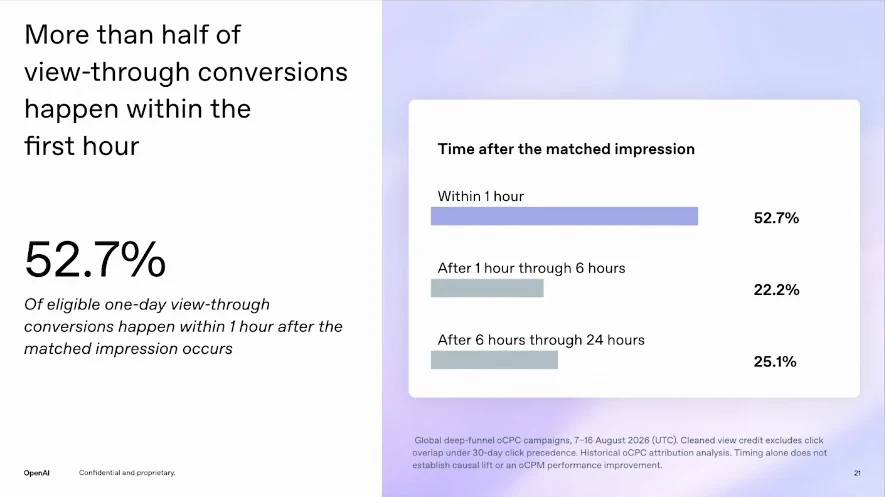 52.7% of view-through conversions (within a one-day window) happened within one hour of the impression, 22.2% between one and six hours, and 25.1% between six and 24 hours. Screenshot from the official OpenAI webinar
What does the system do with your creative?
Two capabilities that are still in testing and worth knowing about:
- Creative text optimization: ChatGPT adapts the ad to the user's conversational language and tailors the message to their specific question. In the example: an ad about noise-canceling headphones, automatically adapted for someone who asked about gaming headphones.
- Creative suggestions: At the ad step, ChatGPT suggests headlines and descriptions based on what it knows about the business. Not happy with them? Click to regenerate.
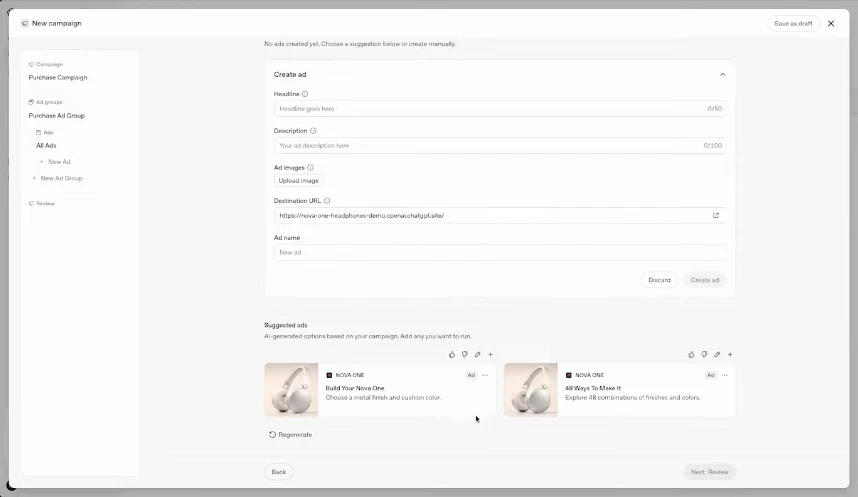 Ad suggestions generated automatically from the site, inside the campaign wizard. Screenshot from the official OpenAI webinar
Rule 4: Why connect a product feed?
Because one ad becomes thousands of ads, and prices and descriptions update themselves. According to OpenAI, campaigns with an active product feed saw CTR approximately 74% higher.
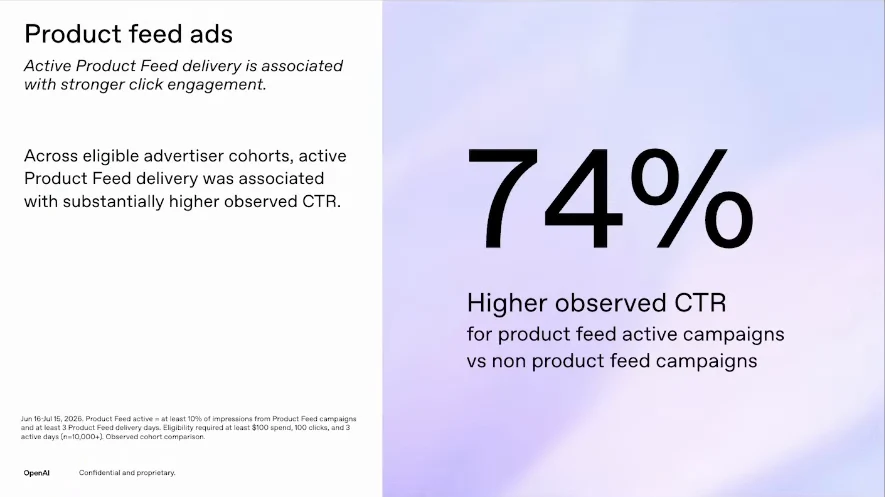 74% higher CTR for campaigns with an active product feed, compared to campaigns without one. Screenshot from the official OpenAI webinar
How to connect it: In Ads Manager, under Tools and then Feeds. Three options: a CSV file, a link to a file hosted on your server, or an SFTP connection. After uploading, you create a Product feed campaign, mark which field contains the product image, and every variation in the catalog becomes a possible ad.
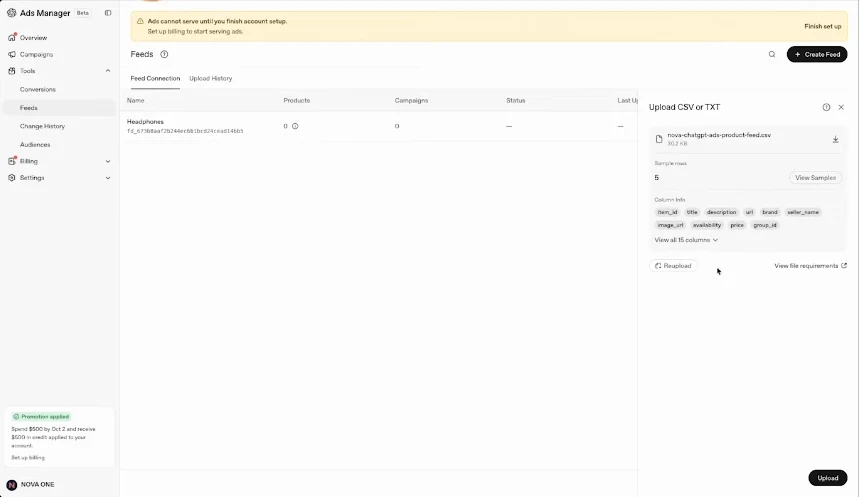 Uploading a catalog as a CSV file. Screenshot from the official OpenAI webinar
Shopify store owners: There is an official app called ChatGPT Ads in the Shopify App Store. The connection brings in your catalog as an auto-updating feed and creates a Pixel that sends store events (add to cart, purchase) as conversion events, in just a few clicks.
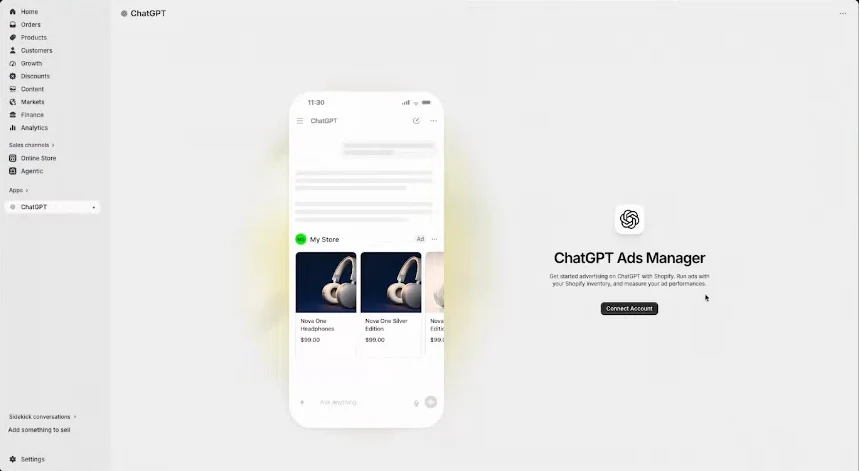 Connecting a Shopify account to Ads Manager through the official app. Screenshot from the official OpenAI webinar
Rule 5: How Does ChatGPT Itself Manage Campaigns?
Through the ChatGPT Ads Manager plugin, which you install from within ChatGPT and then talk to in plain language. Abhi called this his favorite part of the platform, and for good reason.
 "Lean on AI to help create and manage your campaigns". Screenshot from the official OpenAI webinar
Here is what they demonstrated live:
- Paste a URL and ask for an ad. ChatGPT scans the site and suggests copy and an image.
- Approve the image and get a live preview of the ad.
- Ask for the full campaign structure, approve it, and the campaign is created in Ads Manager.
- Two weeks later, ask "How are my ads performing?" and receive a breakdown: the top ad reached a CTR of 4.8%.
- Ask why, and request recommendations. In the demo, ChatGPT recommended shifting budget from the weaker campaign to the stronger one.
For those who prefer full automation: there is also an API for advertisers, and bulk campaign uploads from an Excel file. Since the webinar, bulk upload has been opened up to product feed campaigns as well, and the Insights API now returns purchases even when the goal is leads. Full details in the ChatGPT Ads update for September 2026.
What Does This Mean for Your Business?
The central message of the webinar is not "the AI will do everything." It is the opposite: the system learns only from what you give it. If the Pixel is broken, it learns about the wrong customers. If you spread your budget across ten campaigns, none of them has enough data. And if you chose a clicks objective, it never sees most of the people who buy after viewing.
A two-minute check before you spend any budget:
- Do you have both a Pixel and CAPI, and can you see incoming events in the event stream?
- Is your Event Quality Score (EQS) high, with no open warnings?
- One or two campaigns, with a budget that allows for learning, rather than ten small ones?
- Is the objective conversions with impression-based billing, and is the event the real business outcome (purchase or lead)?
- If you have a catalog: is the feed connected and updating?
Three "no" answers or more? Hold off on the budget. That is the easiest money to save.
Before you get started, it is also worth reading the complete guide to ChatGPT Ads Manager, which covers advertising policies and limitations for businesses in Israel, as well as the piece on the ad format that opens a conversation with an agent.
The Bottom Line
OpenAI is building a system where the AI handles most of the technical work: writing ads, translating them, managing bids, and explaining results. But the five rules from the webinar show that the fundamentals have not changed: clean measurement, concentrated budget, and the right objective. Those who set these up correctly in the first month will benefit from the AI. Those who do not will pay for it.
Want help setting up your Pixel, CAPI, and first ChatGPT Ads campaign the right way? Get in touch.
Transcription, translation, and summary: Yaakov Tzedek, AI lecturer, consultant, and organizational AI implementer. Screenshots from the official OpenAI webinar, "Set up your ChatGPT Ads", September 2026.
Frequently asked questions

Yaakov Tzedek
An Israeli AI lecturer, consultant and implementer who has supported 100+ organizations in AI implementation and lectured for 200+. Official content partner of Meta, Google, Canva and TikTok, featured on Israel's Channel 13.
More about Yaakov →