- Start from a real pain you have yourself, not from a product idea. That is how most of the SaaS products I build are born.
- Two specs before a single line of code: one for architecture (for Claude Code), and one for design (for Claude Design).
- The stack: GitHub for version control, Supabase for data and users, Vercel for hosting, Resend for email, all connected to Claude Code via MCP.
Vercel's free Hobby plan is for personal, non-commercial use. Once your system charges customers, you need to upgrade to the Pro plan at $20 per month (verified September 17, 2026).
At the live session I ran on September 16, two systems went from idea to spec, to mockup, to working code in two hours and ten minutes. One was born from a pain point shared by a participant who works in structural planning, and the other was a CRM for real estate agencies. The speed is actually the least interesting part.
The interesting part is what happened in the middle: on the first system we worked in the wrong order, and Claude Code started building from a faulty assumption. On the second, we followed the method, and everything flowed. This guide is the method, in the right order, including what I learned from the mistakes.
In short
- Start from a real pain you have yourself, not from a product idea. That is how most of the SaaS products I build are born.
- Two specs before a single line of code: one for architecture (for Claude Code), and one for design (for Claude Design).
- The stack: GitHub for version control, Supabase for data and users, Vercel for hosting, Resend for email, all connected to Claude Code via MCP.
- Build in small stages and test each one yourself. External integrations and payment processing come last.
- Starting cost: around $20 a month for a Claude Pro subscription. The other services start free, but commercial use on Vercel requires a paid plan.
What is SaaS, and how is it different from "just a system"
SaaS (Software as a Service) is software that runs in the cloud, that users log into with a username and password, and pay for with a subscription. Monday, Canva, and Zoom are familiar examples.
An internal system is built almost the same way, just without the commercial layer: it serves you or your organization. A project management dashboard, an internal CRM, or a tool that reviews documents.
The technical difference is smaller than it seems. Three things turn a system into SaaS:
- Tenant separation. Each organization sees only its own data.
- Subscriptions and billing. Plans, monthly charges, and what happens when a payment fails.
- Responsibility. Backups, security, support, and what to do when the system goes down.
That is why the right approach is to build a system that works for you first, and only then add those three layers.
A few concepts before we start
- Claude Code: Anthropic's agent that writes code, runs commands, and manages an entire project through conversation. If you have not installed it yet, the Claude Code installation guide covers it in a few minutes.
- MCP (Model Context Protocol): A direct connection between Claude and an external tool, so Claude acts inside the tool on your behalf. More detail in the Claude Code with MCP guide.
- API: The technical gateway of an external tool. When a tool has no MCP, you give Claude Code its API documentation and it builds the integration.
- Repository: The project folder on GitHub, where every change is saved as a version.
- Spec: A document that describes what the system does, which screens it has, what data it stores, and who is allowed to see what.
- Mockup: A visual simulation of the screens before they actually exist.
The stack: four services that turn a project into a system
I have been working with the same stack for ten months across every system, from my own site to products that clients pay for. The main reason for the choice: all four services have an MCP connection to Claude, so Claude Code performs actions in them and I just approve.
| Service | Its role | Why you need it |
|---|---|---|
| GitHub | Version control | Every change is saved. When something breaks, you ask Claude to roll back one version |
| Supabase | Database, users, and files | Like Excel spreadsheets in the cloud, with built-in user authentication and permissions |
| Vercel | Hosting | Serves the system on the internet, with CDN and a firewall |
| Resend | Sending emails | You cannot send bulk email from Gmail, and doing so without consent is also not legal |
Three notes from practice:
- A private repository for each project. With a public repo, anyone can read your code.
- A separate Supabase project for each system. Data and permissions from different systems should not live in the same place. There is a separate guide for Claude Code with Supabase.
- SQL Editor. Sometimes Claude asks you to paste code into Supabase. This is the place: paste it, click Run. When MCP is connected this almost never happens.
The method: from real pain to a live system, in 7 steps
Step 1: Define the pain, not the product
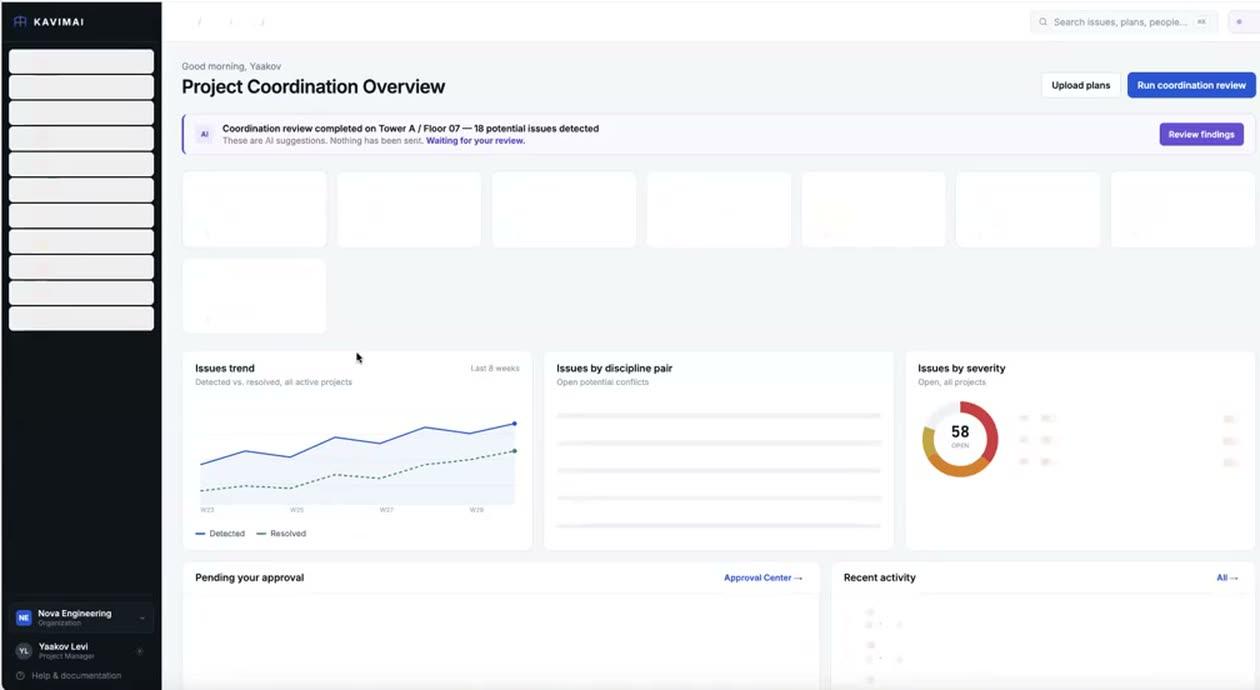
The first system at the session was born from a sentence by a participant who works in structural planning: a plumbing consultant runs a pipe above a window, and nobody notices until it reaches the construction site. That is not a product idea. That is a pain that repeats every week.
This is how most of the SaaS products I build are born: I hate something I do, I look for a shortcut, and find that none exists. okdoc, the contract-signing system, was born from hating to chase clients who had not signed a quote.
The rule: specific beats general. "CRM" returns a generic system. "CRM for real estate agencies, with property tours and agents as representatives" returns a product.
Step 2: Two specs in a chat, before opening Claude Code
Open ChatGPT or a Claude chat window, write the goal and the stack, and ask for two separate outputs:
- An architecture spec for Claude Code: screens, tables, permissions, workflows, and build order.
- A design spec for Claude Design: colors, typography, direction, and a detailed description of every screen.
At the session, the spec that came back included a rule I had not explicitly asked for: the system must not send an email to an engineer without approval. That is exactly what a good spec does: it thinks about the cases you did not think of.
Here is a condensed template to copy. The full version, with permissions, workflows, and approval rules, is in the kit later in the guide.
Let's plan a system. I am not a developer, so explain every decision in plain language.

The goal: [the pain this system solves, in one sentence]
The users: [a specific audience]
What must never happen: [e.g. no email goes out without my approval]

The stack is fixed: Vercel for hosting, GitHub for version control,
Supabase for data and users, Resend for email.

Prepare two separate things:
1. A full spec for Claude Code: screens, tables, permissions, workflows, and a staged build order
2. A design spec for Claude Design covering every screen

Do not write code. Only the spec.
Step 3: Mockup in Claude Design
Paste the design spec into Claude Design. It asks a few questions (language, direction, which screens to detail) and starts designing. If you have a defined aesthetic, write it in: dark or light, a product you love as inspiration. If not, leave it open.
When the mockup is ready, transfer it to Claude Code via Share, choose Claude Code, and copy the prompt. At the session we saw in real time that a simple system gets designed faster than a complex one, because it handles both planning the screens and designing them.
Why design before you build? Because a change in a mockup costs one sentence. A change in a system that has already been built costs hours of back-and-forth.
Step 4: Prepare Claude Code, and only then paste
This is the step where we went wrong at the session, and it is the most important lesson in the guide.
On the first system, we opened Claude Code and asked it how to connect to the drafting tool the participant used, before there was any spec. It started building under the assumption that the task was the integration, not the system. By the time the spec arrived, it was already heading in a different direction.
The correct order, as we did it on the second system:
- Open a new private repository on GitHub.
- Connect Claude to GitHub, Supabase, Vercel, and Resend via the connectors.
- Paste the full architecture spec.
- Add the design file from Claude Design.
- Ask for a staged work plan, without code, and approve it.
Step 5: Build in small stages, and test each one yourself
The temptation is to ask for everything at once. It does not work. For the building-plans review system, the order I built was:
- The core action only: detect conflicts and save them.
- Management: clients and projects around the detection.
- Approval: a screen where a person approves before anything goes out.
- External integration: the drafting tool's API, only after everything else works.
After each stage: open it, test it, and only when it genuinely works move on. And when you do not understand what Claude is asking, write "explain this to me like I know nothing." I do this constantly, including with complicated registration flows on developer portals.
Step 6: Live on Vercel, and you are the first user
When the first version works, Claude Code deploys it to Vercel and connects a domain. From here comes the step most people skip: use the system yourself, on real work, until you are satisfied. You are the first user who needs to be happy.
Step 7: Subscriptions, billing, and AI capabilities
Only now do you turn the system into SaaS:
- Billing. I work with Sumit, which has API documentation. Give Claude Code the link to the documentation and ask it to build subscriptions. It will not work on the first try. There will be a series of errors and fixes, and eventually it settles. The billing account itself is worth opening early, because it can take a few weeks to approve.
- AI capabilities. Through OpenRouter you get access to many models with a single key and pay-as-you-go billing. In okdoc, for example, the AI analyzes when clients tend to sign. The math is simple: if an AI action costs you a few cents, you can charge your customer a few shekels for it.
Permission modes: how much autonomy to give Claude Code
Claude Code asks before taking actions, and in a large system that gets exhausting. According to the official permission modes documentation, there are several modes, and you switch between them with Shift+Tab:
| Mode | What happens | When to use it |
|---|---|---|
| Manual (default) | Asks before almost every action | Sensitive work, when you want to see every step |
| plan | Reads and plans without changing files | Start of a project, understanding existing code |
| acceptEdits | Edits files without asking | When you review the changes yourself |
| auto | A second model checks every action in the background | Ongoing builds. This is the default mode on Pro, Max, and Team |
| bypassPermissions | Everything without checks | Only in a container or isolated machine |
For the connectors themselves (Supabase, Vercel, etc.) I choose Always Allow, so I do not have to approve every read again. For irreversible actions, like deleting a table or sending messages to clients, I ask Claude to stop and check with me first, and that is written into the opening message in the kit.
Local or cloud: the moment Claude Code refused
In the middle of the session I asked Claude Code to fill out a registration form in the browser. It replied that it had no access to the browser. I knew it could do this, so I pushed. After checking, it explained: the session was running in the cloud, in a separate container, without the browser, the cookies, and the accounts I have connected locally.
It was right. And that is the difference worth understanding:
- A local session runs on your computer. It has access to files, the browser (with the Claude in Chrome extension), and installed tools.
- A cloud session runs in a container connected to a repository on GitHub. Convenient for picking up from another device, but no access to your local environment.
When you need to work with large files, sensitive data, or a logged-in browser, work locally. Questions like these are worth asking Claude during the planning stage, before you open a project.
What to Build First
- A tool that saves you one hour a week. A report, a check, a tracker. Small, clear, and you know exactly whether it works.
- A CRM or dashboard for a field you know deeply. Your professional knowledge is the advantage, not the code.
- A layer on top of an existing tool. Instead of building a drawing tool from scratch, you build controls on top of existing software. That is exactly the precision the expert brought to the system in the session.
What not to build first: a system with ten external integrations, payment processing, and a mobile app. You will get there, just not in the first week. If you are at the very beginning of this journey, Claude Code for Beginners is a better starting point.
Common Mistakes and How to Get Out of Them
- Starting without a spec. Claude guesses, and guesses in the wrong direction. The fix: go back to step 2, even if code has already been written.
- Asking for everything at once. You get a system where half of it does not work, and you cannot tell which half.
- Connecting an external API at the start. Integrations are the most fragile part. Get the system working first, then add the connection.
- Not saving versions. Without a commit after every working step, there is nowhere to roll back to.
- Going in circles around the same error. Stop, ask for an explanation and hypotheses, check the logs, and if necessary roll back a version. For general tool issues there is a separate troubleshooting guide for Claude Code getting stuck.
- An MCP connection that keeps asking you to reconnect. This is usually a limitation in the provider's MCP server. The alternative: build a direct connection from the API documentation.
- Pasting keys and passwords into the chat. Keys go into environment variables, not into the conversation and not into the code.
- Selling before you have used it yourself. Your first customer will discover what you would have discovered in one week of use.
- Choosing a ready-made tool when you need freedom. Base44 and Lovable are excellent for a quick website or landing page. For a system with an API and payments, I tried them and hit a wall inside the framework. In Claude Code it worked.
How Much It Costs
Prices were checked on official websites on September 17, 2026, in dollars per month.
| Service | Free | When you pay |
|---|---|---|
| Claude | Claude Code is not included in the free plan | Pro at $20 ($17 billed annually). Max starting at $100 |
| GitHub | Unlimited private repositories | Usually not needed at this stage |
| Supabase | 2 active projects, 500MB per database, 50,000 monthly active users. An inactive project is paused after one week | Pro at $25, includes $10 compute credit |
| Vercel | Hobby, for personal and non-commercial use only | Pro at $20, the moment you charge money |
| Resend | 3,000 emails per month, up to 100 per day | Pro at $20 for 50,000 emails |
| OpenRouter | Free models with request limits | Pay per use, with a 5.5% platform fee |
In practice: learning and building for yourself, around $20 per month. Running a SaaS with paying customers, roughly $40 to $85 per month before AI costs, depending on how many services move to a paid plan. Two more items not in the table: a domain, and payment processor fees. And when the system holds sensitive customer data, it is worth paying an external security professional as well.
Short Checklist
- The pain is defined in one sentence, and the target audience is specific
- Architecture spec and design spec, separate documents
- A private repository and a separate Supabase project
- All four connectors linked to Claude Code
- A step-by-step work plan approved before any code
- A commit after every working step
- Permissions on every table, and keys only in environment variables
- You have used the system yourself before charging anyone
- Vercel on a plan that permits commercial use
The full checklist, 30 checks across three stages, is in the kit in the middle of the guide.
Where to Go from Here
There are two paths, and both are completely fine.
On your own, with the recording. Everything written here happened on screen during the intro session: both specs, Claude Design, the connectors, the reversed order and the fix, and a CRM for real-estate agents built from scratch. The full recording runs two hours and ten minutes, costs 97 ILS including VAT, and there is a free 5-minute preview on the page. It does not end with a finished product, and it is not an installation walkthrough. It shows the entire process.
Together, in the full workshop. The full Claude Code workshop is 4 sessions of 4 hours each, where you build a complete system end to end, go deep on databases, permissions and automations, with WhatsApp support throughout. It is suited to anyone who knows what they want to build and would rather not get stuck alone.
And for anyone building a website rather than a system, the guide to building a website with Claude Code covers that side in depth. If you want your screens to look professional from the very first version, UI UX Pro Max is a free skill that adds design intelligence to Claude Code based on product type, a nice complement to the design spec stage.
Sources
- Transcript of the live Claude Code intro session, September 16, 2026, Yaakov Tzedek
- Claude Code: Choose a permission mode, official documentation, checked September 17, 2026
- Claude pricing, checked September 17, 2026
- Supabase pricing, checked September 17, 2026
- Vercel pricing, including the commercial-use restriction on Hobby, checked September 17, 2026
- Resend pricing, checked September 17, 2026
- GitHub pricing, checked September 17, 2026
- OpenRouter pricing, checked September 17, 2026
Frequently asked questions

Yaakov Tzedek
An Israeli AI lecturer, consultant and implementer who has supported 100+ organizations in AI implementation and lectured for 200+. Official content partner of Meta, Google, Canva and TikTok, featured on Israel's Channel 13.
More about Yaakov →