
- What it is: Sites lets ChatGPT create, preview, publish, host and update websites and apps, all from within a conversation.
- When: Launched July 9, 2026, as part of the ChatGPT Work release wave and the GPT-5.6 model family.
- Who: Public beta on paid plans, except Free and Go. Available in Israel from day one, and in Europe, the UK and Switzerland from July 20, 2026.
Within three months of launch, more than 5 million sites had been created on ChatGPT Sites, according to OpenAI. And the infrastructure is not OpenAI's at all: the sites run on Cloudflare Workers, the database is D1, and file storage is R2.
Sites is a ChatGPT feature that lets you create, preview, publish and host interactive websites and lightweight web apps directly from a conversation, with no separate deployment process. It launched on July 9, 2026, is available in Israel on paid plans, and runs on Cloudflare infrastructure. Here is what changed, how to use it correctly, and where the landmines are.
Update October 6, 2026: OpenAI's Atlas browser stopped working on August 9, 2026, and I have updated the section on it accordingly. In the comparison table I also clarified that Base44 and Lovable allow a custom domain only on a paid plan.
Update September 15, 2026: Since launch, Sites has changed substantially. You can now sell and charge through an external payment processor, the feature has opened in Europe, collaborative editing has been added, private sharing with people outside your organization, built-in analytics, and URL changes without redeployment. All updates are collected in the What's new in Sites since launch section, and every chapter in this guide has been revised accordingly.
In short: everything that matters in six lines
- What it is: Sites lets ChatGPT create, preview, publish, host and update websites and apps, all from within a conversation.
- When: Launched July 9, 2026, as part of the ChatGPT Work release wave and the GPT-5.6 model family.
- Who: Public beta on paid plans, except Free and Go. Available in Israel from day one, and in Europe, the UK and Switzerland from July 20, 2026.
- Where it runs: On Cloudflare infrastructure: Workers, D1 database and R2 file storage.
- Domain: You can connect a domain you already own by editing DNS records. Sites does not purchase a domain for you.
- What changed: Selling through an external payment processor is now allowed, collaborative editing is here, private sharing by email, built-in analytics, and URL changes without redeployment.
- The important warning: Do not migrate a long-running business site to this. It is still beta with usage limits. Use it for landing pages, portals, dashboards and prototypes.
What's new in Sites since launch: all updates through September 2026
In the two months after launch, OpenAI added to Sites what had been missing for real business use: payment processing through an external provider, the Europe opening, collaborative editing, private sharing, analytics and URL changes. According to OpenAI, by September 11, 2026, more than 5 million websites had been created with the tool.
| Date | What changed | Who |
|---|---|---|
| July 20, 2026 | Sites opened in the European Economic Area (EEA), the UK and Switzerland | Plus and Pro |
| July 23, 2026 | Sites Terms of Service update: selling and charging through an external payment processor is now allowed, and the site owner is the "data controller" for visitor information | All users |
| August 20, 2026 | Change your chatgpt.site URL without redeployment, and the old URL redirects to the new one | Plus and Pro |
| August 20, 2026 | Collaborative editing: the owner grants team members a "Can edit" permission | Business and Enterprise |
| September 3, 2026 | Private sharing by email with people outside the organization, view only, also from a personal account | Plus, Pro, Business and Enterprise (rolling rollout) |
| September 11, 2026 | OpenAI reports more than 5 million sites, deployment twice as fast, and the ability to ask ChatGPT to inspect the site's database | All users |
Alongside the dated updates, the official documentation now describes capabilities that were not in the original guide:
- Built-in analytics: Unique visitors and page views, with nothing to install. Not available for sites owned by an Enterprise workspace.
- Sign in with ChatGPT: A public site can offer optional sign-in, for example to save progress.
- On-page comments: In the desktop app browser, you select a part of the site, write a comment, and the system fixes it.
- Building from your phone: You can build and edit a site from ChatGPT Work on web and mobile, not only in the desktop app.
- Clear storage limits: Up to 10GB for the database (D1) per site, with no fixed limit for files (R2).
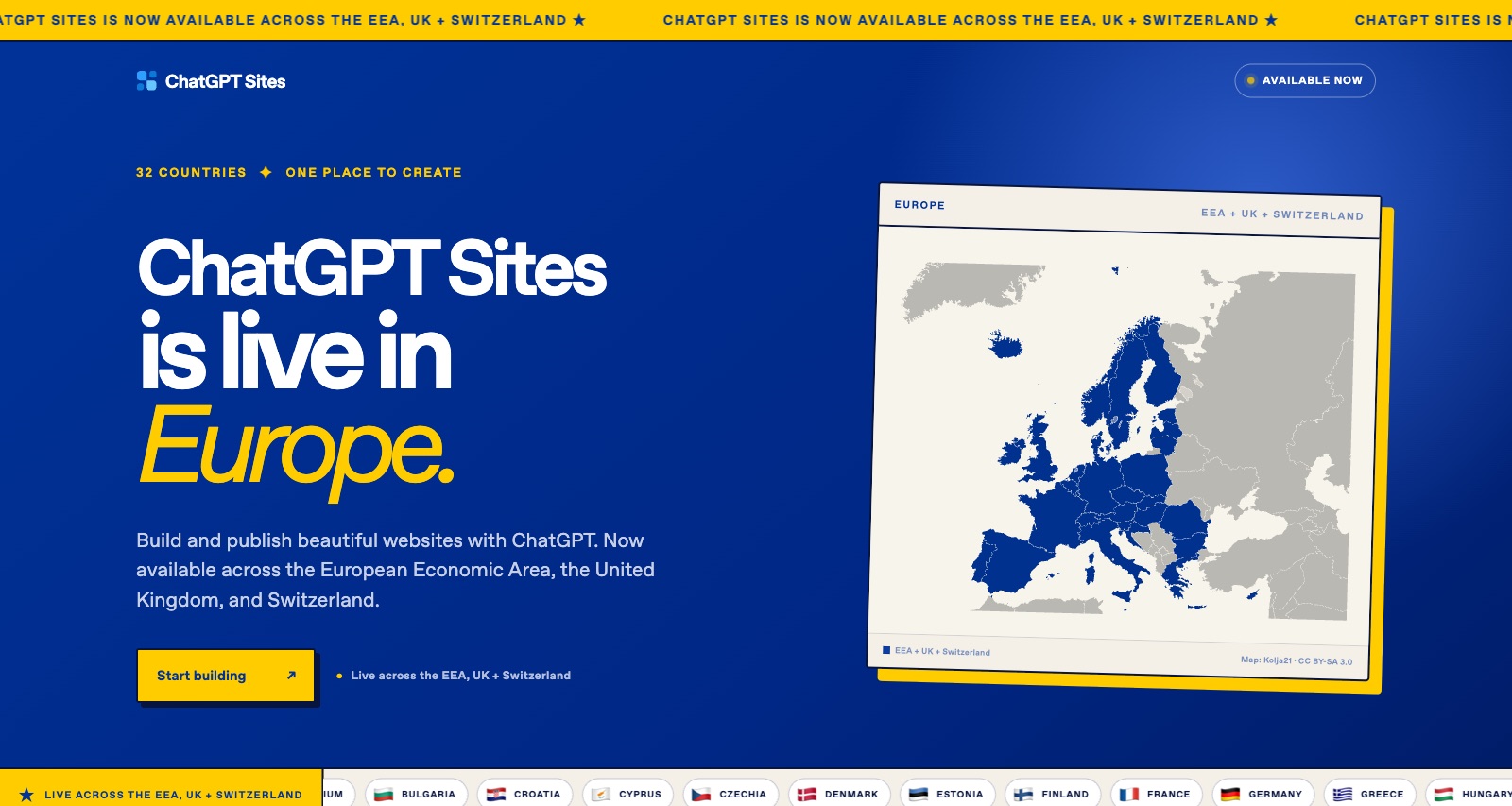
OpenAI's announcement page for the Europe opening, across 32 countries, was itself built with Sites and is hosted on chatgpt.site. Screenshot from the official site, September 15, 2026.
Watch the official videos
Build and publish web apps directly in ChatGPT
OpenAI · July 14, 2026
Build a Shareable Site
OpenAI · August 28, 2026
You can just launch Sites | ChatGPT Work
OpenAI · August 13, 2026
What is ChatGPT Sites, really?
Sites closes the gap between "I have code" and "I have a live link." Until now you asked the model for code, it printed HTML into the chat, and then the unpleasant part began: copy, save files, find hosting, configure a domain. That gap killed most projects.
Now you describe what you want, the system builds it, shows a private preview, and once you approve, it publishes and hosts it. The link is live, public, and requires no account from the visitor.
Definition, ChatGPT Sites: A build-and-host layer inside ChatGPT. It turns a prompt, a file or an existing project into a live website at a web address, including a database, file storage, access permissions and a custom domain. The site continues to be updated through conversation, not through a code editor.
The key point: this is not a classic "website builder" with templates and drag-and-drop. It generates real code running on real cloud infrastructure, similar to what you know from vibe coding tools like Base44 and Lovable, but inside the chat you already have.
The official documentation states that target use cases include dashboards, project trackers, launch calendars, prototypes, internal portals and interactive reports. That list reveals the intent: Sites was not built to replace your company website. It was built to replace the slide deck, the spreadsheet and the document nobody actually opens.
The difference between a website and a "living asset"
A document is a snapshot. A dashboard is a state. That difference is the whole story.
When a manager asks for a monthly report, they do not really want a file. They want an up-to-date answer. Sites lets you turn that report into a page that keeps living, updating and accepting responses.
What exactly launched, and when?
Sites launched on July 9, 2026, as a public beta, together with ChatGPT Work, the new desktop app and the GPT-5.6 model family. It is the successor to Codex Sites, which was in closed beta since June.
| Date | What happened | Why it matters |
|---|---|---|
| June 2, 2026 | Codex Sites announced, preview for Business and Enterprise only | The critical limitation: no one could view the site outside the workspace |
| July 9, 2026 | ChatGPT Work + GPT-5.6 + Sites launched for all paid subscribers | Sites became publicly viewable, no account required. That is what made the feature relevant |
| July 9-10, 2026 | Staged public rollout: Pro, Pro Lite, Enterprise and Edu first; Plus and Business after | The rollout completed in the following weeks |
| July 20 through September 11, 2026 | Europe, payment processing, URL changes, collaborative editing, private sharing and analytics | Full details in the "What's new" section above |
Alongside the feature, the same launch wave brought additional changes: the app library was replaced by a Plugin Directory, group chats were closed to new creation, and Atlas, OpenAI's browser, stopped operating on August 9, 2026, with its capabilities moving inside ChatGPT and Codex.
The figure that explains why this feature exists: on the eve of launch, Codex had more than 5 million weekly users, of whom more than one million were non-developers, and knowledge workers were growing at three times the rate of developers. When that is your audience, you stop building a tool for developers and start building a tool for people who want a deliverable.
Who has access, and what is the situation in Israel?
Sites is available in public beta on paid plans except Free and Go. In Israel it has been available since launch day, and in Europe, the UK and Switzerland it opened on July 20, 2026, for Plus and Pro subscribers.
At launch, Israel received the feature before London and Berlin, because Europe was blocked by regulation. That advantage lasted exactly 11 days. Today the question is not whether you have access, but which plan unlocks which capability.
| Plan | Access to Sites | Notes |
|---|---|---|
| Free | No | No access in beta |
| Go | No | No access in beta |
| Plus | Yes | Includes URL changes and private sharing by email; no collaborative editing |
| Pro | Yes | Same as Plus. Pro Lite appeared in the launch list and does not appear in current listings |
| Business | Yes | Enabled by default; includes collaborative editing |
| Enterprise | Yes, conditionally | Admin must enable via RBAC; public publishing is off by default; sharing with guests requires a separate permission |
| Edu | Yes | In the first wave |
Why can't I see the feature?
- You are on a Free or Go plan. The feature is only available on paid plans.
- You are in the old interface. Sites is not available in ChatGPT Classic. It works in ChatGPT Work on web and mobile, and in the desktop app.
- You are not in the right mode. You need to select Work mode (and on desktop also Codex), not the regular chat.
- Your workspace admin has blocked it. In Enterprise, activation via RBAC is required.
- You are in the wrong workspace. If you have both a personal and an organizational account, check which one you are signed into.
What Runs Under the Hood: Cloudflare, D1, and R2
Sites is built through a partnership between OpenAI and Cloudflare: sites run as Cloudflare Workers, the database is D1, and file storage is R2. Why does this matter even if you are not a developer? Because it determines what you can build.
Definition, Cloudflare Workers: A runtime environment that executes code at the network edge, physically close to the user. Very fast, but not a classic server: no long-running background processes, no access to private networks, and not every framework is supported.
Definition, D1: A relational database (SQLite-based) for structured data that needs to persist between visits: records, statuses, scores, form submissions.
Definition, R2: Object storage for files: images, documents, audio, video, when the site accepts uploads or serves heavy files.
The link between the project and storage is saved in a file called .openai/hosting.json. A site with a database but no file storage will look like this:
{
  "project_id": "<project-id>",
  "d1": "DB",
  "r2": null
}
You do not need to edit this file manually, but when something is not working, this is the place to check whether storage was actually allocated.
Storage limits: Up to 10GB for the database (D1) per site, and no fixed limit for files (R2). The site supports HTTP, HTTPS, and WebSockets, but not direct TCP connections.
What is not supported: Some frameworks, private networks, external databases, background services, and certain storage patterns. In addition, Sites does not support Data Residency or Inference Residency: the sites, the code, D1/R2 data, and logs. If your organization is required to keep data within specific geographic boundaries, Sites does not meet that requirement at this stage, and that is a decision that needs to be made before you deploy anything there.
How to Build a Site: Step by Step
Go into Work or Codex mode, describe the site (using the word "website" or the @Sites tag), attach content and files, review the preview, request changes, and only then publish.
- Choose the right mode. On web and mobile, choose Work; on the desktop app, choose Work or Codex. The feature will not activate in the regular chat.
- Describe the site. Two ways to trigger it explicitly: use the word "website" in the prompt, or use the
@Sitestag. The tag is recommended. - Feed in your raw materials. This is the step most people skip, and it is the one that determines the quality of the result. Attach files, data, brand documents, colors, and copy. A site built from a description alone will look generic; a site built from your materials will look like your site.
- Review the preview seriously. Go through it carefully: content, links, forms, auto-generated images.
- Iterate. Request changes in plain language: "change the primary color," "add a phone field to the form." In the desktop app's browser you can also select an area of the site and annotate it directly. If you are new to writing prompts, our prompts guide will give you a foundation.
- Set the audience. A new site is restricted by default to owners and admins only. Do not rush to change that.
- Publish. Click Publish, receive a URL.
- Later edits. Return to the conversation where the site was created, or through Sites in the sidebar.
Anatomy of a Winning Prompt (Plus 5 Ready-to-Use Templates)
A good prompt for Sites includes four components: the target audience, the core experience, the required data, and persistence behavior, meaning what the site needs to remember between visits.
The example from the official documentation answers all four without a wasted word:
@Sites Build a project request dashboard for my operations team. Let team
members submit requests, see who owns each one, update the status, and filter
the list. Require people to sign in with their workspace account, and keep the
request data saved between visits.
"Audience" = the operations team. "Experience" = submission, ownership, status, filtering. "Identity" = organizational login. "Persistence" = data is saved.
Five Ready-to-Use Templates
1. Service landing page: @Sites Build a Hebrew RTL landing page for the service [X]. Target audience: [Y]. Structure: headline with a measurable promise, three benefits, social proof, a lead form (name, phone, email), and FAQ. Primary color [code], Heebo font. Save form submissions to the database. Mobile-optimized.
2. Internal team dashboard: @Sites Build a dashboard for tracking [process]. Team members add items, assign an owner, update status, and filter. Require login with a workspace account. Save data between visits. Display a count by status at the top of the page.
3. Client portal: @Sites Build a client portal with project status, milestones, downloadable files, and a messages area. The client logs in via an invitation link. Allow file uploads from the client side. Clean design, RTL.
4. Calculator / lead tool: @Sites Build an interactive [ROI / pricing / savings] calculator. The user inputs 3-4 parameters and sees a real-time result with a chart. At the end, a form to receive the full report by email. Save the inputs.
5. Deploy an existing project: @Sites Deploy this project. Check whether it is compatible with Sites, make any required changes, and give me the deployment URL.
The Rule That Prevents Most Frustration
Do not request persistent storage for temporary display state (a theme, a closed banner). On the other hand, do request persistent storage for product data that people expect the site to remember: inquiries, scores, progress, files. That distinction prevents both poor performance and unnecessary costs.
Save vs. Deploy: The Difference That Prevents Disasters
Saving a version (Save) produces a deployment candidate you can review without touching the live site. Deploying (Deploy) publishes the saved version. Every deployment URL is a production URL. There is no staging environment.
That point appears in the official documentation in unambiguous terms: Every Sites deployment URL is a production deployment. Once you deploy, it is live.
| Stage | What happens | When to use it |
|---|---|---|
| Save version | The system builds the site and links the version to the commit used for the build | When you want a deployment candidate you can review |
| Deploy version | The system publishes the saved version and returns a production URL | Only when you intend for your audience to reach the site |
Pre-Deployment Checklist
- Have you reviewed the code changes and database migrations?
- Did the build succeed, and is the selected version the one you intended?
- Can only the intended audience access it?
- Were secret values set through Sites, not pushed into source files?
- After deploying, did you confirm the status and production URL before sharing?
Access Permissions, Sharing, and Authentication
There are currently five access modes: owners and admins only, selected users, guests invited by email, the entire workspace, and the entire internet. The default for a new site is the most restrictive, and that is intentional.
| Access mode | Who gets in | When it fits |
|---|---|---|
Owners and admins (admins_only) | The site owner and workspace admins | Default. The build and testing phase |
Custom (custom) | Users or groups you select | Executive review, a specific team |
| Invited only (new, September 2026) | Specific people invited by email, including those outside the organization, view only | Client portal, vendor, external consultant |
Workspace (workspace_all) | All users in the workspace | Internal dashboard, team portal |
| Entire internet | Anyone, no account required | Landing page, public tool |
A critical distinction: The site's audience setting and the authentication built inside the site are two separate controls. A public site can include its own login, and a restricted site does not automatically become internally secure.
Collaborative Editing: What an Editor Can and Cannot Do
Since August 20, 2026, in Business and Enterprise plans, the owner can grant team members a "Can edit" permission. Personal Plus or Pro accounts do not have collaborative editing, only view-only sharing.
- An editor can: update the site, save versions, and publish new versions after the owner has published the first time. There is no approval step.
- An editor sees: the live data in the site's database as well. That is a critical point when the site is collecting leads.
- Only the owner controls: access permissions, the name and URL, secrets, the domain, analytics, version rollback, and ownership transfer.
- Where the editor finds the site: in Sites, under "Shared with you."
Private Sharing with People Outside the Organization
Since September 3, 2026, you can invite specific people by email to view a site without making it public. This works from a personal account as well. Invitees log in with the account to which the invitation was sent, even if they did not previously have an OpenAI account. In Enterprise, an admin needs to enable a separate permission for this.
This is exactly the mechanism that was missing for a client portal: the client sees their own status, and the rest of the world does not.
What You Must Check Before Publishing Publicly
- Sensitive information: Did anything leak in from the files you uploaded?
- Third-party content: Do you have the right to publish it?
- Behavior for another user: Does the site work as expected when someone else opens it?
- Forms and free-text fields: Do you actually want to collect that information? Where is it saved?
- Open content areas: Are you ready for what people will write there?
- Admin permissions: In Enterprise, public publishing is off by default.
If the site collects personal information from visitors, you are in privacy-law territory, including Israel's Privacy Protection Law and Amendment 13. A lead form is a database of personal information. That is not a theoretical remark.
Connecting a Custom Domain
You can connect a domain you already own. Sites does not purchase domains; you must own it and be able to edit the DNS records. In Enterprise, a custom domain is not available at launch.
- Open the site settings and choose Add domain.
- Enter an apex domain or subdomain.
- Copy the DNS records the system provides and add them at your domain registrar.
- Wait a few minutes and refresh the status.
Changing the Address on chatgpt.site
Since August 20, 2026, Plus and Pro site owners can change the URL without redeploying. Go to the site settings and choose Change URL. The old address automatically redirects to the new one, including paths and parameters, and the custom domain is unaffected.
The rules for the URL: at least 5 characters, starts with a lowercase letter, and contains only lowercase letters, digits, and a single hyphen.
A shortcut: you can ask ChatGPT to help you redirect the domain. If browsing is enabled, the system navigates to your registrar after you have logged in.
Without a custom domain, the site sits on a subdomain of chatgpt.site. That is perfectly fine for an internal tool, and less appropriate for a marketing asset that is building domain authority.
Storage: When to Use D1, When R2, and When Neither
Content sites and landing pages need no persistent storage. Records and statuses go in D1. Images and uploads go in R2. Files with searchable metadata need both.
| Your need | What to request |
|---|---|
| Content site or landing page | No persistent application state |
| Records, progress tracking, scores | D1, relational database |
| Images, documents, uploads | R2, object storage |
| Files + searchable metadata | D1 for metadata, R2 for files |
| Internal site requiring user identity | Workspace-authenticated identity |
| Public login / external identity provider | Sites project with authentication enabled |
If you are not sure, start without storage. You can always add it in a single follow-up request.
Secrets and Environment Variables
Environment values and secrets are configured through the Sites panel in the sidebar, not in source files. After any change, request a redeployment.
This is one of the points where non-technical users fail most often: an API key accidentally saved in the code of a public site is a leaked key.
- Secrets are defined in the Sites panel, not in the code.
- Local
.envfiles stay synced with key names only, never with the secret values themselves. - Do not push secret values to Git.
- After adding, updating, or removing a secret, request a redeployment, otherwise the next deployment will run with the old configuration.
Built-in Analytics: Who Is Visiting Your Site
Sites measures traffic automatically, with no tracking code to install: unique visitors and page views, over time. Open Sites, select your site, then More actions and choose Analytics. You can adjust the date range and resolution.
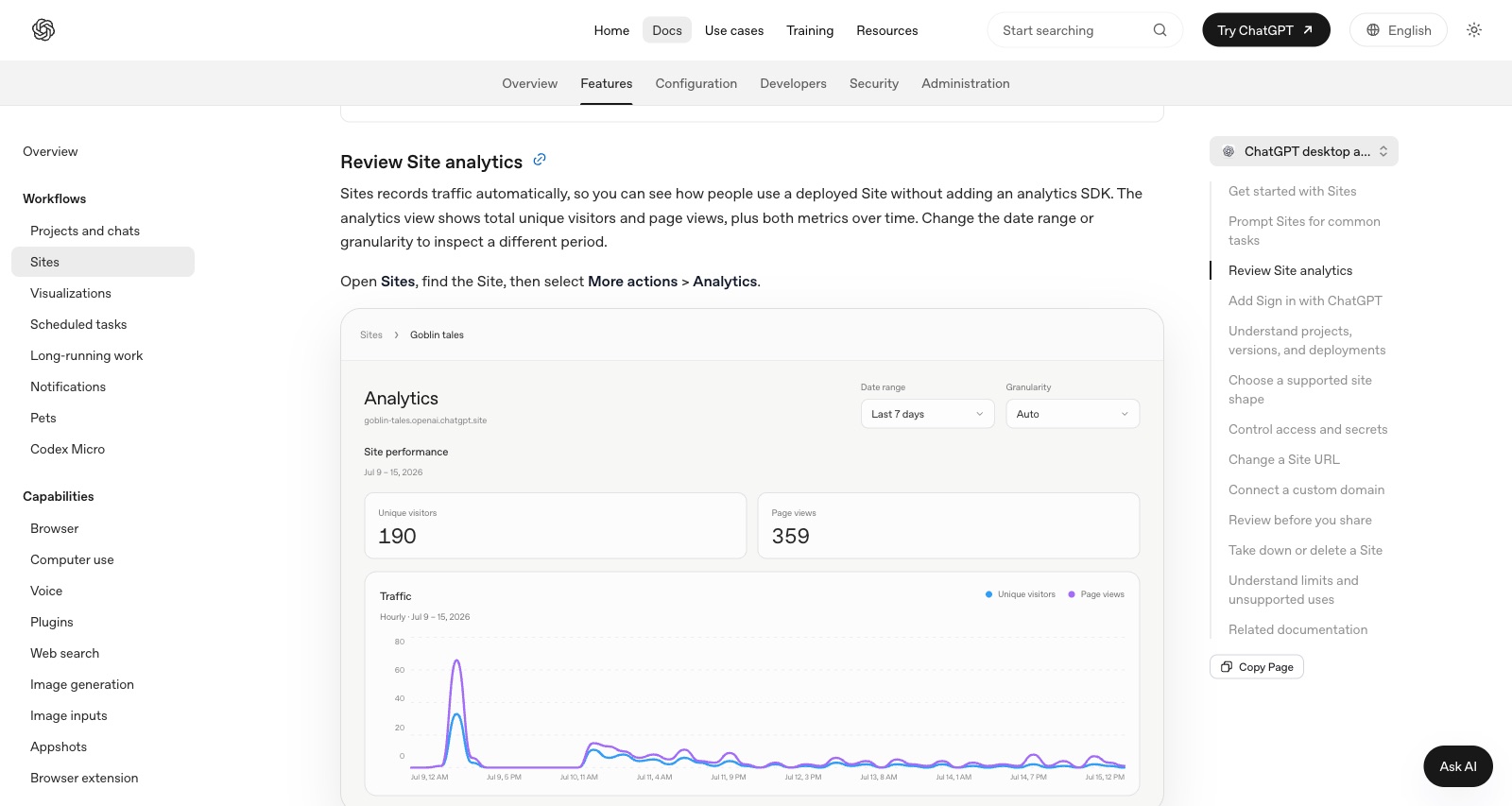
The analytics screen as shown in OpenAI's official documentation. Screenshot, September 15, 2026.
Two caveats. First: analytics is not available for sites owned by an Enterprise workspace. Second: this is a basic counter, not a marketing tool. It has no traffic sources, conversions, or campaign data, so a landing page receiving paid traffic still needs proper measurement.
Sales and Payments: What Has Been Permitted Since July 2026
Since the terms update on July 23, 2026, selling products and services and collecting payment on a Sites site is permitted, provided that payment flows through an external payment processor. This is a material change from launch, when financial transactions were prohibited entirely. OpenAI's official examples now include an online store.
- Credit card data: only the payment processor collects and processes it. The site itself never touches it.
- Your responsibility: shipping, refunds, customer service, taxes, and compliance with anti-money-laundering laws and sanctions.
- Visitor data: under the terms, you are the "data controller." A visible privacy policy is required, and cookie consent where the law mandates it.
- Attribution: OpenAI may add a "powered by ChatGPT" notice to the site footer or bar.
A word of caution: some OpenAI documentation pages still show the old prohibition on financial transactions. The terms of service are the binding document, but before building a store, read them yourself.
Beta Limitations and What Is Not Allowed
During the beta, usage is included up to per-plan limits, and those limits apply across all sites in an account. Reaching the limit may prevent you from creating a new site, adding storage, or keeping a high-traffic site public. Even after reaching the limit you can still edit and manage existing sites. On Enterprise and Edu, limits vary by workspace.
Prohibited Uses: The Official List
- Processing protected health information (PHI)
- Collecting credit card data other than through an external payment processor
- Targeting children under 13 (or below the digital age of consent in the relevant country)
- Financial transactions that do not flow through an external payment processor
- Mass-registering subdomains in order to hold or sell them
- Distributing malware, phishing, or impersonation
- Any other violation of OpenAI's usage policies
Note the change: at launch this section stated that online stores were not permitted on Sites. Since July 2026 that is no longer the case, provided payments are handled externally. Full details are in the sales and payments section above.
What Happens If a Site Is Removed, and Deletion
OpenAI may remove or restrict a site that is at risk of violating policy. You can appeal via the link in the notification email or through the appeals form. On Business and Enterprise, workspace admins can also disable sites. Deleting a site is permanent, with no recovery. If you only want to take a site offline, change its permissions instead of deleting it.
Sites vs. Base44, Lovable, Wix, and Claude
Sites is strong on the flow from chat to live site, on built-in storage, and on connecting to organizational context. It is weak on code control, SEO, and storage flexibility, and on e-commerce it is only getting started. It does not replace a website platform. It replaces the dashboard and the presentation.
| Criterion | ChatGPT Sites | Base44 / Lovable | Wix / WordPress | Claude Artifacts |
|---|---|---|---|---|
| Creation from conversation | ✅ Full | ✅ Full | ❌ Visual editor | ✅ Full |
| Built-in storage and publishing | ✅ Included | ✅ Included | ✅ Included | ⚠️ Within the platform |
| Custom domain | ✅ (not on Enterprise at launch) | ✅ On paid plan | ✅ Yes | ❌ No |
| Database | ✅ D1 | ✅ Built-in | ✅ Plugins | ❌ No |
| E-commerce / payments | ⚠️ Permitted via external processor (from July 2026) | ✅ Possible | ✅ Core product | ❌ No |
| Team collaboration | ✅ Collaborative editing (Business, Enterprise) and private sharing | ✅ Yes | ✅ Yes | ⚠️ Sharing only |
| Built-in analytics | ⚠️ Basic (visitors and page views) | ⚠️ Varies | ✅ Full | ❌ None |
| Full code control | ⚠️ Limited | ✅ Export | ✅ Full | ⚠️ Limited |
| SEO maturity | ⚠️ Low (beta) | ⚠️ Medium | ✅ High | ❌ None |
The conclusion is not "who wins" but "when to use which":
- Brand site or primary store? WordPress or Wix. Sites now permits external payments, but for a store that is the heart of the business you still need a mature platform.
- SaaS product that will become a real company? Base44 or Lovable, because you need the code and the freedom to leave.
- Internal tool, dashboard, or prototype to present tomorrow morning? Sites. Nothing competes with its speed from idea to link.
- One-off demo inside a conversation? A Claude artifact. And anyone who wants a full design-to-code workflow should check out the Claude Design guide.
OpenAI itself does not present Sites as a platform replacement: the original announcement mentioned a partner ecosystem that includes Wix, Base44, Replit, Lovable, Figma, and Webflow. That is not a declaration of war. It is a declaration of a layer.
SEO and GEO: Should You Move Your Site There?
No. Do not move an established business site to Sites. A .chatgpt.site subdomain starts from zero authority, the feature is in beta, and the limits may change. An established site has accumulated links, crawl history, and trust. None of that travels with you.
But There Is a Layer Here That Is Worth Real Money
The interesting point is not classical SEO, it is GEO (visibility in answer engines). A few numbers:
- The overlap between top Google results and sources cited in AI answers has dropped from 70% to under 20% (Brandlight).
- Adding citations to an article improves AI answer visibility by 41%, and statistics by 32% (Princeton/Georgia Tech research, KDD 2024, across 10,000 queries).
- Visitors arriving from ChatGPT convert at 15.9%, compared with 1.76% from organic search (Seer Interactive). AI traffic is small in volume and extremely high in quality.
How does this connect to Sites? In two practical ways:
- Tool pages as citation engines. Calculators, checkers, simulators, exactly the page types answer engines point to. Sites produces them in an hour, not a month.
- Fast companion pages. A page for a conference, a webinar, a research piece, each one a separate citation opportunity.
The golden rule: your core stays on your own domain. Sites is the fast periphery, not the center.
If You Do Publish Content on Sites
- Connect your own domain from day one.
- Make sure the
titleanddescriptionare real and meaningful, ask for them explicitly in the prompt. - Request JSON-LD (Article or FAQPage). It is not the default.
- Confirm the content exists in the initial HTML, not only after JavaScript runs.
- Allow the
GPTBotandOAI-SearchBotcrawlers inrobots.txt. - Submit a sitemap to Bing Webmaster Tools. ChatGPT search pulls from the Bing index.
12 Business Use Cases That Work Today
The strongest use cases are the ones that replace a document nobody opens: dashboards, portals, calculators, and trackers.
- Real-time lead dashboard: instead of a spreadsheet refreshed manually.
- Client portal for a project: status, milestones, files. Cuts "what's happening with this?" questions by 80%.
- ROI calculator as a lead tool: the user enters their numbers, gets a result, leaves their email.
- Landing page for a webinar or conference: built in a day, live the next.
- Internal request tracker: instead of a WhatsApp thread.
- Launch calendar: the marketing team sees what ships when.
- New employee onboarding portal: the entire first week on a single page.
- Product prototype before development: to show a client or investor before you build.
- Interactive client report: instead of a 40-page PDF.
- Internal knowledge catalog: procedures and scripts, with search.
- Training tool or knowledge quiz: with progress saved in D1.
- Research or survey page: collect responses and display results on the same page.
The common thread: every one of these already existed as a document, and works better as a site. The same principle, by the way, applies equally with Claude Code, including dedicated agents working on your behalf around those same processes.
8 Common Mistakes
- Deploying before testing. Every deployment URL is production.
- Forgetting the audience setting. The default protects you, until you change it carelessly.
- Uploading sensitive files as raw material. What enters the context can end up on the site.
- Confusing access permissions with authentication inside the site. Two separate systems.
- Requesting persistent storage for display state. A theme does not need a database.
- Migrating an existing business site. You are trading your SEO history for convenience.
- Granting edit access without thinking it through. An editor also sees the live data, including leads and personal details.
- Building payment collection inside the site. Sales are permitted only through an external payment processor, and card data must never pass through the site itself. Anyone planning their own credit card form is violating the terms.
What Is Still Unknown
As of September 2026, the following questions remain open: post-beta pricing, usage limits at scale, full site export, and API/MCP access for automated publishing. The Europe question has been settled: the feature launched there on July 20, 2026.
- Portability. Community reports described receiving a Wrangler project for self-hosting on a personal Cloudflare account, but this is not officially documented and you should not build a business plan around it.
- Automation. No public API, no MCP, no CLI. Anyone who wants an automated publishing pipeline needs a different tool (which is exactly what Claude Code is for).
- Pricing. During the beta, usage is included up to certain limits. What comes after has not been announced.
The Bottom Line
Sites did not make building websites easier. It reduced the gap between an idea and a live link to nearly zero, and that is an entirely different thing.
Anyone who tries to replace a branding site or an online store with it will be disappointed. Anyone who understands that it replaces the dashboard, the presentation, the spreadsheet, and the PDF that nobody ever opened will find it saves weeks every quarter.
The practical recommendation: this week, take one thing you regularly send as a document, a report, a tracker, a client status update, and rebuild it as a site.
Want to practice that inside a guided page, with outputs you can keep? The interactive ChatGPT Sites course for 9.90 ILS takes you from your first prompt all the way to a personal build plan, including every update covered in this guide. And once it works, ask yourself the next question: how many other processes in your business are waiting for exactly the same upgrade? If you want to learn how to roll out tools like this inside an organization in a structured way, here is how we approach AI implementation in organizations, and you can also dive into the world of Claude in Hebrew.
Sources (verified September 15, 2026): OpenAI Help Center, Creating and managing ChatGPT Sites; ChatGPT Sites Terms (updated July 23, 2026); OpenAI Learn, Sites developer guide; ChatGPT Release Notes (August 20, 2026; September 3, 2026); ChatGPT Business and Enterprise Release Notes; OpenAI Devs announcement on the Europe launch (July 20, 2026); ChatGPT announcement on 5 million sites (September 11, 2026); Princeton/Georgia Tech/Allen Institute/IIT Delhi GEO research (KDD 2024); conversion data: Seer Interactive; citation overlap data: Brandlight. The feature is in public beta; details, limits, and availability are subject to change.
Further reading: For professional writing in English, there is a veteran player that has reinvented itself, Grammarly: The Complete Guide in the AI Era, including why Claude is the better choice for Hebrew.
Sites has a new home: The feature now lives inside OpenAI's new agent, ChatGPT Work: The Complete Guide to the Agent That Produces Finished Deliverables.
And before you choose a platform: Claude vs. ChatGPT, the in-depth comparison shows where each one actually wins.
Frequently asked questions

Yaakov Tzedek
An Israeli AI lecturer, consultant and implementer who has supported 100+ organizations in AI implementation and lectured for 200+. Official content partner of Meta, Google, Canva and TikTok, featured on Israel's Channel 13.
More about Yaakov →